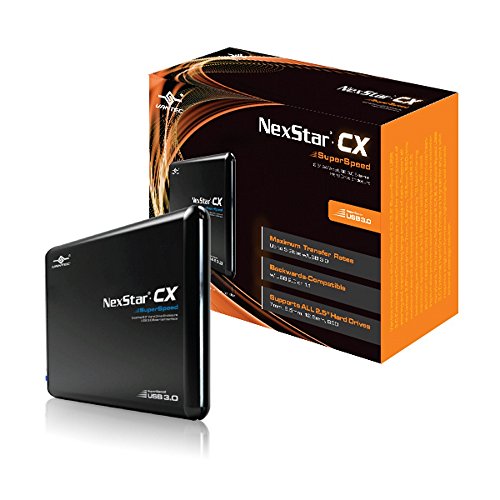
Vantec USA NexStar CX 2.5-Inch SATA to USB 3.0 External Hard Drive Enclosure (NST-200S3-BK)


Key features
- •Supports ALL 2.5" Hard Drives -- 7mm, 9.5mm, 12.5mm, SSD
- •Backwards-Compatible with USB 2.0 or 1.1
- •Hi-Quality Shielded USB 3.0 Cable Ensures Data Integrity and Speed
- •Attractive Blue LED Indicates Power & HDD Activity
- •Aluminum Casing Cools Down Your Hard Drive
Vantec USA NexStar CX 2.5-Inch SATA to USB 3.0 External Hard Drive Enclosure (NST-200S3-BK)
List Price: $38.78$34.90DEALYou Save: $3.88 (10%)
Free shippingFree Returns – 30 daysFree Order CancellationSecure Payment2–3 Days DeliveryGet It October 26, 2026In Stock (1)No marketing spamNo account requiredFulfilment by FedEx / Amazon / UPS / ShipwirePayPal / Card Buyer Protection
Customer Reviews
Reviews sourced from verified Amazon purchasers4.2
out of 5
Based on 10 reviews
5★
60%
4★
0%
3★
20%
2★
0%
1★
20%
Worked Great
Smootherworld✓ Verified Purchase•August 26, 2017
Amazed how easy this item was to use, it really is pretty much plug and play, after securing the hard drive in the case with the teeny tiny screws just plug it in any of your USB ports, once it's found and the action box pops up just click on open folder, click on user, then click on the folder that has your name on it, another box will pop up shortly saying you don't have permission to open this fold, click on continue to get permission, this will be the longest wait, up to 10 minutes, once open then drag your folders over to where you want them, they move fairly fast
Got a bad unit.
S. Walters✓ Verified Purchase•February 6, 2017
This enclosure did not work for me on Windows or Macintosh. It's like the enclosure had bad communication to the drive. It would initialize very slowly but then it couldn't reliably read or write data to the SSD. Connected the bare SSD with a StarTech USB 3.0 to 2.5" SATA III Hard Drive Adapter Cable w/ UASP and the drive work reliably. I contacted the manufacturer for repair or replacement and was not contacted back. I eventually tossed this enclosure and bought a replacement. The replacement works fine.
Finally A Good 2.5 Enclosure
ValandurIX✓ Verified Purchase•January 30, 2017
For a couple of weeks now I have been trying to get a good enclosure for a Samsung 830 Series SSD that I wanted to convert as a backup for my documents. I usually work off my Microsoft Surface Pro 3 and always moving around so I wanted something that did not need a power supply. The first enclosure I tried was the Sabrient 2.5 that uses a male USB cable on both ends. This one appeared to have worked until I started transferring big files. It would cut off after about 50 MB of transferred files and then just cut off. Not sure if this problem was specific to my SP3 but it was a problem I could not tolerate. Seems that the problem might be something with the controller which Sabrent changed from being a ASMedia to JMS. I don't know much about JMS IC chips but it seems to be hit and miss because this Vantec enclosure also has a JMS controller but does not have the problems that the Sabrent enclosure had.
Pros:
-Traveling pouch so it the aluminum doesn't get scratched during travel
-Consistent transfer speeds (no benchmarks done, but for backing up documents, I don't see why a benchmark is really needed)
-A thick USB cable (a plus for me since I have a cat that likes to chew on cables)
-Enclosure is closed using screws (I prefer this than the tool-less)
-Activity LED
Cons:
-The included screwdriver is really tiny
-Why isn't this device on the first page when you search 2.5 enclosure, I had to actually google makers of 2.5 enclosures and browse the whole catalog of Vantec devices from their site
My final words are that this is my 3rd Vantec device and they undoubted have earned my trust when it comes to peripheral and computer accessories, their solutions have been hassle free every time and its the most basic thing that I can expect from these types of manufacturers because waiting for things to arrive to only find out that they don't work is a pain and absolute waste of time.
Pros:
-Traveling pouch so it the aluminum doesn't get scratched during travel
-Consistent transfer speeds (no benchmarks done, but for backing up documents, I don't see why a benchmark is really needed)
-A thick USB cable (a plus for me since I have a cat that likes to chew on cables)
-Enclosure is closed using screws (I prefer this than the tool-less)
-Activity LED
Cons:
-The included screwdriver is really tiny
-Why isn't this device on the first page when you search 2.5 enclosure, I had to actually google makers of 2.5 enclosures and browse the whole catalog of Vantec devices from their site
My final words are that this is my 3rd Vantec device and they undoubted have earned my trust when it comes to peripheral and computer accessories, their solutions have been hassle free every time and its the most basic thing that I can expect from these types of manufacturers because waiting for things to arrive to only find out that they don't work is a pain and absolute waste of time.
Don't buy Vantec - Poor Quality, stopped working after 3 days. Garbage.
TShoot✓ Verified Purchase•January 16, 2017
Was able to format disk and then it just stopped being recognized in this enclosure after a couple of days. Swapped cables, disassembled and re-assembled with no luck. Garbage. Quality is bad and it is the only USB 2.5 enclosure I have ever had that failed.
I wouldn't walk away - I would run!
I wouldn't walk away - I would run!
So easy to use.
H.H. Eccluus✓ Verified Purchase•August 15, 2016
Great little device. I have a bunch of old dead laptops stuffed in closets but never want to get rid of them in case there was some file on there that I might need some day. Ok, I'm a bit obsessive. So, I found this little device and watched a youtube about how to use it and it looked too easy. So, I purchased. It is super simple to use. You simply remove the hard drive from the dead laptop and insert it into the new case. Easy. Screw the thing closed and plug in the USB. Then plug it into your (good) computer. It is powered by the USB so there is no other cable necessary. It even comes with a magnetized mini-screwdriver. Your laptop will "see" the new drive and show it in Windows Explorer. Bingo, you now have a great external drive, you can get to those "missing" files and, best of all, you can recycle the rest of the dead laptop. I am ordering 2 more.
Page 1 of 2