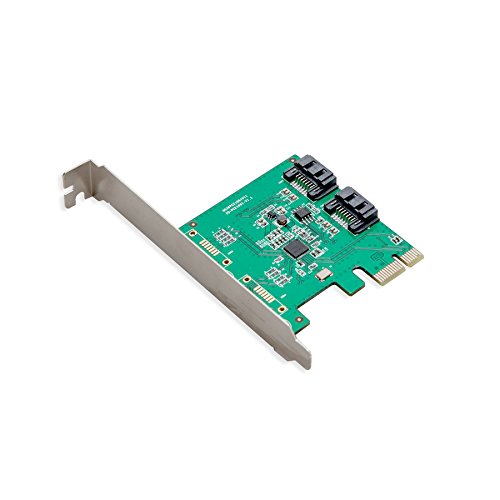
IO CREST I/O CREST 2 Port SATA III PCI-e 2.0 x1 Controller Card Asmedia ASM1061 Non-Raid with Low Profile Bracket SY-PEX40039


Key features
- •We recommend a fresh Windows install with this card
- •Drivers are required for this card to function.
- •ASM1061 Chipset (Asmedia 1061 SATA Host Controller)
- •Supports Hot Plug and Hot Swap
- •Supports Communication Speeds of 6.0Gbps, 3.0Gbps, and 1.5Gbps, 2 Ports Serial ATA, Native Command Queue (NCQ), Port Multiplier
- •Supports 2 Ports Serial ATA, Native Command Queue (NCQ), Port Multiplier
IO CREST I/O CREST 2 Port SATA III PCI-e 2.0 x1 Controller Card Asmedia ASM1061 Non-Raid with Low Profile Bracket SY-PEX40039
List Price: $38.78$34.90DEALYou Save: $3.88 (10%)
Free shippingFree Returns – 30 daysFree Order CancellationSecure Payment2–3 Days DeliveryGet It October 25, 2026In Stock (5)No marketing spamNo account requiredFulfilment by FedEx / Amazon / UPS / ShipwirePayPal / Card Buyer Protection
Customer Reviews
Reviews sourced from verified Amazon purchasers4.1
out of 5
Based on 10 reviews
5★
0%
4★
20%
3★
20%
2★
0%
1★
60%
Not a good idea for PCI version 1.x, TOO SLOW. if compared to the SATA 2 already on your board.
Carlos Patterson✓ Verified Purchase•November 9, 2017
1 star for unclear description. The marketing of this card plays on the ambiguity of this card's throughput. I admit I didn't read the reviews before buying, that part is my fault. The description does say this card is only 1 PCIe lane (PCIe x 1), but what that means in throughput depends on your motherboard's version of the PCIe implementation and that is not in the description. After testing I got wiser (too late).
First problem was that I got unwanted text on my clean boot screens with two extra seconds added to my otherwise fast boot time. Then I realized I had PCIe version 1.x.
After overhead (only 8b out of 10b are your data), the maximum per-lane data rate of PCIe 1.x is about 250MB/s (average 195MB/s real world reads on a faster than that SSD and too slow compared with SATA 2 average 265MB/s real world reads on same SSD). So no good if you have PCIe 1.x slots and already have SATA 2 on your board (my case).
Couldn't test the card on PCIe 2.0 on my other computer (it wouldn't work, not sure what was the problem) but the motherboard's native SATA 3 average was 515MB/s real world reads on same SSD.
PCIe 3.0 could maybe get 985MB/s per lane (better than SATA III, but you'll only get SATA 3 throughput which is less). Newer motherboards that have PCIe 3.0 or PCIe 2.X typically have SATA III, so then you don't need this card. Older motherboards with native SATA 2 or 1, that could benefit from a SATA 3 expansion card, typically have PCIe 1.x, so this card on PCIe 1.x bus, you will not do better than the native SATA 2 performance. It's a catch 22.
First problem was that I got unwanted text on my clean boot screens with two extra seconds added to my otherwise fast boot time. Then I realized I had PCIe version 1.x.
After overhead (only 8b out of 10b are your data), the maximum per-lane data rate of PCIe 1.x is about 250MB/s (average 195MB/s real world reads on a faster than that SSD and too slow compared with SATA 2 average 265MB/s real world reads on same SSD). So no good if you have PCIe 1.x slots and already have SATA 2 on your board (my case).
Couldn't test the card on PCIe 2.0 on my other computer (it wouldn't work, not sure what was the problem) but the motherboard's native SATA 3 average was 515MB/s real world reads on same SSD.
PCIe 3.0 could maybe get 985MB/s per lane (better than SATA III, but you'll only get SATA 3 throughput which is less). Newer motherboards that have PCIe 3.0 or PCIe 2.X typically have SATA III, so then you don't need this card. Older motherboards with native SATA 2 or 1, that could benefit from a SATA 3 expansion card, typically have PCIe 1.x, so this card on PCIe 1.x bus, you will not do better than the native SATA 2 performance. It's a catch 22.
Incompatible / non-returnable
Will✓ Verified Purchase•March 5, 2017
Doesn't work with my system. Cannot get machine to post with drives connected to both the motherboard and this device. Amazon won't accept a return as defective. Seems like I'm stuck with a non-working device. Couldn't be less happy. Will file a purchase protection claim with Amex.
If you need more than 4 ports, just get multiple 4 port cards instead of an 8 port card.
Ricardo✓ Verified Purchase•January 16, 2017
I purchased the SI-PEX40071 looking for 8 ports, but only 4 ports ended up working. Seems like this is a common issue after doing a bit of research.around the web.
I instead got 2 SI-PEX40064, and have no problems.
I recommend you get a 4 port card, as those don't require any drivers.
I instead got 2 SI-PEX40064, and have no problems.
I recommend you get a 4 port card, as those don't require any drivers.
+++ UPDATE +++ I'll save you some time
AK✓ Verified Purchase•February 16, 2016
If you are looking at this card you probably want a card which will allow your SATA 3 hard drives to function on an older SATA 2 motherboard. The good news is this card will do that (at least for me on Win7 64bit). The bad news is there are many variations of the PCI-E interface and this card based on the Marvel 88SE9215 which is only an X1 device. That means that you will only get a single channel for your data (X1) and that the ability to get a SATA 3 speed is greatly reduced. For example, my SATA 3 Samsung 850 EVO SSD should be getting > 500MB/s but on this 88SE9215 controller I am only getting an average of 333MB/s. Technically, the speed I am getting is > 300MB/s so it can be called SATA3, but barely.
What you want is the other IO Crest card in this group based on the 88SE9235. It is only a few bucks more but is an X2 device and should allow more data flow closer to 500MB/s. I'll update this when I get the 88SE9235 installed.
++ UPDATE ++
Removed 88SE9215 and installed 88SE9235 (which is X2). Once I got the drivers installed, the transfer rate stabilized and my Samsung 850 EVO SSD averaged a transfer rate of 425 MB/s. I'm pretty happy with that.
To recap, 850 EVO SSD - SATA2 motherboard connectors= 245MB/s, 88SE9215 (X1) = 333MB/s, 88SE9235 (X2) = 424MB/s.
What you want is the other IO Crest card in this group based on the 88SE9235. It is only a few bucks more but is an X2 device and should allow more data flow closer to 500MB/s. I'll update this when I get the 88SE9235 installed.
++ UPDATE ++
Removed 88SE9215 and installed 88SE9235 (which is X2). Once I got the drivers installed, the transfer rate stabilized and my Samsung 850 EVO SSD averaged a transfer rate of 425 MB/s. I'm pretty happy with that.
To recap, 850 EVO SSD - SATA2 motherboard connectors= 245MB/s, 88SE9215 (X1) = 333MB/s, 88SE9235 (X2) = 424MB/s.
Speed depends on your motherboard
D A Hsieh✓ Verified Purchase•August 18, 2015
After reading the specs of this card and talking to tech support at SYBA, here is what I understand.
1. While the SATA ports on the card is capable of SATA III (6 Gb/s or 750 MB/s, where Gb = Gigabit and MB = Megabyte, and 1 Gb = 125 MB), the maximum speed of this card is limited by the 1 lane of PCIe slot, which depends on the version of PCI Express on your motherboard.
2. PCI Express 2.0 supports maximum speed of 4 Gb/s (=500MB/s) for each lane. So the max speed of this card would be 500 MB/s. This is faster than SATA II (375 MB/s) but slower than SATA III (750 MB/s).
3. PCI Express 1.1 supports maximum speed of 2 Gb/s (=250MB/s) for each lane. So the max speed of this card would be 250 MB/s. This is slower than SATA II.
4. The 4 ports on this card share the same PCIe x1 lane. So if all 4 ports are in use, the maximum speed per port is 1/4 of the maximum speed given in (2) or (3).
I have been able to confirm these conclusion by running the following experiment. I am using a Transcend SSD370 512 GB drive, which is advertised to have max read/write speeds of 560/460 MB/s.
To test this SSD's speed, I plug the SSD into an ASUS P8Z77V-LX motherboard, which has both SATA II and SATA III ports.
In the SATA III ports, the max R/W speeds are 504/457 MB/s, as measured by CrystalDiskMark 3.0.1
In the SATA II ports, the max R/W speeds are 275/262 MB/s.
Now, I plugged the SSD into the PEX-40064, and put it into the PCIe x1 slot, which is compatible with PCI Express 2.0. The max R/W speeds are 385/286 MB/s
So, the PEX-40064 is capable of delivering a higher speed than SATA II, but far from SATA III (read on if you have PCI Express 1.1).
I ran the same tests on an older motherboard -- Gigabyte P35-DS4, which has only SATA II ports and supports PCIe Express 1.1
In the SATA II ports, the max R/W speeds are 260/254 MB/s, similar to those in the SATA II ports of the newer ASUS board.
I then plugged the SSD into the PEX-40064, and put it into the PCIe x1 slot of the older P35-DS4 board: The max R/W speeds are 202/168 MB/s
Indeed, the PCI Express 1.1 slots are slower than the PCI Express 2.0 slots and the SATA II ports.
Conclusion: Where does this leave us?
-If you have a motherboard that has SATA II ports (but no SATA III ports), and you have PCI Express 2.0 slots, then you can use the PEX-40064 card to get a faster speed (if your SSD can achieve it) but you will not get close to SATA III speeds (even if the SSD is capable to achieve it).
-If you have a motherboard that has SATA II ports but no SATA III ports, and you have PCI Express 1.1 slots, then you are better off using the SATA II ports than the PEX-40064 card.
-If you are using the older magnetic spin hard drives (HDDs), then this discussion is not relevant. Most of my HDDs rarely achieve sustained R/W speeds above 100 MB/s.
-In my experience, the PEX-40064 card tends to freeze up in the PCIe 1x slot when I transfer large amounts of data (more 10 GB). But if I put the PEX-40064 card into a PCEe x16 slot, I rarely encounter freeze up. I don't know how to explain this, since the card uses only 1 data lane, regardless of how many data lanes are available in the PCIe slot. I ask tech support about this but I did not get an explanation.
Hope all of this is helpful.
AFTER THOUGHT: To get faster than SATA II speeds for motherboards with PCI Express 1.1 slots, here is what I would do. Switch from the PEX-40064 card (which uses 1 PCIe lane) to the PEX-40054 card (which uses 2 PCIe lanes). This turns out to work !! The Transcend SSD370, plugged into a PEX-40054 card in a motherboard supporting PCI Express 1.1, has the following max R/W speeds: 373/285 MB/s. This is almost the same as the PEX-40064 card with PCI Express 2.0. The only downside is that the PEX-40054 works in a PCIe x4, x8, or x16 slot, but not in a PCIe x1 slot.
SECOND AFTER THOUGHT: It is possible to achieve close to SATA III speeds in a motherboard with PCI Express 2.0 slots with more than 2 data lanes (e.g. x4, x8, or x16) with the PEX-40054 card instead of the PEX-40064 card. For the Transcend SSD370, the max R/W speeds are 479/458 MB/s, very close to the speeds of the SATA III port in the new ASUS board.
1. While the SATA ports on the card is capable of SATA III (6 Gb/s or 750 MB/s, where Gb = Gigabit and MB = Megabyte, and 1 Gb = 125 MB), the maximum speed of this card is limited by the 1 lane of PCIe slot, which depends on the version of PCI Express on your motherboard.
2. PCI Express 2.0 supports maximum speed of 4 Gb/s (=500MB/s) for each lane. So the max speed of this card would be 500 MB/s. This is faster than SATA II (375 MB/s) but slower than SATA III (750 MB/s).
3. PCI Express 1.1 supports maximum speed of 2 Gb/s (=250MB/s) for each lane. So the max speed of this card would be 250 MB/s. This is slower than SATA II.
4. The 4 ports on this card share the same PCIe x1 lane. So if all 4 ports are in use, the maximum speed per port is 1/4 of the maximum speed given in (2) or (3).
I have been able to confirm these conclusion by running the following experiment. I am using a Transcend SSD370 512 GB drive, which is advertised to have max read/write speeds of 560/460 MB/s.
To test this SSD's speed, I plug the SSD into an ASUS P8Z77V-LX motherboard, which has both SATA II and SATA III ports.
In the SATA III ports, the max R/W speeds are 504/457 MB/s, as measured by CrystalDiskMark 3.0.1
In the SATA II ports, the max R/W speeds are 275/262 MB/s.
Now, I plugged the SSD into the PEX-40064, and put it into the PCIe x1 slot, which is compatible with PCI Express 2.0. The max R/W speeds are 385/286 MB/s
So, the PEX-40064 is capable of delivering a higher speed than SATA II, but far from SATA III (read on if you have PCI Express 1.1).
I ran the same tests on an older motherboard -- Gigabyte P35-DS4, which has only SATA II ports and supports PCIe Express 1.1
In the SATA II ports, the max R/W speeds are 260/254 MB/s, similar to those in the SATA II ports of the newer ASUS board.
I then plugged the SSD into the PEX-40064, and put it into the PCIe x1 slot of the older P35-DS4 board: The max R/W speeds are 202/168 MB/s
Indeed, the PCI Express 1.1 slots are slower than the PCI Express 2.0 slots and the SATA II ports.
Conclusion: Where does this leave us?
-If you have a motherboard that has SATA II ports (but no SATA III ports), and you have PCI Express 2.0 slots, then you can use the PEX-40064 card to get a faster speed (if your SSD can achieve it) but you will not get close to SATA III speeds (even if the SSD is capable to achieve it).
-If you have a motherboard that has SATA II ports but no SATA III ports, and you have PCI Express 1.1 slots, then you are better off using the SATA II ports than the PEX-40064 card.
-If you are using the older magnetic spin hard drives (HDDs), then this discussion is not relevant. Most of my HDDs rarely achieve sustained R/W speeds above 100 MB/s.
-In my experience, the PEX-40064 card tends to freeze up in the PCIe 1x slot when I transfer large amounts of data (more 10 GB). But if I put the PEX-40064 card into a PCEe x16 slot, I rarely encounter freeze up. I don't know how to explain this, since the card uses only 1 data lane, regardless of how many data lanes are available in the PCIe slot. I ask tech support about this but I did not get an explanation.
Hope all of this is helpful.
AFTER THOUGHT: To get faster than SATA II speeds for motherboards with PCI Express 1.1 slots, here is what I would do. Switch from the PEX-40064 card (which uses 1 PCIe lane) to the PEX-40054 card (which uses 2 PCIe lanes). This turns out to work !! The Transcend SSD370, plugged into a PEX-40054 card in a motherboard supporting PCI Express 1.1, has the following max R/W speeds: 373/285 MB/s. This is almost the same as the PEX-40064 card with PCI Express 2.0. The only downside is that the PEX-40054 works in a PCIe x4, x8, or x16 slot, but not in a PCIe x1 slot.
SECOND AFTER THOUGHT: It is possible to achieve close to SATA III speeds in a motherboard with PCI Express 2.0 slots with more than 2 data lanes (e.g. x4, x8, or x16) with the PEX-40054 card instead of the PEX-40064 card. For the Transcend SSD370, the max R/W speeds are 479/458 MB/s, very close to the speeds of the SATA III port in the new ASUS board.
Page 1 of 2