StarTech.com 4-Bay Hard Drive Duplicator and Eraser, External Standalone 1:3 HDD/SSD Cloner/Copier, USB 3.0 / eSATA to SATA Docking Station, Hard Disk Copier / Sanitizer / Wiper Tool (SATDOCK4U3RE)


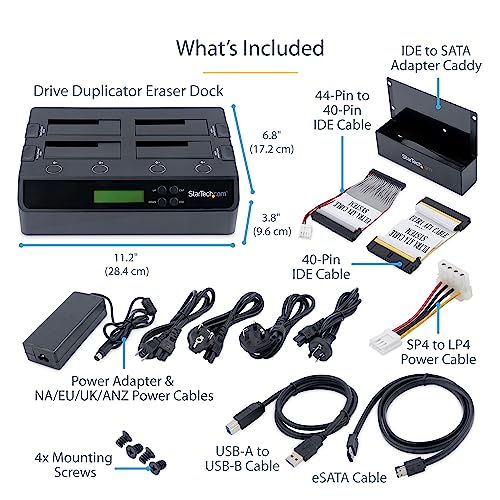
Key features
- •THE STARTECH.COM ADVANTAGE: StarTech.com offers a 2-year warranty and free lifetime technical support on this HDD duplicator and has been the IT pro's choice since 1985
- •PLUG & PLAY: The standalone USB 3.0 hard drive duplicator/wiper lets you quickly copy your SATA (I/II/III) or SAS disk and sanitize with confidence without connecting to a host computer or laptop
- •EASILY DUPLICATE & DOCK: With speeds up to 4.2 GBpm copying one hard drive to three (1:3) and a capacity of one 4TB drive per bay, this external multi SSD/HDD copier dock makes cloning quick and easy
- •FOR 2.5" & 3.5" DRIVES: The 4 bay cloner/sanitizer station supports 2.5in & 3.5in drives, and can be used as a docking station by connecting to a host computer through USB 3.0 (5Gbps) or eSATA (3Gbps)
- •VERSATILE USE: This USB 3.1 (USB 3.1 Gen 1) SATA hard drive copier/wiper for the IT professional features one duplication mode and two erase modes, ensuring your data is secure
- •1:1 hard drive duplicator and docking station
StarTech.com 4-Bay Hard Drive Duplicator and Eraser, External Standalone 1:3 HDD/SSD Cloner/Copier, USB 3.0 / eSATA to SATA Docking Station, Hard Disk Copier / Sanitizer / Wiper Tool (SATDOCK4U3RE)
List Price: $708.45$637.61DEALYou Save: $70.84 (10%)
Free shippingFree Returns – 30 daysFree Order CancellationSecure Payment2–3 Days DeliveryGet It October 26, 2026In Stock (36)No marketing spamNo account requiredFulfilment by FedEx / Amazon / UPS / ShipwirePayPal / Card Buyer Protection
Customer Reviews
Reviews sourced from verified Amazon purchasers4.4
out of 5
Based on 10 reviews
5★
50%
4★
50%
3★
0%
2★
0%
1★
0%
Can't clone two identical WD10EZEX - StarTech has Super customer service !!!
Lou✓ Verified Purchase•October 14, 2023
Works great - Hard drives get extremely hot! I I use a small fan to cool down the drives when I clone.
Update - Can't boot with 3 diff drives inserted in Dock with USB cable, Those same drives all boot ok when connected to Sata cable on MB
I tried USB 2 and USB 3.0 ports on computer. I played around with CMOS boot priority, no go
*** Update March 2017 - I have not used since last February 2016 and today decided to clone my two WD10EZEX drives. The source drive is my everyday desktop drive and the destination is a clone that I did about a month ago directly on the computer. These are same capacity and same same part # WD10EZEX drives. I start cloning process with the 2 drives in the dock station and the progress lights starts to go back and forth for about 10 minutes, then the HDD2 light comes on red and the instructions shows that this means that cloning failed. If I install that failed copy in my desktop, it does boot, but 3 partitions are missing form the source drive. I turned off the power to the dock and inserted the 2 drives again and started the process one more time and again failed.
I am very disappointed because I bought this to save time to do cloning instead of using a cloning program in my PC, but at this point, this dock is useless and too late to return for refund.
*** March 6 2017 update - Sent email to Star Tech and they have accepted return and replacement. Shipping defective unit today and we'll see how it goes when I get replacement.
*** March 17 2017 update - Star Tech service is excellent, they shipped replacement the day after they received the defective device. Great customer service !!! They take care of customers !!
Update - Can't boot with 3 diff drives inserted in Dock with USB cable, Those same drives all boot ok when connected to Sata cable on MB
I tried USB 2 and USB 3.0 ports on computer. I played around with CMOS boot priority, no go
*** Update March 2017 - I have not used since last February 2016 and today decided to clone my two WD10EZEX drives. The source drive is my everyday desktop drive and the destination is a clone that I did about a month ago directly on the computer. These are same capacity and same same part # WD10EZEX drives. I start cloning process with the 2 drives in the dock station and the progress lights starts to go back and forth for about 10 minutes, then the HDD2 light comes on red and the instructions shows that this means that cloning failed. If I install that failed copy in my desktop, it does boot, but 3 partitions are missing form the source drive. I turned off the power to the dock and inserted the 2 drives again and started the process one more time and again failed.
I am very disappointed because I bought this to save time to do cloning instead of using a cloning program in my PC, but at this point, this dock is useless and too late to return for refund.
*** March 6 2017 update - Sent email to Star Tech and they have accepted return and replacement. Shipping defective unit today and we'll see how it goes when I get replacement.
*** March 17 2017 update - Star Tech service is excellent, they shipped replacement the day after they received the defective device. Great customer service !!! They take care of customers !!
Great Unit.
HiTek21✓ Verified Purchase•October 6, 2023
I have several hard drives that I use periodically but don't have space inside of my desktop, I don't use all of them at every minute so being able to swap them in and out when needed is great.
Just recently i wanted to transfer my work computer from a HDD over to a SSD to make it a little faster and thought that built in duplicating feature would make things simple. I thought I would be able to put the two drives start the clone and be done in an hour. This was not the case for me.
I bought an Intel 530 series 240gb SSD, placed it in the destination slot (HDD 2), put my work HDD in the source slot (HDD 1), pressed and held the clone button until the all 4 LEDs turned orange but shortly after the #4 LED blinked red which meant the cloning process has a problem and won't start. Tried it several times and everytime came up with the same error.
I first thought this may be due to the fact that my work drive was encrypted so i started looking for software to duplicate an encrypted HDD and found clonezilla. Well the docking feature did not show up on clonezilla. Then I stared to look at the HDDs again
Since the drive copies everything over you need a target drive equal or larger than the source. My mistake since I didn't realize my work drive was 250gb I thought it was 200gb. I thought that this would copy everything it needed and nothing more but not the case it copies everything. Strike this up to operator error.
I moved some things around from my laptop collection and pulled a very lightly used Crucial M4 256gb drive to install it on. I made it one partition and reformatted it. I tried the process again this time it started duplicating the drives and was working for about 30 minutes when it got to the 75% mark and then the #4 led lit red meaning the cloning failed. I tried it again one more time by wiping the M4 SSD with the docks erase feature. Same results. I started doing some testing on the HDD or SSD thinking there was a bad sector or some kind of damage but all the scans and tests came up negative.
Fast forward to several hours later and much frustration I was able to complete the cloning of my HDD to SSD with Clonezilla, USB stick, & DVD HDD Caddy. I was not able to use the dock for either purpose since the dock wasn't recognized by clonezilla which is why I used the DVD HDD caddy.
The included instructions (which are the same as on the mfg site) are very vague so its of very little help. They just explain the operation of the unit and what the LED indicators mean. They don't give any explanation of what would cause the errors, they just expect you to know.
I still plan on keeping this for the docking ability of 3.5" and 2.5" HDDs. Maybe some day in the future i'll get a use out of the duplicating feature.
3/27/16
I had another chance to use this to clone my new work computer from a 128gb to 256gb ssd. This time the unit worked perfectly, was able to duplicate the drive over in about 20 minutes. Windows activation had to be redone because of the change in hardware but easily done.
Just recently i wanted to transfer my work computer from a HDD over to a SSD to make it a little faster and thought that built in duplicating feature would make things simple. I thought I would be able to put the two drives start the clone and be done in an hour. This was not the case for me.
I bought an Intel 530 series 240gb SSD, placed it in the destination slot (HDD 2), put my work HDD in the source slot (HDD 1), pressed and held the clone button until the all 4 LEDs turned orange but shortly after the #4 LED blinked red which meant the cloning process has a problem and won't start. Tried it several times and everytime came up with the same error.
I first thought this may be due to the fact that my work drive was encrypted so i started looking for software to duplicate an encrypted HDD and found clonezilla. Well the docking feature did not show up on clonezilla. Then I stared to look at the HDDs again
Since the drive copies everything over you need a target drive equal or larger than the source. My mistake since I didn't realize my work drive was 250gb I thought it was 200gb. I thought that this would copy everything it needed and nothing more but not the case it copies everything. Strike this up to operator error.
I moved some things around from my laptop collection and pulled a very lightly used Crucial M4 256gb drive to install it on. I made it one partition and reformatted it. I tried the process again this time it started duplicating the drives and was working for about 30 minutes when it got to the 75% mark and then the #4 led lit red meaning the cloning failed. I tried it again one more time by wiping the M4 SSD with the docks erase feature. Same results. I started doing some testing on the HDD or SSD thinking there was a bad sector or some kind of damage but all the scans and tests came up negative.
Fast forward to several hours later and much frustration I was able to complete the cloning of my HDD to SSD with Clonezilla, USB stick, & DVD HDD Caddy. I was not able to use the dock for either purpose since the dock wasn't recognized by clonezilla which is why I used the DVD HDD caddy.
The included instructions (which are the same as on the mfg site) are very vague so its of very little help. They just explain the operation of the unit and what the LED indicators mean. They don't give any explanation of what would cause the errors, they just expect you to know.
I still plan on keeping this for the docking ability of 3.5" and 2.5" HDDs. Maybe some day in the future i'll get a use out of the duplicating feature.
3/27/16
I had another chance to use this to clone my new work computer from a 128gb to 256gb ssd. This time the unit worked perfectly, was able to duplicate the drive over in about 20 minutes. Windows activation had to be redone because of the change in hardware but easily done.
May appear to be deffective, but is actually fine.
Lamboom✓ Verified Purchase•October 3, 2023
This is a letter to StarTech support.. which is very fast, and helpful:
The main issue with the docking station (which works fine, by the way) .. is the instructions. They are very poor.
This unit, I assume, is a product designed in the US, and marketed world wide. I really don't care if it's made in China.. but, some of the Amazon buyers seem to care, in their reviews of this product.. And, that leads me to the second issue: The negative feedback by Amazon buyers.
Many claimed the unit failed soon after purchase, others claimed it was DOA out of the box.. and there were issues about an included 3 amp power supply not supporting drives that require 4 amps total. By the way, (unlike in your reply email) my unit had a 3 amp power supply, and the replacement one from Amazon has a 3 amp PS. So if you are now supplying a 4 amp power supply with newer units, mine is probably an older version. These "problems" experienced by Amazon buyers, set me up to be ready for a possible problem when I first did the hardware installation:
"Quick Start" instructions, with minimal explanation, designed for people who already have experience with a product, often results in failure, when the lesser experienced try to follow such instructions ... that's why they invented the "˜Tutorial". It too, is often simple; however, it tends to include every significant step, along with comments as to what to expect with each step. Like the re-cycling of "power' .. to shift modes from dock to clone"¦ and the wait time to mount a drive.. and what to expect from the LED's at each step.
The following is where the StarTech instructions for the SATDOCK2REU3 get it wrong, and can lead to the conclusion that the unit is defective, when in fact, there is nothing wrong with it:
1) Hardware installation, step 2, says to connect the USB 3.0 cable (why?)
2) Then, two drives are to be installed .. one to be a source, and the other to be a target "¦ suggesting that this is to be a cloning operation.
3) Step 5 says to power up .."and you are now ready to use the unit" "¦. Really? To do what? "¦ clone, monitor the two drives using the PC during cloning? Use the drive as a dock? Nothing about those options is mentioned.
When I did the above steps with the first unit, first time, with the intent to clone"¦ there was no LED indication of power on. (the target drive was unformatted) After powering off, then on ..all four blue LED's came on the source drive blinked a few times .. so I moved on to the "Hardware Operation":
NOTE: Destination drive must be same size or larger (that's good to know) "¦ what about formatting? If one was going to clone, does the target drive need to be formatted? Nothing is said about that..
The next instruction was to hold in the clone button"¦ I did"¦ for a long time"¦ nothing happened
What followed was a frustrating series of trying to figure out what was wrong, and not appreciating how long it takes to "mount" a drive using the unit as a dock. (with my PC.. about 10 seconds) There was a lot of Red Power LED only .. nothing about "red" indication when cloning. I looked at "Hard Drive Duplication Mode" .. Red was possible.. but only if the USB cable was not connected I tried a cloning without the USB cable connected .. there were no examples of what to expect from the LED's prior to cloning "¦ Nothing worked ..
I assumed the unit was another dreaded DOA (thank you Amazon reviews) .. and sent it back to Amazon.. they sent another the same day (love Amazon) and I received it Monday.
Sunday, while I was waiting for UPS to pick up the return on Monday.. I decided to try again.. this time with a formatted drive for the target. I plugged in the drives (no USB cable) powered up, pressed in the clone button "¦ waited.. NO red LED's appeared "¦ got tired.. released the button.. and the amber (running back and forth) started "¦ "it was cloning!" "¦ when finished (about 1.3 hours).. I was able to mount the cloned drive using the USB cable.
Tried to cancel the "return" to Amazon .. (it hadn't shipped yet) .. but, was notified about an hour later .. the new one was on the way.. too bad.. re-packaged it for return.
Was a little concerned that the 4 RED LED's never came on while the clone button was pressed"¦ but, it did make a clone.
UPS picked up the return on Monday, and USPS dropped off the new one.. which I tested"¦ following my modified instructions .. re-cloned the same drive.. this time quickly got 4 RED LED's .. and everything works great.. (no idea why I never saw the 4 Red IED's when I used the returned one)
I recommend that StarTech rewrite the instructions.. more like a tutorial.. and don't assume that a short "quick start" is intuitive"¦ it isn't .. :-)
........
Note:
StarTech replied that the USB cable should not be connected during the cloning operation, and they would look into the power supply .. it is supposed to be 4 amps
The main issue with the docking station (which works fine, by the way) .. is the instructions. They are very poor.
This unit, I assume, is a product designed in the US, and marketed world wide. I really don't care if it's made in China.. but, some of the Amazon buyers seem to care, in their reviews of this product.. And, that leads me to the second issue: The negative feedback by Amazon buyers.
Many claimed the unit failed soon after purchase, others claimed it was DOA out of the box.. and there were issues about an included 3 amp power supply not supporting drives that require 4 amps total. By the way, (unlike in your reply email) my unit had a 3 amp power supply, and the replacement one from Amazon has a 3 amp PS. So if you are now supplying a 4 amp power supply with newer units, mine is probably an older version. These "problems" experienced by Amazon buyers, set me up to be ready for a possible problem when I first did the hardware installation:
"Quick Start" instructions, with minimal explanation, designed for people who already have experience with a product, often results in failure, when the lesser experienced try to follow such instructions ... that's why they invented the "˜Tutorial". It too, is often simple; however, it tends to include every significant step, along with comments as to what to expect with each step. Like the re-cycling of "power' .. to shift modes from dock to clone"¦ and the wait time to mount a drive.. and what to expect from the LED's at each step.
The following is where the StarTech instructions for the SATDOCK2REU3 get it wrong, and can lead to the conclusion that the unit is defective, when in fact, there is nothing wrong with it:
1) Hardware installation, step 2, says to connect the USB 3.0 cable (why?)
2) Then, two drives are to be installed .. one to be a source, and the other to be a target "¦ suggesting that this is to be a cloning operation.
3) Step 5 says to power up .."and you are now ready to use the unit" "¦. Really? To do what? "¦ clone, monitor the two drives using the PC during cloning? Use the drive as a dock? Nothing about those options is mentioned.
When I did the above steps with the first unit, first time, with the intent to clone"¦ there was no LED indication of power on. (the target drive was unformatted) After powering off, then on ..all four blue LED's came on the source drive blinked a few times .. so I moved on to the "Hardware Operation":
NOTE: Destination drive must be same size or larger (that's good to know) "¦ what about formatting? If one was going to clone, does the target drive need to be formatted? Nothing is said about that..
The next instruction was to hold in the clone button"¦ I did"¦ for a long time"¦ nothing happened
What followed was a frustrating series of trying to figure out what was wrong, and not appreciating how long it takes to "mount" a drive using the unit as a dock. (with my PC.. about 10 seconds) There was a lot of Red Power LED only .. nothing about "red" indication when cloning. I looked at "Hard Drive Duplication Mode" .. Red was possible.. but only if the USB cable was not connected I tried a cloning without the USB cable connected .. there were no examples of what to expect from the LED's prior to cloning "¦ Nothing worked ..
I assumed the unit was another dreaded DOA (thank you Amazon reviews) .. and sent it back to Amazon.. they sent another the same day (love Amazon) and I received it Monday.
Sunday, while I was waiting for UPS to pick up the return on Monday.. I decided to try again.. this time with a formatted drive for the target. I plugged in the drives (no USB cable) powered up, pressed in the clone button "¦ waited.. NO red LED's appeared "¦ got tired.. released the button.. and the amber (running back and forth) started "¦ "it was cloning!" "¦ when finished (about 1.3 hours).. I was able to mount the cloned drive using the USB cable.
Tried to cancel the "return" to Amazon .. (it hadn't shipped yet) .. but, was notified about an hour later .. the new one was on the way.. too bad.. re-packaged it for return.
Was a little concerned that the 4 RED LED's never came on while the clone button was pressed"¦ but, it did make a clone.
UPS picked up the return on Monday, and USPS dropped off the new one.. which I tested"¦ following my modified instructions .. re-cloned the same drive.. this time quickly got 4 RED LED's .. and everything works great.. (no idea why I never saw the 4 Red IED's when I used the returned one)
I recommend that StarTech rewrite the instructions.. more like a tutorial.. and don't assume that a short "quick start" is intuitive"¦ it isn't .. :-)
........
Note:
StarTech replied that the USB cable should not be connected during the cloning operation, and they would look into the power supply .. it is supposed to be 4 amps
My Review
Keithmj✓ Verified Purchase•September 26, 2023
I purchased this May 22 2018.
This unit does what it says it will do, copy or clone disks. This makes fast work of cloning a disk, it takes just a little over an hour for a disk with 250gb if files.
Warning...If you buy this to clone a disk make sure you have you Keys or Licenses for every program that you bought, even for windows, some are digital so make sure you have those or you might have to buy a new license or key.
I cloned my disk and could not activate windows as the key would not work because I changed the hard drive to a newer one, be careful of hardware changes. I can not find my keys as the computer was made in 2009. It was supposed to be in an Email.
In order to copy or clone my disk without the keys I had to use a Sabrent USB 2.0 SATA/IDE Hard Drive Adapter that took over 7 hours to clone, but it copied all the keys and licenses this way.
From what I can tell the StarTech has something built in that won't copy the Keys or Licenses.
One hour or seven hours, it is your pick.
This unit does what it says it will do, copy or clone disks. This makes fast work of cloning a disk, it takes just a little over an hour for a disk with 250gb if files.
Warning...If you buy this to clone a disk make sure you have you Keys or Licenses for every program that you bought, even for windows, some are digital so make sure you have those or you might have to buy a new license or key.
I cloned my disk and could not activate windows as the key would not work because I changed the hard drive to a newer one, be careful of hardware changes. I can not find my keys as the computer was made in 2009. It was supposed to be in an Email.
In order to copy or clone my disk without the keys I had to use a Sabrent USB 2.0 SATA/IDE Hard Drive Adapter that took over 7 hours to clone, but it copied all the keys and licenses this way.
From what I can tell the StarTech has something built in that won't copy the Keys or Licenses.
One hour or seven hours, it is your pick.
Exceeded my expecations!
Greener✓ Verified Purchase•September 6, 2023
I have to wipe about 25 2.5" HDD, all are 500GB. Doing 2 at a time, unattended is great. Super easy, just load the drives, turn it on, press and hold the small micro button on the back for 3 seconds or so, then release. On average 2 500GB HDD takes about 3-4hours total. When its done it blinks, if there's an issue just 1 light blinks. I've yet to use the duplication, but thats coming right after I wipe the rest of these drives. I'll update as I go. I also got some M.2 SSD adapters too. should be interesting.
Page 1 of 2


