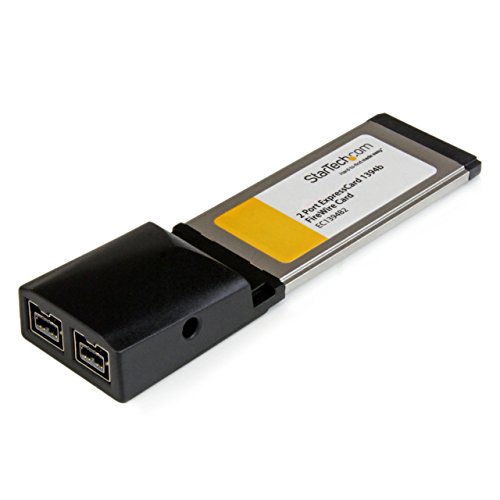
Syba SY-PEX30016 3 Port IEEE 1394 Firewire 1394B & 1394A PCIe 1.1 x1 Card TI XIO2213B Chipset Requires Legacy Driver for Windows 8 10


Key features
- •Simultaneous Operation of Multiple High-performance Devices
- •Supports Hot-swapping and Plug-n-Play Connection of Peripheral Devices
- •Works with Various Types of FireWire 800 (1394b) and 1394a Devices Including Portable Hard Disk, DV Camcorder, Digital Camera, CD-RW/DVD-ROM Drive and Other Audio/Video Devices
- •Support Provisions of IEEE P1394b Revision 1.33+
- •Compliant with IEEE 1394 OpenHCI Specifications V1.0 and V1.1
- •Compliant with IEEE 1394-1995 for a High Performance Serial Bus
Syba SY-PEX30016 3 Port IEEE 1394 Firewire 1394B & 1394A PCIe 1.1 x1 Card TI XIO2213B Chipset Requires Legacy Driver for Windows 8 10
List Price: $38.64$34.78DEALYou Save: $3.86 (10%)
Free shippingFree Returns – 30 daysFree Order CancellationSecure Payment2–3 Days DeliveryGet It October 26, 2026In Stock (8)No marketing spamNo account requiredFulfilment by FedEx / Amazon / UPS / ShipwirePayPal / Card Buyer Protection
Customer Reviews
Reviews sourced from verified Amazon purchasers4.4
out of 5
Based on 10 reviews
5★
80%
4★
10%
3★
10%
2★
0%
1★
0%
Works with Windows 10 64-bit - Comes with a crappy cable though
Bryan H. Emanuel✓ Verified Purchase•December 20, 2017
It's really well built. The knobs have a nice smooth feel when rotating left or right. Perfect for my small home studio (FL Studio and a Roland Juno-Di). I experience 0 latency when recording. I had to install a Firewire PCI card onto my Motherboard (ASUS TUF Z270 Mark 1) in order to enjoy this audio interface. I used the Syba SY-PEX30016 3 Port Firewire 1394B & 1394A PCI Card. If you're wanting to go with Firewire and are in the similar situation where you'll have to install a Firewire PCI card you'll want to use the Syba one I suggested because it hosts a Texas Instrument Chipset and anything else is a waste of money.
This is a nice card that is compatible with Windows 10 Pro 64-bit (it's what I'm using). I installed it on my ASUS TUF Z270 Mark 1 motherboard without issue in order to connect a Focusrite Saffire Pro 14 Firewire Audio Interface and it's working perfectly. No latency when recording and has 3 plugs. It does come with a crappy firewire cable that has a plastic plug on one end which is a 1394a to 1394b as well so I recommend purchasing a higher quality cable that will better suit your needs. This card hosts a Texas Instrument Chipset making this card that much better than the rest. Well made and stylish design for what it is.
This is a nice card that is compatible with Windows 10 Pro 64-bit (it's what I'm using). I installed it on my ASUS TUF Z270 Mark 1 motherboard without issue in order to connect a Focusrite Saffire Pro 14 Firewire Audio Interface and it's working perfectly. No latency when recording and has 3 plugs. It does come with a crappy firewire cable that has a plastic plug on one end which is a 1394a to 1394b as well so I recommend purchasing a higher quality cable that will better suit your needs. This card hosts a Texas Instrument Chipset making this card that much better than the rest. Well made and stylish design for what it is.
Adds INTERNAL 9-pin Firewire Header...
AFelectrngineer✓ Verified Purchase•March 5, 2017
Perfect! Provides INTERNAL 9-pin FIREWIRE header to connect PC front panel for new custom build with new next generation Z270 motherboard that doesn't have onboard FIREWIRE 9-pin header. This PCIe x 1 card also adds rear panel FIREWIRE connections - both 400 and 800 Mbs 1394 type A and B. New motherboards generally no longer have internal FIREWIRE MB headers. However, if you have pro audio gear, you'll likely want to have FIREWIRE capability for your system. This is also true for many people that use FIREWIRE for their video cameras equipped to interface with PC for downloading all your favorite video memories via FIREWIRE. This add-in card will get you connected. I didn't need to install any drivers as Windows 8.1 Pro recognized Texas Instruments chipset and auto loaded driver. Works Great! Includes both full sized and low profile PCI bracket.
FOOT NOTE: With a high end graphics card (GTX 1080) with backplate in the PCIe slot next to this card it's a tight fit for the internal FIREWIRE header but it works.
FOOT NOTE: With a high end graphics card (GTX 1080) with backplate in the PCIe slot next to this card it's a tight fit for the internal FIREWIRE header but it works.
Works with ASUS motherboards and Skylake Core i7 architecture with older FireWire pro audio interfaces.
Technology Geek✓ Verified Purchase•August 31, 2016
If you are dealing with legacy Firewire issues for a pro audio interface, camera, video camera, etc., after building or purchasing an Intel Skylake Core i7 CPU and ASUS motherboard, this card is the solution to your problem! I was really frustrated after building a badass $1500 worth of parts new studio computer to run my Pro Tools interfaces, and everything else. I had purchased the AVID recommended SIIG N342534X which would not work. It would show up in the OS fine on either Win7 x64 pro or Win10 x64 pro, but Pro Tools would always error out with the 'ASIO device could not be loaded'. I tried everything, adjusting BIOS settings, trying the legacy MS FW driver, regular MS FW driver, even the TI FW driver, same experience. Purchased a 2nd AVID recommended FW card, the Pyro API-316, same issues. Spent hours searching the AVID forums, opened support case with ASUS, maybe a beta BIOS I could try? Nothing would work. I am very experienced and A+, NET+ certified Sr. Systems admin with 18 years experience working for one of the largest companies in the US, so not just a hobbyist who doesn't do his research before building a system. I knew it was an issue with DMA and memory timing, or something like that, because if I slowed my 32GB of G Skill memory down below a certain point, it would work, but I was unable to set the AVID HW buffer and what not where it needed to be. The problem I believe is the older TI XIO2213A FW chipset just cannot clock or time accurately on the newer Skylake Architecture. I ended up finding the answer to my problem on GearSlutz (thank you GearSlutz, you guys are awesome). The newer TI XIO2213B can sync correctly without any BIOS adjustments for power management, C-States, Turbo boost, etc. I hope this review helps someone else avoid the waste of time that I went through trying everything, rebooting, testing, adjusting, testing, change driver, reboot, test, etc. I built my new system because Skylake is the last architecture that will support my pro audio hardware software platform, very thankful to get my Digidesign Digi002 mixer working properly, I would like to get another 5-7 years out of my hardware because I don't need anything newer for my project studio.
Focusrite Saffire Pro 40
Nathaniel Andrew✓ Verified Purchase•August 23, 2016
I bought this for the sole purpose of connecting a Focusrite Saffire Pro 40 DAW interface and it works perfectly. I am using the FW800 to FW400 cable that came with the Focusrite and have zero problems with the unit. I am able to get 1.3ms latency on this setup, though I do not actually use it that low unless I am ONLY tracking a guitar through a simulator. Great card, zero problems, fully compatible with the Texas Instruments chipset. You will see this card has a molex connector on it that would provide additional power. I do not connect anything to it because it is not necessary and the Saffire unit has its own power source.
It was super easy to install once I figured out how my ...
MT✓ Verified Purchase•June 24, 2016
I bought this because I still have an old High 8 Digital videocamera that needs a firewire cable to convert the video to digital on the computer. It was super easy to install once I figured out how my computer opens up to allow new cards. It is basically plug and play. Don't freak out if the driver doesn't download-- it doesn't need a driver. Just plug in the firewire cable (making sure your camera is on VCR mode) and it will do the rest (will even rewind if you want it to record from the start).
One caution: I don't know all the technical terms, but you need to know if your computer is so old that it has power plug in for the cards or if the cards are powered through the motherboard port. I first bought one of these ports with a power connector, and it didn't work. Then I exchanged for this one (that powers through the port itself) and it worked great!
One caution: I don't know all the technical terms, but you need to know if your computer is so old that it has power plug in for the cards or if the cards are powered through the motherboard port. I first bought one of these ports with a power connector, and it didn't work. Then I exchanged for this one (that powers through the port itself) and it worked great!
Page 1 of 2