Plugable USB 2.0 Sharing Switch for One-Button USB Device Port Sharing Between Two Computers (A/B Dual Computer Switch)




Key features
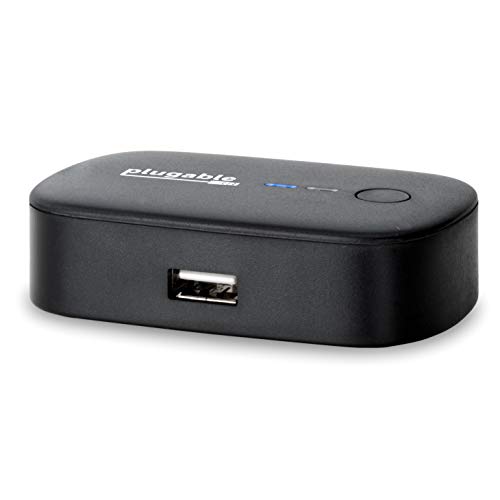
- •SIMPLE DEVICE SHARING - Compact design provides easy one-touch switching of a USB device or hub between two computers
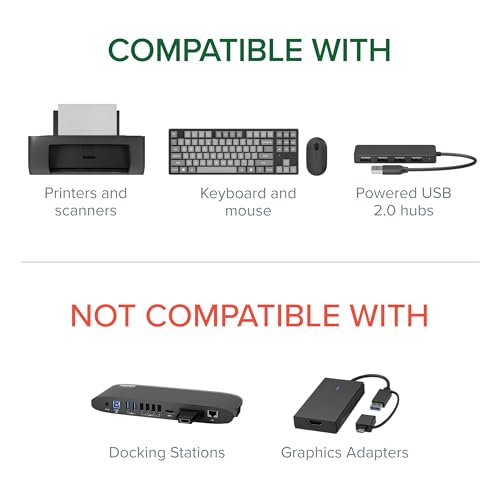
- •ONE BUTTON TOGGLE - Great for sharing a printer, scanner, or other USB device between two computers (one computer at a time). Attach a powered USB hub that is connected to the keyboard, mouse, and USB 2.0 graphics adapter for an all-USB KVM solution
- •PLUG AND PLAY - Switch works with any USB-enabled computer without drivers - attached devices may require drivers as usual. LED indicator lights show which connected computer has control of the attached devices
- •COMPATIBILITY - Not recommended for switching mass storage devices such as hard drives, flash drives, memory cards, etc. We recommend using the provided 59in/1.5m cables to connect the USB switch to your computer and 6ft/1.8m to your peripheral.
- •QUALITY ASSURANCE - We love our Plugable products and hope you will too. All of our products are backed with a full one-year warranty and top-notch US-based email support team.
Plugable USB 2.0 Sharing Switch for One-Button USB Device Port Sharing Between Two Computers (A/B Dual Computer Switch)
List Price: $29.00$26.10DEALYou Save: $2.90 (10%)
Free shippingFree Returns – 30 daysFree Order CancellationSecure Payment2–3 Days DeliveryGet It October 24, 2026In Stock (1)No marketing spamNo account requiredFulfilment by FedEx / Amazon / UPS / ShipwirePayPal / Card Buyer Protection
Customer Reviews
Reviews sourced from verified Amazon purchasers4.2
out of 5
Based on 10 reviews
5★
60%
4★
10%
3★
30%
2★
0%
1★
0%
OK for noncritical use, does not reliably switch back and forth.
Matthew M•October 23, 2017
If you're looking for a switch that you need to rely on working every single time without error, you do not want to purchase this one. I probably switch between two computers about 20-30 times a day. At least 3 or 4 times during the day, the switch will either not connect to the computer it just switched to, or it will "flip" the 2 systems. For example, computer A is hooked to port A, computer B to port B. I'll press the switch, and now computer A is hooked to port B, B to A.
The good news is that, if you are patient, you can just press the button until it gets itself sorted out or remove/reconnect the cables. For the price, it'd be hard to find a bulletproof enterprise switch for this price, so this is a good alternative for noncritical use.
The good news is that, if you are patient, you can just press the button until it gets itself sorted out or remove/reconnect the cables. For the price, it'd be hard to find a bulletproof enterprise switch for this price, so this is a good alternative for noncritical use.
Awesome product
Greg W•September 13, 2017
So simple, and so useful. I use it with the mouse-keyboard combo receiver between two PCs. I have not noticed any flaws so far. At the press of the button it toggles between the two computers. And the light changes color, so at a glance you know which one it is connected to. Someone mentioned that there is a delay when switching, but this may depend on the PC and the Operating System, because I can barely notice one and only when switching to my Windows 7 PC (maybe half a second). The other one is running Linux and I do not see any delay at all. And they provide two USB cables in the box, so it's a complete solution. Did I mention that it's also inexpensive? I'm very impressed with this product and extremely happy with this purchase.
but falling back to older tech was a great idea. Instead of battling my BT devices
Tiger Ali•September 13, 2017
In my office I keep my literal desktop computer, a Macbook Pro, and across the room, a PC tower I use for gaming. My monitor has dual HDMI inputs, so both the Macbook and the PC are plugged into the monitor. Using this device, I can also share a keyboard and mouse between the two machines.
I tried doing this with bluetooth for the keyboard and mouse, but BT is flakey and always caused issue. I got this USB switcher as a last resort, but falling back to older tech was a great idea. Instead of battling my BT devices, my USB devices just worked, and it was easy to switch from controlling one machine to the other.
I rated the item a four because it feels a little cheap, but it works perfectly and that is definitely the most important thing. A few other caveats to know - obviously this won't work if the two computers aren't close enough to physically connect. The USB cables that come with the device are of average length, but one can buy a longer USB A/B cable for devices further away (which is what I did).
I tried doing this with bluetooth for the keyboard and mouse, but BT is flakey and always caused issue. I got this USB switcher as a last resort, but falling back to older tech was a great idea. Instead of battling my BT devices, my USB devices just worked, and it was easy to switch from controlling one machine to the other.
I rated the item a four because it feels a little cheap, but it works perfectly and that is definitely the most important thing. A few other caveats to know - obviously this won't work if the two computers aren't close enough to physically connect. The USB cables that come with the device are of average length, but one can buy a longer USB A/B cable for devices further away (which is what I did).
Great! Works as expected. Try different USB ports if you have troubles.
AGamer•May 19, 2017
Great little box, I searched all over the place for something like this to share one PC across 2 rooms.
It's been working fine for months now, tho at the beginning I did have several disconnects, especially from a sound card; I've heard sound cards consume quite a lot of bandwidth so that might have been the problem, but then I tried connecting the thing to different USB ports and voila, haven't had much problems since. Sometimes one of the devices gets disconnected and you have to unplug and plug it back in, but it doesn't happen often.
I also want to say that even tho the manual advices against using long cable I found no problem whatsoever while using a long USB cable + USB 2.0 extension, there's no perceivable lag or anything, and I use this to switch between a PC I have in a room and another 1 gaming PC I have in another room far away.
It's a great device and I look forward for more products from this company.
It's been working fine for months now, tho at the beginning I did have several disconnects, especially from a sound card; I've heard sound cards consume quite a lot of bandwidth so that might have been the problem, but then I tried connecting the thing to different USB ports and voila, haven't had much problems since. Sometimes one of the devices gets disconnected and you have to unplug and plug it back in, but it doesn't happen often.
I also want to say that even tho the manual advices against using long cable I found no problem whatsoever while using a long USB cable + USB 2.0 extension, there's no perceivable lag or anything, and I use this to switch between a PC I have in a room and another 1 gaming PC I have in another room far away.
It's a great device and I look forward for more products from this company.
Works as a wireless keyboard/mouse combo KV switch!
Eric•March 4, 2017
I use this as a KV switch to utilize a wireless keyboard/mouse combo on two separate computers. It's a simple as the push of a button. I've tested it on a logitech and an HP dual keyboard/mouse combo. My first switch failed immediately, but i reached out to customer support ([email protected]). Customer support responded within hours, and I had a new switch within days. The new switch has worked flawlessly.
One point to note: there is a delay of about 1 second between going from one computer to another. There is an audible chime letting you know that the transfer is complete, but it is not instantaneous.
Thank you Raul and Plugable for a very positive experience!
One point to note: there is a delay of about 1 second between going from one computer to another. There is an audible chime letting you know that the transfer is complete, but it is not instantaneous.
Thank you Raul and Plugable for a very positive experience!
Page 1 of 2