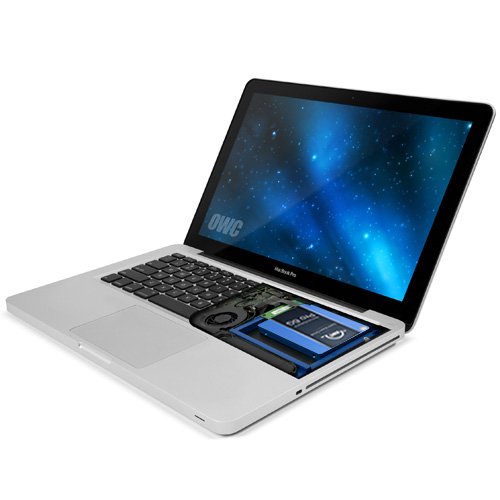
OWC Data Doubler, Optical to SATA HD Converter Bracket Solution for Mac Laptops, (OWCDDAMBS0GB)



Key features
- •Optical to SATA Drive Converter Bracket Solution
- •Supports: SATA / SATA 3G / SATA 6G Interface 2.5" Drive or SSD (Solid State Drive) of up to 9.5mm (Super Slim) height
- •Dimensions: 5"(D) x 5"(W) x 03"(H) (12.7 x 12.7 x 7.6mm)
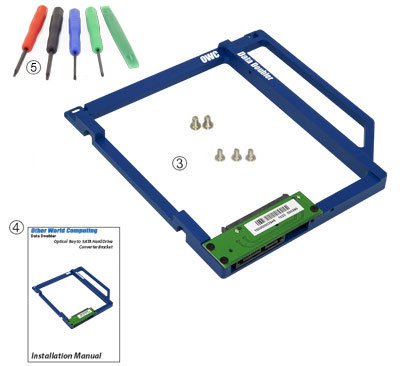
- •Includes: OWC Data Doubler Bracket, Interposer Board, Screws (3 x Phillips #00, 2 x Phillips #1), OWC 5 Piece Toolkit
- •1 Year OWC Limited Warranty
BrandOWC
CategoryEnclosures
OWC Data Doubler, Optical to SATA HD Converter Bracket Solution for Mac Laptops, (OWCDDAMBS0GB)
List Price: $29.08$26.17DEALYou Save: $2.91 (10%)
Free shippingFree Returns – 30 daysFree Order CancellationSecure Payment2–3 Days DeliveryGet It October 24, 2026In Stock (2)No marketing spamNo account requiredFulfilment by FedEx / Amazon / UPS / ShipwirePayPal / Card Buyer Protection
Customer Reviews
Reviews sourced from verified Amazon purchasers4.8
out of 5
Based on 10 reviews
5★
90%
4★
10%
3★
0%
2★
0%
1★
0%
Easy installation thanks to the included instructions and tools
Marco Ponce•January 7, 2018
Easy installation thanks to the included instructions and tools. Was able to dedicate the original hardware for media storage and add a faster SSD drive for the operating system. Performance of the MB Pro 13in 7,1 with SSD, 16gb ram and a dedicated media hd is fantastic. With a new battery, my laptop has life for the next 5 years.
Happy to have replaced my CD/DVD reader with this and a hard drive.
ccccccc•November 10, 2017
This item is a great addition to my MacBook Pro 2012, as I was able to replace the CD/DVD drive with a second hard drive that I pulled from my older MacBook Pro. The dimensions of this enclosure + an installed hard drive are the same as a stock CD/DVD drive included in the MacBook Pro. There were absolutely no problems with connecting a hard drive to the enclosure or the computer recognizing a second hard drive, and I've even used SuperDuper! to clone my original hard drive to the second hard drive. I am very satisfied with this item.
One thing of note: I use a typical hard disk drive and do not own any solid state drives (ssd) so I can't comment on if a solid state drive fits in this enclosure. If you own a laptop hard drive, rest assured that it will fit perfectly inside this.
One thing of note: I use a typical hard disk drive and do not own any solid state drives (ssd) so I can't comment on if a solid state drive fits in this enclosure. If you own a laptop hard drive, rest assured that it will fit perfectly inside this.
Expand-o-matic
aggregator•May 29, 2016
OWC has always made some cool stuff for Macs and other machines, but I think this is one of the best-made, but buys I've made for my MBP. I wasn't using the DVD drive in the machine, so I thought, "why not, let's get more storage."
I was going to replace the standard Toshiba drive with a Crucial M550, but the Toshiba still had some life in it. The data doubler worked better than advertised with 0 install problems, even for a novice. The Aluminum frame added little to no weight to the computer and the bay that was formerly occupied by the DVD drive was brought back to life, adding an additional 750mb of storage to my old, reliable MBP.
Highly recommend.
I was going to replace the standard Toshiba drive with a Crucial M550, but the Toshiba still had some life in it. The data doubler worked better than advertised with 0 install problems, even for a novice. The Aluminum frame added little to no weight to the computer and the bay that was formerly occupied by the DVD drive was brought back to life, adding an additional 750mb of storage to my old, reliable MBP.
Highly recommend.
So perfect, that a case screw that had always stuck ...
NetBoy2020•March 21, 2016
Fit perfectly. So perfect, that a case screw that had always stuck a out a little when the DVD drive was in finally went in flush. On my mid 2012 15" MBP MD104LL/A A1286 I am getting full SATA III 6 Gigabit for negotiated/link speed. My Windows 10 VM boots in mere moments now that this has two SSD's! One thing to note - if you have a mid 2012 MBP or mini for whatever reason, once you go SSD you can't go back nor can you mix. I could not get a 1TB or 500 MB HDD to be seen. They both work perfectly via USB, but not internally. As soon as I put a SSD in, it was visible. I even swapped primary drive bay with the doubler. I mean, I spent a good hour trying every configuration and multiple drives. I had the same issue with a 2012 mini. I tried to boot a CCC clone HDD after having a SSD and it refused.
Don't hesitate to pick this up if you're looking for reliability and speed!
Brent Long•November 4, 2015
This thing just WORKS. It's such a simple design, yet sturdy as can be, and installed quickly and easily. Data speeds are fantastic, no errors in massive transfer operations (I tested with a 350GB file transfer), and overall this is the exact solution you need to expand your storage capabilities reliably. DO NOT make the mistake of trying to buy a cheaper tray/caddy to do this job. I did. And I wasted $8 trying to save a few bucks by doing so, not to mention the absolute headache the other drive tray gave me. Constant errors, slow speeds, tight fit. What a mistake! Spend the little bit extra money now and go with the sure-fire OWC Data Doubler to save a headache and to save time later. Trust me, I'm an IT guy. :)
Page 1 of 2