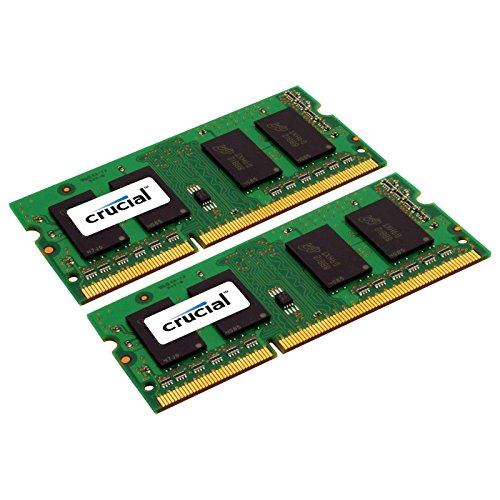
Crucial 16GB kit (8GBx2), 204-pin SODIMM, DDR3 PC3-12800,


Key features
- •Increases system performance
- •Easy to install. Designed for leading platforms, compatible with OEM systems
- •Premium quality memory from a trusted brand
- •Laptop/Notebook dual voltage 1.35 Volts
- •x4Gb based part uses newer technology
Crucial 16GB kit (8GBx2), 204-pin SODIMM, DDR3 PC3-12800,
List Price: $92.59$83.33DEALYou Save: $9.26 (10%)
Free shippingFree Returns – 30 daysFree Order CancellationSecure Payment2–3 Days DeliveryGet It October 25, 2026In Stock (22)No marketing spamNo account requiredFulfilment by FedEx / Amazon / UPS / ShipwirePayPal / Card Buyer Protection
Customer Reviews
Reviews sourced from verified Amazon purchasers4.7
out of 5
Based on 10 reviews
5★
90%
4★
0%
3★
0%
2★
0%
1★
10%
Failed in <3 months
Essais✓ Verified Purchase•August 12, 2017
Disappointed. I'd never suspect Crucial of such weak performance. I installed this 8GB module in my new HP 14-an013nr notebook PC to replace the existing Samsung 4GB module. Performance was as expected until a sudden failure while in sleep mode overnight. The PC did not return from sleep. Hard reboot showed no POST -- no display at all. Replacing the Crucial memory module with the original Samsung module fixed the problem. Installed the Crucial module in an ACER AO756, producing the same result -- hard boot showed no POST or any indication of display activation or ROM initiation. Replacing the original 4GB module in the Acer corrected that failure also.
I could not find that this memory has any warranty at all, so I'm disappointed. And out $60. Any ideas?!
I could not find that this memory has any warranty at all, so I'm disappointed. And out $60. Any ideas?!
Bad Hd I guess
Aaron Keller✓ Verified Purchase•July 23, 2017
So. I got an older Acer Aspire 1.6 Ghz Celeron (Wal-Mart) mini-desktop for nothing. Basically an old laptop mother-board stuck in a mini-tower. Bad Hd I guess, wouldn't boot past the repair screen, wouldn't restore, wouldn't reload. I put in a 1TB HD from my 'Box 'o Stuff' to replace the WD 540, it reloaded fine with Win10. Ultra slow, tho. It's my shop PC, I normally recycle older 'stuff' into there just for music and youtube vids on auto repair and wood-working things. It's not an easy life for them out here, they don't normally last too much longer. It only had 4Gb RAM in slot 0, so I bought this Crucial mem because of price, Amazon Prime, and normally certain reliability. Well, it didn't even boot to the Bios. Swapped them around, same thing. Each chip would boot up singly in slot zero, but neither way with both chips installed. So I on lined a Crucial tech, he said they don't guarantee their memory in parallel with a factory/dif man chip. Fair enough. So, another $28.x (plus tax) from Amazon for another Crucial 4Gb chip, and problem solved. Booted right up with the max 8Gb the computer will take. So, I'm about $60 into a free clunker - mouse/kb/sound/dual vids(one monitor, one big screen wall-mount) is fine. Just posting in case someone experiences something similar.
Edit: Sweet, this posted to both orders. I did have to get both the same sticks. Oh well. Still $60 total into a sub-par machine I paid nothing for. Except the HD I already had. Cheers!
Edit: Sweet, this posted to both orders. I did have to get both the same sticks. Oh well. Still $60 total into a sub-par machine I paid nothing for. Except the HD I already had. Cheers!
It's like I have a new computer!!
GoodBooks55✓ Verified Purchase•June 12, 2017
Why did I wait so long to get these!! I have a MacBook Pro 13" early 2014. I have had it for a year and I have spent so many moments frustrated at how slow it was! I finally discovered that I could easily upgrade the memory to increase the speed, and let me tell you, it is a miracle worker!
I know nothing about computers, but I was able to watch YouTube videos and do the upgrade myself very easily. However, since I am so computer illiterate, I didn't realize I needed two 4GB cards to make it have 8GB. I knew the computer already had 4GB, so I thought I just needed one more 4GB card. But (as most of you already probably know), this 4 gigs is in two 2GB cards, so you have to replace them both. Thought I'd mention that just in case someone is as inexperienced as I am.
But again, I could switch them out myself even with no computer knowledge! Do it today!! It will be the best money you ever spent! I was legit ready to go trade my laptop in for a new one until I discovered this! Feels like a brand new computer, but at a fraction of the cost!
I know nothing about computers, but I was able to watch YouTube videos and do the upgrade myself very easily. However, since I am so computer illiterate, I didn't realize I needed two 4GB cards to make it have 8GB. I knew the computer already had 4GB, so I thought I just needed one more 4GB card. But (as most of you already probably know), this 4 gigs is in two 2GB cards, so you have to replace them both. Thought I'd mention that just in case someone is as inexperienced as I am.
But again, I could switch them out myself even with no computer knowledge! Do it today!! It will be the best money you ever spent! I was legit ready to go trade my laptop in for a new one until I discovered this! Feels like a brand new computer, but at a fraction of the cost!
Upgrade for my Toshiba Satellite C55-A5195 Notebook
BookWorm✓ Verified Purchase•March 11, 2017
Purchased as upgrade for my Toshiba Satellite C55-A5195 Notebook. Installed easily and was instantly recognized by the Windows 7 OS. Excellent price, super fast shipping. Previously had 6GB of memory which was getting maxed out. I had already upgraded the onboard HDD by replacing it with a SSD HDD. Runs like new now, very satisfied.
Yes, yes, yes. So much yes. Stuck in old laptop with PC3-10800 with no issues!
Exit✓ Verified Purchase•February 8, 2017
I stuck these bad boys in my crumbling Toshiba C655D-S5210 which replaced the original 3 GB of PC3-10600S memory at 1066MHz.
Took only a minute to install, touched some grounded metal with both hands, popped out the old ones and put in the new ones. Booted and went to the BIOS screen to make sure they were sensed. BIOS reported 8GB of memory, so I saved (just to be sure the system recognized the change) and started up.
Wow, a new lease on what has been already a long life for this laptop. I bought the laptop in preparing for a trip 5.5 years ago, and in all this time even though I used it DAILY since I'm a web developer and generally use my computers a lot, it has been nothing but annoying concerning memory with the original 3GB. Constantly having Chrome tasks bombing out, closing my email program to get more memory, slow and sluggish response when changing tabs.
All of that is gone. With this laptop maxed out at 8GB, I started Daz3D with a complex scene with 8 high poly characters, Photoshop, Thunderbird, and Chrome. Nothing stopped this. I had the Task Manager open and monitored memory usage, and I think I topped out at 5GB. Beyond that, everything is now so much faster, clicking between tabs is basically instant.
Heck, even my screen seems brighter, or is that my perspective on life now that I've have these RAM kit in my life?
Took only a minute to install, touched some grounded metal with both hands, popped out the old ones and put in the new ones. Booted and went to the BIOS screen to make sure they were sensed. BIOS reported 8GB of memory, so I saved (just to be sure the system recognized the change) and started up.
Wow, a new lease on what has been already a long life for this laptop. I bought the laptop in preparing for a trip 5.5 years ago, and in all this time even though I used it DAILY since I'm a web developer and generally use my computers a lot, it has been nothing but annoying concerning memory with the original 3GB. Constantly having Chrome tasks bombing out, closing my email program to get more memory, slow and sluggish response when changing tabs.
All of that is gone. With this laptop maxed out at 8GB, I started Daz3D with a complex scene with 8 high poly characters, Photoshop, Thunderbird, and Chrome. Nothing stopped this. I had the Task Manager open and monitored memory usage, and I think I topped out at 5GB. Beyond that, everything is now so much faster, clicking between tabs is basically instant.
Heck, even my screen seems brighter, or is that my perspective on life now that I've have these RAM kit in my life?
Page 1 of 2