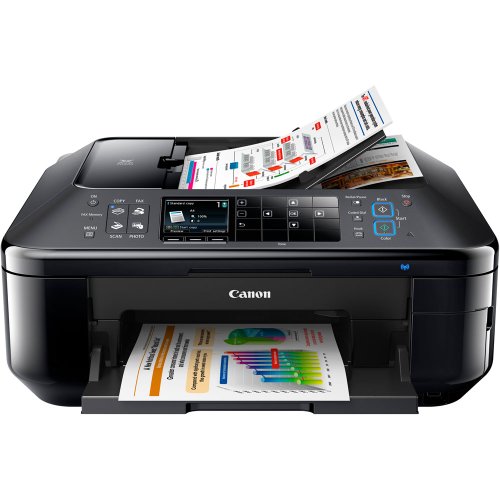
Canon Office Products PIXMA MX892 Wireless Color Photo Printer with Scanner, Copier and Fax



Key features
- •Fully-integrated 35-sheet auto duplex document feeder for rapid document copying, scanning and faxing
- •PIXMA Cloud Link provides PC-free web-connected printing and mobile printing allows you to print and scan right from your iPhone, iPad or Android device
- •Full HD Movie Print turns your favorite HD movie clips captured with your compatible Canon EOS Digital SLR or PowerShot cameras into beautiful prints
- •The Dual Function Panel feature provides useful function buttons that transform into a keypad in fax mode for easier operation
BrandCanon
CategoryDesktop Photo Printers
ColorBlack
Warranty1-year limited warranty with instantexchangeprogram. 1-year toll-free technical phonesupport
Canon Office Products PIXMA MX892 Wireless Color Photo Printer with Scanner, Copier and Fax
List Price: $916.65$824.99DEALYou Save: $91.66 (10%)
Free shippingFree Returns – 30 daysFree Order CancellationSecure Payment2–3 Days DeliveryGet It October 25, 2026In Stock (2)No marketing spamNo account requiredFulfilment by FedEx / Amazon / UPS / ShipwirePayPal / Card Buyer Protection
Customer Reviews
Reviews sourced from verified Amazon purchasers2.9
out of 5
Based on 10 reviews
5★
60%
4★
40%
3★
0%
2★
0%
1★
0%
At $300 Cannon price themselves out of the market at this Price Points!!!!
Brian•November 19, 2014
After 2 years of heavy use "50 prints per day" it have to get new one. Very well worth the money as I paid $119 back then. I see price has gone up allot. I started to get a "wrong or incorrect print head error message" so will not do a thing for me. I did see online this is an issue with these. I used it for Printing black white 90% of the time and refilled the ink myself. I filled the color also but with mix results. If you refill I would just do the black. Scanning and copping work great and I never had a PC that couldn't connect to it wireless. I don't know if I would pay $300 for another one but would in the $140 range. There are to many printers out there that can do what I need for allot less. Well worth $119 so don't get me wrong just not $300 Cannon price themselves out of the market at these Price Points.
Love this Printer!
Justinsbb•June 19, 2014
I love this printer! It's 10 times better than the HP printer I had previously. It's extremely easy to set up. Never loses wifi connection which is a high plus for me. Okay, not the greatest results with printing photos, but look - Go to a professional printing company for printing precious family photos. Years from now you will be glad you did. As for printing other things it's great! Copier is great. Price was excellent! Well pleased customer.
One more thing - there has been one problem I have experienced. When I use the air printer from my IPhone, sometimes it kicks on the back side of the printer where you have to insert one page at a time instead of the front where the paper is already loaded. That is extremely annoying. Doesn't happen all of the time though.
One more thing - there has been one problem I have experienced. When I use the air printer from my IPhone, sometimes it kicks on the back side of the printer where you have to insert one page at a time instead of the front where the paper is already loaded. That is extremely annoying. Doesn't happen all of the time though.
Canon printer setup experience
Medved•January 1, 2013
I setup the printer a few hours ago, over my lunch break. Fairly straight foward. I was able to connect to my wireless network, with little trouble. I did setup from the control pannel, and enter my WEP key. My only hurdle, is that I have two networks in my house. I won't go into the details, however, everything worked great! I also have an iPad, and was able to print to the printer without having to upgrade the ROM revision. You can get a print out of the version which must be 2.0 in order to work with the Airprint function. This printer was set from the factory with the newest version!
The setup took about 30 minutes, maybe a little longer. I took my time and made sure I had all parts removed. The printer cycles thru a number of setup processes, which in of it self takes about 10 minutes. During the time you put in the cartridges, allignment processes, then a few for the wireless setup. I did need to use a USB to install the drivers on my PC, however that is becuase of the mentioned issue with it being on a different wireless network. I setup my other laptop completely wirelessly.
The print outs are very nice so far, crisp and clean.
I have not run thur all the functions yet, but so far so good. The biggest plus I can see is the inexpensive ink available for this unit. I think the extra cost vs some of of the other less expensive printers, will be made up for in ink supplies alone. Having each color replaceable over a consolidated color cartridge I see as a big benefit.
I did notice that printing from the iPad is slow. it takes a short while for it to show up, but I don't see that as a problem.
So far, pleased. FWIW, this is replacing my HP Photosmart 2710. The ink cartridges were costing me over 50 dollars for one black and one color. So rather than spending 50 on ink, I thought an upgrade to something more cost effective in the long run was worth it, plus the advantage of printing from the iPads was something I was looking to take advantage of.
Edit Update: 1/13/13, After a few weeks, everything is still running fine. I added the software on my PC to allow scanning directly to it. Works fine. I also just ordered aftermarket ink, 20 cartridges for 30 dollars. ipad printint is still working fine. So far so good, still 5 stars.
The setup took about 30 minutes, maybe a little longer. I took my time and made sure I had all parts removed. The printer cycles thru a number of setup processes, which in of it self takes about 10 minutes. During the time you put in the cartridges, allignment processes, then a few for the wireless setup. I did need to use a USB to install the drivers on my PC, however that is becuase of the mentioned issue with it being on a different wireless network. I setup my other laptop completely wirelessly.
The print outs are very nice so far, crisp and clean.
I have not run thur all the functions yet, but so far so good. The biggest plus I can see is the inexpensive ink available for this unit. I think the extra cost vs some of of the other less expensive printers, will be made up for in ink supplies alone. Having each color replaceable over a consolidated color cartridge I see as a big benefit.
I did notice that printing from the iPad is slow. it takes a short while for it to show up, but I don't see that as a problem.
So far, pleased. FWIW, this is replacing my HP Photosmart 2710. The ink cartridges were costing me over 50 dollars for one black and one color. So rather than spending 50 on ink, I thought an upgrade to something more cost effective in the long run was worth it, plus the advantage of printing from the iPads was something I was looking to take advantage of.
Edit Update: 1/13/13, After a few weeks, everything is still running fine. I added the software on my PC to allow scanning directly to it. Works fine. I also just ordered aftermarket ink, 20 cartridges for 30 dollars. ipad printint is still working fine. So far so good, still 5 stars.
Surprising quality, impressive features (so far)
S. Dawdy•December 12, 2012
I spent a lot of time researching printers before I bought this and was getting ready to pull the trigger at the listed price of $139 around Black Friday, when I decided to wait for Cyber Monday, when I got it for $69.99. Of course, I'm tickled to death with the deal, how could I not be? But, when I received it, I realized I would've felt I got an excellent deal at $139 - I now understand why the original retail was much higher.
For many years, I was a strictly HP printer user, but the quality of their items has significantly declined in the past decade. I was very disappointed with the Photosmart 6180 I bought in late 2006 compared to several deskjets and laser printers I have owned / used. Two older laser printers are still going strong, despite the fact that they are scheduled to be collectibles any minute now, they are so "old".
At this point, when it comes to quality in lots of electronics, I expect disposable level quality or poor function just outside of warranty status, even when I've done my homework, unless I pay a small fortune...and sometimes even when I do. This seems to be an increasingly unfortunate fact in the past 10 - 15 years.
I was looking for an all-in-one wireless unit that would do quality scans, had a document feeder, and had two-way printing capability.
I haven't been as impressed with anything as much I am with this Canon printer in years - especially considering the price I paid for it. But, as I noted above, I would've believed I got an excellent value for the $139 I was considering paying. I truly NEEDED a new color printer, I've been without one for a while.
I haven't put ALL of the features through the paces yet, but I am duly impressed with the following:
Quality construction
Attractive design
Easy set up
Ease of WIRELESS connectivity on Mac and Windows (stunning! a first!)
Extra features on the hatches and "doors" and ink cartridge install / change
Easy to use display
Unobtrusive software
Quality print out
Ease of touch scanning
I've got to say that I am blown away by the cool operation of the access doors on this printer - I chuckle with glee every time I print something watching how the output area door pops open by itself and out pops a printed sheet. I grab my print out and close the door.
Electronics are dust magnets - allowing for the unit to be as closed down as possible when not in use...genius.
The access to the printer cartridge area has something like a spring-loaded hinge - you can't damage it, it eases right into place.
I've never seen a printer which has a lighting system associated with the ink cartridge placement. The cartridges are very easy to install, but you also don't have to worry about whether you've popped them into place correctly, because they light up when they are properly positioned. Also, genius.
It's been a long time since I was able to set up a new piece of hardware as fast as I did this printer - as long as a the hardware isn't so old that it wasn't meant to be compatible with a Mac, it's the easiest thing in the world, practically effortless, to get things working on my Mac.
But we have several Windows computers in our house, and that's where the nightmares happen...and sometimes continue. Especially if there is networking involved. This was the first time I can remember that the setup was effortless on Windows as it was on the Mac. And by the way, that was Windows XP. (We have one Vista laptop...haven't tried it yet, but don't expect problems, considering.) I truly expected to use a USB cord to get the printer to work with XP, at least during setup. Not necessary. Wireless connectivity...totally painless. Amazing. BRAVO, Canon!
I will be testing the true capabilities and the quality of the scanning on this unit in the next week or so. I also haven't tried out printing from a smartphone, but will be doing so. We have Androids and iPhones in our house, so we'll be putting them both to the test.
I'll report back in the future about those issues, and about ink usage. That seems to be a concern for some people.
For many years, I was a strictly HP printer user, but the quality of their items has significantly declined in the past decade. I was very disappointed with the Photosmart 6180 I bought in late 2006 compared to several deskjets and laser printers I have owned / used. Two older laser printers are still going strong, despite the fact that they are scheduled to be collectibles any minute now, they are so "old".
At this point, when it comes to quality in lots of electronics, I expect disposable level quality or poor function just outside of warranty status, even when I've done my homework, unless I pay a small fortune...and sometimes even when I do. This seems to be an increasingly unfortunate fact in the past 10 - 15 years.
I was looking for an all-in-one wireless unit that would do quality scans, had a document feeder, and had two-way printing capability.
I haven't been as impressed with anything as much I am with this Canon printer in years - especially considering the price I paid for it. But, as I noted above, I would've believed I got an excellent value for the $139 I was considering paying. I truly NEEDED a new color printer, I've been without one for a while.
I haven't put ALL of the features through the paces yet, but I am duly impressed with the following:
Quality construction
Attractive design
Easy set up
Ease of WIRELESS connectivity on Mac and Windows (stunning! a first!)
Extra features on the hatches and "doors" and ink cartridge install / change
Easy to use display
Unobtrusive software
Quality print out
Ease of touch scanning
I've got to say that I am blown away by the cool operation of the access doors on this printer - I chuckle with glee every time I print something watching how the output area door pops open by itself and out pops a printed sheet. I grab my print out and close the door.
Electronics are dust magnets - allowing for the unit to be as closed down as possible when not in use...genius.
The access to the printer cartridge area has something like a spring-loaded hinge - you can't damage it, it eases right into place.
I've never seen a printer which has a lighting system associated with the ink cartridge placement. The cartridges are very easy to install, but you also don't have to worry about whether you've popped them into place correctly, because they light up when they are properly positioned. Also, genius.
It's been a long time since I was able to set up a new piece of hardware as fast as I did this printer - as long as a the hardware isn't so old that it wasn't meant to be compatible with a Mac, it's the easiest thing in the world, practically effortless, to get things working on my Mac.
But we have several Windows computers in our house, and that's where the nightmares happen...and sometimes continue. Especially if there is networking involved. This was the first time I can remember that the setup was effortless on Windows as it was on the Mac. And by the way, that was Windows XP. (We have one Vista laptop...haven't tried it yet, but don't expect problems, considering.) I truly expected to use a USB cord to get the printer to work with XP, at least during setup. Not necessary. Wireless connectivity...totally painless. Amazing. BRAVO, Canon!
I will be testing the true capabilities and the quality of the scanning on this unit in the next week or so. I also haven't tried out printing from a smartphone, but will be doing so. We have Androids and iPhones in our house, so we'll be putting them both to the test.
I'll report back in the future about those issues, and about ink usage. That seems to be a concern for some people.
Canon wins hands down.
Green eyes in the dark•October 8, 2012
Long time HP Officejet user here. I went back & forth between HP & Cannon before finally took a leap of faith & chose this Cannon, after having used this MX892 for a solid 6 hours today, I am very impressed.
(1) Prints faster with sharper images than my HP Officejet
(2) Scans faster & yield better resolution than my old HP, Cannon's software has been much more stable so far without the occasional freeze-up I've encountered with HP.
(3) Much quieter & operates with lesser vibration than my old HP Officejet.
(4) Solidly built machine & heavier duty than the HP Officejet in similar price range. All parts fit nicely with very tight tolerances.
Don't worry about the reviews regarding excessive ink usage, buy a refill kit that comes with needle syringe where you can inject the ink thru the top of the toner itself. I have done that with all my HP cartriges for years & consequently saved a small fortune on ink.
(1) Prints faster with sharper images than my HP Officejet
(2) Scans faster & yield better resolution than my old HP, Cannon's software has been much more stable so far without the occasional freeze-up I've encountered with HP.
(3) Much quieter & operates with lesser vibration than my old HP Officejet.
(4) Solidly built machine & heavier duty than the HP Officejet in similar price range. All parts fit nicely with very tight tolerances.
Don't worry about the reviews regarding excessive ink usage, buy a refill kit that comes with needle syringe where you can inject the ink thru the top of the toner itself. I have done that with all my HP cartriges for years & consequently saved a small fortune on ink.
Page 1 of 2