SteelSeries Sensei Laser Gaming Mouse RAW - Rubberized Black


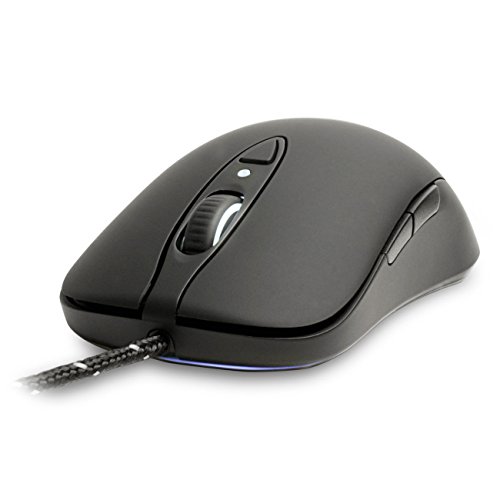



Key features
- •Delivers only what you need to help you eliminate the competition
- •Available in two different textures: Glossy smooth and Rubberized anti-sweat
- •Light up your wheel, CPI indicator or SteelSeries logo Or turn it all off
- •CPI toggle for on-the-fly high/low sensitivity adjustments
- •Scalable pointer speed from 90 up to 5670 in increments of 90 so you can be exact
- •Improved durability and tangle-free via its double braided nylon cord
SteelSeries Sensei Laser Gaming Mouse RAW - Rubberized Black
List Price: $141.12$127.01DEALYou Save: $14.11 (10%)
Free shippingFree Returns – 30 daysFree Order CancellationSecure Payment2–3 Days DeliveryGet It October 24, 2026In Stock (1)No marketing spamNo account requiredFulfilment by FedEx / Amazon / UPS / ShipwirePayPal / Card Buyer Protection
Customer Reviews
Reviews sourced from verified Amazon purchasers4.0
out of 5
Based on 10 reviews
5★
40%
4★
50%
3★
10%
2★
0%
1★
0%
Love it!
Zzzz...✓ Verified Purchase•January 2, 2018
Overall, I think that this is a great mouse but I need some time to get used to using it for gaming for long periods. The software that comes with it is really fun because you can choose any color from a full color palette to change the glow of the logo and wheel lights. The mouse surface is sort of a powdery, matte texture so it feels comfortable in a way where my hand isn't sticking to the surface. The button clicks feel great and the wheel has a nice robust notched scroll to it.
The only thing that I have against it is that the first gaming session with this mouse, my hand cramped after an hour or so. I think that over time, I will build up different muscles in my hand and it won't be a problem but the hand fit of the mouse is not as good as my previous razor mouse. The mouse sort of wants to push out of my palm when I rest my hand on it so I have to grip the sides with my thumb and ring/pinky fingers a little tighter than what I used to. I really like the side grips for your fingers though. The pad on both sides has a nice raised texture that gives you a solid hold.
Sort of a mild wish is that the side buttons stuck out a bit more because they are pretty flush with the surface and it makes them a little hard to find with your thumb. I think this is just another learning curve thing that will get better when I get used to the mouse. Being an ambidextrous mouse, there are side buttons on the right side as well but I don't find those as a problem at all since they are so flush with the surface.
The only thing that I have against it is that the first gaming session with this mouse, my hand cramped after an hour or so. I think that over time, I will build up different muscles in my hand and it won't be a problem but the hand fit of the mouse is not as good as my previous razor mouse. The mouse sort of wants to push out of my palm when I rest my hand on it so I have to grip the sides with my thumb and ring/pinky fingers a little tighter than what I used to. I really like the side grips for your fingers though. The pad on both sides has a nice raised texture that gives you a solid hold.
Sort of a mild wish is that the side buttons stuck out a bit more because they are pretty flush with the surface and it makes them a little hard to find with your thumb. I think this is just another learning curve thing that will get better when I get used to the mouse. Being an ambidextrous mouse, there are side buttons on the right side as well but I don't find those as a problem at all since they are so flush with the surface.
Not for large hands, fairly well built, I found it a bit disappointing
ben brown✓ Verified Purchase•August 24, 2017
PROS
The sensor is excellent in my subjective opinion and it tracks well on a variety of surfaces
The mouse feels solid and well made, if a little light
Driver software is less annoying than others (looking at you Razer)
CONS
Too small for someone with pretty normal sized hands who prefers a palm grip
Buttons on the right side of mouse get accidentally pressed all the time, best to just disable them
Don't buy this mouse just because it looks like the classic Microsoft IntelliMouse, it feels pretty different
Mouse is light enough that cord is heavy and stiff in comparison and tugs at mouse movements during normal use, not really great for a budget mouse to need a cable holder accessory
TLDR
Wanted a replacement for my old DeathAdder, ended up keeping the DeathAdder for its superior ergonomics
The sensor is excellent in my subjective opinion and it tracks well on a variety of surfaces
The mouse feels solid and well made, if a little light
Driver software is less annoying than others (looking at you Razer)
CONS
Too small for someone with pretty normal sized hands who prefers a palm grip
Buttons on the right side of mouse get accidentally pressed all the time, best to just disable them
Don't buy this mouse just because it looks like the classic Microsoft IntelliMouse, it feels pretty different
Mouse is light enough that cord is heavy and stiff in comparison and tugs at mouse movements during normal use, not really great for a budget mouse to need a cable holder accessory
TLDR
Wanted a replacement for my old DeathAdder, ended up keeping the DeathAdder for its superior ergonomics
Close to MS Intellimouse but not exact
C.✓ Verified Purchase•August 13, 2017
I have been using the same Microsoft Intellimouse for almost 15 years. Mine still works great but looks gnarly after many years of daily use so I began preparing for the inevitable day when it finally croaks. I have touched and used many different mice over the years and this is probably as close as you're going to get to a replacement. My old Intellimouse fits the Sensei's box perfectly, which tells you how similar they are in size and shape, though I would say the Sensei is slightly slimmer.
Most importantly, however, is that the side buttons are much smaller than the Intelli's and they aren't true "blank" buttons that you can bind to do whatever you like in whatever setting you wish. You must map them using the mouse's configuration and you can only choose from a list they provide. This took some getting used to as I had always bound my side buttons for gaming and was confused when the Sensei's keybinds began overlapping others. This is most notable with side buttons 6 and 7, which are page up and down by default. Deactivating this feature disables the button entirely, making it useless for gaming keybinds.
Overall I'm very glad I tried it, but it has just shown me that there will never be a truly perfect Intellimouse replacement.
Most importantly, however, is that the side buttons are much smaller than the Intelli's and they aren't true "blank" buttons that you can bind to do whatever you like in whatever setting you wish. You must map them using the mouse's configuration and you can only choose from a list they provide. This took some getting used to as I had always bound my side buttons for gaming and was confused when the Sensei's keybinds began overlapping others. This is most notable with side buttons 6 and 7, which are page up and down by default. Deactivating this feature disables the button entirely, making it useless for gaming keybinds.
Overall I'm very glad I tried it, but it has just shown me that there will never be a truly perfect Intellimouse replacement.
Highly Recommended
mnxn✓ Verified Purchase•February 24, 2017
Great mouse, I have been using for about two years. It has a great look, greet feel. Very responsive and the software allows you to easily adjust it to your needs. I highly recommend if you want a reasonably priced high performance mouse that is aesthetically pleasing. It is more classical looking in appearance and design except for the flashing logo which looks great. The fabric covered cord is nice, and it was durable enough to survive a couple bad drops and an overseas trip or two without losing a step. Basically, a great mouse with everything you need and doesn't look ridiculous like many gaming mouses do.
Reviews led me to the SteelSeries Sensei and it offered the best combination of features and price
Olli Thomson✓ Verified Purchase•June 18, 2016
After many years of working exclusively with a trackpad I recently returned to mousing following a hand injury that made extend use of the trackpad uncomfortable. I primarily use my laptop for photo editing in Lightroom and after some web searching came across the crazy world of gaming mice. Reviews led me to the SteelSeries Sensei and it offered the best combination of features and price.
Before connecting it I downloaded the SteelSeries Engine, a software package that enables management and customisation of the mouse. Once plugged in the mouse was recognised and I was able to set it up to suit my requirements. The sensitivity is adjustable between 90-5670 PCI using the software and two separate settings can be set and then switched using the button on the mouse. This means I can set a higher setting for general use and a lower one for photo editing.
There are an additional four buttons, though these are arranged two on each side since this is designed as an ambidextrous mouse. This means that while the two near the thumb are usable, the two on the opposite side are more awkward to use since you have to use your little finger. I currently have two of these buttons programmed with Lightroom keyboard shortcuts and it's a very effective system.
The mouse itself is in a matt black material, easily gripped and not at all slippery. The movement is very smooth and all the buttons have a clean click. The scroll wheel moves smoothly. Like many gaming mice the Sensei comes with a built in light display. However, it is quite understated compared to some and can be turned off if you don't like it. This is a wired mouse and, without measuring it, the cable is around 5' long and braided.
Overall, a vast improvement on the cheap and nasty things I used many years ago and it has been very easy to adjust to using the mouse alongside the trackpad.
Before connecting it I downloaded the SteelSeries Engine, a software package that enables management and customisation of the mouse. Once plugged in the mouse was recognised and I was able to set it up to suit my requirements. The sensitivity is adjustable between 90-5670 PCI using the software and two separate settings can be set and then switched using the button on the mouse. This means I can set a higher setting for general use and a lower one for photo editing.
There are an additional four buttons, though these are arranged two on each side since this is designed as an ambidextrous mouse. This means that while the two near the thumb are usable, the two on the opposite side are more awkward to use since you have to use your little finger. I currently have two of these buttons programmed with Lightroom keyboard shortcuts and it's a very effective system.
The mouse itself is in a matt black material, easily gripped and not at all slippery. The movement is very smooth and all the buttons have a clean click. The scroll wheel moves smoothly. Like many gaming mice the Sensei comes with a built in light display. However, it is quite understated compared to some and can be turned off if you don't like it. This is a wired mouse and, without measuring it, the cable is around 5' long and braided.
Overall, a vast improvement on the cheap and nasty things I used many years ago and it has been very easy to adjust to using the mouse alongside the trackpad.
Page 1 of 2
![Hotline Games [Grip Upgrade] 2.0 Plus Anti Slip Grip Tape Compatible with Endgame Gear XM1 / XM1 RGB Gaming Mouse Skins,Sweat Resistant,Cut to Fit,Easy to Apply,Professional Mice Upgrade](https://m.media-amazon.com/images/I/517+llojfSS._SL500_.jpg)




![Hotline Games [Grip Upgrade] 2.0 Plus DIY Hexagon Version Gaming Mouse Grip Tape, Professional Mice Upgrade Kit,Sweat Resistant,Cut to Fit,Easy to Use](https://m.media-amazon.com/images/I/51OcrjLkMOS._SL500_.jpg)