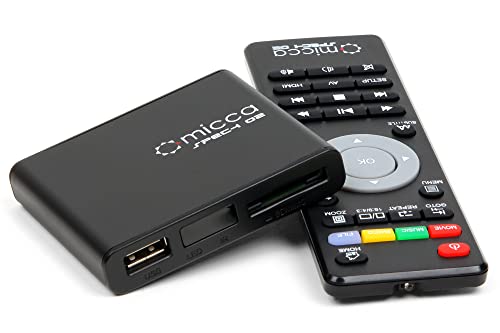
Micca Speck G2 1080p Full-HD Digital Media Player for USB Drives and SD/SDHC Cards, Digital Signage, H.264/AVC MP4 MKV Videos MP3 Music JPG Photos, HDMI and AV Output, Auto Play and Resume




Key features
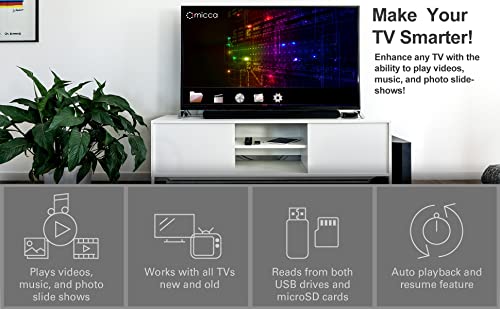
- •Make Your TV Smarter! Enhance any TV with the ability to play videos, music, and photo slideshows! The Micca Speck G2 is amazingly compact, affordable, and simple to use. Get one for each TV in the house.
- •Works with TVs old and new! High Definition 1080p HDMI output for sending sharp and clear video and audio in pure digital format to HDTVs, as well as composite AV output for use with analog TVs. Analog AV cable included.
- •Supports USB flash drives and USB hard drives up to 2TB - Requires MBR partition table and FAT32 or NTFS file systems. Supports SD memory cards up to 32GB.
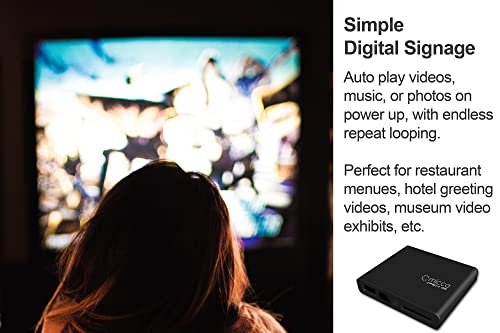
- •Auto Playback and Resume! Can be configured for automatic video playback with endless repeat and looping, and ability to resume from stopping point. Great for simple digital signage applications.
- •Video File Support: MKV, AVI, TS/TP, MP4/M4V (4GB file size limit), MOV, VOB, and M2TS files encoded with H.264/AVC, VC1, and MPEG1/2/4, up to 1920x1080, 30fps, 10mbps. Note: formats not listed here, such as H.265/HEVC, are not supported.
Micca Speck G2 1080p Full-HD Digital Media Player for USB Drives and SD/SDHC Cards, Digital Signage, H.264/AVC MP4 MKV Videos MP3 Music JPG Photos, HDMI and AV Output, Auto Play and Resume
List Price: $80.49$72.44DEALYou Save: $8.05 (10%)
Free shippingFree Returns – 30 daysFree Order CancellationSecure Payment2–3 Days DeliveryGet It June 25, 2026In Stock (1)No marketing spamNo account requiredFulfilment by FedEx / Amazon / UPS / ShipwirePayPal / Card Buyer Protection
Customer Reviews
Reviews sourced from verified Amazon purchasers4.2
out of 5
Based on 10 reviews
5★
50%
4★
50%
3★
0%
2★
0%
1★
0%
Finally, a simple solution for playing movies in the car!
D. Taylor✓ Verified Purchase•August 3, 2023
Overall this device is a great solution for my situation. Here are the details in case any of you are in a similar boat:
The challenge: I wanted to play movies from my digital library in the family minivan with as little fuss (equipment, time and dollars) as possible.
Current setup:
1. Minivan has a video system with RCA inputs and AC power.
2. Movies are on my home PC in various file formats, mostly MP4 and some MKV.
3. My phone: Nexus 6 (Motorola)
4. Wife's phone: iPhone 6 Plus
Goals:
1. Need to be able to play movies "offline." I don't want to stream them through my cell phone data plan.
2. Would prefer a solution that didn't require monopolizing my phone to be the media player.
3. System needs to be manageable by my wife and kids (I shouldn't have to be there to go from Off to Movie Watching)
The Phone Option:
I looked at several approaches online where folks would copy movies to their phone, use a series of adapters to covert digital output to analog (RCA), etc. But they were all very complex. First, my Nexus 6 as it turns out doesn't provide HDMI out. The iPhone might "“ but then I'd need to buy an HDMI to analog converter. Plus, assuming that all works, the system would require the phone be plugged in the back of the van with the kids, unavailable for use by my wife or myself. Sure, I could string longer cables around, but at this point it's become a very convoluted solution to the problem with several points of failure in a cramped environment. (In other words, my kids would just end up fighting over who gets to play with the phone).
The streaming box option:
The lower-end Rokus can output to RCA. I considered setting up a wifi network inside the van and then attaching a HDD to the roku directly or streaming to it from my phone. One major drawback "“ the Roku requires an internet connection. From what I've seen, this is primarily required during setup, so in theory I could do this through my phone's hotspot or home wifi while parked in the garage"¦ but even if that all works, my brief experience in the past is the roku will act up without internet. I wouldn't call this path dead, but at this point we're talking about running a router, roku, phone or hard drive all in the car"¦ again, feels like a lot of overkill and points of failure. Not the kind of thing I picture the wife and kids using when I'm not there for tech support.
This Option: The Micca Speck:
While searching for converters and media players I stumbled across this product. It's awesome. I load movies onto a SD card from my home computer and then play them from this device in the car. It supports both RCA and HDMI output "“ meaning I don't need some separate converter. There are no dependencies on my phone, a wifi network, streaming box, etc. The setup and interface is simple enough for the kids to use.
Limitations:
While I love this solution, there are some draw-backs if you're looking to make your car the ultimate multimedia machine. First, this is an "offline" solution "“ meaning you're not playing youtube videos or netflix in the car with this. It plays files you have in hand (video, music, pictures). This also means you're required to "sync" things the old-fashioned way "“ unplug the SD card, plug it into the computer, and drag and drop what you want onto it. It's not the end of the world, but keep in mind this means you don't have instant access to your whole library on demand (Plex has spoiled me). You need to plan ahead. Second, I really wish I'd read the fine print before buying on the SD card limitations. I didn't realize the max supported size was 32 GB and when I bought it I also bought a 64 GB card. I loaded it up with 64 GB of movies, TV shows and music. When I plugged it in to try it out for the first time I was really confused as to why some movies would play and others wouldn't. I wasted a lot of time troubleshooting file formats, potential codec differences, etc. only to eventually discover the SD card size limitation. That's not to say I wouldn't have bought this had I known the limitation was lower. I just mention it here in case you're having similar problems. Note: I haven't tried it yet, but it's also got a usb port (in addition to the SD card slot). So, in theory, you could hook up an external drive (up to 2TB) to take a lot more content with you.
Conclusion:
For the price and simplicity I'm completely happy with this option. I wish the SD card size limit was higher, but no big deal. At the end of the day I don't have to carry around a binder of DVD's in the car. When we're on a long drive the kids can fire up the movie themselves"¦ we don't have to deal with a convoluted chain of adapters, converters and duct tape to make it all work.
By the way, this is a perfectly viable option for viewing content on a TV as well"¦ wish I would have had this a year ago at our family reunion! Remote location, no internet but a big fancy TV, lots of kids and time"¦ we had to TALK to each other!
The challenge: I wanted to play movies from my digital library in the family minivan with as little fuss (equipment, time and dollars) as possible.
Current setup:
1. Minivan has a video system with RCA inputs and AC power.
2. Movies are on my home PC in various file formats, mostly MP4 and some MKV.
3. My phone: Nexus 6 (Motorola)
4. Wife's phone: iPhone 6 Plus
Goals:
1. Need to be able to play movies "offline." I don't want to stream them through my cell phone data plan.
2. Would prefer a solution that didn't require monopolizing my phone to be the media player.
3. System needs to be manageable by my wife and kids (I shouldn't have to be there to go from Off to Movie Watching)
The Phone Option:
I looked at several approaches online where folks would copy movies to their phone, use a series of adapters to covert digital output to analog (RCA), etc. But they were all very complex. First, my Nexus 6 as it turns out doesn't provide HDMI out. The iPhone might "“ but then I'd need to buy an HDMI to analog converter. Plus, assuming that all works, the system would require the phone be plugged in the back of the van with the kids, unavailable for use by my wife or myself. Sure, I could string longer cables around, but at this point it's become a very convoluted solution to the problem with several points of failure in a cramped environment. (In other words, my kids would just end up fighting over who gets to play with the phone).
The streaming box option:
The lower-end Rokus can output to RCA. I considered setting up a wifi network inside the van and then attaching a HDD to the roku directly or streaming to it from my phone. One major drawback "“ the Roku requires an internet connection. From what I've seen, this is primarily required during setup, so in theory I could do this through my phone's hotspot or home wifi while parked in the garage"¦ but even if that all works, my brief experience in the past is the roku will act up without internet. I wouldn't call this path dead, but at this point we're talking about running a router, roku, phone or hard drive all in the car"¦ again, feels like a lot of overkill and points of failure. Not the kind of thing I picture the wife and kids using when I'm not there for tech support.
This Option: The Micca Speck:
While searching for converters and media players I stumbled across this product. It's awesome. I load movies onto a SD card from my home computer and then play them from this device in the car. It supports both RCA and HDMI output "“ meaning I don't need some separate converter. There are no dependencies on my phone, a wifi network, streaming box, etc. The setup and interface is simple enough for the kids to use.
Limitations:
While I love this solution, there are some draw-backs if you're looking to make your car the ultimate multimedia machine. First, this is an "offline" solution "“ meaning you're not playing youtube videos or netflix in the car with this. It plays files you have in hand (video, music, pictures). This also means you're required to "sync" things the old-fashioned way "“ unplug the SD card, plug it into the computer, and drag and drop what you want onto it. It's not the end of the world, but keep in mind this means you don't have instant access to your whole library on demand (Plex has spoiled me). You need to plan ahead. Second, I really wish I'd read the fine print before buying on the SD card limitations. I didn't realize the max supported size was 32 GB and when I bought it I also bought a 64 GB card. I loaded it up with 64 GB of movies, TV shows and music. When I plugged it in to try it out for the first time I was really confused as to why some movies would play and others wouldn't. I wasted a lot of time troubleshooting file formats, potential codec differences, etc. only to eventually discover the SD card size limitation. That's not to say I wouldn't have bought this had I known the limitation was lower. I just mention it here in case you're having similar problems. Note: I haven't tried it yet, but it's also got a usb port (in addition to the SD card slot). So, in theory, you could hook up an external drive (up to 2TB) to take a lot more content with you.
Conclusion:
For the price and simplicity I'm completely happy with this option. I wish the SD card size limit was higher, but no big deal. At the end of the day I don't have to carry around a binder of DVD's in the car. When we're on a long drive the kids can fire up the movie themselves"¦ we don't have to deal with a convoluted chain of adapters, converters and duct tape to make it all work.
By the way, this is a perfectly viable option for viewing content on a TV as well"¦ wish I would have had this a year ago at our family reunion! Remote location, no internet but a big fancy TV, lots of kids and time"¦ we had to TALK to each other!
Useful, but has some glaring flaws.
Hawk eye✓ Verified Purchase•July 26, 2023
I recently came across some old media files on my PC and wanted to be able to watch the files on my TV. I initially tried loading my files on a thumb drive and connecting the thumb drive to my PlayStation 5, but there are issues with compatibility, and I didn't feel like buying several thumb drives and/or memory cards. After a bit of research, I came across this Speck and bought it.
Overall, I'm satisfied with this device, but it has some flaws that I feel could be easily addressed with software revisions.
First off, there is about a three second delay of audio when a video or audio file is initially played. When files are played in sequence, this delay does not happen at every file start. It only happens when you first start a file. When I sit and watch a few files sequentially, this is a very minor annoyance. But when I wish to manually select files to play, the audio delay is quite a nuisance.
Second, the Speck ignores settings when you manually select files. For example, by default, the Speck plays files in order. You can easily select a "random" play setting in the menu and so long as you let files play beginning to end, the Speck will indeed play files at random.
But if you don't feel like watching the last few seconds of a file and hit "next" on the remote, the Speck will select the next file sequentially, not at random.
Also, I find that if you move through menus or input commands too swiftly, the Speck can't keep up and will buffer harshly enough that commands may be read incorrectly even though you didn't push any wrong buttons.
In the end, I feel like the Speck is running on obsolete, inefficient code. It's rather sad, as the Speck's physical form is hip and modern; it's got a small, minimal footprint, and has only the necessities showing: memory card slot, USB port, HDMI jack and power jack. There are no unnecessary frills in the Speck's form. Given that I have a behemoth PS5 nearby, the Speck's tiny footprint is a serious boon for me.
I may research other devices someday, but I will be more cautious in purchasing one, as I certainly don't want multiple devices that have the same issues. But for now, I'm content with the Speck, and if I'm unable to find a more efficient device, I'm fine with keeping the Speck.
Overall, I'm satisfied with this device, but it has some flaws that I feel could be easily addressed with software revisions.
First off, there is about a three second delay of audio when a video or audio file is initially played. When files are played in sequence, this delay does not happen at every file start. It only happens when you first start a file. When I sit and watch a few files sequentially, this is a very minor annoyance. But when I wish to manually select files to play, the audio delay is quite a nuisance.
Second, the Speck ignores settings when you manually select files. For example, by default, the Speck plays files in order. You can easily select a "random" play setting in the menu and so long as you let files play beginning to end, the Speck will indeed play files at random.
But if you don't feel like watching the last few seconds of a file and hit "next" on the remote, the Speck will select the next file sequentially, not at random.
Also, I find that if you move through menus or input commands too swiftly, the Speck can't keep up and will buffer harshly enough that commands may be read incorrectly even though you didn't push any wrong buttons.
In the end, I feel like the Speck is running on obsolete, inefficient code. It's rather sad, as the Speck's physical form is hip and modern; it's got a small, minimal footprint, and has only the necessities showing: memory card slot, USB port, HDMI jack and power jack. There are no unnecessary frills in the Speck's form. Given that I have a behemoth PS5 nearby, the Speck's tiny footprint is a serious boon for me.
I may research other devices someday, but I will be more cautious in purchasing one, as I certainly don't want multiple devices that have the same issues. But for now, I'm content with the Speck, and if I'm unable to find a more efficient device, I'm fine with keeping the Speck.
Hoping this is just bad luck
TypicalGirl✓ Verified Purchase•July 23, 2023
UPDATE:
Turns out the issue was my screen resolution. I added an AV to HDMI converter, and now, while it's not perfect, it's much better, and will work for my needs.
Support was great, and I am loving this little gadget!
Still can't get find the little button to force a firmware update, or find a menu option for it.
OP:
I am hoping I just got a dud, because I have high hopes for this little guy. But...
The menu/settings screens are off center and cut off - the picture is not centered on screen.
It does not matter what screen res I choose, its always cut off.
Tried to update firmware before seeking support, but despite the instructions in the manual,there is NO force firmware button on this device, and because the screen is off center, I cannot access the entire settings menu.
Turns out the issue was my screen resolution. I added an AV to HDMI converter, and now, while it's not perfect, it's much better, and will work for my needs.
Support was great, and I am loving this little gadget!
Still can't get find the little button to force a firmware update, or find a menu option for it.
OP:
I am hoping I just got a dud, because I have high hopes for this little guy. But...
The menu/settings screens are off center and cut off - the picture is not centered on screen.
It does not matter what screen res I choose, its always cut off.
Tried to update firmware before seeking support, but despite the instructions in the manual,there is NO force firmware button on this device, and because the screen is off center, I cannot access the entire settings menu.
Great Media Player Replacement!
Chief_Engineer✓ Verified Purchase•June 30, 2023
I needed to replace our media file playback unit for our campus newscasts and went looking for updated technology. This little (&I do mean little!) player caught my eye, and the price convinced me to try it. I'm glad I did! It took my .h264 video files via a flash drive; and I was playing video within a minute. Now the details of my testing before I hooked it up to campus cable...
I bought two 32GB flash drives as a pack of 2, so they're the same. One I left as the FAT32 it came with; the other I reformatted to ExFAT so it could take files bigger than 4 GB (but I mostly wanted to test to see if it would work). Both drives were read by the player as if identical. Impressive!
I wanted the loop playback feature, and this offers not only to play back one file repeatedly, but all files, and offered sequential or random (shuffle) playback, among other options. It asked for prefered video format, and I changed the unit from 720p to 1080i. It ALSO offered auto playback when powered, so it would automatically start playing after a power outage. I had two video files, so set the unit to auto play both files. When it tried to repeat PB, it stopped & said it could not; the file was not recognized. I went to the Explore setting, chose USB, it asked to read the f: files, so yes, then it listed... 4 files. Two were the files I copied to the drive, but two others were TRASH files (files that started with ._filename or some such). With that screen up, I pressed MENU, and got a popup window offering several things, including DELETE. Once I deleted those two trash files, the unit will play my two files continuously without a hitch.
Once I determined that worked, I wanted to try the other ExFAT formatted flash drive, so I powered down the unit, removed the flash drive, stuck in the second, and supplied power. Not only did it auto-start, it resumed playback from where the first drive was playing! COOL! But I DID have to, once again, delete the trash files before it would loop the two files without stopping.
I will confirm there are no controls on the unit, so keep close tabs on the remote control, and there are no required batteries included (2-AAA batteries needed). Also, it has a wall-wart power supply with is almost as big as the media player. It does come with a composite out adapter cable, but no HDMI is provided.
EDIT: The unit worked flawlessly for the first week as described above with the flash drive. The next week, I needed to update our newscasts with a new one, so I brought over the 2nd flash drive with the newest program plus the program from the previous week. After clearing the trash files & started continuous loop playback, I noticed lip sync issues, so I restarted. The third restart cleared the lip sync, and I thought I was good for another week. This time, the unit began locking up with a frozen image & no audio after significant time. I tried restarting, but the intermittent freezing continued, even with flash drive #1. After a couple of days, I tried a different tactic: I changed to a class 6 SDHC 8 GB memory card. After clearing the trash files, it has played without a hitch so far. I'll keep you posted, but I've dropped my rating from 5 stars to 4.
I contacted Amazon & was given a replacement within a week. This unit has worked MUCH better with no lockups, frozen images, or any such failure. I did determine, while testing before installing in its final location, the unit plays fine with NO lip sync issues when connected directly to a monitor. Unfortunately, I'm connecting to an HDMI splitter/distribution amp, which then feeds a cable modulator. In this configuration, it does show lip sync, especially at first. If stopped and restarted, the lip sync gets better & works itself out after a minute or so of playing. SO FAR, SO GOOD -- the second unit has been playing continuously for about 6 weeks now & reloaded with new programs via the USB flash drives originally purchased.
I bought two 32GB flash drives as a pack of 2, so they're the same. One I left as the FAT32 it came with; the other I reformatted to ExFAT so it could take files bigger than 4 GB (but I mostly wanted to test to see if it would work). Both drives were read by the player as if identical. Impressive!
I wanted the loop playback feature, and this offers not only to play back one file repeatedly, but all files, and offered sequential or random (shuffle) playback, among other options. It asked for prefered video format, and I changed the unit from 720p to 1080i. It ALSO offered auto playback when powered, so it would automatically start playing after a power outage. I had two video files, so set the unit to auto play both files. When it tried to repeat PB, it stopped & said it could not; the file was not recognized. I went to the Explore setting, chose USB, it asked to read the f: files, so yes, then it listed... 4 files. Two were the files I copied to the drive, but two others were TRASH files (files that started with ._filename or some such). With that screen up, I pressed MENU, and got a popup window offering several things, including DELETE. Once I deleted those two trash files, the unit will play my two files continuously without a hitch.
Once I determined that worked, I wanted to try the other ExFAT formatted flash drive, so I powered down the unit, removed the flash drive, stuck in the second, and supplied power. Not only did it auto-start, it resumed playback from where the first drive was playing! COOL! But I DID have to, once again, delete the trash files before it would loop the two files without stopping.
I will confirm there are no controls on the unit, so keep close tabs on the remote control, and there are no required batteries included (2-AAA batteries needed). Also, it has a wall-wart power supply with is almost as big as the media player. It does come with a composite out adapter cable, but no HDMI is provided.
EDIT: The unit worked flawlessly for the first week as described above with the flash drive. The next week, I needed to update our newscasts with a new one, so I brought over the 2nd flash drive with the newest program plus the program from the previous week. After clearing the trash files & started continuous loop playback, I noticed lip sync issues, so I restarted. The third restart cleared the lip sync, and I thought I was good for another week. This time, the unit began locking up with a frozen image & no audio after significant time. I tried restarting, but the intermittent freezing continued, even with flash drive #1. After a couple of days, I tried a different tactic: I changed to a class 6 SDHC 8 GB memory card. After clearing the trash files, it has played without a hitch so far. I'll keep you posted, but I've dropped my rating from 5 stars to 4.
I contacted Amazon & was given a replacement within a week. This unit has worked MUCH better with no lockups, frozen images, or any such failure. I did determine, while testing before installing in its final location, the unit plays fine with NO lip sync issues when connected directly to a monitor. Unfortunately, I'm connecting to an HDMI splitter/distribution amp, which then feeds a cable modulator. In this configuration, it does show lip sync, especially at first. If stopped and restarted, the lip sync gets better & works itself out after a minute or so of playing. SO FAR, SO GOOD -- the second unit has been playing continuously for about 6 weeks now & reloaded with new programs via the USB flash drives originally purchased.
Great little player for travel or at home with a usable remote control
Bob Baust✓ Verified Purchase•June 12, 2023
I have only used this product for a short while but so far I like almost everything about it. The size is very small and perfect for travel, which is one of the reasons I purchased it*. I have been testing it with MP3 files and mkv files, both standard video and HD (1080p), and it plays all of them without any issues.
HDMI Video - I had no trouble with the HDMI output connected to a 27" monitor and playing both standard video and 1080p content, though the audio volume seemed a little low. Might be better on a TV rather than a computer monitor. When stopping a movie and selecting it again it remembers where you left off and gives you the option to resume or start over. This works even after a power cycle. According to the menu that option can be turned off.
Composite Video/Audio - This output works too but a couple notes are warranted. First, if your video display is not connected on power-up the G2 will not see it automatically, so either connect the display and power-cycle or select "AV" on the remote. Secondly, immediately ditch the A-V cable supplied with the box and get a good quality cable. The one that came with it is so cheap that the metal rings on the RCA plugs can be easily bent by squeezing them between my fingers, the metal is barely stronger than aluminum foil. Also, there was a very annoying constant buzzing sound in the audio and it would get worse any time a menu was brought up on the screen. Swapping to an A-V cable that was supplied with one of my inexpensive digital cameras fixed the noise problem completely, and it's certainly not a "special" cable by any means, just better quality than what comes with the box.
Audio - Seems to work fine for audio playback, however the resume feature does not work with audio files, only movies, which is a shame. It would be nice to not start with the same song every time I want to play music. It can be set to auto-play music but this feature will not work if there is more than one source device connected (like an SD card AND a USB drive). If only one media source is connected it will start playing music within 10 seconds of a cold boot, which is pretty fast IMO. This means it's possible to play music without a video screen, as long as you don't need to navigate folders.
Remote Control - The remote controls works like you'd expect and has good range. I could do straight-line control from 25-30 feet away and had no trouble controlling the device even when behind it - there is enough signal reflected from the room for the player to respond. I didn't notice any lag in responding to commands. When navigating the menu the TV/monitor will show a list of files and you can easily scroll and select the one you want to play. However, there is one goofy thing when playing MP3 files on a USB drive. You use the menu to select "Music", then the source as "USB", but then it makes you select "USB" a second time before giving you the list of songs. Weird, but it's just one extra button push so no big deal.
For the more geeky customers, I did some current (amperage) testing because I plan to run this from a portable battery pack. The supplied power adapter is rated at 2 amps but none of my testing with SD cards or USB flash drives required even .5 amps, so I should be able to get at least 8 or 10 hours of run time using my RavPower 6-amp-hour battery pack. I assume the reserve capacity in the power adapter is there for portable hard drives that are plugged into the USB port, but I didn't test that capability.
~ Idle current - .22 amps
~ with 64GB SD card - .23 amps
~ with USB flash drive - .26 to .30 amps, seems to vary more by drive brand rather than capacity
~ playing standard video or audio from SD card - .25 amps
~ playing 1080p video from SD card - .32 to .41 amps, varies by video content. Opening credits where the scene doesn't change much was only .32 amps but once the movie started and there were any "action" scenes the amperage went up to .4 or a little higher.
~ playing video from USB - add .03 to .07 amps to the SD card numbers, varies by flash drive
UPDATE: I have tested my G2 player with a variable power supply and found that it will operate down to 3.3 volts, at least when playing from my USB flash drives. That means it will work from a single Li-ion cell.
When playing 1080p video from a 32GB USB stick it draws .45 amps at 5 volts and the current increases as the voltage drops, reaching .50 amps at 4 volts. Below 4 volts the current remains about the same and the player operated normally as far as I could tell down to 3.2 volts. Below 3.2 volts the screen went black, but I believe the USB drive quit working because as soon as I raised the voltage above 3.2 volts the movie picked up right where it left off. I did this several times and the G2 player never sputtered or rebooted, just stopped the movie when the voltage got too low for the USB drive to work and picked up again when the voltage came back up. Also, while the movie fails to play at 3.1 volts, I could still use the remote control and navigate the G2 menus which displayed on the TV like normal.
I was considering using the G2 with a "power bank" but now I think I'll try running it from a Li-ion cell phone battery. My Samsung S4 Mini battery has a slightly smaller footprint than the G2, is only 1/8" thick, and should run it for about 4 hours. Perfect for travel.
If you're interested in using alternate power for your G2, the power plug is 3.5 x 1.3mm, a small but standard size.
==========
* I initially bought a chromecast, based on the "system requirements" listed on the package that claimed it would work with a wi-fi network. I figured I could use it with my RavPower portable Wi-Fi/Powerpack to create a wi-fi network between my phone or laptop and the chromecast in order to play content stored on my devices. However, contrary to the advertised features, chromecast will NOT work with wi-fi, it must be wi-fi AND INTERNET access. It seems that unless the chromecast can talk to google it won't talk to your TV.
HDMI Video - I had no trouble with the HDMI output connected to a 27" monitor and playing both standard video and 1080p content, though the audio volume seemed a little low. Might be better on a TV rather than a computer monitor. When stopping a movie and selecting it again it remembers where you left off and gives you the option to resume or start over. This works even after a power cycle. According to the menu that option can be turned off.
Composite Video/Audio - This output works too but a couple notes are warranted. First, if your video display is not connected on power-up the G2 will not see it automatically, so either connect the display and power-cycle or select "AV" on the remote. Secondly, immediately ditch the A-V cable supplied with the box and get a good quality cable. The one that came with it is so cheap that the metal rings on the RCA plugs can be easily bent by squeezing them between my fingers, the metal is barely stronger than aluminum foil. Also, there was a very annoying constant buzzing sound in the audio and it would get worse any time a menu was brought up on the screen. Swapping to an A-V cable that was supplied with one of my inexpensive digital cameras fixed the noise problem completely, and it's certainly not a "special" cable by any means, just better quality than what comes with the box.
Audio - Seems to work fine for audio playback, however the resume feature does not work with audio files, only movies, which is a shame. It would be nice to not start with the same song every time I want to play music. It can be set to auto-play music but this feature will not work if there is more than one source device connected (like an SD card AND a USB drive). If only one media source is connected it will start playing music within 10 seconds of a cold boot, which is pretty fast IMO. This means it's possible to play music without a video screen, as long as you don't need to navigate folders.
Remote Control - The remote controls works like you'd expect and has good range. I could do straight-line control from 25-30 feet away and had no trouble controlling the device even when behind it - there is enough signal reflected from the room for the player to respond. I didn't notice any lag in responding to commands. When navigating the menu the TV/monitor will show a list of files and you can easily scroll and select the one you want to play. However, there is one goofy thing when playing MP3 files on a USB drive. You use the menu to select "Music", then the source as "USB", but then it makes you select "USB" a second time before giving you the list of songs. Weird, but it's just one extra button push so no big deal.
For the more geeky customers, I did some current (amperage) testing because I plan to run this from a portable battery pack. The supplied power adapter is rated at 2 amps but none of my testing with SD cards or USB flash drives required even .5 amps, so I should be able to get at least 8 or 10 hours of run time using my RavPower 6-amp-hour battery pack. I assume the reserve capacity in the power adapter is there for portable hard drives that are plugged into the USB port, but I didn't test that capability.
~ Idle current - .22 amps
~ with 64GB SD card - .23 amps
~ with USB flash drive - .26 to .30 amps, seems to vary more by drive brand rather than capacity
~ playing standard video or audio from SD card - .25 amps
~ playing 1080p video from SD card - .32 to .41 amps, varies by video content. Opening credits where the scene doesn't change much was only .32 amps but once the movie started and there were any "action" scenes the amperage went up to .4 or a little higher.
~ playing video from USB - add .03 to .07 amps to the SD card numbers, varies by flash drive
UPDATE: I have tested my G2 player with a variable power supply and found that it will operate down to 3.3 volts, at least when playing from my USB flash drives. That means it will work from a single Li-ion cell.
When playing 1080p video from a 32GB USB stick it draws .45 amps at 5 volts and the current increases as the voltage drops, reaching .50 amps at 4 volts. Below 4 volts the current remains about the same and the player operated normally as far as I could tell down to 3.2 volts. Below 3.2 volts the screen went black, but I believe the USB drive quit working because as soon as I raised the voltage above 3.2 volts the movie picked up right where it left off. I did this several times and the G2 player never sputtered or rebooted, just stopped the movie when the voltage got too low for the USB drive to work and picked up again when the voltage came back up. Also, while the movie fails to play at 3.1 volts, I could still use the remote control and navigate the G2 menus which displayed on the TV like normal.
I was considering using the G2 with a "power bank" but now I think I'll try running it from a Li-ion cell phone battery. My Samsung S4 Mini battery has a slightly smaller footprint than the G2, is only 1/8" thick, and should run it for about 4 hours. Perfect for travel.
If you're interested in using alternate power for your G2, the power plug is 3.5 x 1.3mm, a small but standard size.
==========
* I initially bought a chromecast, based on the "system requirements" listed on the package that claimed it would work with a wi-fi network. I figured I could use it with my RavPower portable Wi-Fi/Powerpack to create a wi-fi network between my phone or laptop and the chromecast in order to play content stored on my devices. However, contrary to the advertised features, chromecast will NOT work with wi-fi, it must be wi-fi AND INTERNET access. It seems that unless the chromecast can talk to google it won't talk to your TV.
Page 1 of 2


