Nyrius Aries Pro Wireless HDMI Transmitter and Receiver to Stream HD 1080p 3D Video from Laptop, PC, Cable, Netflix, YouTube, PS4, Drones, Pro Camera, to HDTV/Projector/Monitor (NPCS600)




Key features
- •Stream HD 1080p 3D movies, TV shows, video wirelessly from your laptop, PC, Mac, UAV/FPV Drone, HDSLR Camera to HDTV, projector, or monitor
- •High performance, powerful long-range signal transmits through walls, floors, & ceilings, up to 100ft away (streaming line of sight results in maximum range)
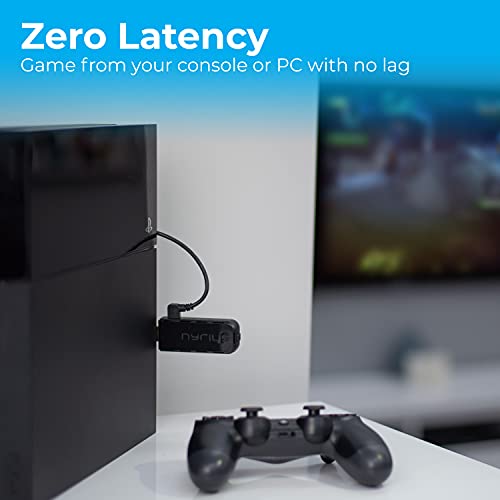
- •Send crystal clear, uncompressed HD video & digital audio with ease. Signal experiences zero latency (real time) even when streaming 3D video to an 1080p device
- •Easy to install plug 'n play set up eliminates the need to install expensive, inconvenient cables. No software or WiFi connection required. Transmitter: 1x HDMI input, Receiver: 1x HDMI output
- •Compact transmitter design suited for laptops, UAV Drones and streaming live camera footage & any other HDMI source to a monitor; powered by USB.
BrandNyrius
CategoryStreaming Media Players
Size100ft Range
ColorBlack
Warranty1 Year Manufacturer's Labor + Parts Warranty
Nyrius Aries Pro Wireless HDMI Transmitter and Receiver to Stream HD 1080p 3D Video from Laptop, PC, Cable, Netflix, YouTube, PS4, Drones, Pro Camera, to HDTV/Projector/Monitor (NPCS600)
List Price: $261.86$235.67DEALYou Save: $26.19 (10%)
Free shippingFree Returns – 30 daysFree Order CancellationSecure Payment2–3 Days DeliveryGet It October 26, 2026In Stock (3)No marketing spamNo account requiredFulfilment by FedEx / Amazon / UPS / ShipwirePayPal / Card Buyer Protection
Customer Reviews
Reviews sourced from verified Amazon purchasers3.8
out of 5
Based on 10 reviews
5★
20%
4★
30%
3★
0%
2★
30%
1★
20%
The signal between my FiOS STB and the television -- ...
Thomas J. Bugos, Ph.D.✓ Verified Purchase•January 6, 2018
The signal between my FiOS STB and the television -- which occurs thanks to the
Nyrius Aries Pro transmitter and receiver -- is "real time" with no noticeable
latency. However, given my equipment and configuration, I need to take special
steps to ensure that the transmitter and receiver connect.
My Equipment --
"Nyrius Aries Pro Wireless HD Video Transmitter and Receiver"
"Amanka 1080p HDMI to AV 3RCA CVBs Composite Video Audio Converter
Supporting PAL/NTSC with USB Charge Cable"
"Maxent MX-27X2 Television" (which has no HDMI input ports)
My Configuration --
(1) The transmitter is connected directly to a FiOS set top box (STB) via the
HDMI output port of the STB.
(2) The receiver is connected to an Amanka HD Video Converter via the video
converter's HDMI input port. The video converter is then connected to one
of the Maxent TV's standard AV input ports (red, white, yellow cables) via
the video converter's AV output port.
That is :
STB -> transmitter -> [... WIRELESS SIGNAL ...] -> receiver -> video converter -> television
To make a connection --
(1) Power on the transmitter.
(2) Power on the receiver but do not power on the video converter. The video
converter has a USB charge cable plugged into a USB wall charger which is
plugged into a powerstrip.
Note : Powering on the receiver when it is connected to the video converter
which itself is already powered on does not -- for reasons which I
do not understand -- result in a successful transmitter/receiver
connection.
(3) Once the connection between transmitter and receiver occurs, then
power on the video converter.
Nyrius Aries Pro transmitter and receiver -- is "real time" with no noticeable
latency. However, given my equipment and configuration, I need to take special
steps to ensure that the transmitter and receiver connect.
My Equipment --
"Nyrius Aries Pro Wireless HD Video Transmitter and Receiver"
"Amanka 1080p HDMI to AV 3RCA CVBs Composite Video Audio Converter
Supporting PAL/NTSC with USB Charge Cable"
"Maxent MX-27X2 Television" (which has no HDMI input ports)
My Configuration --
(1) The transmitter is connected directly to a FiOS set top box (STB) via the
HDMI output port of the STB.
(2) The receiver is connected to an Amanka HD Video Converter via the video
converter's HDMI input port. The video converter is then connected to one
of the Maxent TV's standard AV input ports (red, white, yellow cables) via
the video converter's AV output port.
That is :
STB -> transmitter -> [... WIRELESS SIGNAL ...] -> receiver -> video converter -> television
To make a connection --
(1) Power on the transmitter.
(2) Power on the receiver but do not power on the video converter. The video
converter has a USB charge cable plugged into a USB wall charger which is
plugged into a powerstrip.
Note : Powering on the receiver when it is connected to the video converter
which itself is already powered on does not -- for reasons which I
do not understand -- result in a successful transmitter/receiver
connection.
(3) Once the connection between transmitter and receiver occurs, then
power on the video converter.
No so Perfect for our TV.
Dan✓ Verified Purchase•December 11, 2017
Update, we have been using it for about a week now.
Unit is randomly restarting. Does it about every 20 min or so.
I've tried unplugging it, restarting it. Keeps doing it.
Going to return and try another (same brand).
I'll update either way.
Previous review,
So far so good. I used this to replace an ageing and failing previous unit.
Connected instantly and from what I can tell the latency is next to none.
Our system is about 20feet from the TV and I've had zero issues with connection.
Unit is randomly restarting. Does it about every 20 min or so.
I've tried unplugging it, restarting it. Keeps doing it.
Going to return and try another (same brand).
I'll update either way.
Previous review,
So far so good. I used this to replace an ageing and failing previous unit.
Connected instantly and from what I can tell the latency is next to none.
Our system is about 20feet from the TV and I've had zero issues with connection.
Flawless, Easy to Use, Wireless HDMI
StrongEagle✓ Verified Purchase•November 14, 2017
I have now purchased 3 of these devices for meeting and training rooms. They all work great. Receivers are plugged into 65" TV's, the transmitters into laptops in each room. They are a complete no brainer to operate, just as though you had plugged an HDMI monitor into your laptop.
I get no complaints or service calls from users with these devices. They just work. I've read some comments about issues with distance... at 20 feet, in the same room, works fine for me.
I get no complaints or service calls from users with these devices. They just work. I've read some comments about issues with distance... at 20 feet, in the same room, works fine for me.
This worked great for about 10 months and tonight has started turning ...
RP✓ Verified Purchase•November 2, 2017
Update
Do not buy this company's products. 12 months in it is completely dead. Just out of warranty. My money does not grow on trees!!
Maybe yours does. Your millage may very!
This worked great for about 10 months and tonight has started turning on and off every 15 to 30 seconds. It cost a lot more when I purchased it than it does now. I hope this helps some one else.
Do not buy this company's products. 12 months in it is completely dead. Just out of warranty. My money does not grow on trees!!
Maybe yours does. Your millage may very!
This worked great for about 10 months and tonight has started turning on and off every 15 to 30 seconds. It cost a lot more when I purchased it than it does now. I hope this helps some one else.
Definitely needs line-of-sight to work best. No noticeable latency between the PC image and ...
Andys✓ Verified Purchase•May 28, 2017
Works as intended. Definitely needs line-of-sight to work best. No noticeable latency between the PC image and the wireless HDMI image, which is what we needed. This claims to support two receivers as well, though we have not used this feature.
I am currently using this in a church setting, sending the projector image over wireless HDMI to an HDTV on the stage.
I am currently using this in a church setting, sending the projector image over wireless HDMI to an HDTV on the stage.
Page 1 of 2


