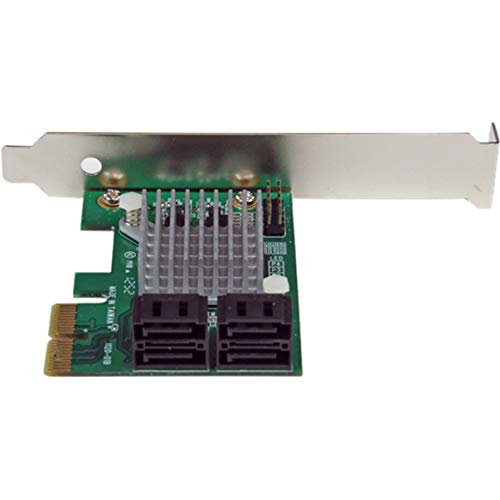
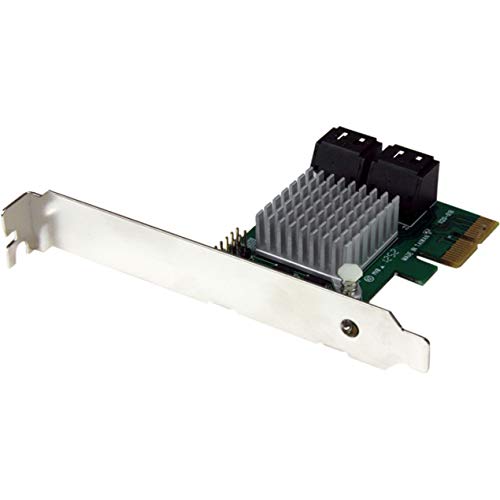
StarTech.com 4 Port PCI Express 2.0 SATA III 6Gbps RAID Controller Card with HyperDuo SSD Tiering - PCIe SATA 3 Controller Adapter , TAA (PEXSAT34RH)




Key features
- •Leverage SSD performance and standard HDD capacity with HyperDuo technology
- •Maximize system capability with SATA III connection speeds
- •Fit any standard or low profile chassis with included brackets
- •Supports HyperDuo SSD auto-tiering
- •4 AHCI SATA III (6Gbps) ports through PCI Express x2
- •Fully compliant with SATA 3.0 specifications and backward compatible with SATA I/II (1.5/3.0Gbps) drives
- •Use SSD tiering to optimize your system for I/O intensive applications such as Office Suites, photo/video editing and media players
- •Upgrade an older PCIe-based system to SATA 6Gbps capability, to better utilize faster SATA drives
- •Add more internal SATA ports to a computer system, to connect additional storage drives and/or optical drives
- •Provide optimized off-site back-ups/vaulting, through built-in RAID 1 capability
- •Perfect for multi-drive internal RAID storage solutions
- •Supports HyperDuo SSD auto-tiering
- •Four AHCI SATA III (6Gbps) ports through PCI Express x2
- •Fully compliant with SATA 3.0 specifications and backward compatible with SATA I/II (1.5/3.0Gbps) drives
- •Supports hardware RAID 0, 1, and 1+0 modes configured through BIOS
- •Compliant with PCI Express 2.0 standards
- •Port Multiplier FIS-based and Command-based switching supported
- •Natively supported single chipset design
- •Simple HyperDuo configuration via card-BIOS level or intuitive GUI console (Windows only)
- •Supports Native Command Queuing (NCQ) and ATA/ATAPI commands
- •Includes Low Profile/Half-Height installation bracket
- •Supports HDDs/SSDs/Optical/Blu-Ray drives
- •LED headers for HDD activity LED indicators
StarTech.com 4 Port PCI Express 2.0 SATA III 6Gbps RAID Controller Card with HyperDuo SSD Tiering - PCIe SATA 3 Controller Adapter , TAA (PEXSAT34RH)
List Price: $129.09$116.18DEALYou Save: $12.91 (10%)
Free shippingFree Returns – 30 daysFree Order CancellationSecure Payment2–3 Days DeliveryGet It October 25, 2026In Stock (42)No marketing spamNo account requiredFulfilment by FedEx / Amazon / UPS / ShipwirePayPal / Card Buyer Protection
Customer Reviews
Reviews sourced from verified Amazon purchasers4.1
out of 5
Based on 10 reviews
5★
80%
4★
20%
3★
0%
2★
0%
1★
0%
Startech card a good low cost
Expo Reviews✓ Verified Purchase•July 31, 2023
They need to rewrite the on-line manual for better ease of use, but otherwise this is a nice little SATA 4 Port card (only used for 1 week so far). My Dell T7500 dual Xeon processor workstation now shows my WD Red 4Tb drives that otherwise were invisible or maxed at 2Tb without a multiport card. I set the multiple 4Tb drives up as RAID 1 mirrors. I decided not to trust the hyperdrive with my solid state drives, as system reliability and recover-ability is my #1 concern I am using this Startech card only for mirrored 4Tb Red data drives that I also back up externally.
The Startech instructions are not intuitive and take careful reading of instructions. But, the instructions are not lengthy.
I previously had a LSI 9640-8i card that ate expensive custom backup batteries and constantly warned about rewriting data even if the added battery backup was used and was charged, had a huge set-up requirement, had more perpetual software bugs than a rotted tree trunk, and still ended up corrupting my drives in under 2 years (faster than that if I had not used a RAID - drives still good, but data corrupted due to write-backing), so I hope for better long term results with this simple card. I am now using a error-correcting solid state 1Tb clone of my new solid state system drive for system backup this time.
My battery backup for the whole PC will provide sufficient protection against power outages that may occur when writing to the mirror drives through the Startech.
The Startech instructions are not intuitive and take careful reading of instructions. But, the instructions are not lengthy.
I previously had a LSI 9640-8i card that ate expensive custom backup batteries and constantly warned about rewriting data even if the added battery backup was used and was charged, had a huge set-up requirement, had more perpetual software bugs than a rotted tree trunk, and still ended up corrupting my drives in under 2 years (faster than that if I had not used a RAID - drives still good, but data corrupted due to write-backing), so I hope for better long term results with this simple card. I am now using a error-correcting solid state 1Tb clone of my new solid state system drive for system backup this time.
My battery backup for the whole PC will provide sufficient protection against power outages that may occur when writing to the mirror drives through the Startech.
Good for the price
Andrew✓ Verified Purchase•July 31, 2023
Pros:
- low cost RAID controller that works / easy to set up
Cons
- Well, I wouldn't say the data transfer speed is terrible through the RAID card, but it is definitely a little slower than just doing RAID through the integrated RAID controller on the motherboard. I have 4x 4TB WD Red Pro 7200rpm 256MB cache in RAID 10, and write speeds definitely dropped ~20% through this RAID card vs just using onbaord RAID controller. In reality, this is not that big of an issue, since the write speed is still above what my 1-Gbit home network bottlenecks the read / writes to / from my fileserver to which is ~120MB/s.
- limited sector size (or whatever the term is) to 64KB when configuring RAID 10 through the BIOS
- the SATA ports are a little looser than typical . The cables don't really fit like gloves, but fit loosely
Other Notes
During initial setup, the moment I plugged in the drives to the card, the computer wouldn't post at all, and when I disconnect the drives from the card, the computer boots again just fine. It turned out to be a bad SATA cable - after switching out the cable, boots just fine with minimal delay if any in boot time. Just something to watch out for, as a bad sata cable to a non-boot drive prevents the whole system from posting.
- low cost RAID controller that works / easy to set up
Cons
- Well, I wouldn't say the data transfer speed is terrible through the RAID card, but it is definitely a little slower than just doing RAID through the integrated RAID controller on the motherboard. I have 4x 4TB WD Red Pro 7200rpm 256MB cache in RAID 10, and write speeds definitely dropped ~20% through this RAID card vs just using onbaord RAID controller. In reality, this is not that big of an issue, since the write speed is still above what my 1-Gbit home network bottlenecks the read / writes to / from my fileserver to which is ~120MB/s.
- limited sector size (or whatever the term is) to 64KB when configuring RAID 10 through the BIOS
- the SATA ports are a little looser than typical . The cables don't really fit like gloves, but fit loosely
Other Notes
During initial setup, the moment I plugged in the drives to the card, the computer wouldn't post at all, and when I disconnect the drives from the card, the computer boots again just fine. It turned out to be a bad SATA cable - after switching out the cable, boots just fine with minimal delay if any in boot time. Just something to watch out for, as a bad sata cable to a non-boot drive prevents the whole system from posting.
Great macOS-compatible JBOD card
Wire✓ Verified Purchase•July 22, 2023
Plugged in, plays, and off to races.
This Startech 8P6G-PCIE-SATA-CARD is modeled after LSI HBA and provides SAS-style cabling and reliable drive connections.
This is a SATA card, it does not support SAS.
Pros:
"¢ Works natively with macOS (I'm using Monterey), no additional driver required.
"¢ Also Windows and Linux support.
"¢ Adds 8 ports, JBOD.
"¢ Supports SMART.
"¢ Includes SFF-8087 mini-SAS to SATA data cables, which will work with any SATA drive.
"¢ Cables included are standard SATA length, 0.5 meter.
"¢ Supports SATA port multiplier for additional ports.
"¢ Ports run at drive speed as expected, no glitches.
Cons:
"¢ Not bootable, UEFI does not see connected drive EFI partitions.
Notes:
"¢ Supports any size drive per SATA spec (this question is perennial).
"¢ Drive power cabling not included.
"¢ I am using longer 1 meter SFF-8087 cables for a large case with no problem.
"¢ I am using a Bewinner port multiplier, ADP6ST0-J05 SATA3 4-port Expansion Card: 1 source port, 5 drive ports, which expands by 4 ports for a total of 12 drives connected to this Startech.
"¢ Using a port multiplier means upstream link capacity is shared with all downstream drives: plan your storage layout accordingly. I am seeing drives run at speed over (e.g., 130+ MB/s sustained) to spinning drives over the multiplier.
Final words:
"¢ This Startech is solid going in.
"¢ Before getting this card, I've tried two other PCIe SATA cards with typical SATA cabling (non-SAS) and both were totally unreliable, not detecting drives on some ports, CRC errors on detected ports, caused drive data corruption.
"¢ I also tried an LSI 9207-8i which is completely reliable and bootable, but it's not batively supported by macOS, which I need.
This Startech 8P6G-PCIE-SATA-CARD is modeled after LSI HBA and provides SAS-style cabling and reliable drive connections.
This is a SATA card, it does not support SAS.
Pros:
"¢ Works natively with macOS (I'm using Monterey), no additional driver required.
"¢ Also Windows and Linux support.
"¢ Adds 8 ports, JBOD.
"¢ Supports SMART.
"¢ Includes SFF-8087 mini-SAS to SATA data cables, which will work with any SATA drive.
"¢ Cables included are standard SATA length, 0.5 meter.
"¢ Supports SATA port multiplier for additional ports.
"¢ Ports run at drive speed as expected, no glitches.
Cons:
"¢ Not bootable, UEFI does not see connected drive EFI partitions.
Notes:
"¢ Supports any size drive per SATA spec (this question is perennial).
"¢ Drive power cabling not included.
"¢ I am using longer 1 meter SFF-8087 cables for a large case with no problem.
"¢ I am using a Bewinner port multiplier, ADP6ST0-J05 SATA3 4-port Expansion Card: 1 source port, 5 drive ports, which expands by 4 ports for a total of 12 drives connected to this Startech.
"¢ Using a port multiplier means upstream link capacity is shared with all downstream drives: plan your storage layout accordingly. I am seeing drives run at speed over (e.g., 130+ MB/s sustained) to spinning drives over the multiplier.
Final words:
"¢ This Startech is solid going in.
"¢ Before getting this card, I've tried two other PCIe SATA cards with typical SATA cabling (non-SAS) and both were totally unreliable, not detecting drives on some ports, CRC errors on detected ports, caused drive data corruption.
"¢ I also tried an LSI 9207-8i which is completely reliable and bootable, but it's not batively supported by macOS, which I need.
it works
hjcw✓ Verified Purchase•July 20, 2023
works
Great Product For Upgrading Your Computer
Gregg T.✓ Verified Purchase•June 19, 2023
I purchased this controller along with a pair of 3 TB WD Hard Drives to upgrade the built in RAID Controller on my 4 year old MSI Mother Board. I had intended to use it to replace the built in controller but discovered that the BIOS on my mother board would not support booting from hard drives larger than 2 TB. Drives larger than 2 TB under Windows 7 require a BIOS that supports UEFI in order to take full advantage of the drive's capacity. So instead, I am booting from my original RAID controller and my original drives and using the StarTech controller and the new 3 TB drives for additional high speed storage in a RAID 0 configuration. The controller was recognized by Windows 7 and worked fine with the standard Windows 7 Drivers. I was pleased that the StarTech was compatible with the build in RAID controller. I had tried another controller but found that it wasn't compatible with the built in controller. The only problem that I encountered was with the driver that I downloaded from the StarTech site which I installed to "upgrade" the Windows driver. When I tried to run Picasa, after installing the StarTech dirver, Windows crashed. Very strange! I went back to the Windows driver which solved the problem. I highly recommend the StarTech controller. It is compatible with Windows 7 and my MSI Motherboard and has excellent performance.
Page 1 of 2