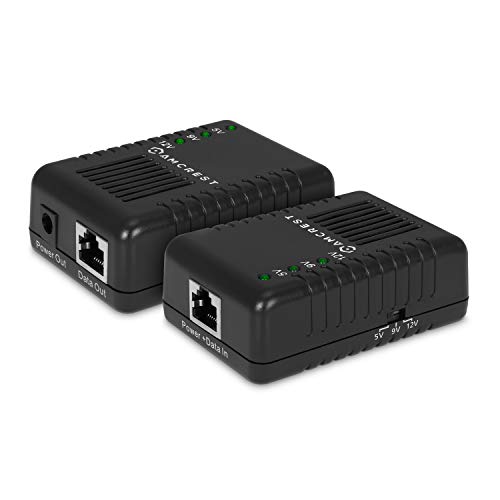
Amcrest Active PoE Splitter Adapter, IEEE 802.3af compliant, Up To 100 meters, 5V / 12V Output



Key features
- •A
- •c
- •t
- •i
- •v
- •e
Amcrest Active PoE Splitter Adapter, IEEE 802.3af compliant, Up To 100 meters, 5V / 12V Output
List Price: $40.16$36.14DEALYou Save: $4.02 (10%)
Free shippingFree Returns – 30 daysFree Order CancellationSecure Payment2–3 Days DeliveryGet It October 25, 2026In Stock (1)No marketing spamNo account requiredFulfilment by FedEx / Amazon / UPS / ShipwirePayPal / Card Buyer Protection
Customer Reviews
Reviews sourced from verified Amazon purchasers4.2
out of 5
Based on 10 reviews
5★
90%
4★
10%
3★
0%
2★
0%
1★
0%
Works great I have 4 of them!
Leedizzal•May 29, 2017
Great product solved the problem for me. I had purchased several foscam R2's great camera however one big draw back is they don't have POE which is a real pain if you don't have power nearby where you are going to mount the camera. So instead of running power to all the camera locations I just pulled an Ethernet cable and bought these to power the cameras with. Pretty slick it just plugs into the ethernet cable and then pulls the power from your POE switch just as any other POE device would you then plug the power cord out from the box into the device you need to power and you plug the ethernet cable into the device as well as the box and presto you are done. The box has a switch to select 5v,7v, and 12v out and comes with a nice selection of power tips to fit many applications and different power jacks. This is a brilliant device and works much better than a passive injector would allows you to use POE from your network switch (if you have a POE network switch) and skip all the clutter from injectors for each line on the other end.
Great splitter to convert non-PoE devices into PoE-compatible ones-
Univeral Custom PC's and Electronics•October 15, 2016
What can I say? It is a splitter, for cameras that do not have the PoE functionality out of the box. This allows you to run the PoE signal, and terminate it back to power and data, at the end where your connection is (camera, routers, etc). If it uses PoE, you only need an injector. If they do not use PoE, this item converts them into PoE compatible devices. So an Amcrest 1080P PTZ cam, would be able to use this WITH an injector, b/c they are not able to use PoE directly to the port they use for data.
The product comes with multiple tips, for different power levels of applications. There is a switch for changing these levels, to limit the power going to a device - to the amount it needs to run. It is an effective combo with the PoE Injector, and these splitters actually fit inside most domes/housings for IP cameras. With my own, I used Velcro tape to secure it to the wall, and it splits the power in the final foot or two (connecting to the cameras)
Each device will need its own, so if you are planning a system, remember that these splitters, and extra injectors (or a PoE output router), which will cost extra in the end. PoE is nice to keep clutter down, and to run wires nicely, but it is primarily to run power and data on one cable. So if you have cameras that are PoE compatible, then you do not need this. If they are not (and require a plug for power - and wifi or Ethernet as a data source), you will need this splitter for those cameras only.
I hope this helps a bit - I know PoE can be confusing to those that are new to it.
The product comes with multiple tips, for different power levels of applications. There is a switch for changing these levels, to limit the power going to a device - to the amount it needs to run. It is an effective combo with the PoE Injector, and these splitters actually fit inside most domes/housings for IP cameras. With my own, I used Velcro tape to secure it to the wall, and it splits the power in the final foot or two (connecting to the cameras)
Each device will need its own, so if you are planning a system, remember that these splitters, and extra injectors (or a PoE output router), which will cost extra in the end. PoE is nice to keep clutter down, and to run wires nicely, but it is primarily to run power and data on one cable. So if you have cameras that are PoE compatible, then you do not need this. If they are not (and require a plug for power - and wifi or Ethernet as a data source), you will need this splitter for those cameras only.
I hope this helps a bit - I know PoE can be confusing to those that are new to it.
Excellent solution for any POE environment. Recomended by IT expert and easy to use
Pongchmp•March 7, 2016
Works like a charm with Foscam cameras. We have a POE switch but don't want to bother with power cables so this makes it clean and simple. We hid the splitter in the ceiling so we can hang a camera without running power. Just ran a Cat5e cable and it looks neat.
Adjustable DIP switch for 5V, 9V, and 12V adjustable output
Only problem is the Interchangeable tips included. The power port on the Foscams doesn't fit well. The closest one is way too small and comes out. We used a zip tie to the cat5 cable and its holds it in securely. I would highly recommend this product
Photos are ceiling camera and demo camera showing adapter that we move from one room to another.
Adjustable DIP switch for 5V, 9V, and 12V adjustable output
Only problem is the Interchangeable tips included. The power port on the Foscams doesn't fit well. The closest one is way too small and comes out. We used a zip tie to the cat5 cable and its holds it in securely. I would highly recommend this product
Photos are ceiling camera and demo camera showing adapter that we move from one room to another.
Five Stars
Logan Rose•January 12, 2016
Very nice.
Works well!
James F.•December 26, 2015
Works as described, The current rating isn't listed, but I called the company and it is listed as 12 volts @ 2 Amps. Works perfectly on my Samsung Network Extender.
Page 1 of 2