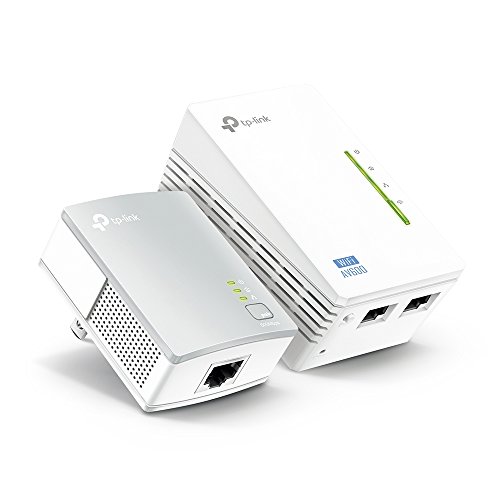
TP-Link Powerline WiFi Extender - Powerline Adapter with WiFi, WiFi Booster, Plug & Play, Power Saving, Ethernet over Power, Expand both Wired and WiFi Connections, AV600 (TL-WPA4220 KIT)



Key features
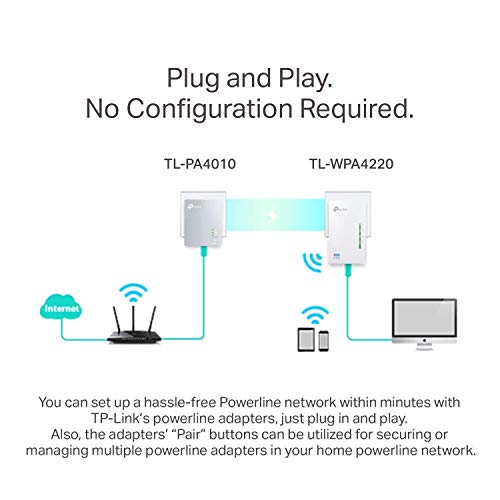
- •WiFi powerline adapter provides up to 600Mbps Ethernet over power, up to 300Mbps WiFi. Ideal to be Ethernet extender who can easily go over the walls
- •As network adapters supporting HomePlug AV, easy to add multiple adapters and works under 110-240V
- •Power saving automatically reduces power consumption by up to 85%
- •Wired speeds up to 600Mbps and wireless speeds up to 300Mbps for lag-free HD video streaming and online gaming
- •Compatible with all AV2000, AV1300, AV1200, AV1000, AV600, AV500 & AV200 powerline adapters
TP-Link Powerline WiFi Extender - Powerline Adapter with WiFi, WiFi Booster, Plug & Play, Power Saving, Ethernet over Power, Expand both Wired and WiFi Connections, AV600 (TL-WPA4220 KIT)
List Price: $181.80$163.62DEALYou Save: $18.18 (10%)
Free shippingFree Returns – 30 daysFree Order CancellationSecure Payment2–3 Days DeliveryGet It October 27, 2026In Stock (2)No marketing spamNo account requiredFulfilment by FedEx / Amazon / UPS / ShipwirePayPal / Card Buyer Protection
Customer Reviews
Reviews sourced from verified Amazon purchasers3.9
out of 5
Based on 10 reviews
5★
60%
4★
0%
3★
0%
2★
20%
1★
20%
Did not work for me.
Dale✓ Verified Purchase•April 1, 2018
Placed the remote end of the extender in my workshop. Product brochures show this product basically working anywhere you have electricity in your home. I was on support with their staff, and they ONLY support it if it is on the same physical circuit breaker as the ethernet-cable connected end. Homes just aren't wired that way. The most efficient way to wire a home is to group outlets in a home together on a circuit. Since the purpose of an extender is to extend beyond the range of the existing WIFI, then it would be normal for the extension to be on a different circuit.
Reading Amazon feedback, there are a number of customers that said it worked through multiple breaker boxes for them. For me, this did not work.
My bad that I didn't return this promptly. TP-Link's bad that they do not highlight this lack of support on the package. .
Reading Amazon feedback, there are a number of customers that said it worked through multiple breaker boxes for them. For me, this did not work.
My bad that I didn't return this promptly. TP-Link's bad that they do not highlight this lack of support on the package. .
They work! Period!
Kindle Customer✓ Verified Purchase•December 12, 2017
These things work better than anything that I've ever used. I have a tri level home with the main router on the lower floor. We have a computer, laptop, and two smart tv's on the upper floor, and all of them were suffering from a medium to low wifi signal all of the time. Keep in mind that my house was built in the mid 1970's, so it's basically a faraday cage, with brick, metal and just about everything that's not friendly to getting a strong signal. I've setup repeaters in the past which work pretty good, but they are more trouble than they are worth to setup. As soon as I plugged these guys into the wall outlets, and set them up, I immediately saw my wifi bars go from two or three, to five on every device that I had in my house. I can stream video and have yet to have one buffer or stall, and the speeds are exactly the same as they are right next to my main router. Setup was easy, and the units have been running 24/7 with no problems whatsoever. I have yet to find one drawback or complaint from using these units and that's a rarity today with just about anything that you buy. I'd recommend this product all day long to anyone looking for an inexpensive, workable solution to getting a solid wifi signal, to an area that's impossible to do with a wireless router alone!
Please note: I did not receive this product for free, or in exchange for a review. Product was paid for in full by me, and the results mentioned above were in no way influenced by TP-Link or any other third party.
Please note: I did not receive this product for free, or in exchange for a review. Product was paid for in full by me, and the results mentioned above were in no way influenced by TP-Link or any other third party.
Acceptable Product, Horrible Customer Service
Robert✓ Verified Purchase•February 22, 2017
This Powerline system actually worked quite well. I am reasonably savvy with consumer electronics and I would describe the set-up as moderately difficult. I live in a 100 year-old condo so a less than modern wiring system may have played a part there. Regardless, after about 3 hours of troubleshooting, I was able to get it working. It absolutely solved our problem of virtually no wireless signal at the rear of the condo and only had to reset it once over six months.
Then, one day, it just failed. I went to start the reset procedure, and the adapter (the part that connects directly with the router or modem and transmits the signal via the electrical wiring) was simply dead. All LEDs were dark and no amount of unplugging and replugging could get it to come back on. At this point, I remembered that they have a published process to replace defective products (perhaps that should have been a red flag from the start). I contacted their support team (via online chat; they are nearly impossible to get on the phone) and it took less than 10 minutes for them to determine that I had a defective product and was eligible for a replacement. They said a member of their RMA department, the group that manages this process, would contact me within 3 business days. I was sent an email from RMA asking for details to begin the process, which I provided promptly.
To make a long story short, that was 6 weeks ago and there is no replacement in sight. I have tried to email the RMA group and they do not respond. I have reached back out to the general support team and they have (supposedly) sent additional emails. My claim has been marked "Urgent" three times now. No one has a direct phone number for the RMA group and it seems like no one is capable of helping me replace a defective product.
Bottom line: If you can get a non-defective Poweline System from TP-Link (ssuming they make them), you will probably be happy. But if it breaks and you want help replacing it, you are in for a long fight.
Then, one day, it just failed. I went to start the reset procedure, and the adapter (the part that connects directly with the router or modem and transmits the signal via the electrical wiring) was simply dead. All LEDs were dark and no amount of unplugging and replugging could get it to come back on. At this point, I remembered that they have a published process to replace defective products (perhaps that should have been a red flag from the start). I contacted their support team (via online chat; they are nearly impossible to get on the phone) and it took less than 10 minutes for them to determine that I had a defective product and was eligible for a replacement. They said a member of their RMA department, the group that manages this process, would contact me within 3 business days. I was sent an email from RMA asking for details to begin the process, which I provided promptly.
To make a long story short, that was 6 weeks ago and there is no replacement in sight. I have tried to email the RMA group and they do not respond. I have reached back out to the general support team and they have (supposedly) sent additional emails. My claim has been marked "Urgent" three times now. No one has a direct phone number for the RMA group and it seems like no one is capable of helping me replace a defective product.
Bottom line: If you can get a non-defective Poweline System from TP-Link (ssuming they make them), you will probably be happy. But if it breaks and you want help replacing it, you are in for a long fight.
VERY nice unit that works GREAT!.....but I also purchased the RE210 Extender
JustMe✓ Verified Purchase•February 16, 2017
I used "openspeedtest" software on my Ipad and laptop to check the download speeds of the 4220 wifi/ethernet powerline unit and found some interesting observations. The 4220 unit was cloned to match my routers name/pass to ease changing networks (this may be done automatically by your devices and some of you may want to have separate network names for control). I found that the powerline use of the electric wires really worked and I have both ethernet and wifi signals in my furthest room that my router alone had a really weak signal (plus this room could not use ethernet without stringing some wires). The ethernet had about 40Mbps and the wifi about 35Mbps. I was told by TPLink people that the wifi was really created by the 4220 powerline unit, and not necessarily by reading the router's wifi signal. WPS clone button on the router just reads the name and pass. So, the 4220 wifi is not an extension/expansion of the routers wifi but a signal that gets created by the 4220 unit. The ethernet, though, is coming thru the electric lines, and if you have rooms that need ethernet and are far away, and if your electric circuit is not separated, then this unit will work. For me, the speed in the room where the router was located was 80Mbps and 130Mbps ethernet.
For my middle room (router was on the other end of the house, 1 story), I talked with TPLink people and decided to go with the RE210 Extender. This unit does not have powerline capability, but captures the wifi signal from the router (they say you should have about 40% signal or greater for best placement). The ethernet port now gets it's signal from the wifi. At least, that's what I understand. I got 60Mbps when sitting next to the RE210 and the area surrounding it had lower signals. Without the RE210, areas within my large middle family room had slower spots. Now, I could have purchased another 4220 but wanted to try something different, and at least be able to experiment. If you need wifi/ethernet in a far away room (note the RE210 has a signal strength indicator on the face to indicate good distances, and for me, it did not work in my furthest room ), and your router cannot reach, then the 4220 that uses the electric wires is great. If you just need a RE210 or any other TPlink extenders, any would do the trick. This one had 5G but my ISP didn't offer.
One thing I also noticed when running the Win10 "wifi analyzer" to display my networks, I see 3 separate networks with the same cloned name. I'm guessing the computers/ipads finds the best signals, but if you move around the rooms while streaming, there could be a short transition between networks where there may be a signal drop. Also, I see that many people are captivated by device speed, however actual signal strength do vary in your home. Check your speeds from the ISP and the area right next to your router...you will not get any faster with any device, so don't overbuy any products.
For my middle room (router was on the other end of the house, 1 story), I talked with TPLink people and decided to go with the RE210 Extender. This unit does not have powerline capability, but captures the wifi signal from the router (they say you should have about 40% signal or greater for best placement). The ethernet port now gets it's signal from the wifi. At least, that's what I understand. I got 60Mbps when sitting next to the RE210 and the area surrounding it had lower signals. Without the RE210, areas within my large middle family room had slower spots. Now, I could have purchased another 4220 but wanted to try something different, and at least be able to experiment. If you need wifi/ethernet in a far away room (note the RE210 has a signal strength indicator on the face to indicate good distances, and for me, it did not work in my furthest room ), and your router cannot reach, then the 4220 that uses the electric wires is great. If you just need a RE210 or any other TPlink extenders, any would do the trick. This one had 5G but my ISP didn't offer.
One thing I also noticed when running the Win10 "wifi analyzer" to display my networks, I see 3 separate networks with the same cloned name. I'm guessing the computers/ipads finds the best signals, but if you move around the rooms while streaming, there could be a short transition between networks where there may be a signal drop. Also, I see that many people are captivated by device speed, however actual signal strength do vary in your home. Check your speeds from the ISP and the area right next to your router...you will not get any faster with any device, so don't overbuy any products.
Don't expect it to work for long
arcadence✓ Verified Purchase•January 11, 2017
When I first installed this, the setup was rather straight forward and easy, and everything seemed to work fine. I was getting a strong WiFi signal throughout the entire house. After about 6-9 months, the connection was still visible in the WiFi list, but the Internet would not work. I've tried resetting the devices and positioning them in other places, and nothing works. After talking to several friends who also bought the same system, they've reported the same issues. I believe the unit gets too hot and components have failed, resulting in a device that no longer works as intended. Now I have rather expensive paper weights. When the unit worked, it worked great, however, reliability is crap.
Page 1 of 2