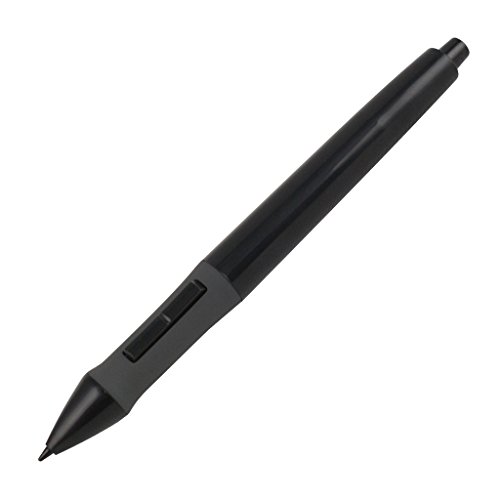
Huion P80 Rechargeable Digital Pen Stylus for Graphics Drawing Tablet Huion New 1060PLUS, WH1409(2048), H610PRO, W58, DWH69, 680TF, Gaomon 1060PRO, M106K, WH850
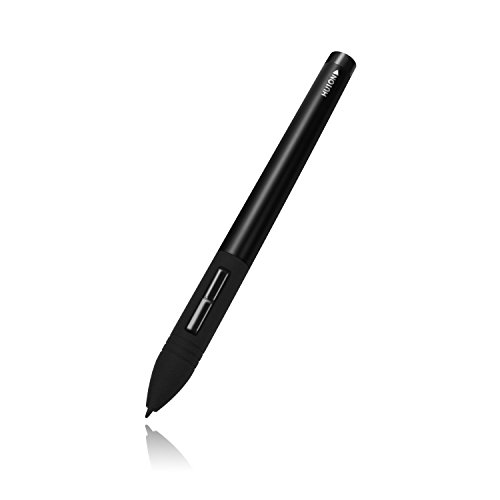


Key features
- •Available for most Huion graphics tablets except G10T and Q11K. NOT compatible with Huion pen displays.
- •NOT compatible with Wacom Graphics Tablet/Phone/Screen/Computer/iPad
- •Technology: Electromagnetic Digitizer. Auto sleep will caused if not used for a period of time
- •Come with a charging cable. It can be continuously used for about 800 hours after 1 hour charging.
- •Slim and Light: 14g in weight.
Huion P80 Rechargeable Digital Pen Stylus for Graphics Drawing Tablet Huion New 1060PLUS, WH1409(2048), H610PRO, W58, DWH69, 680TF, Gaomon 1060PRO, M106K, WH850
List Price: $27.14$24.43DEALYou Save: $2.71 (10%)
Free shippingFree Returns – 30 daysFree Order CancellationSecure Payment2–3 Days DeliveryGet It June 25, 2026In Stock (1)No marketing spamNo account requiredFulfilment by FedEx / Amazon / UPS / ShipwirePayPal / Card Buyer Protection
Customer Reviews
Reviews sourced from verified Amazon purchasers4.1
out of 5
Based on 10 reviews
5★
30%
4★
10%
3★
20%
2★
20%
1★
20%
Worked Great for two weeks.
Lee Vance•January 12, 2018
First thing I received my tablet from Huion with the pen missing, fortunately amazons customer service was cool and sent me one free of charge butI lo' and behold it took only two weeks before the pressure sensitivity not only didn't work it would be erratic and all over the place making it useless even as a pointing device. I will be on my THIRD attempt at getting a working Huion Pen.
Not a happy camper.
Lynda•July 25, 2017
This is the third time I've bought this stylus and had the same problem where it is clicking and drying lines before the tip hits the drawing pad I am very unhappy the first one lasted almost a year but these last three have lasted barely a month with this last one only lasting a week. Not a happy camper.
which is great. It's also sturdier than many pens for many ...
Elizabeth Layne•July 15, 2017
works with the GT 185-HD monitor, but only just. I cannot figure out which pen to buy as a replacement for this, it's extremely difficult to find any information on which replacement pen is appropriate. I assume huion is phasing out that monitor but many of the pens I looked at as replacements for the original pen say they don't work for the GT series. It's hard to get in touch with huion for customer service.
The pen is lightweight and holds a charge for ages, which is great. It's also sturdier than many pens for many products I've used (looking at you, monoprice).
there are a few new issues with the pen/monitor that I did not experience with the pen that came bundled with the GT. The pen is extremely shaky on the screen sometimes, especially in photoshop for whatever reason. I believe the button closest to the tip on the pen sometimes clicks several times when you hit it once. I have it set to CTRL+Z undo, and it will undo several lines from a single tap (this isn't an issue in only one program, it persists across many programs). The monitor stops being able to "see" the pen as well as I approach the top, bottom, and side edges for actions like moving windows around and closing them. The cursor jitters when I do this.
I normally don't post reviews, but I'm hoping to be helpful for other people looking for the same information I was when I was first trying to buy a replacement pen.
The pen is lightweight and holds a charge for ages, which is great. It's also sturdier than many pens for many products I've used (looking at you, monoprice).
there are a few new issues with the pen/monitor that I did not experience with the pen that came bundled with the GT. The pen is extremely shaky on the screen sometimes, especially in photoshop for whatever reason. I believe the button closest to the tip on the pen sometimes clicks several times when you hit it once. I have it set to CTRL+Z undo, and it will undo several lines from a single tap (this isn't an issue in only one program, it persists across many programs). The monitor stops being able to "see" the pen as well as I approach the top, bottom, and side edges for actions like moving windows around and closing them. The cursor jitters when I do this.
I normally don't post reviews, but I'm hoping to be helpful for other people looking for the same information I was when I was first trying to buy a replacement pen.
Worth the upgrade to the stock Huion 420 pen.
Patryk Rojek•July 8, 2017
This pen is extremely light compared to the stock pen that comes with the Huion 420 (as a reference it weighs about the same as the stock pen WITHOUT a battery). The body of the pen is much nicer to hold for people like me who grip their pens by the tip since it doesn't flair out like the default pen and the balance is also slightly better compared to the default pen, it's center of mass is about 2cm lower.
The packaging is very plain but comes with everything you need, and the pen even came charged so it was ready to use out of the box!
Pros:
-VERY light
-uniform body
-less prone to breaking (no need to unscrew plastic)
-rechargeable
Cons:
-still battery powered
-hover distance is reduced by about 1 or 2 mm (not really noticeable but something to mention)
The packaging is very plain but comes with everything you need, and the pen even came charged so it was ready to use out of the box!
Pros:
-VERY light
-uniform body
-less prone to breaking (no need to unscrew plastic)
-rechargeable
Cons:
-still battery powered
-hover distance is reduced by about 1 or 2 mm (not really noticeable but something to mention)
Huion Rechargeable Mouse Digitizer Pen
Michael R. Olson•May 19, 2017
It turned out to be an erroneous purchase. I thought it had lost the charging cable for the identical pen I already had. After my purchase, I found the charging cable I thought I had lost. In any event, the pen works extremely well on the Huion tablet I purchased last year. When fully charged, it lasts for months, depending on how much you use it. Recommended for those with Huion tablets; does not work with Wacom products.
Page 1 of 2