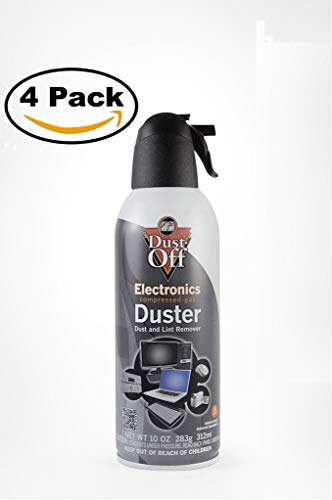
Dust-Off Compressed Gas Duster, Pack of 4

Key features
- •Removes dust, lint and other contaminants from hard to reach areas
- •Ideal for cleaning cups, keyboards, computer mice, and workstations
- •Can be used for cleaning items around the home including collectibles, figurines and window blinds
- •ozone safe, contains no cfcs, huffs, propane or butane
- •Contains a bitterant to discourage inhalant abuse
Dust-Off Compressed Gas Duster, Pack of 4
List Price: $36.86$33.17DEALYou Save: $3.69 (10%)
Free shippingFree Returns – 30 daysFree Order CancellationSecure Payment2–3 Days DeliveryGet It October 25, 2026In Stock (51)No marketing spamNo account requiredFulfilment by FedEx / Amazon / UPS / ShipwirePayPal / Card Buyer Protection
Customer Reviews
Reviews sourced from verified Amazon purchasers4.7
out of 5
Based on 10 reviews
5★
70%
4★
30%
3★
0%
2★
0%
1★
0%
As promised
Larry✓ Verified Purchase•August 2, 2023
Shipped as promised!
Good product was shipped quickly thank you!
RR✓ Verified Purchase•June 25, 2023
This was my first time using compressed air and cleaning my pc with it.for the most part it worked pretty good. Depending on if you ever cleaned your computer at all are to if you have.it did pretty good at getting dust out though if you havent ever done it before it wont get it all out. you will have to do amore detailed job on it and remove parts clean them with more than compressed air.the cans do get cold pretty quickly you will have to let them warm back up before using them again.so its a god idea too get more than one can when cleaning inside your pc.use quick short burt of air never tilt are shake the cans or turn them upside down.you will spray the liquid on the bottom will spray out not the air.i would suggest when you first use it spray away to make sure the air is coming out not the liquid take your time cleaning your computer.my package was delivered fine and quickly would order again.
Good product with a few flaws
Jessica✓ Verified Purchase•June 18, 2023
So, I noticed my PS4 was running loud. After some searching, I found that it was likely due to dust in the fan. I decided to go for the air compressor route and ordered this.
The inside of the consoles was loaded with dust as I had been using it for over a year. There are a few pros and cons I found while using the product.
Pros:
-It worked. It threw dust out of my console and got it cleaned much faster than if I had used a cloth and Q-tips
- It was very each to use. Just snap back the plastic bit for use, attach the straw and press the trigger.
Cons:
- The can got REALLY cold while using it. It was like I had just gotten the thing from the freezer. This made using it less enjoyable.(UPDATE: after searching around I found that the temperature drop is normal)
- it sprayed moisture/foam. Now, I've heard this was an issue with compressed air coming from a can. It only happened after I had been spraying for a long time. If you are planning to use this to dust the inside of a console/PC be very careful. I found that only applying a minimum amount of pressure avoided this from happening. (UPDATE: This is normal for compressed air. I have read that it would not damage electrics but still, be careful. I've also read that keeping the can upright prevents this from occurring. That's kind of hard with a ps4 since I'm not going to hold the thing up in the air because I kept the power supply (power brick) attached to the cord.)
I wiped down my ps4 after using this and let it sit open for a minute, just in case. It did not damage my console and it runs significantly quieter now.
All in all, I'm pleased with the product.
Pictures include 3 before and 1 after picture. I cannot believe the amount of dust that was in that thing!
The inside of the consoles was loaded with dust as I had been using it for over a year. There are a few pros and cons I found while using the product.
Pros:
-It worked. It threw dust out of my console and got it cleaned much faster than if I had used a cloth and Q-tips
- It was very each to use. Just snap back the plastic bit for use, attach the straw and press the trigger.
Cons:
- The can got REALLY cold while using it. It was like I had just gotten the thing from the freezer. This made using it less enjoyable.(UPDATE: after searching around I found that the temperature drop is normal)
- it sprayed moisture/foam. Now, I've heard this was an issue with compressed air coming from a can. It only happened after I had been spraying for a long time. If you are planning to use this to dust the inside of a console/PC be very careful. I found that only applying a minimum amount of pressure avoided this from happening. (UPDATE: This is normal for compressed air. I have read that it would not damage electrics but still, be careful. I've also read that keeping the can upright prevents this from occurring. That's kind of hard with a ps4 since I'm not going to hold the thing up in the air because I kept the power supply (power brick) attached to the cord.)
I wiped down my ps4 after using this and let it sit open for a minute, just in case. It did not damage my console and it runs significantly quieter now.
All in all, I'm pleased with the product.
Pictures include 3 before and 1 after picture. I cannot believe the amount of dust that was in that thing!
Product is excellent, but overpriced by Amazon seller
Expressed Reviews✓ Verified Purchase•June 11, 2023
I'm rating this product 5 stars because it does a great job of removing dust from computers and other intricate places. What really bothers me about my purchase, however, is that Amazon leads you to believe that you're purchasing it directly from the seller listed on the product page.
The sad fact is that the seller uses Sam's Club as a drop shipper and in doing so, charges more than twice what the exact same item would cost at that store. The Amazon price is over $22, while it can be purchased for less than $10 at any Sam's Club.
I don't think that Amazon should allow sellers to drop ship items from stores, especially when they're marking up the price by well over 100%. What bothers me the most is that Amazon seems to be selling fewer items that come directly from one of their warehouses, in favor of the independent seller who can easily overcharge for an item.
It used to be that virtually everything that I purchased on Amazon actually came from Amazon, now it's more like 50% and falling. The bottom line is that this is an example of a good product, but a lousy seller who's simply using the Amazon website as a sales platform to overcharge customers.
The sad fact is that the seller uses Sam's Club as a drop shipper and in doing so, charges more than twice what the exact same item would cost at that store. The Amazon price is over $22, while it can be purchased for less than $10 at any Sam's Club.
I don't think that Amazon should allow sellers to drop ship items from stores, especially when they're marking up the price by well over 100%. What bothers me the most is that Amazon seems to be selling fewer items that come directly from one of their warehouses, in favor of the independent seller who can easily overcharge for an item.
It used to be that virtually everything that I purchased on Amazon actually came from Amazon, now it's more like 50% and falling. The bottom line is that this is an example of a good product, but a lousy seller who's simply using the Amazon website as a sales platform to overcharge customers.
CLEANED OUR COMPUTER PERFECTLY!
Reviewer✓ Verified Purchase•June 5, 2023
These work great. Our computer was making so much noise, we thought it was dying. Well, in some ways it was because it was not getting enough circulation. We watched a youtube video showing how to air blow out the computer and so I bought these. Each can comes with a thin straw like apparatus to narrow the direction of the spray. The jet stream of air is very strong. I was able to clean out our computer in no time. The only problem is that these cans must be perfectly vertical during their application. They also become freezing cold very quickly and so you have to spray a little and then wait till the can becomes more normal in temperature. Otherwise, you end up spraying a fine mist out which freezes instantly. So I used one can and when it got really cold and started to sputter out frozen particles, I used a second can and rotated the cans. They still needed to wait for a while between applications of blowing dust out of the computer. But they seemed to work very efficiently.
The way I did it was:
1) Turn off all power sources to the computer and associated drives and devices.
2) Turn off all power sources to the computer (main power cord)
3) Push the on power button of the computer to get rid of the extra electrical discarges.
4) Wear plastic gloves (optional - I use surgical gloves for convenince) if you want to handle any components in your computer.
5) Unplug all plugs and cables and usb's from the back of the computer.
6) Take the computer outside or to some area where you can blow out all the dust without a problem and where you can spray with adequate ventilation.
6) Remove the side wall. (Most computers are easy to access this way with a few screws)
7) Remove the plastic tab from the product handle head. Attach the red straw to the nozzle opening.
8) Begin to blow out the dust from the top compartments of the computer's interiors. Work from top down. Pay special attention to the fans and vent areas. Hold the fan wheels with one hand or thumb or finger on the center of the fan head and the blow off each blade, one at a time, as you manually rotate the blades to get each one in position to spray the air on them. Continue until each blade is clean. Do this for whatever fans you have in your computer.
9) Also blow off the boards and wires gently. Continue to blow off the wires, circuits, plates, and panels, being careful not to touch them with the straw tip. The distance works well at any range from 3 to 5 inches from the surfaces. In come cases, such as blowing off the plastic fan blades, I was able to get within a 1/4 inch to get stubborn dust out.
10) Tip: Have a feather duster handy to sweep out or dust out the bottom of the computer interior as the dust wads will be thick and heavy. It will happen many times as you clean each computer area. Keep dusting out the bottom gently, barely touching the base of the computer interiors so that the "breeze" created by the feather duster can do most of the work. You don't want to irritate the boards or panels with the feather duster. I do this also, along with spraying using the Dust-Off product.
11) Once everything is cleaned and dusted out, attach the panel back on.
12) Plug all cables back in, including usb's, and then finally the power cable back into your computer. Turn on power strips. Your computer should be ready to go.
We did this and our computer is so clean and silent now, running perfectly! You cannot even hear it at all and it is functioning better than before. Should have done this sooner. As mentioned earlier however, the cans get very icy cold and are tricky to manage. But as long as you keep the cans vertical (using the red straw to get to the difficult areas), and you DO NOT SHAKE the cans, they work great.
The way I did it was:
1) Turn off all power sources to the computer and associated drives and devices.
2) Turn off all power sources to the computer (main power cord)
3) Push the on power button of the computer to get rid of the extra electrical discarges.
4) Wear plastic gloves (optional - I use surgical gloves for convenince) if you want to handle any components in your computer.
5) Unplug all plugs and cables and usb's from the back of the computer.
6) Take the computer outside or to some area where you can blow out all the dust without a problem and where you can spray with adequate ventilation.
6) Remove the side wall. (Most computers are easy to access this way with a few screws)
7) Remove the plastic tab from the product handle head. Attach the red straw to the nozzle opening.
8) Begin to blow out the dust from the top compartments of the computer's interiors. Work from top down. Pay special attention to the fans and vent areas. Hold the fan wheels with one hand or thumb or finger on the center of the fan head and the blow off each blade, one at a time, as you manually rotate the blades to get each one in position to spray the air on them. Continue until each blade is clean. Do this for whatever fans you have in your computer.
9) Also blow off the boards and wires gently. Continue to blow off the wires, circuits, plates, and panels, being careful not to touch them with the straw tip. The distance works well at any range from 3 to 5 inches from the surfaces. In come cases, such as blowing off the plastic fan blades, I was able to get within a 1/4 inch to get stubborn dust out.
10) Tip: Have a feather duster handy to sweep out or dust out the bottom of the computer interior as the dust wads will be thick and heavy. It will happen many times as you clean each computer area. Keep dusting out the bottom gently, barely touching the base of the computer interiors so that the "breeze" created by the feather duster can do most of the work. You don't want to irritate the boards or panels with the feather duster. I do this also, along with spraying using the Dust-Off product.
11) Once everything is cleaned and dusted out, attach the panel back on.
12) Plug all cables back in, including usb's, and then finally the power cable back into your computer. Turn on power strips. Your computer should be ready to go.
We did this and our computer is so clean and silent now, running perfectly! You cannot even hear it at all and it is functioning better than before. Should have done this sooner. As mentioned earlier however, the cans get very icy cold and are tricky to manage. But as long as you keep the cans vertical (using the red straw to get to the difficult areas), and you DO NOT SHAKE the cans, they work great.
Page 1 of 2


![Falcon Dust-Off Electronics Compressed Gas Duster 10 oz (4 Pack) [New Improved Version]](https://m.media-amazon.com/images/I/51FnDPWGfQL._SL500_.jpg)