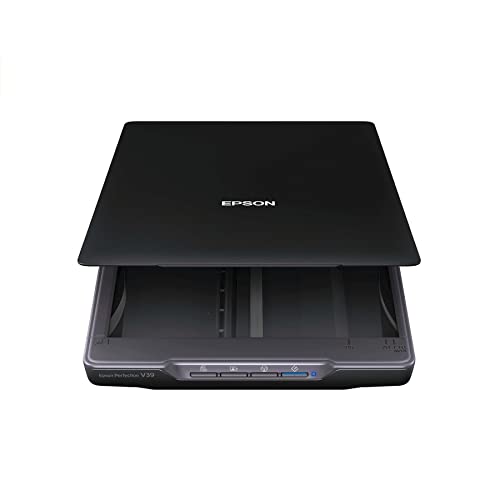
Epson Perfection V550 Color Photo, Image, Film, Negative & Document Scanner with 6400 DPI Optical Resolution


Key features
- •Create sharp, vivid reproductions 6400 dpi optical resolution1 for enlargements up to 17 x 22 inches
- •Scan 35 millimeter slides, negatives and film built in Transparency Unit
- •Achieve robust photos restorations Digital ICE technology removes the appearance of dust and scratches on film
- •Bring faded photos back to life Easy Photo Fix for one touch photo restorations
- •Achieve greater productivity with ReadyScan LED technology fast scanning, no warmup time, no mercury
- •Scan multiple photos at one time auto edge detection crops each image and saves it as a separate file
Epson Perfection V550 Color Photo, Image, Film, Negative & Document Scanner with 6400 DPI Optical Resolution
List Price: $654.75$589.28DEALYou Save: $65.47 (10%)
Free shippingFree Returns – 30 daysFree Order CancellationSecure Payment2–3 Days DeliveryGet It October 24, 2026In Stock (2)No marketing spamNo account requiredFulfilment by FedEx / Amazon / UPS / ShipwirePayPal / Card Buyer Protection
Customer Reviews
Reviews sourced from verified Amazon purchasers4.3
out of 5
Based on 10 reviews
5★
60%
4★
40%
3★
0%
2★
0%
1★
0%
Fantastic quality and features
JG McClung✓ Verified Purchase•January 21, 2024
I purchased this scanner after my printer/scanner combo quit working. I decided to just get a dedicated scanner and this scanner fills the bill perfectly. First of all the added bonus of being able to scan film negatives and slides is a huge plus. The quality of this scanner exceeds the quality of my dedicated film scanner plus it can handle much more different types of film and negatives. For me the main issue for any scanner is the software. I was able to download the manual before buying this scanner and confirmed that it has all the bells and whistles that I need for all my scanner needs; especially being able to adjust the sliders on the histogram and being able to correct the color. Of course it has all the other features you would ever want. You will have to dig into the manual to get to some of the features but it's worth the time to explore. The advance features are too numerous to mention but suffice it to say that you can do anything you can imagine with this scanner. The only issue is that you need a lot of overhead room to lift the cover and remove the light baffle for film. Also the scanner is a lot longer than my older scanner so it does take more room than usual. One strange feature is that the power switch is toward the back on the right side; not exactly convenient! The film frames are a little fidgety but they do work. The software automatically recognizes the frames but you do have to make sure you setup the parameters (film, reflection, color, gray scale, resolution, etc) before you do a preview. I've only had this scanner for a week so I hope it will stand up to the test of time.
Working great so far, but Windows 10 concerns
ejp✓ Verified Purchase•January 8, 2024
This unit replaced an 18yr old Epson Perfection 1200U Photo that ran perfectly until it succumbed to Windows 10 driver incompatibility issues. I've had this unit only a couple months and have done little to no real scanning beyond a couple test cases, but do fire it up every day or so just to see how it likes Windows 10 Pro/64. When you turn it on, you do have to give it 30 sec or so to settle down before the computer can see it, then it's fine.
BUT, today I did have that all too familiar message from the old scanner saying "Cannot communicate with scanner...check connections, make sure it on...yadda-yadda". Of course it's on and connected. This just happened after a fresh reboot, but after 5-10 min when I was about to reinstall the driver, it started working. So....while I think this is manageable (so far) I have a concern that Epson may still have some sort of problem with Windows 10 compatibility, especially since this scanner hit the market before Windows 10. Stay tuned. I'd give the scanner itself 5 stars except for the Windows 10 concern.
I do like the fact that their user interface is the same as what I'm familiar with on the old scanner and do not agree with others who complain about it. I find it works great and with the four modes of operation (basic to advanced with gradations in the middle), there should be something for every skill level.
BUT, today I did have that all too familiar message from the old scanner saying "Cannot communicate with scanner...check connections, make sure it on...yadda-yadda". Of course it's on and connected. This just happened after a fresh reboot, but after 5-10 min when I was about to reinstall the driver, it started working. So....while I think this is manageable (so far) I have a concern that Epson may still have some sort of problem with Windows 10 compatibility, especially since this scanner hit the market before Windows 10. Stay tuned. I'd give the scanner itself 5 stars except for the Windows 10 concern.
I do like the fact that their user interface is the same as what I'm familiar with on the old scanner and do not agree with others who complain about it. I find it works great and with the four modes of operation (basic to advanced with gradations in the middle), there should be something for every skill level.
Great hardware; Epson software not so good
jdp✓ Verified Purchase•December 22, 2023
First, I'll explain why I chose this over the V600. They are very similar products and these are the only notable differences I could find.
V600 advantages:
* Includes Photoshop Elements, albeit a 3 year old version (v9 from September 2010).
* Digital ICE for prints as well as for film (V550 only has the latter). From the little bit of research I did, I get the impression that Digital ICE for prints doesn't work too well.
V550 advantages:
* Includes ABBYY FineReader 9.0 Sprint.
* Newer hardware, so maybe it will be supported longer (this is just speculation).
* Less expensive.
When it first arrived, I installed the Epson software and made some scans which I compared against my 10 year old Canon multifunction device (MP370). I was disappointed. The colors from the Epson looked much less accurate, and there was too much contrast for my taste due to the auto exposure. Thankfully I had the idea to try other software: Windows Fax and Scan, VueScan, and SilverFast. The first two seemed to be an improvement over the Epson software. Then I tried SilverFast, and was amazed that I finally got a great looking scan with accurate colors. I immediately purchased SilverFast ($49) since the trial version leaves a watermark on the scans. Now when I compare the scans to those from my Canon, they look far better.
One tip that I recommend in SilverFast: go to Preferences, CMS, and change the internal color profile to sRGB IEC61966-2.1. Most monitors, software, etc. are designed for the sRGB color space, so you will get more consistent results this way (especially because a lot of software isn't color space aware, e.g. IrfanView). Or, if you want to make 48 bit scans like I do: in Preferences, General, check "for HDR output" next to Gamma Gradation (otherwise no gamma correction will be applied, resulting in a dark image). Then you can use the "48 Bit HDR" scan setting. When scanning at 48 bit, SilverFast will embed the scanner's color profile into the image. Then, you must use editing software that's color space aware, e.g. Adobe Photoshop Elements, and before exporting your work, make sure to convert the color profile to sRGB.
V600 advantages:
* Includes Photoshop Elements, albeit a 3 year old version (v9 from September 2010).
* Digital ICE for prints as well as for film (V550 only has the latter). From the little bit of research I did, I get the impression that Digital ICE for prints doesn't work too well.
V550 advantages:
* Includes ABBYY FineReader 9.0 Sprint.
* Newer hardware, so maybe it will be supported longer (this is just speculation).
* Less expensive.
When it first arrived, I installed the Epson software and made some scans which I compared against my 10 year old Canon multifunction device (MP370). I was disappointed. The colors from the Epson looked much less accurate, and there was too much contrast for my taste due to the auto exposure. Thankfully I had the idea to try other software: Windows Fax and Scan, VueScan, and SilverFast. The first two seemed to be an improvement over the Epson software. Then I tried SilverFast, and was amazed that I finally got a great looking scan with accurate colors. I immediately purchased SilverFast ($49) since the trial version leaves a watermark on the scans. Now when I compare the scans to those from my Canon, they look far better.
One tip that I recommend in SilverFast: go to Preferences, CMS, and change the internal color profile to sRGB IEC61966-2.1. Most monitors, software, etc. are designed for the sRGB color space, so you will get more consistent results this way (especially because a lot of software isn't color space aware, e.g. IrfanView). Or, if you want to make 48 bit scans like I do: in Preferences, General, check "for HDR output" next to Gamma Gradation (otherwise no gamma correction will be applied, resulting in a dark image). Then you can use the "48 Bit HDR" scan setting. When scanning at 48 bit, SilverFast will embed the scanner's color profile into the image. Then, you must use editing software that's color space aware, e.g. Adobe Photoshop Elements, and before exporting your work, make sure to convert the color profile to sRGB.
Very good scanner for OSX
Marc A. Speth✓ Verified Purchase•December 13, 2023
Excellent scanner for slides, negatives and prints. When I was researching what scanner to get to replace my old HP scanner I did a lot of looking around. This one was the best trade-off between cost and image quality.
Since it uses LEDs to light it up there is zero 'warm-up' time.
When I scan 35mm slides I can dial up the Dot Per Inch (DPI) so high that when I zoom in tight on the finished scan I can see the film grain!
The software from Epson is pretty good too. It offers 3 modes that go from "I don't know anything about scanning pictures - just do it for me", to "I know just enough to be dangerous but I still want some control on how my pictures are scanned", to "I have a good solid understanding of how scanning works and I want be in complete control."
Most of the time "Restore Colors" does a good job but occasionally it takes the colors over the top to make the picture look like a cartoon. But it's easy to turn it on, check the colors, and then turn it off again if you don't like it.
Occasionally the software will misidentify a slide as being turned horizontal when it's actually vertical ... but usually a rescan of the preview will solve that. In six months worth of use I have only had one occasion that the software "got confused" and I had to toss out the preferences file to reset everything. But then it was all back to normal again.
All in all ... this is a very good scanner with excellent performance without a major hit to the wallet.
P.S. since I don't run Windows I don't know how well it works in that environment but if the software is similar to the Mac version you're good-to-go
Since it uses LEDs to light it up there is zero 'warm-up' time.
When I scan 35mm slides I can dial up the Dot Per Inch (DPI) so high that when I zoom in tight on the finished scan I can see the film grain!
The software from Epson is pretty good too. It offers 3 modes that go from "I don't know anything about scanning pictures - just do it for me", to "I know just enough to be dangerous but I still want some control on how my pictures are scanned", to "I have a good solid understanding of how scanning works and I want be in complete control."
Most of the time "Restore Colors" does a good job but occasionally it takes the colors over the top to make the picture look like a cartoon. But it's easy to turn it on, check the colors, and then turn it off again if you don't like it.
Occasionally the software will misidentify a slide as being turned horizontal when it's actually vertical ... but usually a rescan of the preview will solve that. In six months worth of use I have only had one occasion that the software "got confused" and I had to toss out the preferences file to reset everything. But then it was all back to normal again.
All in all ... this is a very good scanner with excellent performance without a major hit to the wallet.
P.S. since I don't run Windows I don't know how well it works in that environment but if the software is similar to the Mac version you're good-to-go
Read The Reviews Before Buying - Check Settings Before Scanning!
MacDoodle✓ Verified Purchase•December 4, 2023
I am a web designer/programmer and amateur photographer that has over 25 years experience with digital imaging. I bought this mainly to scan 50+ year old family slides. It was fairly easy to use out of the box, but please double check the settings before you start scanning. Do test scans, check sizes & quality. One thing that most people don't understand, is that if you want a large print of something you scan, the scan also needs to be large - large in terms of the number of resolution or pixels per inch.
How do you make that happen if you're scanning a tiny slide or negative? You adjust the dpi - dots per inch - of the scan. The higher the dpi, the larger the print you can print. If you think you're going to want to print an 8" x 10" of that slide of grandma as a child on her pony, your digital image needs to measure AT LEAST 1536 x 1024 pixels minimum (citing web source).
If you scan too low on resolution, you're going to limit print size or quality of what you can do with the digital image. Low dpi images scaled up look terrible, but you can always scale down high dpi images. Because of this, I was scanning slides at 1200 dpi to be better safe than sorry.
Operating was easy, intuitive to a degree. Interface on my Mac was like one other reviewer said, pretty cheesy. Looks pre OS X. It was functional, which is most important. As I said above, you should fine tune for slide scanning and save your settings if you're going to do a large number of slides.
Biggest recommendation based on slide scanning only is turn off all the adjust settings except auto exposure, and then fine tune for each batch on a slide by slide basis if necessary. Once you get into the rhythm of scanning batches of slides, it goes by fairly quickly. I did about 300 slides off and on over a weekend.
Color restoration was spot on every time I used it. ICE technology never seemed to make a difference so I quit trying to use it.
Overall, I'm happy with performance of this scanner for the price I paid. No complaints other than the interface being sad and in serious need of updating for Mac.
Additional advise that has nothing to do with the scanner itself: Buy this scanner, take it & your laptop & go to your parents or grandparents house for a weekend, scan those slides, photos and negatives NOW. Your family has stories to tell you about the people in those photos. If you wait until they are gone you won't know who those people in the photos are or their stories, and you won't have spent a memorable weekend with your family, making new memories.
How do you make that happen if you're scanning a tiny slide or negative? You adjust the dpi - dots per inch - of the scan. The higher the dpi, the larger the print you can print. If you think you're going to want to print an 8" x 10" of that slide of grandma as a child on her pony, your digital image needs to measure AT LEAST 1536 x 1024 pixels minimum (citing web source).
If you scan too low on resolution, you're going to limit print size or quality of what you can do with the digital image. Low dpi images scaled up look terrible, but you can always scale down high dpi images. Because of this, I was scanning slides at 1200 dpi to be better safe than sorry.
Operating was easy, intuitive to a degree. Interface on my Mac was like one other reviewer said, pretty cheesy. Looks pre OS X. It was functional, which is most important. As I said above, you should fine tune for slide scanning and save your settings if you're going to do a large number of slides.
Biggest recommendation based on slide scanning only is turn off all the adjust settings except auto exposure, and then fine tune for each batch on a slide by slide basis if necessary. Once you get into the rhythm of scanning batches of slides, it goes by fairly quickly. I did about 300 slides off and on over a weekend.
Color restoration was spot on every time I used it. ICE technology never seemed to make a difference so I quit trying to use it.
Overall, I'm happy with performance of this scanner for the price I paid. No complaints other than the interface being sad and in serious need of updating for Mac.
Additional advise that has nothing to do with the scanner itself: Buy this scanner, take it & your laptop & go to your parents or grandparents house for a weekend, scan those slides, photos and negatives NOW. Your family has stories to tell you about the people in those photos. If you wait until they are gone you won't know who those people in the photos are or their stories, and you won't have spent a memorable weekend with your family, making new memories.
Page 1 of 2