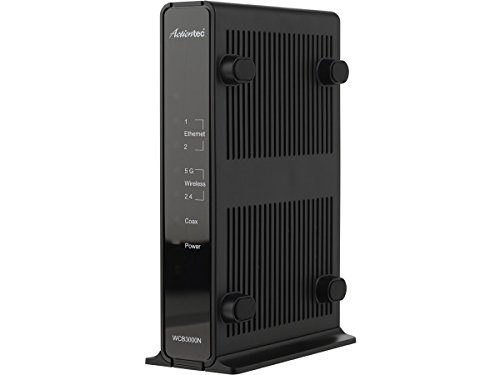
Actiontec Single Dual-Band Wireless Network Extender and Ethernet Over Coax Adapter (WCB3000N)
Key features
- •Turns any existing cable coax connection into a high speed Ethernet outlet.
- •Compatible with smart TVs, gaming consoles, Blu-ray players, DVRs, laptops and smartphones.WIRELESS:802.11 a/b/g/n
- •Dual 2.4 GHz and 5 GHz radios eliminate wireless dead spots and lost signals throughout the home.
- •Wireless extender provides networking speeds twice as fast as wireless repeaters
- •Actiontec app lets you configure your wireless network extender and measure the strength of your Wi-Fi signals. Please refer the installation Guide before use.
Actiontec Single Dual-Band Wireless Network Extender and Ethernet Over Coax Adapter (WCB3000N)
List Price: $121.01$108.91DEALYou Save: $12.10 (10%)
Free shippingFree Returns – 30 daysFree Order CancellationSecure Payment2–3 Days DeliveryGet It October 24, 2026In Stock (2)No marketing spamNo account requiredFulfilment by FedEx / Amazon / UPS / ShipwirePayPal / Card Buyer Protection
Customer Reviews
Reviews sourced from verified Amazon purchasers3.6
out of 5
Based on 10 reviews
5★
70%
4★
20%
3★
0%
2★
0%
1★
10%
Good value, but know the limitations
Daniel Austin•June 16, 2018
This is a great product for the price, but you need to know the limitations before pulling the trigger and decide if you are ok with them.
1. I believe it's moca 1.1, which is much slower than moca 2.0 or bonded moca 2.0. However, the administrative panel on the web interface indicates that all connections within my moca network are 250 Mbit or higher, which is plenty fast enough for my needs now and into the foreseeable future.
2. The 5 GHz radio on this unit only supports up to 802.11n. 802.11ac is much faster and the modern standard, but again, 802.11n is plenty fast for me. To get good connection speed I had to make sure the channel width setting was set to Auto.
3. This is a unit made specifically for Time Warner Cable customers. This means that ActionTec will not provide any support for it, and also that ActionTec has no firmware for it. I could not find any support online by Time Warner either. The firmware installed is from 2015.
4. Be sure you get a moca network controller because this unit does not have one built in. It can only be added to an existing moca network. It will not make a moca network for you. I used this one. Motorola MOCA Adapter for Ethernet over Coax, 1,000 Mbps Bonded 2.0 MoCA (Model MM1000). The passthrough port on the Motorola device goes into my cable modem, which goes into a wireless router, which then connects via ethernet to the back of the Motorola. Perhaps it's possible to replace the Motorola device with one of these, but I'm not sure.
But all in all, the price (around 10-15 bucks) and value can't be beat, especially compared to other Moca products. I use two of them to add better wifi throughout my house (in addition to my normal Wifi router). They are located near my TVs, so I can use the ethernet ports in the back for very strong streaming TV connection without using the Wifi. I use a high-quality diplexer like this one BAMF SAT/CATV Signal Combiner Mixer, Segregator at each TV. The low frequency side goes to my cable box. The high frequency side goes to the ActionTec device. This is better than using a regular cable splitter.
1. I believe it's moca 1.1, which is much slower than moca 2.0 or bonded moca 2.0. However, the administrative panel on the web interface indicates that all connections within my moca network are 250 Mbit or higher, which is plenty fast enough for my needs now and into the foreseeable future.
2. The 5 GHz radio on this unit only supports up to 802.11n. 802.11ac is much faster and the modern standard, but again, 802.11n is plenty fast for me. To get good connection speed I had to make sure the channel width setting was set to Auto.
3. This is a unit made specifically for Time Warner Cable customers. This means that ActionTec will not provide any support for it, and also that ActionTec has no firmware for it. I could not find any support online by Time Warner either. The firmware installed is from 2015.
4. Be sure you get a moca network controller because this unit does not have one built in. It can only be added to an existing moca network. It will not make a moca network for you. I used this one. Motorola MOCA Adapter for Ethernet over Coax, 1,000 Mbps Bonded 2.0 MoCA (Model MM1000). The passthrough port on the Motorola device goes into my cable modem, which goes into a wireless router, which then connects via ethernet to the back of the Motorola. Perhaps it's possible to replace the Motorola device with one of these, but I'm not sure.
But all in all, the price (around 10-15 bucks) and value can't be beat, especially compared to other Moca products. I use two of them to add better wifi throughout my house (in addition to my normal Wifi router). They are located near my TVs, so I can use the ethernet ports in the back for very strong streaming TV connection without using the Wifi. I use a high-quality diplexer like this one BAMF SAT/CATV Signal Combiner Mixer, Segregator at each TV. The low frequency side goes to my cable box. The high frequency side goes to the ActionTec device. This is better than using a regular cable splitter.
Excellent, just do some quick homework
JB•May 26, 2018
My modem does not seem to support MoCA, so I got a pair of these to extend the network to an upstairs room that was wired for coax but not cat5e. It not only does the job perfectly as a MoCA adapter and adds a hard line in another part of the house, but the wireless functionality adds another access point to enhance WiFi coverage.
Setup was super easy, and you can decide on the configuration of ethernet to coax, or vice versa. My setup is the non-MoCA cable modem connected to the primary wireless router. From the router, I'm running cat5e to the first Actiontec device. It then connects to a coax line feeding the upstairs bedroom. Second Actiontec device connects to coax in that room, adding two live ethernet ports and a wireless AP. Keep in mind that when you use this configuration, the IP to access the device configuration will not be what it says on the sticker; it will be whatever your router assigns it via DHCP or otherwise if assigning a static IP.
All in all, this is a great deal for a very capable device. Just do some research to see what's compatible with your system before buying. I do not have one of the fancy all in one modem/router combos from the ISP, but instead use my own separate modem and router. This meant having to buy two of these devices - one to take the ethernet connection from the router and bridge to coax, and another to bridge the coax back to ethernet. Still a good buy, considering the attractive price and built in wifi.
Setup was super easy, and you can decide on the configuration of ethernet to coax, or vice versa. My setup is the non-MoCA cable modem connected to the primary wireless router. From the router, I'm running cat5e to the first Actiontec device. It then connects to a coax line feeding the upstairs bedroom. Second Actiontec device connects to coax in that room, adding two live ethernet ports and a wireless AP. Keep in mind that when you use this configuration, the IP to access the device configuration will not be what it says on the sticker; it will be whatever your router assigns it via DHCP or otherwise if assigning a static IP.
All in all, this is a great deal for a very capable device. Just do some research to see what's compatible with your system before buying. I do not have one of the fancy all in one modem/router combos from the ISP, but instead use my own separate modem and router. This meant having to buy two of these devices - one to take the ethernet connection from the router and bridge to coax, and another to bridge the coax back to ethernet. Still a good buy, considering the attractive price and built in wifi.
Outstanding price points for first tier MoCA equipment. You will not go wrong with these units at this price!!!
Mr. D•May 18, 2018
The Actiontec WCB3000N Extender can be used in a two point configuration over Coax using two WCB3000N extenders. Both units will synch up over a Coax connection, just like the less expensive DECA media converter counterpart. MoCa media converters have the advantage of operating simultaneous with Cable/Over the Air (OTA) TV signals and Ethernet on the same cable. DECA equipment, while effectively performing the same media conversion task, utilizes a different band of RF frequencies on the Coax cable that may interfere with Cable and OTA TV signals, however DECA is more suited to work in conjunction with satellite (Direct TV) RF signals over the same Coax cable connection.
As of today, I do not know if three Actiontec WCB3000N Extenders will inter-operate on the same Coax segment using Coax 1 to 2 spliter to create a three way Ethernet over Coax network configuration. A multi-point MoCA test using the WCB3000N will be made, and report provided.
Keep equipment well ventilated. WCB3000N equipment does get warm to the touch when in operation.
As of today, I do not know if three Actiontec WCB3000N Extenders will inter-operate on the same Coax segment using Coax 1 to 2 spliter to create a three way Ethernet over Coax network configuration. A multi-point MoCA test using the WCB3000N will be made, and report provided.
Keep equipment well ventilated. WCB3000N equipment does get warm to the touch when in operation.
Works as an extender or access point for any Ethernet or MOCA internet
Al Brain•May 13, 2018
Works great with Fios and optimum. With Fios you have the choice to use the Ethernet or coax as an input. With any other internet provider you can use the Ethernet only input and have an instant Access point or extender.
Easy instructions for installation.
1. Power up.
2. connect coax(FIOS Only) or Ethernet from any internet router .
3. Find the local network IP address of this Actiontec. It should start with 192.168.1.___. If you don't know how to find the local ip addrees of the ACTIONTEC, download Fing app on phone. Once Fing is install run it and look up Actiontec's local IP address.
4. type local ip addrees of actiontec on browser. 192.168.1.___
5. user name = admin Password =admin
6. update the ssid and SSID password to be the same as your existing WIFI SSID and SSID password.
7. You just installed a very cheap extender and or access point
Easy instructions for installation.
1. Power up.
2. connect coax(FIOS Only) or Ethernet from any internet router .
3. Find the local network IP address of this Actiontec. It should start with 192.168.1.___. If you don't know how to find the local ip addrees of the ACTIONTEC, download Fing app on phone. Once Fing is install run it and look up Actiontec's local IP address.
4. type local ip addrees of actiontec on browser. 192.168.1.___
5. user name = admin Password =admin
6. update the ssid and SSID password to be the same as your existing WIFI SSID and SSID password.
7. You just installed a very cheap extender and or access point
Missing Ethernet cable, coax cable & coax splitter
MB•April 7, 2018
The item description says "Included in the box are the WCB3000N Wireless Network Extender, 1 Ethernet cable, 1 coax cable, 1 power adapter, 1 coax splitter, base stand, and a Quick Start Guide." The Ethernet cable, coax cable, and coax splitter were missing and the system doesn't work without them.
Page 1 of 2