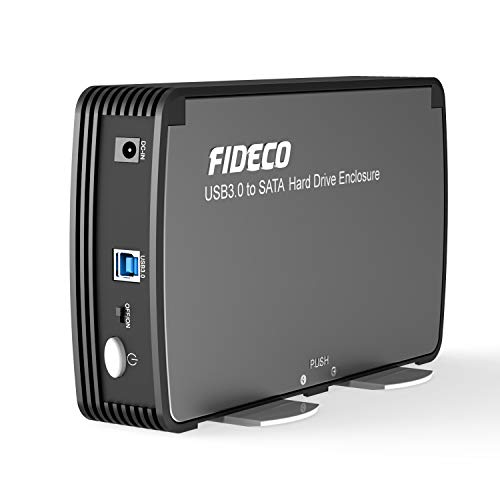
ORICO USB 3.0 External Hard Drive Enclosure for 3.5/2.5 Inch SATA Hard Drives/SSD Up to 20 TB, 3.5\'\' Tool-Free HDD Enclosure with 12V/2A Power Supply and UASP Acceleration (3588US3)



Key features
- •Supports: Most 3.5 inch SATA I, II, III HDD or SSD up to 12TB (Max); Compatible with Windows, Macintosh, Linux and Unix Desktops or Laptops;Support UASP.
- •Featuring: Tool free installation; Plug and Play; No Reboot and Driver needed; USB 3.0 connection offers data transfer rates of up To 5 Gbps.
- •Technical: Material: ABS plastic + Metal; Data transfer port: USB 3.0+SATA III; Support capacity: 8TB; Power adapter: 12V2A.
- •Stable: A shock-proof sponge is installed on the bottom cap of the hard drive enclosure making the hard drive more stable and safer.
- •What's In the Box: 1x USB 3.0 3.5 Inch HDD External Enclosure; 1x 12V/2A US Power Adapter; 1x USB 3.0 Data Cable; 1x User Manual; 1x Service Card.
ORICO USB 3.0 External Hard Drive Enclosure for 3.5/2.5 Inch SATA Hard Drives/SSD Up to 20 TB, 3.5\'\' Tool-Free HDD Enclosure with 12V/2A Power Supply and UASP Acceleration (3588US3)
List Price: $36.84$33.16DEALYou Save: $3.68 (10%)
Free shippingFree Returns – 30 daysFree Order CancellationSecure Payment2–3 Days DeliveryGet It October 26, 2026In Stock (30)No marketing spamNo account requiredFulfilment by FedEx / Amazon / UPS / ShipwirePayPal / Card Buyer Protection
Customer Reviews
Reviews sourced from verified Amazon purchasers4.5
out of 5
Based on 10 reviews
5★
100%
4★
0%
3★
0%
2★
0%
1★
0%
Works as described and good price.
Ava Smith✓ Verified Purchase•July 25, 2023
Easy to use. Cable supplied. Works as described.
Great 3.5" Enclosure
Nicholas D✓ Verified Purchase•June 27, 2023
I purchased this product in hopes of being able to access files off of my five-year-old desktop that died nearly two years ago. Initially, I was hesitant to try this because I thought that the hard drive in the PC had failed and I'd just be wasting money. I was pleasantly surprised by the Orico 3.5" Hard Drive Enclosure.
The package comes with a few items inside. You get the enclosure, a power cable, a USB 3.0 cable, an instruction manual in both Chinese and English, and two foam strips. I believe these require external power because of the 3.5" drive. A 2.5" drive in an enclosure does not need external power. The instruction manual is accurate and helpful, but it is for new drives. You do not have to follow this manual if you're using an old drive from a PC as I was.
The build quality of this enclosure is good. The material is a very sturdy plastic and the top of the case is metal, or at least feels like it's metal. The bottom slides off and clicks into place with ease, but not easy enough that you should fear it sliding off unexpectedly. There is an LED power indicator on the front beside the power button.
I took off the side of my old PC and blew out the immense amount of dust it had gathered. I pulled out the 2TB Seagate Barracuda 7200 RPM drive, blew off the dust that was remaining on it, and slid it into the enclosure. There is extra space on the bottom and left side of the enclosure once the 3.5 drive is in. This worried me because it may become loose; however, Orico provides two foam or foam-like strips with adhesive on the back. I just used one of the two on the bottom and the hard drive did not move inside when I tried to move it.
Using the provided cables, I plugged the drive into a socket and one of my USB 3.1 (my PC doesn't have any 3.0) type A ports. I pressed the power button and the LED indicator came on. I pulled up Windows Explorer and I was shocked. All of my files from my five-year-old desktop were there.
I've only had this running for 6 hours as of my typing of this review so I cannot speak for long-term use, but if anything changes I will update this.
Performance wise I've not done any true testing, but I do have some figures to look at. Please keep in mind I am using a five-year-old hard drive that has been sitting for two years. I was transferring all the documents, pictures, music, etc. from the Seagate in the enclosure to the Toshiba HDD in my desktop. During 5-10 GB transfers, I saw transfer speeds of up to 220 MB/s. There was some fluctuation, but I never saw the speed go below 130 MB/s. (Attached is an image of the result from CrystalDiskMark after format completed).
Here's a bit of advice for anyone who may not be too tech savvy and is hoping to do what I did. My drive had both a system partition and data partition since it was the only drive in an old PC. This annoyed me. Also, many folders and files could not be accessed whatsoever because of the security used by Windows. For me, this was fine. I didn't lose anything that I didn't already have backed up elsewhere. I could still access my documents, pictures, music, downloads, and could even see what programs I had installed and all their files. I'm currently formatting the drive because of the partitions and the inaccessible/unable to delete files. It isn't hard and anyone can do it. Lifewire has great guides on how to remove the partitions and format the drive if you don't already know how to on Windows machines. Make sure you back up all of the files you can/want to keep before you begin the process. Deleting the partitions and formatting the drive permanently deletes all the files on the drive. It takes a while (I'm currently at hour 3 and it's at 95%), but it is worth it. It deletes the system files you may not be able to delete and frees up that space.
I would recommend this product. It was one of the cheaper choices that I saw here on Amazon and it does its job well. I'm happy with it and hope to be happy with it for at least a year.
The package comes with a few items inside. You get the enclosure, a power cable, a USB 3.0 cable, an instruction manual in both Chinese and English, and two foam strips. I believe these require external power because of the 3.5" drive. A 2.5" drive in an enclosure does not need external power. The instruction manual is accurate and helpful, but it is for new drives. You do not have to follow this manual if you're using an old drive from a PC as I was.
The build quality of this enclosure is good. The material is a very sturdy plastic and the top of the case is metal, or at least feels like it's metal. The bottom slides off and clicks into place with ease, but not easy enough that you should fear it sliding off unexpectedly. There is an LED power indicator on the front beside the power button.
I took off the side of my old PC and blew out the immense amount of dust it had gathered. I pulled out the 2TB Seagate Barracuda 7200 RPM drive, blew off the dust that was remaining on it, and slid it into the enclosure. There is extra space on the bottom and left side of the enclosure once the 3.5 drive is in. This worried me because it may become loose; however, Orico provides two foam or foam-like strips with adhesive on the back. I just used one of the two on the bottom and the hard drive did not move inside when I tried to move it.
Using the provided cables, I plugged the drive into a socket and one of my USB 3.1 (my PC doesn't have any 3.0) type A ports. I pressed the power button and the LED indicator came on. I pulled up Windows Explorer and I was shocked. All of my files from my five-year-old desktop were there.
I've only had this running for 6 hours as of my typing of this review so I cannot speak for long-term use, but if anything changes I will update this.
Performance wise I've not done any true testing, but I do have some figures to look at. Please keep in mind I am using a five-year-old hard drive that has been sitting for two years. I was transferring all the documents, pictures, music, etc. from the Seagate in the enclosure to the Toshiba HDD in my desktop. During 5-10 GB transfers, I saw transfer speeds of up to 220 MB/s. There was some fluctuation, but I never saw the speed go below 130 MB/s. (Attached is an image of the result from CrystalDiskMark after format completed).
Here's a bit of advice for anyone who may not be too tech savvy and is hoping to do what I did. My drive had both a system partition and data partition since it was the only drive in an old PC. This annoyed me. Also, many folders and files could not be accessed whatsoever because of the security used by Windows. For me, this was fine. I didn't lose anything that I didn't already have backed up elsewhere. I could still access my documents, pictures, music, downloads, and could even see what programs I had installed and all their files. I'm currently formatting the drive because of the partitions and the inaccessible/unable to delete files. It isn't hard and anyone can do it. Lifewire has great guides on how to remove the partitions and format the drive if you don't already know how to on Windows machines. Make sure you back up all of the files you can/want to keep before you begin the process. Deleting the partitions and formatting the drive permanently deletes all the files on the drive. It takes a while (I'm currently at hour 3 and it's at 95%), but it is worth it. It deletes the system files you may not be able to delete and frees up that space.
I would recommend this product. It was one of the cheaper choices that I saw here on Amazon and it does its job well. I'm happy with it and hope to be happy with it for at least a year.
Gave me access to failed PC drives
whidbeyphotosdotcom✓ Verified Purchase•June 21, 2023
When my desktop PC failed, I removed the two hard drives, but the external enclosure I had on hand also failed. Orico to the rescue. Works just like it should and gave me access to my drives in order to transfer the data to my new PC.
Absolutely perfect
Amazon Customer✓ Verified Purchase•June 1, 2023
I could not be happier with this drive case.
I bought it so i could take a 4TB drive from my desktop and hook it to other computers.
once i had the drive out of the desktop it took less than 5 minutes to put in this enclosure and get running on a laptop.
and, as one would hope but can't always be expected, the drive which was already formatted, partitioned, and full of data, was instantly recognized with all partitions and files as they should be.
i could not be happier with this case than i already am. 5/5
I bought it so i could take a 4TB drive from my desktop and hook it to other computers.
once i had the drive out of the desktop it took less than 5 minutes to put in this enclosure and get running on a laptop.
and, as one would hope but can't always be expected, the drive which was already formatted, partitioned, and full of data, was instantly recognized with all partitions and files as they should be.
i could not be happier with this case than i already am. 5/5
Nice hard drive enclosure
Roy Josephson✓ Verified Purchase•May 15, 2023
Easy to install and use. Allows me to access and put back into service several hard drives saved from old computers.
Page 1 of 2