SiliconDust HDHomeRun Connect. Free Broadcast HDTV (2-Tuner)
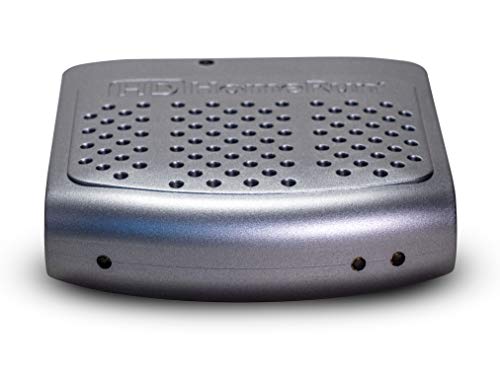


Key features
- •Cut the cable and cut monthly fees; Watch live HDTV on up to 2 devices simultaneously on your wired network
- •Works with our HDHomeRun DVR software so you can watch, pause and record
- •Expand the number of tuners with multiple HDHomeRun devices; Will stream HD via WiFi on an 802.11ac router or SD on an 802.11n compatible router
- •Watch and record in full 1080p resolution where available
- •HDHomeRun streams to DLNA compatible devices on your network; TV Antenna required
SiliconDust HDHomeRun Connect. Free Broadcast HDTV (2-Tuner)
List Price: $218.24$196.42DEALYou Save: $21.82 (10%)
Free shippingFree Returns – 30 daysFree Order CancellationSecure Payment2–3 Days DeliveryGet It October 25, 2026In Stock (1)No marketing spamNo account requiredFulfilment by FedEx / Amazon / UPS / ShipwirePayPal / Card Buyer Protection
Customer Reviews
Reviews sourced from verified Amazon purchasers4.0
out of 5
Based on 10 reviews
5★
70%
4★
20%
3★
10%
2★
0%
1★
0%
You probably want the non-transcoding box instead, for half the price.
Matthew✓ Verified Purchase•April 27, 2018
Before you buy one of these, determine if you really need the transcoding feature. That feature doubles the price compared to the non-transcoding devices.
I used the transcoding a few times, to see if it was working, and now just don't use it. The manufacturer claims that you need the transcoding to watch HD channels over Wifi-N. That may be so, and it may not, depending on how saturated your network is. The maximum bandwidth that you can pull over the air is about 19Mb, and that's for all programs on a channel. More typically you will see less than 12Mb for the "main" logical channel. My wifi will easily carry that, so I don't use the transcoding even for HD channels over wireless. However, I almost never use the box over Wifi, usually using ethernet-connected devices instead.
For an input of 720p60 or 1080i30 mpeg-2, the best transcoded output is 720p30 h.264. I thought transcoding in hardware would be good for making recordings, but I don't like the output so I don't use it for that. If it was able to transcode into h.264 at the input resolution and frame rate it would be perfect for making recordings using a home-brew DVR (e.g. wget or curl).
I used the transcoding a few times, to see if it was working, and now just don't use it. The manufacturer claims that you need the transcoding to watch HD channels over Wifi-N. That may be so, and it may not, depending on how saturated your network is. The maximum bandwidth that you can pull over the air is about 19Mb, and that's for all programs on a channel. More typically you will see less than 12Mb for the "main" logical channel. My wifi will easily carry that, so I don't use the transcoding even for HD channels over wireless. However, I almost never use the box over Wifi, usually using ethernet-connected devices instead.
For an input of 720p60 or 1080i30 mpeg-2, the best transcoded output is 720p30 h.264. I thought transcoding in hardware would be good for making recordings, but I don't like the output so I don't use it for that. If it was able to transcode into h.264 at the input resolution and frame rate it would be perfect for making recordings using a home-brew DVR (e.g. wget or curl).
Unit is great but DVR is a work in progress.
Tom S✓ Verified Purchase•December 30, 2017
After almost 20 years, my series 1 and series 2 TIVO both stopped working...time to get with 2018 so I searched online and discovered HDHomeRun. Using only a rooftop antenna, (we cut the cable years ago) the Connect DUO 2-tuner was just the ticket to finally start recording shows in an HD format and bye analog less than sharp picture. The unit arrived quickly and easily hooked up as instructed. (We are using a wired Ethernet which is recommended over Wi-Fi.)
In order to tape shows, however, you need an external hard drive. SiliconDust pushes the WD NAS drives but you can actually use any external hard drive. The DVR software that SiliconDust provides is as they say a "work in progress" and yes, it is evolving.
Just know this: Once unit is installed on your computer (PC in our case) and your unit is "discovered in set-up", download DVR software. The minimal $35 a year DVR Electronic Programming Guide fee is worth it as you get great visuals and info on shows and search features (AND one E.P.G. can be used with multiple HDHomeRun units in your home)...also "discover" shows feature. (If a show does not populate in search or guide, you can simply search for it to locate.) When setting up DVR software and you go through steps to indicate storage of programming, browse to find your already installed external hard drive and apply change...when you come to external hard drive with NAS set up, if you are NOT using an NAS drive, just click to finish. Our unit found and began using the external drive as it's recording storage source. Note: at time of this review, the instructions on using DVR functionality including recording and options available is extremely limited if at all. The online tutorial videos do not fully address all potential questions that could arise.
PROS:
*Easy to install
*Unit pulled in over the air signals stronger than original over the air decoder box
*HD viewing on your TV
*NO CABLE BILLS!
*Pairs with downloadable HDHomeRun DVR software (which is evolving.)
*Shows are recorded in .mpeg format which loads easily into our Sony Movie Studio editor
*Can pause a show to grab a large file screen capture (using Microsoft Snipping tool.)
CONS:
*Instructions are vague on DVR software
*Instructions are vague on FAQ or potential problems
*DVR set up does NOT require their "sponsored" WD NAS drives as heavily pushed (and offers 0 troubleshooting help online at their site or fully explains the options at time of this purchase/review.)
*NO REMOTE. Although your phone can be used to remotely view programming, you MUST have Wi-Fi on and working.
*Cannot manually set DVR to record specific times within a show or manually set to record a channel. (Say if you wanted to record only the first 15 minutes of a 30 minutes show, you can't.)
Our Connect Duo 2-Tuner did record two shows at once and stored them as we directed in our external (Seagate 6tb) drive. To record a show individually rather than an entire "series" you simply click on the show you want to watch and then the 14 days programming guide will populate all of the upcoming shows of that series. Simply click on the line of the show you want to record and the red record button will illuminate to indicate it is scheduled. (you can check in "TASKS" to make sure.
We purchased our unit and everything described and were not compensated in any way for our honest user review.
In order to tape shows, however, you need an external hard drive. SiliconDust pushes the WD NAS drives but you can actually use any external hard drive. The DVR software that SiliconDust provides is as they say a "work in progress" and yes, it is evolving.
Just know this: Once unit is installed on your computer (PC in our case) and your unit is "discovered in set-up", download DVR software. The minimal $35 a year DVR Electronic Programming Guide fee is worth it as you get great visuals and info on shows and search features (AND one E.P.G. can be used with multiple HDHomeRun units in your home)...also "discover" shows feature. (If a show does not populate in search or guide, you can simply search for it to locate.) When setting up DVR software and you go through steps to indicate storage of programming, browse to find your already installed external hard drive and apply change...when you come to external hard drive with NAS set up, if you are NOT using an NAS drive, just click to finish. Our unit found and began using the external drive as it's recording storage source. Note: at time of this review, the instructions on using DVR functionality including recording and options available is extremely limited if at all. The online tutorial videos do not fully address all potential questions that could arise.
PROS:
*Easy to install
*Unit pulled in over the air signals stronger than original over the air decoder box
*HD viewing on your TV
*NO CABLE BILLS!
*Pairs with downloadable HDHomeRun DVR software (which is evolving.)
*Shows are recorded in .mpeg format which loads easily into our Sony Movie Studio editor
*Can pause a show to grab a large file screen capture (using Microsoft Snipping tool.)
CONS:
*Instructions are vague on DVR software
*Instructions are vague on FAQ or potential problems
*DVR set up does NOT require their "sponsored" WD NAS drives as heavily pushed (and offers 0 troubleshooting help online at their site or fully explains the options at time of this purchase/review.)
*NO REMOTE. Although your phone can be used to remotely view programming, you MUST have Wi-Fi on and working.
*Cannot manually set DVR to record specific times within a show or manually set to record a channel. (Say if you wanted to record only the first 15 minutes of a 30 minutes show, you can't.)
Our Connect Duo 2-Tuner did record two shows at once and stored them as we directed in our external (Seagate 6tb) drive. To record a show individually rather than an entire "series" you simply click on the show you want to watch and then the 14 days programming guide will populate all of the upcoming shows of that series. Simply click on the line of the show you want to record and the red record button will illuminate to indicate it is scheduled. (you can check in "TASKS" to make sure.
We purchased our unit and everything described and were not compensated in any way for our honest user review.
After playing around with some settings I am able to get live TV pretty reliably over the network on my Roku Ultra and ...
A. Hilton✓ Verified Purchase•December 5, 2017
Working well with PLEX as a DVR. Live TV works fairly well too using the unofficial PLEX channel "HDHR Viewer 2". After playing around with some settings I am able to get live TV pretty reliably over the network on my Roku Ultra and even my gen 1 Chromecasts (sometimes I need to pause for a few seconds to stop stuttering).
If I am being picky, I would complain the transcode profiles are vague and not changeable. They are just called things like "Heavy" and "Mobile" and "Internet720", requiring me to go look around online to find out the actual resolutions, frame rates, bit rates, etc. I also see a lot of interlacing problems using their profiles, so for recordings on PLEX I actually just record the raw MPEG2 and have my DVR computer convert it to MP4 later using MCEbuddy. For live TV though, the on-the-fly transcoding works fine and makes the Extend worth the extra cost over the Connect.
If I am being picky, I would complain the transcode profiles are vague and not changeable. They are just called things like "Heavy" and "Mobile" and "Internet720", requiring me to go look around online to find out the actual resolutions, frame rates, bit rates, etc. I also see a lot of interlacing problems using their profiles, so for recordings on PLEX I actually just record the raw MPEG2 and have my DVR computer convert it to MP4 later using MCEbuddy. For live TV though, the on-the-fly transcoding works fine and makes the Extend worth the extra cost over the Connect.
It just works
J. Treworgy✓ Verified Purchase•June 10, 2017
Bought this for use with Plex DVR. Setup couldn't have been easier. Plug in antenna, plug into my network, and Plex immediately found and configured it. There's really nothing to configure as far as the HomeRun is concerned. If you're using this with Plex, the EXTEND version seems like a no brainer, since it will significantly reduce the storage requirements for the streams. Plex is able to transcode in real time to h.264 when recording, but I am sure my 6 year old PC Plex server is not capable of doing that with any kind of quality, and certainly not two streams at once. The extra $60 seems a small price to pay to keep load off the server when recording. If you have a really fast server and fast hardwired network, then maybe not necessary, but seems like cheap insurance.
HARDWARE
Appears to be of good build quality. Solidly made. No buttons, one light on the LAN port. Simple.
SOFTWARE
The internal web UI for configuration is (charitably) basic, but there's really not much to configure other than transcoding options. Plex can manage the options through its DVR setup anyway. It would be nice if the web UI had some kind of integrated signal strength meter to help with positioning antenna, but there's a free android app that works well enough for this.
I tried the "beta" Android app for watching live TV and the Kodi extension running on my Amazon Fire TV (gen 1). The Android app works OK, though the video seems to stutter a bit. The Kodi extension works flawlessly. It's a little surprising that they don't have better apps since this product has been around for such a long time, but I guess most people use it in conjunction with some other software anyway.
OVERALL
HDHomeRun + Plex DVR is awesome. Having OTA broadcasts appear in Plex is a dream come true. I just canceled my DirecTV service. The only thing I am missing right now is being able to start watching recordings while they are in progress (though this has nothing to do with this hardware, and really just software support - perhaps Plex Live TV will support this).
HARDWARE
Appears to be of good build quality. Solidly made. No buttons, one light on the LAN port. Simple.
SOFTWARE
The internal web UI for configuration is (charitably) basic, but there's really not much to configure other than transcoding options. Plex can manage the options through its DVR setup anyway. It would be nice if the web UI had some kind of integrated signal strength meter to help with positioning antenna, but there's a free android app that works well enough for this.
I tried the "beta" Android app for watching live TV and the Kodi extension running on my Amazon Fire TV (gen 1). The Android app works OK, though the video seems to stutter a bit. The Kodi extension works flawlessly. It's a little surprising that they don't have better apps since this product has been around for such a long time, but I guess most people use it in conjunction with some other software anyway.
OVERALL
HDHomeRun + Plex DVR is awesome. Having OTA broadcasts appear in Plex is a dream come true. I just canceled my DirecTV service. The only thing I am missing right now is being able to start watching recordings while they are in progress (though this has nothing to do with this hardware, and really just software support - perhaps Plex Live TV will support this).
Zero regrets! Wish I'd gotten it sooner.
TunaMan✓ Verified Purchase•March 7, 2017
Fantastic! Works great with a r-pi running Kodi to watch live TV.
Also works great with any other device on the network to watch or record OTA TV. To record, just use wget and the URL to the specific channel. It really is that easy. Of course, you can use any PVR program too.
The tuner seems to be slightly more sensitive than the older HDHR3 model.
Also works great with any other device on the network to watch or record OTA TV. To record, just use wget and the URL to the specific channel. It really is that easy. Of course, you can use any PVR program too.
The tuner seems to be slightly more sensitive than the older HDHR3 model.
Page 1 of 2