Plugable USB 3.0 Sharing Switch, One-Button USB A Switch to Share Devices Between 2 Computers | KVM Switch for Keyboards, Docking Stations & More



Key features
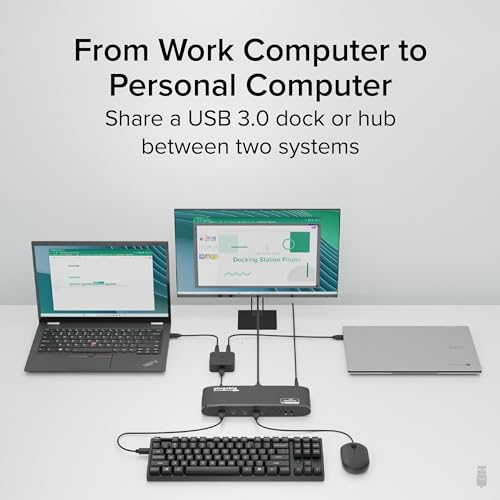
- •SIMPLE DEVICE SHARING - Compact design provides easy one-touch switching of a USB 3.0 device or hub between two computers
- •ONE BUTTON TOGGLE - Attach a USB docking station or powered USB hub that is connected to keyboard, mouse, and USB graphics adapter for an all-USB KVM solution
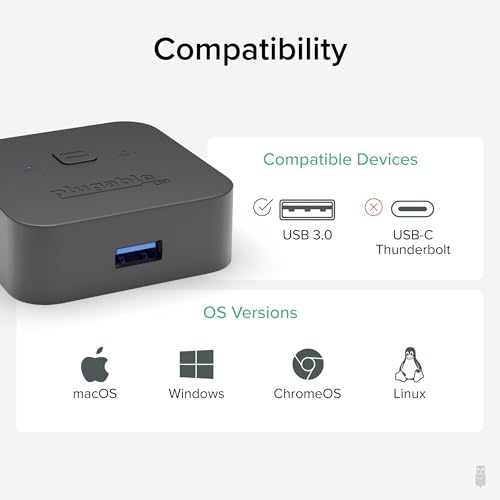
- •PLUG AND PLAY - Switch works with any USB-enabled computer without drivers, but note that any attached devices still require drivers. LED indicator lights show which connected computer has control of the attached devices
- •COMPATIBILITY - Not recommended for switching mass storage devices such as hard drives, flash drives, memory cards, etc. We recommend using the provided 1m cables to connect the USB switch to your computer and keep connections less than 1.8m to your peripheral
- •2 YEAR WARRANTY - We love our Plugable products, and hope you will too. All of our products are backed with a 2-year limited parts and labor warranty as well as Seattle-based email support
Plugable USB 3.0 Sharing Switch, One-Button USB A Switch to Share Devices Between 2 Computers | KVM Switch for Keyboards, Docking Stations & More
List Price: $42.99$38.69DEALYou Save: $4.30 (10%)
Free shippingFree Returns – 30 daysFree Order CancellationSecure Payment2–3 Days DeliveryGet It October 25, 2026In Stock (2)No marketing spamNo account requiredFulfilment by FedEx / Amazon / UPS / ShipwirePayPal / Card Buyer Protection
Customer Reviews
Reviews sourced from verified Amazon purchasers4.3
out of 5
Based on 10 reviews
5★
50%
4★
30%
3★
10%
2★
0%
1★
10%
Elegant solution to USB peripheral sharing between two DAWs
Moss Parker✓ Verified Purchase•May 23, 2017
I have been using one of these to switch a non-networked printer between two computers for a couple years. When I moved into a new studio, I decided to build two Digital Audio Workstations (DAWs) and share all the USB inputs (e.g., keyboards, controllers, software dongles, etc). I decided that the most elegant solution would be to connect all the USB devices to a hub, and use this switch to route the USB inputs to either DAW. This is a very inexpensive solution to what could have been a very costly problem. So, if you haven't thought about using a switch this way, think again!
Bought with a Sabrent hub, and both were disappointing.
Analytical Guy✓ Verified Purchase•March 20, 2017
4/16/17 Follow-up:
It may not be fair to compare this $12.95 device to a $29.95 IOGEAR device:
https://www.amazon.com/gp/product/B00BD8I3EI
So I am raising my rating to 3 stars.
Plugable sent me a replacement part, which still isn't what I'd call great. In the meantime, I bought a second IOGEAR device. (I have one at home and one at work.)
The IOGEAR work perfectly every time I push the button. That's what I want from a switcher. The Plugable device sometimes doesn't work.
I think a lot of people would be okay with sometimes having to push the button a couple times to get the device to switch, especially if it gets them a product for less than half the price. So, sure, 3 stars.
Original Review:
I bought these two items together:
Plugable USB 2.0 Switch for One-Button Swapping of USB Device/Hub Between Two Computers (A/B switch)
https://www.amazon.com/dp/B006Z0Q2SI/
and
Sabrent 4-Port USB 3.0 Hub with Individual Power Switches and LEDs
https://www.amazon.com/gp/product/B00JX1ZS5O
At the time, the Amazon page for each device pointed to the other device as "Customers also bought..." so I figured they were known to work well as a team.
Neither device worked well.
The Plugable button felt flimsy and, rather than changing back and forth between its green A and blue B settings, often neither light would light up. It also wouldn't switch correctly, sometimes getting its colors switched, and often losing a device completely.
I thought the problem must be that I needed a power adapter for the Sabrent hub. And I read a few reviews where Manny from Sabrent would reply to people, saying:
"Search on amazon for PS-5V4A or see the link below..."
My Amazon search for PS-5V4a turned this up as the first result:
Sabrent 5V 4A 100V-240V to DC Power Adapter Support most Sabrent USB Hub
https://www.amazon.com/gp/product/B00MRGKPH8
I bought that adapter, hooked it to the hub... and IMMEDIATELY my monitor went black! The monitor wasn't even one of the two devices for which I was using the hub + switch! However, the power adapter + hub caused some "keyboard error" which shut off my PC.
I tried this repeatedly, and it happened every time.
I've tried using the Plugable switch without the Sabrent hub, and it's still unacceptable.
I tried using the Sabrent hub+switch once or twice before I got scared that I was hurting my computer in the name of saving a few bucks. Then I gave up on all three devices.
They're each only about $10, so I'm not sure it's worth the effort to send them back. I don't have the boxes anymore. But I think it's worth the effort to give each device this 1-star review.
It may not be fair to compare this $12.95 device to a $29.95 IOGEAR device:
https://www.amazon.com/gp/product/B00BD8I3EI
So I am raising my rating to 3 stars.
Plugable sent me a replacement part, which still isn't what I'd call great. In the meantime, I bought a second IOGEAR device. (I have one at home and one at work.)
The IOGEAR work perfectly every time I push the button. That's what I want from a switcher. The Plugable device sometimes doesn't work.
I think a lot of people would be okay with sometimes having to push the button a couple times to get the device to switch, especially if it gets them a product for less than half the price. So, sure, 3 stars.
Original Review:
I bought these two items together:
Plugable USB 2.0 Switch for One-Button Swapping of USB Device/Hub Between Two Computers (A/B switch)
https://www.amazon.com/dp/B006Z0Q2SI/
and
Sabrent 4-Port USB 3.0 Hub with Individual Power Switches and LEDs
https://www.amazon.com/gp/product/B00JX1ZS5O
At the time, the Amazon page for each device pointed to the other device as "Customers also bought..." so I figured they were known to work well as a team.
Neither device worked well.
The Plugable button felt flimsy and, rather than changing back and forth between its green A and blue B settings, often neither light would light up. It also wouldn't switch correctly, sometimes getting its colors switched, and often losing a device completely.
I thought the problem must be that I needed a power adapter for the Sabrent hub. And I read a few reviews where Manny from Sabrent would reply to people, saying:
"Search on amazon for PS-5V4A or see the link below..."
My Amazon search for PS-5V4a turned this up as the first result:
Sabrent 5V 4A 100V-240V to DC Power Adapter Support most Sabrent USB Hub
https://www.amazon.com/gp/product/B00MRGKPH8
I bought that adapter, hooked it to the hub... and IMMEDIATELY my monitor went black! The monitor wasn't even one of the two devices for which I was using the hub + switch! However, the power adapter + hub caused some "keyboard error" which shut off my PC.
I tried this repeatedly, and it happened every time.
I've tried using the Plugable switch without the Sabrent hub, and it's still unacceptable.
I tried using the Sabrent hub+switch once or twice before I got scared that I was hurting my computer in the name of saving a few bucks. Then I gave up on all three devices.
They're each only about $10, so I'm not sure it's worth the effort to send them back. I don't have the boxes anymore. But I think it's worth the effort to give each device this 1-star review.
Best solution in my case. Works great, uncomplicated and doesn't break the bank!
Volkhard Neumann✓ Verified Purchase•February 28, 2017
When I installed a PC to run Mach3 for my CNC machine I found out, the PC should rather be dedicated to the CNC and not running anything else to avoid issues and timeouts with the CNC. Installing a second PC and a second monitor was no problem.
But 2 keyboards and 2 mice? Not enough real estate on the worktable. Ordering a keyboard mouse combo with one USB micro receiver EagleTec K104 / KS04 2.4 GHz Wireless Combo Keyboard and Mouse - Black which serves both and getting this USB switch Plugable USB 2.0 Switch for One-Button Swapping of USB Device/Hub Between Two Computers (A/B switch) was the solution.
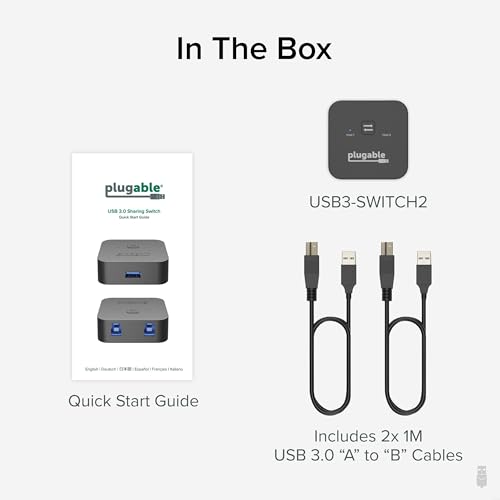
The 2 cable needed to connect the switch to both PC are included. After installing the micro USB receiver in the USB slot on the switch while both PC were up and running was all that was needed. Initially it took a while until the Keyboard mouse combo installed itself on the first PC. After pushing the button to switch to the second PC again it took a little while to initiate.
After restarting both PC the response time after switching is now much quicker (1 to 2 seconds for the PC to re-recognize the Keyboard Mouse combo). Reasonable time I can easily live with.
As I might at times run only one or the other PC, I checked out what happens if I turn down one PC :
Keyboard and mouse still work on the other PC.
The product performs exactly as described It is very easy to install. No software or driver to load. No bluetooth protocols to observe or hotkeys for switching to remember. No batteries required either. Just pushing the button on the top of the switch to activate Keyboard and Mouse one or the other PC.
It doesn't get much simpler or more cost effective.
But 2 keyboards and 2 mice? Not enough real estate on the worktable. Ordering a keyboard mouse combo with one USB micro receiver EagleTec K104 / KS04 2.4 GHz Wireless Combo Keyboard and Mouse - Black which serves both and getting this USB switch Plugable USB 2.0 Switch for One-Button Swapping of USB Device/Hub Between Two Computers (A/B switch) was the solution.
The 2 cable needed to connect the switch to both PC are included. After installing the micro USB receiver in the USB slot on the switch while both PC were up and running was all that was needed. Initially it took a while until the Keyboard mouse combo installed itself on the first PC. After pushing the button to switch to the second PC again it took a little while to initiate.
After restarting both PC the response time after switching is now much quicker (1 to 2 seconds for the PC to re-recognize the Keyboard Mouse combo). Reasonable time I can easily live with.
As I might at times run only one or the other PC, I checked out what happens if I turn down one PC :
Keyboard and mouse still work on the other PC.
The product performs exactly as described It is very easy to install. No software or driver to load. No bluetooth protocols to observe or hotkeys for switching to remember. No batteries required either. Just pushing the button on the top of the switch to activate Keyboard and Mouse one or the other PC.
It doesn't get much simpler or more cost effective.
Works well, switch button is small
B✓ Verified Purchase•January 10, 2017
I'm using this switch to share a wireless keyboard and mouse (with a Logitech unifying receiver) between 2 computers. Switching is fast; by the time my hand moves from the switch back to the mouse/keyboard, it's ready to go, even on an 8-year old box running Win10. It's small enough and unobtrusive enough to sit within easy reach of my mouse.
My only complaint is that the button is quite small and requires a good amount of force with one fingertip to push. I'd prefer a bigger button that I could push without taking my eyes off of the screen or thinking about it much. It's a small problem, but one that could have been easily avoided with a design tweak. I might eventually try to attach a larger pad to the existing button.
I haven't tried it in the BIOS or any boot screens, but I keep an old keyboard on hand for those rare occasions.
My only complaint is that the button is quite small and requires a good amount of force with one fingertip to push. I'd prefer a bigger button that I could push without taking my eyes off of the screen or thinking about it much. It's a small problem, but one that could have been easily avoided with a design tweak. I might eventually try to attach a larger pad to the existing button.
I haven't tried it in the BIOS or any boot screens, but I keep an old keyboard on hand for those rare occasions.
Works as advertised. Coordinates my Mac and PC
Mary✓ Verified Purchase•September 2, 2016
I installed these three items at the same time:
DVI/HDMI adapter: AmazonBasics HDMI to DVI Adapter Cable - 3 Feet (Latest Standard)
USB switch: Plugable USB 2.0 Switch for One-Button Swapping of USB Device/Hub Between Two Computers (A/B switch)
HDMI switch: Goronya Ultra HD 4K 2x1 or 1x2 HDMI Bi-Directional Switcher with HDCP Passthrough, Supports 3D and 1080P
I have a Macbook Pro and an older DVI monitor. For work I have to use a company PC. At the desk I use an extended keyboard rather than the laptop keyboard. It's more comfortable and has a number pad. My goal was to conserve desk space. I raised the monitor slightly to to show above the PC screen. So with this USB and HDMI switch the added desk space is just the PC and it's mouse with no extra keyboard, and there's no swapping of monitor cables. It all works.
These two switches really make a difference in workflow. I don't have to go to a separate station or juggle keyboards or change monitor cables. Click click and the keyboard* and monitor shift between the two computers. It'd be cool if the USB switch were as small as the HDMI switch, which I would say is less than 2" square. But both work great.
Hope this helps!
* For Mac users: I use a full Apple keyboard and I have used the alpha, numeric, Control, Alt (option) and forward Delete keys. They all work with the PC and are all I need PC wise. For everything else I go back to the Mac. There could be a problem using a wireless Apple keyboard that has no forward delete. I don't know. I understand that there may be others such as function keys that don't work correctly but that there are PC drivers to correct this.
DVI/HDMI adapter: AmazonBasics HDMI to DVI Adapter Cable - 3 Feet (Latest Standard)
USB switch: Plugable USB 2.0 Switch for One-Button Swapping of USB Device/Hub Between Two Computers (A/B switch)
HDMI switch: Goronya Ultra HD 4K 2x1 or 1x2 HDMI Bi-Directional Switcher with HDCP Passthrough, Supports 3D and 1080P
I have a Macbook Pro and an older DVI monitor. For work I have to use a company PC. At the desk I use an extended keyboard rather than the laptop keyboard. It's more comfortable and has a number pad. My goal was to conserve desk space. I raised the monitor slightly to to show above the PC screen. So with this USB and HDMI switch the added desk space is just the PC and it's mouse with no extra keyboard, and there's no swapping of monitor cables. It all works.
These two switches really make a difference in workflow. I don't have to go to a separate station or juggle keyboards or change monitor cables. Click click and the keyboard* and monitor shift between the two computers. It'd be cool if the USB switch were as small as the HDMI switch, which I would say is less than 2" square. But both work great.
Hope this helps!
* For Mac users: I use a full Apple keyboard and I have used the alpha, numeric, Control, Alt (option) and forward Delete keys. They all work with the PC and are all I need PC wise. For everything else I go back to the Mac. There could be a problem using a wireless Apple keyboard that has no forward delete. I don't know. I understand that there may be others such as function keys that don't work correctly but that there are PC drivers to correct this.
Page 1 of 2