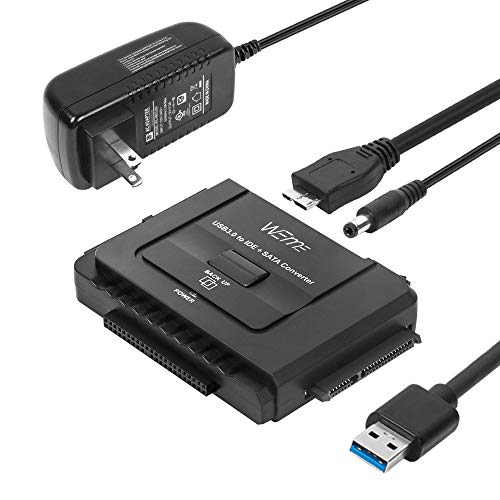
WEme USB 3.0 to SATA/IDE Adapter with Universal 2.5/3.5 Hard Drive Disk Converter for HDD/SSD & IDE HDD Support 6TB and One-Touch Backup Include 12V 2A Power Adapter + USB 3.0 Cable for Laptop


Key features
- •Connect your SATA / IDE device to your computer as an additional external hard drive via USB 3.0. Compatible with 2.5"/3.5" IDE/SATA hard drives and DVD-ROM, CD-ROM, CD-RW, DVD-RW, DVD + RW Optical Drive. Compatible read up to three hard drives simultaneously!
- •One Touch Backup (OTB) Function. Design for people who need to backup data from your computer to portable hard drive. (Please install the included OTB Software CD. OTB function doesn't work for Mac OS and Linux)
- •Plug and Play, Hot- swappable, no driver needed. On/Off Switch design for HDD protection. Led light shows power and activity status.
- •Support 2 IDE and 1 SATA hard drives connecting simultaneously! Compatible with two IDE hard drives simultaneously, If not, Please set the 3.5'' IDE to be the slave drive based on the instruction on the hard drive
- •SuperSpeed USB 3.0 enables data transfer rates of up to 5Gbps, downwards compatible with USB 2.0(high-speed 480 Mbps) / USB 1.1(full-speed 12 Mbps) standards. The actual transmission speed subjects to the setting of the device connected
WEme USB 3.0 to SATA/IDE Adapter with Universal 2.5/3.5 Hard Drive Disk Converter for HDD/SSD & IDE HDD Support 6TB and One-Touch Backup Include 12V 2A Power Adapter + USB 3.0 Cable for Laptop
List Price: $59.35$53.42DEALYou Save: $5.93 (10%)
Free shippingFree Returns – 30 daysFree Order CancellationSecure Payment2–3 Days DeliveryGet It October 26, 2026In Stock (1)No marketing spamNo account requiredFulfilment by FedEx / Amazon / UPS / ShipwirePayPal / Card Buyer Protection
Customer Reviews
Reviews sourced from verified Amazon purchasers4.3
out of 5
Based on 10 reviews
5★
90%
4★
10%
3★
0%
2★
0%
1★
0%
Upgraded htpc from "USB 2.0 to SATA" - big performance boost
Scott✓ Verified Purchase•May 26, 2017
I bought this to replace the two USB 2.0 to SATA interfaces to my 2TB drives.
The result was a much tidier installation (no cable sprawl), power saving (drives spin down when idle) and marked throughput increase.
Haven't tried the duplication feature but likely would use it next time I have to clone a drive.
The result was a much tidier installation (no cable sprawl), power saving (drives spin down when idle) and marked throughput increase.
Haven't tried the duplication feature but likely would use it next time I have to clone a drive.
This was significantly cheaper than the competitors. It works ...
J. Madison✓ Verified Purchase•May 17, 2017
This was significantly cheaper than the competitors. It works amazingly well! Not only can it clone a drive without a computer, but if you attach it to a computer you can make any updates you need. Switched myself over to a bigger hard drive in about 2 hours. I went from 750 GB that was almost full to a 1TB that has plenty of room!
Great source for External Backup Storage (and cheaper)
Eddie✓ Verified Purchase•March 29, 2017
The Hard drive dock seems to be wroking well. I use it for a backup hard drive (Seagate hard drive) to replace my much larger IoSafe external drives. It was easy to install and very importantly does not take up much space. So now it sits on the side of my desk (on all the time) with a 4gb Seagate drive in it. I will be getting another drive for it as well so I can have 8Gb of back up storage. The seller delivered the item as promised and with all the necessary paperwork. Would highly recommend to use as a backup source. (Have not tried any Offline cloning of hard drives and dont necessarily plan to in the future).
Works as advertised.
Mike✓ Verified Purchase•March 18, 2017
Works like a charm. Just keep in mind you won't have airflow cooling your drive as you normally would in the case. For this reason I wouldn't use it as a permanent solution. But, to save you the trouble of opening the case and installing a drive it's awesome to move files or reformat a drive ,delete MBR, etc.
Helped me rescue my files from computer that will not load Windows
Brooks1984✓ Verified Purchase•March 10, 2017
My laptop stopped loading Windows and I needed a way to get the personal files off of it. I suppose there is a way to do it from the computer itself, but I couldn't figure out how to save more than one file at a time. I wanted to be able to copy the whole hard drive and this seemed to be the product for the job. I took my laptop hard-drive out of my computer and used this adapter to connect it to another computer. Unfortunately, I was not able to access the drive at first because I did not have permissions--this had nothing whatsoever to do with the adapter though. I found instructions on YouTube on how to get permissions and make the drive accessible. Now I am transferring the old hard drive to a 4 terabyte portable hard drive using this adapter. This product works great and has allowed me to rescue work files that have been trapped on this buggy computer for the last month.
Page 1 of 2