Tablo 2-Tuner DVR for Over-The-Air HDTV with Wi-Fi
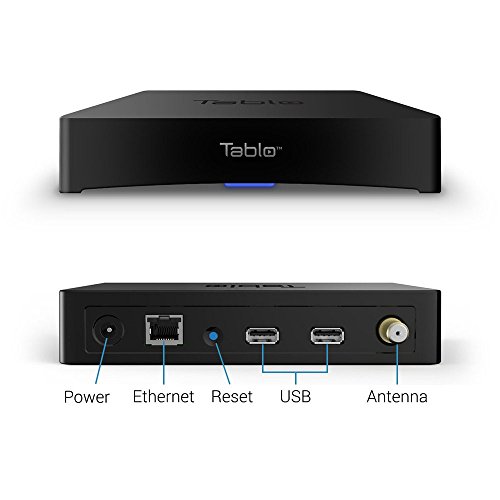
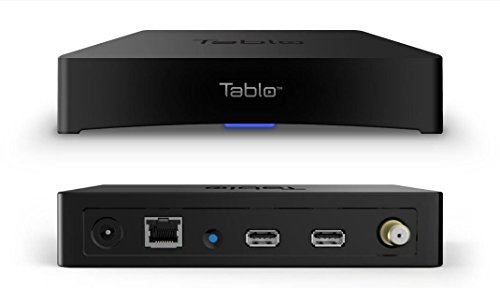
Key features
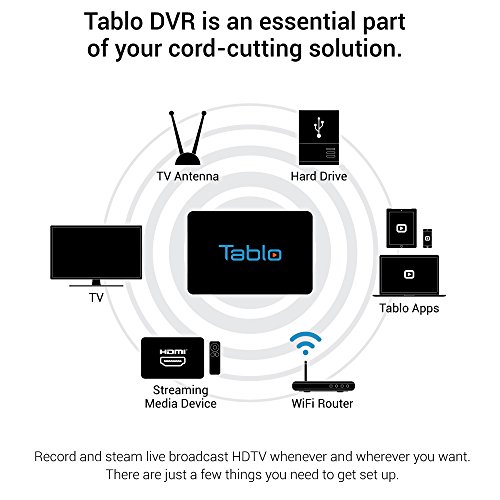
- •Watch, Record, Pause, and Stream Free Network TV Channels from your Antenna: CBS, ABC, NBC, and many more
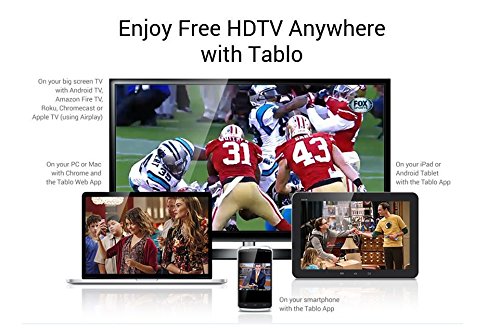
- •Two Tuners allow you to record and watch two live OTA TV streams on up to six devices in your home.
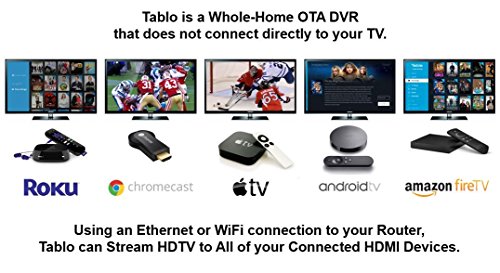
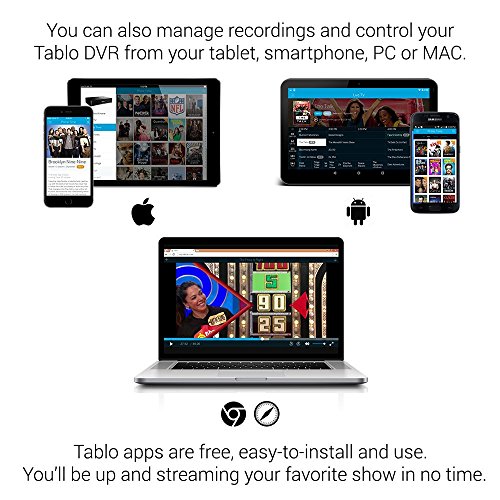
- •Discover new shows, schedule & manage recordings, and skip commercials using the Netflix-style interface of the Tablo Apps for iOS & Android mobile devices, computers, smart TVs, streaming media and gaming devices: Roku, Xbox One, Apple TV, Android TV, NVIDIA SHIELD and Amazon Fire TV, etc.
- •All new Tablo OTA DVRs come with a 30-day free trial of our guide data subscription, including the Tablo Connect feature which lets you access your Tablo over the internet to enjoy live, local news and sports and recordings when traveling or on the go.
- •NO HDMI: Tablo connects to your home's router using Wi-Fi & Ethernet so you can stream your favorite live and recorded TV content to any screen, any time, anywhere.
Tablo 2-Tuner DVR for Over-The-Air HDTV with Wi-Fi
List Price: $436.49$392.84DEALYou Save: $43.65 (10%)
Free shippingFree Returns – 30 daysFree Order CancellationSecure Payment2–3 Days DeliveryGet It October 25, 2026In Stock (2)No marketing spamNo account requiredFulfilment by FedEx / Amazon / UPS / ShipwirePayPal / Card Buyer Protection
Customer Reviews
Reviews sourced from verified Amazon purchasers3.6
out of 5
Based on 20 reviews
5★
65%
4★
35%
3★
0%
2★
0%
1★
0%
Excellent design and works on many platforms.
TB✓ Verified Purchase•April 14, 2017
I connected this to my over the air antenna with a coax cable and my router/home network with an Ethernet cable (I did not configure WiFi). I also attached a 4TB Seagate Hard Drive to the USB port. Setup was simple. It downloaded a firmware update, formatted my hard drive, scanned all my stations and downloaded the program guide. I then installed the Tablo app on my Roku 4 and it worked great. I then installed the Tablo app on my Samsung Galaxy S7 and it also worked great. I then installed the Windows 10 Tablo app on my PC and it too worked great. I then configured my router to allow the Tablo to be accessed remotely (the app tells you how to do this) and I was able to watch TV away from my house on both my laptop and my phone. I tried recording a show and the quality was great. I especially like the fast forward feature on the Roku app. Rather than just jumping ahead 30 seconds at a time, it shows thumbnails of what's coming up in the video so you can quickly see where the commercials end and the show continues.
Another nice feature is you can configure the device to record a show even when you're not at home using the app.
Another nice feature is you can configure the device to record a show even when you're not at home using the app.
Perfect for cord cutters
Wes✓ Verified Purchase•February 22, 2017
After realizing that the majority of shows I watch are on broadcast, Netflix, or Amazon Prime I finally decided to cut the cord. However, finding a DVR for broadcast channels was crucial.
After researching other solutions such as the HDHomerun, Channelmaster, SimpleTV, and Tivo I settled on Tablo. I liked the flexibility the Tablo offered in terms of placement and storage options. Next, I had to decide 2-Tuner or 4-Tuner (nice to have the option). I opted to save money and went with the 2-Tuner, allowing me to record two programs simultaneously. I was initially worried that I would run into recording conflicts, and while I have had a few, they are usually easily resolved by recording a later re-run showing of one of the programs. The Tablo interface gives a warning whenever there is an upcoming conflict, and has an easy interface that allows you to choose which programs to record to resolve the conflict. Depending on which shows you watch, the 4-Tuner may make more sense for you.
A 30 day trial subscription to the extended Tablo guide is included. While you have the option to continue without a subscription once the free trial ends, I wouldn't recommend it. You could set manual recordings by time and channel number, but without the subscription, the guide is only populated with 1 day of information versus 2 weeks with the subscription. You also lose the out-of-home streaming options, ability to record by show, etc. However, it is nice to know that the service is optional and the device will still work should you choose to cancel.
I chose to purchase the lifetime guide subscription ($149.99USD or $179.99CAD) after my 30 day trial was over, but there are monthly ($4.99USD or $5.99CAD) or yearly ($49.99USD or $59.99CAD) options also available. Considering my monthly U-verse bill was close to $200, the lifetime subscription didn't seem crazy since I see myself sticking with this service for a long time.
I have been using my Tablo for around 3 months now, and overall performance has been great. I placed mine out of site near the antenna, a Mohu Leaf 30. Network streaming performance has been great even though I live in a somewhat congested wifi area. Due to the congestion, I elected to hard wire the Tablo to my wifi router.
I have used both the Shield TV (gen 1) and Amazon Fire TV (gen 2) for streaming, and both work well. Occasionally the Tablo app crashes while the Shield TV is in sleep mode, resulting in a message that "Tablo has stopped working" when turning on the TV, but that is easily dismissed. I have not had reliability issues while actually using the app on either device.
Key features:
*Choose your own hard drive - as much storage as you want
*2 or 4 tuner options
*Whole home coverage with most streaming boxes/sticks
*Remote streaming via web interface or Android/iOS apps
*Optional lifetime subscription (avoid ongoing fees)
*Flexible placement options
Additional items required and the items I went with:
*Antenna
*External hard drive
*Streaming device of some variety or compatible smart TV
After researching other solutions such as the HDHomerun, Channelmaster, SimpleTV, and Tivo I settled on Tablo. I liked the flexibility the Tablo offered in terms of placement and storage options. Next, I had to decide 2-Tuner or 4-Tuner (nice to have the option). I opted to save money and went with the 2-Tuner, allowing me to record two programs simultaneously. I was initially worried that I would run into recording conflicts, and while I have had a few, they are usually easily resolved by recording a later re-run showing of one of the programs. The Tablo interface gives a warning whenever there is an upcoming conflict, and has an easy interface that allows you to choose which programs to record to resolve the conflict. Depending on which shows you watch, the 4-Tuner may make more sense for you.
A 30 day trial subscription to the extended Tablo guide is included. While you have the option to continue without a subscription once the free trial ends, I wouldn't recommend it. You could set manual recordings by time and channel number, but without the subscription, the guide is only populated with 1 day of information versus 2 weeks with the subscription. You also lose the out-of-home streaming options, ability to record by show, etc. However, it is nice to know that the service is optional and the device will still work should you choose to cancel.
I chose to purchase the lifetime guide subscription ($149.99USD or $179.99CAD) after my 30 day trial was over, but there are monthly ($4.99USD or $5.99CAD) or yearly ($49.99USD or $59.99CAD) options also available. Considering my monthly U-verse bill was close to $200, the lifetime subscription didn't seem crazy since I see myself sticking with this service for a long time.
I have been using my Tablo for around 3 months now, and overall performance has been great. I placed mine out of site near the antenna, a Mohu Leaf 30. Network streaming performance has been great even though I live in a somewhat congested wifi area. Due to the congestion, I elected to hard wire the Tablo to my wifi router.
I have used both the Shield TV (gen 1) and Amazon Fire TV (gen 2) for streaming, and both work well. Occasionally the Tablo app crashes while the Shield TV is in sleep mode, resulting in a message that "Tablo has stopped working" when turning on the TV, but that is easily dismissed. I have not had reliability issues while actually using the app on either device.
Key features:
*Choose your own hard drive - as much storage as you want
*2 or 4 tuner options
*Whole home coverage with most streaming boxes/sticks
*Remote streaming via web interface or Android/iOS apps
*Optional lifetime subscription (avoid ongoing fees)
*Flexible placement options
Additional items required and the items I went with:
*Antenna
*External hard drive
*Streaming device of some variety or compatible smart TV
Tablo 4 Tuner DVR
Jacob✓ Verified Purchase•January 30, 2017
I took a shot on this while "cutting the cord" from major cable and satellite companies. It's easy to install, has a nice interface, and works well through the Tablo app on Roku. It has a downloadable guide and 30 day free trial. After that, it's only $5 a month. I can watch it on any TV, phone, or tablet with the ability to download the Tablo app. You can also watch it or set up recordings while away from home which softens the blow of losing Dish Anywhere.
I took off one star for 2 reasons:
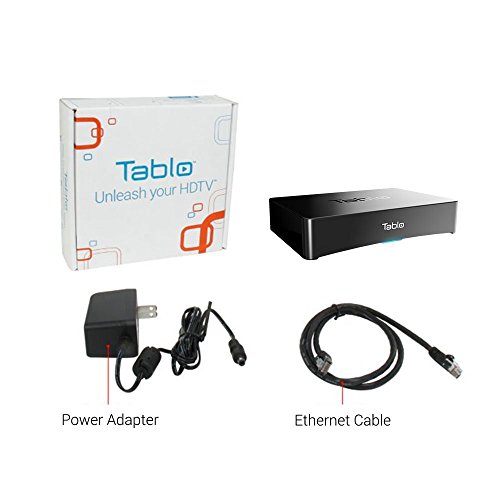
1. Initial investment is not cheap. In addition to the Tablo which was over 200 dollars for the 4 tuner version, I had to buy a separate hard drive since the Tablo has no internal drive, and a good long range antenna since an amplified indoor flat antenna didn't work. Which brings me to the second point.
2. It is highly dependent on the ability of your antenna, and if you are far away from the transmission tower or going through major obstructions, you may need an outside or attic mounted antenna.
Overall it is a solid and viable option for those looking to do away with cable TV or satellite. The whole home aspect of it and WiFi puts it 2 steps above Tivo or any other DVR on the market right now.
I took off one star for 2 reasons:
1. Initial investment is not cheap. In addition to the Tablo which was over 200 dollars for the 4 tuner version, I had to buy a separate hard drive since the Tablo has no internal drive, and a good long range antenna since an amplified indoor flat antenna didn't work. Which brings me to the second point.
2. It is highly dependent on the ability of your antenna, and if you are far away from the transmission tower or going through major obstructions, you may need an outside or attic mounted antenna.
Overall it is a solid and viable option for those looking to do away with cable TV or satellite. The whole home aspect of it and WiFi puts it 2 steps above Tivo or any other DVR on the market right now.
The time is now!
A. Anania✓ Verified Purchase•January 22, 2017
This would seem to be the final piece of the puzzle to allow people to cut the cord and not feel like they are making a huge sacrifice.
Made switch because PS VUE doesn't have local networks and wasn't prepared to continue with prior service provider and wasn't prepared to wait until (if) PS Vue would ever bring Indy stations on. Added this small, out-of-sight device with 4th Gen Apple TV and it gives nearly seamless access to programming choices (when used with PS Vue or similar service). I preferred Apple as connected device over other options because of the speed at which the Apple TV switches between apps. I did not have any problem setting up for use within the house. I noticed when attempting to setup for use outside the home that some tweaking with the router was required, but just required a little extra effort and knowledge to complete. The time has arrived to cut the cord and free yourself from equipment rental and ever-rising costs of traditional programming providers WITHOUT sacrificing features we have come to expect.
Finally, I don't have to rent equipment monthly and have access to my local programming.
Made switch because PS VUE doesn't have local networks and wasn't prepared to continue with prior service provider and wasn't prepared to wait until (if) PS Vue would ever bring Indy stations on. Added this small, out-of-sight device with 4th Gen Apple TV and it gives nearly seamless access to programming choices (when used with PS Vue or similar service). I preferred Apple as connected device over other options because of the speed at which the Apple TV switches between apps. I did not have any problem setting up for use within the house. I noticed when attempting to setup for use outside the home that some tweaking with the router was required, but just required a little extra effort and knowledge to complete. The time has arrived to cut the cord and free yourself from equipment rental and ever-rising costs of traditional programming providers WITHOUT sacrificing features we have come to expect.
Finally, I don't have to rent equipment monthly and have access to my local programming.
Finally delivering on the advertised experience!
simataas✓ Verified Purchase•January 15, 2017
I purchased my Tablo in May of '15. There were some real bumps and bruises during the first year. Specifically, two issues were driving me crazy and prevented me from recommending this product to other would-be cord cutters:
1) I think the Tablo designers didn't anticipate that most people would still want to watch TV on their TV sets (thinking they would move to phones or tablets I guess) and so they hastily slapped a barely usable Roku app together. Aside from its initial lack of features, the Roku app would also freeze and cause a Roku system reboot when advancing past commercials. It was so bad that it was just better to sit through all the commercials than try to fast forward (kind of defeating one of the best features of a DVR). Many, many people complained and reported this issue to Tablo. It took Tablo forever to admit the problem existed, and then they blamed Roku. I finally gave up and stopped following the issue, but somewhere along the line it has been resolved and I haven't seen the problem in months.
2) I could not connect using my PCs. They worked initially and then after a Tablo firmware update they just stopped working. Tablo Customer Service couldn't help me and they frankly just quit trying. Also, I found the email communications to be unacceptably slow & infuriating (they ask me to try something I've already done, I reply I've already done it but did so again per their request and it still doesn't work, they take two days to respond, bang head against the wall, rinse & repeat). I was only able to use Roku and Android devices to manage & view my Tablo content. Then about a month ago I was able to connect again (presumably several firmware updates later the problem was resolved).
Honestly, I believe the product was pushed into the market too soon. Only very patient and tech savvy people were likely to stick with it. I also think this was a conscious business decision by the company and they have well profited from their users (meaning, their early adopters both financed the company by purchasing the product and became free beta testers). I don't think this is wrong per se, but I do think it resulted in a very trying time for their customer base.
Anyway, I held off on writing a negative review, because I had invested so much (4 tuner Tablo, lifetime guide, ran Ethernet cable throughout home, installed a roof tripod and antenna, shielded coax cable, pre-amp, etc.) and I still had high hopes that this product would become what it promised to be. Now with features having been added and the kinks (mostly) being worked out, the Tablo works for me. I expect that features and performance will continue to improve over time.
Now (after much patience and long suffering) I can recommend the product, but the Tablo isn't for everyone - those expecting to just plug it in to their existing infrastructure are likely to be disappointed. I have my Tablo hardwired via Cat5e cable to my router (and all my Roku 3s are hardwired as well). It seems by the reviews that those experiencing the best results are indeed hardwired and not relying on WiFi (although WiFi does work for my phones & tablets). Also, DO NOT BUY THIS PRODUCT UNTIL YOU VERIFY YOU HAVE ACCEPTABLE OTA RECEPTION!! I cannot stress this enough! The Tablo requires a strong signal for acceptable performance. If you cannot get a good strong signal do not bother with this product. I recommend checking out the review by Gregory Buechler on November 1, 2016. His advice mirrors my experience.
I hope Tablo appreciates that I waited to write this review!
1) I think the Tablo designers didn't anticipate that most people would still want to watch TV on their TV sets (thinking they would move to phones or tablets I guess) and so they hastily slapped a barely usable Roku app together. Aside from its initial lack of features, the Roku app would also freeze and cause a Roku system reboot when advancing past commercials. It was so bad that it was just better to sit through all the commercials than try to fast forward (kind of defeating one of the best features of a DVR). Many, many people complained and reported this issue to Tablo. It took Tablo forever to admit the problem existed, and then they blamed Roku. I finally gave up and stopped following the issue, but somewhere along the line it has been resolved and I haven't seen the problem in months.
2) I could not connect using my PCs. They worked initially and then after a Tablo firmware update they just stopped working. Tablo Customer Service couldn't help me and they frankly just quit trying. Also, I found the email communications to be unacceptably slow & infuriating (they ask me to try something I've already done, I reply I've already done it but did so again per their request and it still doesn't work, they take two days to respond, bang head against the wall, rinse & repeat). I was only able to use Roku and Android devices to manage & view my Tablo content. Then about a month ago I was able to connect again (presumably several firmware updates later the problem was resolved).
Honestly, I believe the product was pushed into the market too soon. Only very patient and tech savvy people were likely to stick with it. I also think this was a conscious business decision by the company and they have well profited from their users (meaning, their early adopters both financed the company by purchasing the product and became free beta testers). I don't think this is wrong per se, but I do think it resulted in a very trying time for their customer base.
Anyway, I held off on writing a negative review, because I had invested so much (4 tuner Tablo, lifetime guide, ran Ethernet cable throughout home, installed a roof tripod and antenna, shielded coax cable, pre-amp, etc.) and I still had high hopes that this product would become what it promised to be. Now with features having been added and the kinks (mostly) being worked out, the Tablo works for me. I expect that features and performance will continue to improve over time.
Now (after much patience and long suffering) I can recommend the product, but the Tablo isn't for everyone - those expecting to just plug it in to their existing infrastructure are likely to be disappointed. I have my Tablo hardwired via Cat5e cable to my router (and all my Roku 3s are hardwired as well). It seems by the reviews that those experiencing the best results are indeed hardwired and not relying on WiFi (although WiFi does work for my phones & tablets). Also, DO NOT BUY THIS PRODUCT UNTIL YOU VERIFY YOU HAVE ACCEPTABLE OTA RECEPTION!! I cannot stress this enough! The Tablo requires a strong signal for acceptable performance. If you cannot get a good strong signal do not bother with this product. I recommend checking out the review by Gregory Buechler on November 1, 2016. His advice mirrors my experience.
I hope Tablo appreciates that I waited to write this review!
Page 1 of 4


