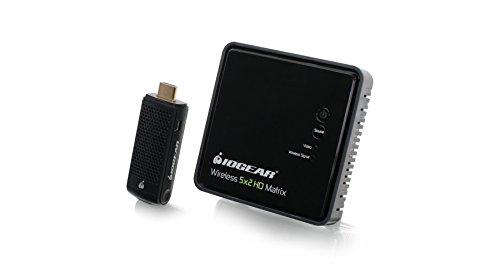
IOGEAR HDMI Wireless Transmitter & Receiver - Full HD 1080p - Up To 30ft - 5.1 Digital Audio - Plug & Play - Wirelessly Connect Laptop - Game Console - HDTV - Projector - GWHD11



Key features
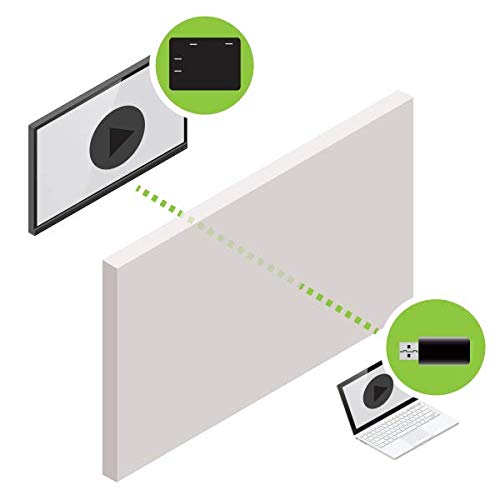
- •Wireless HDMI Audio/video transmitter with receiver kit. For best performance and range: place the receiver where you have a clear view between the transmitter and receiver. Do not install the transmitter/receiver unit behind/below the TV or other metal devices where wireless signal may experience interference.
- •Wireless uncompressed full HD 1080p Audio/video streaming with 3D support up to 30ft
- •Connect and wirelessly transmit content from a laptop, game console, Blu-ray/ DVD player and or set-top box/DVR/cable box
- •Supports 5. 1 Channel digital Audio. Video resolutions: 480p, 720p, 1080i and 1080p
- •Backed by IOGEAR's 1-year and FREE lifetime technical support
- •Scroll down page for additional product content
IOGEAR HDMI Wireless Transmitter & Receiver - Full HD 1080p - Up To 30ft - 5.1 Digital Audio - Plug & Play - Wirelessly Connect Laptop - Game Console - HDTV - Projector - GWHD11
List Price: $334.64$301.18DEALYou Save: $33.46 (10%)
Free shippingFree Returns – 30 daysFree Order CancellationSecure Payment2–3 Days DeliveryGet It October 24, 2026In Stock (30)No marketing spamNo account requiredFulfilment by FedEx / Amazon / UPS / ShipwirePayPal / Card Buyer Protection
Customer Reviews
Reviews sourced from verified Amazon purchasers3.8
out of 5
Based on 10 reviews
5★
70%
4★
30%
3★
0%
2★
0%
1★
0%
Much better than expected!
RobMars✓ Verified Purchase•December 23, 2023
I was very pleasantly surprised at the quality of this item. It's fast, no noticeable lag even when gaming. No glitches and no drop in video quality that I can notice. My transmitter / receiver are only about 20 feet apart with no normal obstructions so I cannot address how it would work at 30 feet passing through a wall. The transmitter is very close to my laser printer however and the signal has to pass through it. I was concerned that there would be an electrical interference problem and I would need to relocate the printer but it has had no affect.My only complaint is that the cost of extra transmitters is so high... $180 for the receiver and transmitter together and $112 for the transmitter alone. Now that I have it I wish I had another transmitter however I can make do with one.
Easy as pie, and just works.
Steve✓ Verified Purchase•November 8, 2023
Plug it in and it works. No messing around with settings, no connection issues.
Unlike some other units, this comes with everything you need. You don't have to provide your own cables/ or power adapters. It's got everything in the box.
Connect the receiver to the TV with HDMI and use the included power cable to plug into the wall outlet. Plug the transmitter into your HDMI laptop, plug in the included power cable into the transmitter and a USB port on the laptop. BAMB! You're casting.
Unlike some other units, this comes with everything you need. You don't have to provide your own cables/ or power adapters. It's got everything in the box.
Connect the receiver to the TV with HDMI and use the included power cable to plug into the wall outlet. Plug the transmitter into your HDMI laptop, plug in the included power cable into the transmitter and a USB port on the laptop. BAMB! You're casting.
Very happy with the results!
Techno T✓ Verified Purchase•November 6, 2023
I use this in a presentation space so coworkers and clients can plug their laptops into our A/V setup. This was very easy to setup and was essentially plug and play. When I first plugged it in I did have to press the "I" button on the transmitter for it to sync with the receiver, but once I did that it came up immediately. The video signal and sound was perfect. I've had it up and running for a few weeks now and sometimes for long presentations (3-4 hours) and it hasn't had a hiccup. It's currently about 15 ft away from the receiver and transmits through two walls.
I have used it with straight HDMI into the laptop as well as with this VGA to HDMI converter: Etekcity® VGA Audio to HDMI 720p/1080p Scaler Converter Adapter Box for Laptop/PC Full HD HDTV with DC Power and no issues!
My personal recommendation for powering this pair would be always use the A/C adapter for the receiver unit. For the transmitter use either the USB plug for a laptop or the A/C adapter if it's a more permanent device that you won't be plugging and unplugging all the time (Blu-ray player, console, etc).
I have used it with straight HDMI into the laptop as well as with this VGA to HDMI converter: Etekcity® VGA Audio to HDMI 720p/1080p Scaler Converter Adapter Box for Laptop/PC Full HD HDTV with DC Power and no issues!
My personal recommendation for powering this pair would be always use the A/C adapter for the receiver unit. For the transmitter use either the USB plug for a laptop or the A/C adapter if it's a more permanent device that you won't be plugging and unplugging all the time (Blu-ray player, console, etc).
Perfect for office conference rooms and training
Doug M✓ Verified Purchase•October 31, 2023
I would give this 10 stars if I could. This set was bought to use in our conference room at work and it works extremely well. I have tested it at 30 feet and it still streams perfectly for office use. I use it several times a week for presentations, spreadsheet reviews and video training. When playing videos from the internet or from local hard drive, there is no delays, no ghosting, no nothing - it displays like it is directly connected to the TV. I have this attached to a 70" LED flat screen TV and is a fabulous to no longer have monitor cable wires dangling across the conference room table. I had to buy a couple of adapter plugs, as my laptop does not have an HDMI or DVI port - I bought a VGA to HDMI adapter plug for about $20 and the whole thing works great.
would recommend if you are not planning on being too far from monitor
Blush Novelties ✓ Verified Purchase•October 29, 2023
been using this product for a few weeks now. the setup was easy, although, i must share i am pretty tech saavy. i keep my laptop about 8 feet from the Monitor . so far it is pretty stable. i tried moving to 15 feet away and thats when it starts to become unstable. Product is as described. i would recommend it if you are looking for a product to rid yourself of cables.
Page 1 of 2