Brother P-Touch Label Maker, PC-Connectable Labeler, PTD600, Color Display, High-Resolution PC Printing, Black, Black/Gray
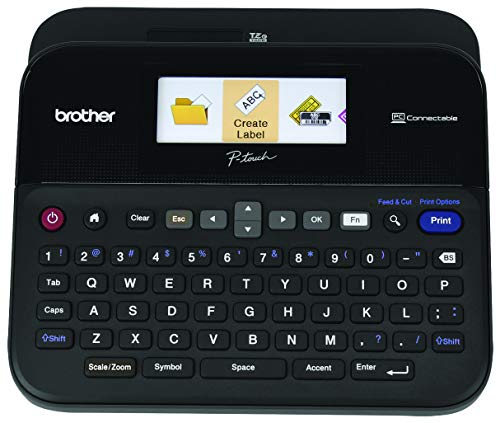


Key features
- •Smart Compact Design With Large Keyboard and Convenient Top Loading Tape Design
- •Full Color, High Resolution Display With Backlight
- •Create Labels Using The Wide Easy Type Keyboard or Connect To A PC or Mac For Additional Functionality
- •Includes AC Adapter or Purchase Batteries For On The Go Use
- •2 Year Limited Warranty and Free Phone Support For The Life Of Your Product
Brother P-Touch Label Maker, PC-Connectable Labeler, PTD600, Color Display, High-Resolution PC Printing, Black, Black/Gray
List Price: $248.02$223.22DEALYou Save: $24.80 (10%)
Free shippingFree Returns – 30 daysFree Order CancellationSecure Payment2–3 Days DeliveryGet It October 24, 2026In Stock (6)No marketing spamNo account requiredFulfilment by FedEx / Amazon / UPS / ShipwirePayPal / Card Buyer Protection
Customer Reviews
Reviews sourced from verified Amazon purchasers4.7
out of 5
Based on 10 reviews
5★
100%
4★
0%
3★
0%
2★
0%
1★
0%
This thing is amazing!
TerryM✓ Verified Purchase•September 19, 2023
Acts like a good ole P-touch when used alone. But add a computer via USB or Bluetooth link, and it's given superpowers. Prints using any font on your computer. You want Bodoni MT Condensed? You got it. Save any of the design label files you've made. You can reuse them as is, or build on them as templates. I can't think of a useful feature it doesn't have. Worth the price!
Perfect purchase.
Duane Herman✓ Verified Purchase•August 2, 2023
Works great, no problems with it, already used 6 sets of tapes. Love the versatility in different size and color of tapes.
simply the best
Greg P.✓ Verified Purchase•July 31, 2023
I have used the P-Touch printers for years at work and home. Bought this one for the office and it is better than the previous models. Excellent product. Even when i use the 'non brand name tapes', this product produces great labels.
Works great.
Nancy Wheeler✓ Verified Purchase•July 22, 2023
We have this exact model at work, and it gets alot of use. It's been working great for us for well over a year, with daily use. So I bought the same one to use at home. So far, it's great.
Easy to use and versatile label maker
Steven✓ Verified Purchase•July 19, 2023
The media could not be loaded. Overall, I really like many aspects of this label maker. It is my first Brother label maker, but I've I had experience with other brands. The difference was that they all required a computer to use. I tested this label maker with the provided sample labels using different templates. I printed directly from the label maker, via Bluetooth with an Android phone, iPad, and a Windows computer. The mobile app is called iPrint&Label and the desktop software is called P-Touch Editor 6. Functionality between mobile and desktop was similar, but as you can imagine, the desktop app was more robust.
The case that came with it was functional and there was space for the sample labels, the printer, and the ac plug. You can choose to use six double batteries (not included) instead if you need a more portable solution.
Build quality for the label maker itself is solid. It is a matte plastic with a little bit of a sheen to it. I didn't notice any fingerprints on it. The keys felt good, but they have a little too much side to side movement for me. Hopefully it won't be an issue in the long run.
The print quality was mostly good, a font did look a little jagged when printed depending on the template chosen. This only showed up on one label out 30. For me it wasn't a deal breaker and I'll do more testing to see if it comes up again. I use the label maker for my photography and video gear, but also use it for some additional items around the house. To peel off the label, turn it over and separate the two part split on the bottom. I did try readjusting the positioning of a label that I put on a case and it came up easily. To be fair, I did it within a short amount of time and not after a day or two.
In terms of sound while printing, it is noticeable for sure, but I didn't find it to be excessive with regard to volume. I would definitely recommend this to people who like the flexibility of printing without a computer, even though the desktop app does work with Mac OS and Windows at the time of this review. It will definitely take time to work through all of the templates and maximize all of the available options.
The case that came with it was functional and there was space for the sample labels, the printer, and the ac plug. You can choose to use six double batteries (not included) instead if you need a more portable solution.
Build quality for the label maker itself is solid. It is a matte plastic with a little bit of a sheen to it. I didn't notice any fingerprints on it. The keys felt good, but they have a little too much side to side movement for me. Hopefully it won't be an issue in the long run.
The print quality was mostly good, a font did look a little jagged when printed depending on the template chosen. This only showed up on one label out 30. For me it wasn't a deal breaker and I'll do more testing to see if it comes up again. I use the label maker for my photography and video gear, but also use it for some additional items around the house. To peel off the label, turn it over and separate the two part split on the bottom. I did try readjusting the positioning of a label that I put on a case and it came up easily. To be fair, I did it within a short amount of time and not after a day or two.
In terms of sound while printing, it is noticeable for sure, but I didn't find it to be excessive with regard to volume. I would definitely recommend this to people who like the flexibility of printing without a computer, even though the desktop app does work with Mac OS and Windows at the time of this review. It will definitely take time to work through all of the templates and maximize all of the available options.
Page 1 of 2


