AC Infinity AIRPLATE T7, Quiet Cooling Fan System 12" with Thermostat Control, for Home Theater AV Cabinets



Key features
- •An ultra quiet fan system designed for cooling cabinets that requires minimal noise.
- •Features an onboard processor that provides a digital readout of the cabinets temperatures.
- •Programming includes thermostat control, fan speed control, and SMART energy saving mode.
- •Fan and controller contain CNC machined aluminum frames with a modern brushed black finish.
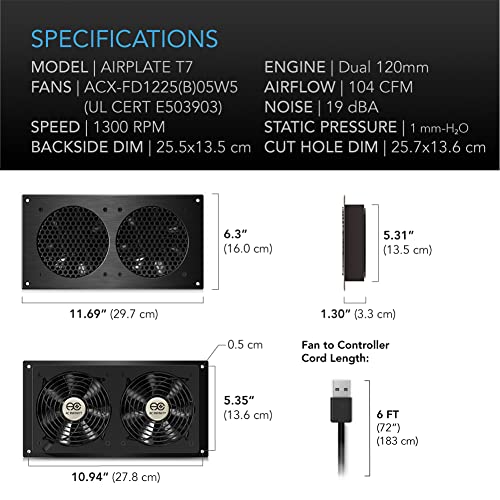
- •Dimensions: 11.7 x 6.1 x 1.3 in. | Airflow: 104 CFM | Noise: 19 dBA | Bearings: Dual Ball
AC Infinity AIRPLATE T7, Quiet Cooling Fan System 12" with Thermostat Control, for Home Theater AV Cabinets
List Price: $130.94$117.85DEALYou Save: $13.09 (10%)
Free shippingFree Returns – 30 daysFree Order CancellationSecure Payment2–3 Days DeliveryGet It October 25, 2026In Stock (1)No marketing spamNo account requiredFulfilment by FedEx / Amazon / UPS / ShipwirePayPal / Card Buyer Protection
Customer Reviews
Reviews sourced from verified Amazon purchasers4.6
out of 5
Based on 10 reviews
5★
80%
4★
0%
3★
10%
2★
10%
1★
0%
Display-Grade Appearance
hillbilly willie•August 10, 2017
Sometimes reviews get commingled with similar products by a seller or manufacturer. FWIW, this is about the Airplate T7 model.
I got this today (shipped fast) and first noted the quality packaging. Everything fit snugly and there is a felted layer to protect the finish. I suppose it could've just as well been a plastic bag, but it's a nice touch. The finish..I guess it anodizing..was uniform in color and unblemished. I realize the normal installation of the fans is hidden, but there is nothing offensive about the design, matte black color or construction that would bother me if exposed. The fastener holes are counter-sunk with matching fasteners included. A bench test shows all functions correctly; hopefully all will be the same once installed. The templates are a nice addition, however, I used the dimensions from AC Infinity's website and made a backer out of plywood and found their dimensions perfect.So, no problems if one wants to get an opening established while the item is in transit.
If there was any issue to take, it would be that I think the white escutcheons ought to be a no-cost choice. Perhaps painting is more costly than anodizing? No matter; it's not an issue. The controller has a clean, contemporary look and even in black on a white wall is acceptable.
I got this today (shipped fast) and first noted the quality packaging. Everything fit snugly and there is a felted layer to protect the finish. I suppose it could've just as well been a plastic bag, but it's a nice touch. The finish..I guess it anodizing..was uniform in color and unblemished. I realize the normal installation of the fans is hidden, but there is nothing offensive about the design, matte black color or construction that would bother me if exposed. The fastener holes are counter-sunk with matching fasteners included. A bench test shows all functions correctly; hopefully all will be the same once installed. The templates are a nice addition, however, I used the dimensions from AC Infinity's website and made a backer out of plywood and found their dimensions perfect.So, no problems if one wants to get an opening established while the item is in transit.
If there was any issue to take, it would be that I think the white escutcheons ought to be a no-cost choice. Perhaps painting is more costly than anodizing? No matter; it's not an issue. The controller has a clean, contemporary look and even in black on a white wall is acceptable.
Important note on using "Smart Mode"
A. Pochanayon•July 15, 2017
This ventilation system with fan and fan controller are very quiet and move a lot of air.
I recommend using them in the "Smart Mode" with 4F increments for good air circulation with the minimum amount of noise. This is the quietest way to run your cooling fans and is virtually silent in most cases.
However, you should realize that the "Smart Mode" turns on at a temperature 20F lower than the set point. So if your house is at 70F (room temp), the fans will run all the time with the default setting of 85F (in fact they will run until it gets below 65F). I recommend that you set a control temperature of 95F-100F when using the "Smart Mode" with the default 4F stepping. If you use the 2F stepping, you will probably want to set a control temperature of 85-95F.
I recommend using them in the "Smart Mode" with 4F increments for good air circulation with the minimum amount of noise. This is the quietest way to run your cooling fans and is virtually silent in most cases.
However, you should realize that the "Smart Mode" turns on at a temperature 20F lower than the set point. So if your house is at 70F (room temp), the fans will run all the time with the default setting of 85F (in fact they will run until it gets below 65F). I recommend that you set a control temperature of 95F-100F when using the "Smart Mode" with the default 4F stepping. If you use the 2F stepping, you will probably want to set a control temperature of 85-95F.
I also wanted an intake / output fan design to be sure I could keep everything cool in the summer especially for a small space r
D. Duncan•April 28, 2017
These are outstanding fans. I originally purchased the S7 and as I added equipment to my cabinet, I added the T7 for the thermostat control. I also wanted an intake / output fan design to be sure I could keep everything cool in the summer especially for a small space running around 900 watts. I work in a data center and equipment cooling is critical. This requires tons of air conditioning and every piece of equipment has at least a fan but most have multiple fans that spin at high RPM, screaming like jet engines. Multiply that times over three thousand and you can imagine the noise. I knew that sound was going to be deal killer for a media cabinet. Luckily I found the Airplates and took a chance - I am very thankful I did because they are super quiet, controllable and does an outstanding job of cooling. My refrigerator is louder than the fans. I would also like to mention that AC Infinity support is surprisingly - highly responsive, helpful and know their products. Very rare these days.
Loved this product
T. Blonski•March 2, 2017
Loved this product, we bought this model and the S7 and then daisy chained them. The install was easy, and it looks good, loved the plastic template that allowed me to tape it to the cabinet so I can easily cut out and drill the appropriate sized holes, although the the template for control box didn't account for the screws in the back of the unit so I had to finagle it just a hair, no biggie. Either way you can control when and how strong the fans turn on at a touch of a button, can't say enough about this device and how I feel it protects my AV equipment from heat.
Effective and well made, but too noticeable for me at anything over LOW fan speed.
Christopher Graham•May 1, 2016
Effective and well made, but too noticeable for me at anything over LOW fan speed.
I have a Denon AVR S900W installed in an open-front console. It would get 120F+ under casual operation, there simply wasn't enough ventilation, and the AVR lacks any active cooling (fan). Unfortunately it also lacks a switched AC jack like the good 'ole days, and even the USB port on the front doesn't have switched power for some reason. So I needed an active cooling solution that could intelligently turn itself on and off somehow and found this thermal based unit.
Install was fairly easy with the included templates and well made metal chassis. However, I found the mounting screw holes located too close to the cut-out edges. It didn't prevent me from installing, but made it slightly more challenging.
I started with SMART mode as that seems the most ideal from a cooling perspective. But I struggled for over a week trying to find the right temp sensor location (ideally right on top of the AVR since that's the target I'm trying to cool) and temp threshold that would provide the best cooling with the least amount of noise annoyance to me. I never was successful as it's audibly obvious whenever the unit cycles from off, to low, or from low to medium, and any other speed change. And it had no buffer between speed cycles, it would throttle up to the speed, stay there for a couple seconds, throttle back down for 5 seconds, throttle back up, and keep cycling like that constantly which was audibly annoying to listen to. Additionally, anything speed other than LOW was simply too audible for me, likely due to my open front console, perhaps if I had a fully enclosed consoles / cabinet I wouldn't notice the noise? But mostly it was the constant changing in speed that caused it to be noticeable.
Anyway, I've ended up setting it to AUTO with a temp threshold of 90F and the speed fixed to LOW speed. So, now I turn on the AVR, the fans come on pretty quickly, and stay on low the entire time, and eventually turn off after the AVR is shut off for a while. The AVR isn't a cool as when the fans are allowed to run on med / high, but it still remains cool. And I don't even notice the fan noise any longer.
Conclusion: mission accomplished. I just wish it was quieter at higher speeds.
I have a Denon AVR S900W installed in an open-front console. It would get 120F+ under casual operation, there simply wasn't enough ventilation, and the AVR lacks any active cooling (fan). Unfortunately it also lacks a switched AC jack like the good 'ole days, and even the USB port on the front doesn't have switched power for some reason. So I needed an active cooling solution that could intelligently turn itself on and off somehow and found this thermal based unit.
Install was fairly easy with the included templates and well made metal chassis. However, I found the mounting screw holes located too close to the cut-out edges. It didn't prevent me from installing, but made it slightly more challenging.
I started with SMART mode as that seems the most ideal from a cooling perspective. But I struggled for over a week trying to find the right temp sensor location (ideally right on top of the AVR since that's the target I'm trying to cool) and temp threshold that would provide the best cooling with the least amount of noise annoyance to me. I never was successful as it's audibly obvious whenever the unit cycles from off, to low, or from low to medium, and any other speed change. And it had no buffer between speed cycles, it would throttle up to the speed, stay there for a couple seconds, throttle back down for 5 seconds, throttle back up, and keep cycling like that constantly which was audibly annoying to listen to. Additionally, anything speed other than LOW was simply too audible for me, likely due to my open front console, perhaps if I had a fully enclosed consoles / cabinet I wouldn't notice the noise? But mostly it was the constant changing in speed that caused it to be noticeable.
Anyway, I've ended up setting it to AUTO with a temp threshold of 90F and the speed fixed to LOW speed. So, now I turn on the AVR, the fans come on pretty quickly, and stay on low the entire time, and eventually turn off after the AVR is shut off for a while. The AVR isn't a cool as when the fans are allowed to run on med / high, but it still remains cool. And I don't even notice the fan noise any longer.
Conclusion: mission accomplished. I just wish it was quieter at higher speeds.
Page 1 of 2