Dell E515dw Monochrome Laser Multifunction Printer
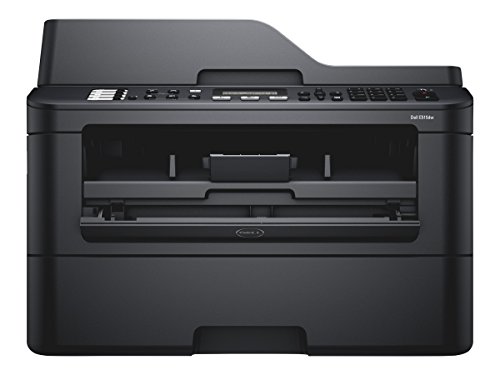


Key features
- •Multifunction Devices: Copier/Fax/Printer/Scanner
- •Recommended Use: Plain Paper Print
- •Monochrome Laser Printers
- •Maximum Mono Print Speed (ppm): 27
Dell E515dw Monochrome Laser Multifunction Printer
List Price: $298.23$268.41DEALYou Save: $29.82 (10%)
Free shippingFree Returns – 30 daysFree Order CancellationSecure Payment2–3 Days DeliveryGet It October 25, 2026In Stock (3)No marketing spamNo account requiredFulfilment by FedEx / Amazon / UPS / ShipwirePayPal / Card Buyer Protection
Customer Reviews
Reviews sourced from verified Amazon purchasers4.0
out of 5
Based on 10 reviews
5★
50%
4★
10%
3★
10%
2★
0%
1★
30%
Junkyard dog
Ricardo Wu•October 3, 2017
Bought the E515dw printer with high. hopes for wireless connectivity. First unit sent was defective. Reconditioned unit sent as replacement, first red flag. Worked fine after. I called Tech Support ( an excellent group and very skilled) and it took one of their techs an hour to complete setup. Second Red flag.Unit became unresponsive after 4 - 6 weeks and has continued to fail every so often. The only redeeming feature is Tech Support who always find a fix
So I'm shopping for a new printer and it won't be Hp.or Dell. Sad to see junk foisted off on the public.
Update Feb.19,2018 The periodic failures didn't stop when I took it off the network but it runs longer between collapsing.. The cable connection to the printer really was an improvement but I bought the printer as a Network printer and I might add, exactly as advertised. My final call to Tech Support (didn't know at the beginning it was my final call) went badly from the answer by Dell. Such a snide tone of voice that I was sure iy was my mistake. I explained the printer had failed again and needed help. Next question? Do you want premium support for x incidents or the one incident fix with a 24-hour warranty.
Whoa! I reminded this person of the 20 service calls, etc. His response was too bad, sorry for that but you out of warranty. What plan do you wish to purchase? Went through it again and told the rep I had been instructed by last rep to pass along case number so I wouldn't get charged.for future help. All I got was "which plan do you wish to purchase?" I inquired,something like are you deaf? Well the snide meter vented smoke and the snotty meter melted. As I opened my mouth to ask his name and ID number, he hung up. I've met this guy before or one like him. Dell is all sweetness and light to a point then its the hard guy.
Epilogue:I had direct desk and voicemail numbers for the 3 techs worked with most successfully. Called my buds and all 3 lines disconnected. Make your own decision but I think Dell knew this was a dog from the beginning, although it's just my humble opinion. .
So I'm shopping for a new printer and it won't be Hp.or Dell. Sad to see junk foisted off on the public.
Update Feb.19,2018 The periodic failures didn't stop when I took it off the network but it runs longer between collapsing.. The cable connection to the printer really was an improvement but I bought the printer as a Network printer and I might add, exactly as advertised. My final call to Tech Support (didn't know at the beginning it was my final call) went badly from the answer by Dell. Such a snide tone of voice that I was sure iy was my mistake. I explained the printer had failed again and needed help. Next question? Do you want premium support for x incidents or the one incident fix with a 24-hour warranty.
Whoa! I reminded this person of the 20 service calls, etc. His response was too bad, sorry for that but you out of warranty. What plan do you wish to purchase? Went through it again and told the rep I had been instructed by last rep to pass along case number so I wouldn't get charged.for future help. All I got was "which plan do you wish to purchase?" I inquired,something like are you deaf? Well the snide meter vented smoke and the snotty meter melted. As I opened my mouth to ask his name and ID number, he hung up. I've met this guy before or one like him. Dell is all sweetness and light to a point then its the hard guy.
Epilogue:I had direct desk and voicemail numbers for the 3 techs worked with most successfully. Called my buds and all 3 lines disconnected. Make your own decision but I think Dell knew this was a dog from the beginning, although it's just my humble opinion. .
Send back immediately if printer will not stay connected to your network...
Katsujinken•September 16, 2017
Have spent over a dozen hours with Dell tech support trying to determine why this particular printer will not hold our wifi password. Have set static IP, have reset router, have called ISP, have had at least six Dell techs take over the system and try to address the issue. They even sent a second printer; same problem. No issue with any other device on our network, including my son's old Epson printer, which just keeps chugging along--wirelessly. Dell techs sent us to customer support, who sent us back to tech support, etc. They've finally said it's our problem, even though it's still under warranty and we still cannot print... bad form Dell.
Finally - a printer I can depend on!
Kindle Customer•June 3, 2017
This printer has lived up to my expectations. The only tough part was getting it online. I ended up calling and even that process took quite some time! But, it is an excellent printer. I finally got tired of ink jet printers that fail. I spent more on the printer, but now I have a great air printer that prints nice clean pages. No complaints at all!
Great all in one
William J. Getty•March 1, 2017
This is a great all in one printer, easy t set up. Only issue is if you use this to print checks as we do it will not do them from the top of the stack. The printing happens on the bottom of the paper as loaded in the tray so if you are using pre-printed and numbered checks you need to load them one at a time to keep them in order or shuffle them so the lower numbers are on the bottom of the stack. . Not a deal killer for a small business like ours.
Great Full Featured Multifunction Printer/Copier/Scanning/Fax With A Bargain Price
Chris L.•February 23, 2017
This is a very easy to use printer, copier, scanner, fax. Using the included software allowed me to have three computers and two Surface tablets setup to use all features very rapidly. All features including faxing are available over the network. While faxing is not needed very often in recent years, it is nice to have the ability to fax both a hard copy or a file on your computer with no hassle. The scanning quality is very solid and the scanning ability was automatically integrated into several applications including the Windows Scan app, Paint and Photoshop. If you leave the software configured for it, updates will automatically download and prompt you to install them. This can be handy as the driver updates often lead to increases in stability while so far not changing anything functionally.
As much as I am very pleased with this unit, there were two minor issues that made me drop a star. First, it is very easy to get something such as paper fuzz on the roller for the copier/scanning which leads to long lines on the copy/scan. The unit is made so that cleaning this off is very easy and requires no disassembly but it still happens fairly often when using the feeder to fax, scan or copy. The larger hiccup, which is also easily resolved, is that the unit will occassionally become unavailable. This seems to happen in bursts where I will go weeks with no problem and then have the problem a few times in a day. When I get an error that the printer is unavailable or I cannot scan all I need to do is power off/on the device and everything works fine typically without even losing the print job. Checking various support forums I see this is a common glitch and that there is not a fix presently other than powering cycling.
As much as I am very pleased with this unit, there were two minor issues that made me drop a star. First, it is very easy to get something such as paper fuzz on the roller for the copier/scanning which leads to long lines on the copy/scan. The unit is made so that cleaning this off is very easy and requires no disassembly but it still happens fairly often when using the feeder to fax, scan or copy. The larger hiccup, which is also easily resolved, is that the unit will occassionally become unavailable. This seems to happen in bursts where I will go weeks with no problem and then have the problem a few times in a day. When I get an error that the printer is unavailable or I cannot scan all I need to do is power off/on the device and everything works fine typically without even losing the print job. Checking various support forums I see this is a common glitch and that there is not a fix presently other than powering cycling.
Page 1 of 2