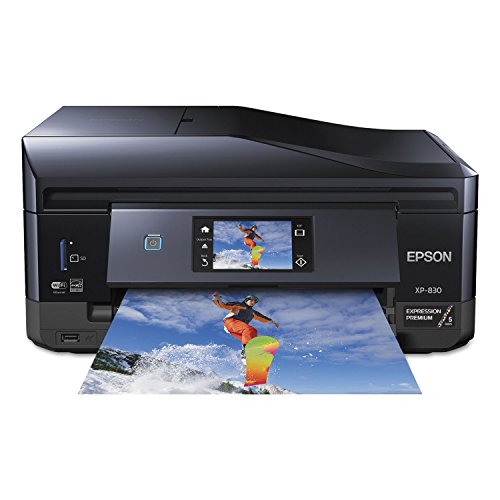
Epson XP-830 Wireless Color Photo Printer with Scanner, Copier & Fax, Amazon Dash Replenishment Ready, C11CE78201, 1


Key features
- •Superior photo quality - vivid, bright photos and sharp text, with five-color inks
- •Full-featured - 30-page Auto Document Feeder; auto 2-sided print/copy/scan/color fax; auto-extend/retract output tray
- •Create - print on specialty paper1 and DVDs; plus, lab-quality, borderless photos up to 8" x 10"
Epson XP-830 Wireless Color Photo Printer with Scanner, Copier & Fax, Amazon Dash Replenishment Ready, C11CE78201, 1
List Price: $810.44$729.40DEALYou Save: $81.04 (10%)
Free shippingFree Returns – 30 daysFree Order CancellationSecure Payment2–3 Days DeliveryGet It October 25, 2026In Stock (4)No marketing spamNo account requiredFulfilment by FedEx / Amazon / UPS / ShipwirePayPal / Card Buyer Protection
Customer Reviews
Reviews sourced from verified Amazon purchasers3.6
out of 5
Based on 10 reviews
5★
20%
4★
10%
3★
30%
2★
20%
1★
20%
Fine for a year, but pooped out at 1 year, 3 months
C.S.✓ Verified Purchase•March 25, 2017
Fine for the first year and 3 months. It just decided to randomly give me the error message that reads, "Ink cartridge is not recognized. please replace the cartridge PBK 410, 410XL." I've looked at youtube, contacted Epson and still waiting to hear back after 3 days, and I'm still nowhere with the piece of garbage. Doesn't work any better with printing pictures either. I thought this would be better than HP, but they all seem to be junk after a year, and you have to take out a small loan just to buy the never lasting ink cartridges.
mostly easy to use, won't print if even one ink cartridge runs out
MR✓ Verified Purchase•February 28, 2017
Amended - this printer also will NOT print if any one of the ink cartridges is out, so revising the rating to 2 stars. If you run out of "Photo black" but the regular black is full, it still will not print anything, even just a regular, black font text document.
Also, it is really difficult to get this to work for scanning with windows 8, and just basic setup with W8 is a pain as well. Works ok with W10.
Overall prints well, mostly easy to use, I would give it more stars aside from that the ADF (automatic document feeder) tray constantly gets stuck / jams. It won't put more than one page through without jamming up, sometimes not even one, so we just about always need to use the scanner glass to scan one page at a time
Also, it is really difficult to get this to work for scanning with windows 8, and just basic setup with W8 is a pain as well. Works ok with W10.
Overall prints well, mostly easy to use, I would give it more stars aside from that the ADF (automatic document feeder) tray constantly gets stuck / jams. It won't put more than one page through without jamming up, sometimes not even one, so we just about always need to use the scanner glass to scan one page at a time
Printer stops when ink is low, and failed reads new Epson cartridges as empty. Avoid it.
Mark in Palo Alto✓ Verified Purchase•February 15, 2017
Its a good printer, but the print cartridges are a nightmare. When the printer senses that the ink is getting low, the printer simply stops working until you change the print cartridge. It doesn't matter how important your document is, or the fact that the prints are still clear, the printer simply doesn't work until you change the cartridge. So, I bought a bunch of Epson cartridges (Epson, not third party) to have on hand. Then the real nightmare began. I put in a brand new Epson shrink wrapped cartridge, hit proceed, and the printer responds with a message that the brand new Epson cartridge is low on ink, and that I need to change the cartridge.
That the Epson stops working any time it thinks a cartridge is low is bad enough, the fact that the printer reads new Epson made cartridges as empty is infuriating.
That the Epson stops working any time it thinks a cartridge is low is bad enough, the fact that the printer reads new Epson made cartridges as empty is infuriating.
My setup was flawless on a mac running OS X 10.10
Nameless Faceless One✓ Verified Purchase•November 17, 2016
My setup was flawless on a mac running OS X 10.10. I went right to the website and downloaded the installer to insure I had the latest version of everything. It installed to CUPS without incident. All of the options worked - fax, scan to pdf via the ADF, print plain, print photo, print CD. My first complaint? It prints the fax reports using color. uh, no thanks, Epson! I have never had a printer install so fast and easy ever. Print quality is amazing. I am replacing my Brother all-in-one since they dropped printing to CD/DVD's in their latest model and their print quality looks like something from the 80's.
I have a few suggestions for those struggling with this model. First, you're buying a printer which does scanning, faxing, print to paper, print to photo, scan to cloud, email printing, print from memory cards so, yes, you can expect to read the manual. Gripes I see in the feedback are it won't print if the color runs out. yes it will - read the manual. Select plain paper, greyscale, and enable the option in the utility program. It won't print cardstock? yes it will - read the manual. There's a slot which opens in the rear for thick paper and there's a thick paper setting if it smears.
If it's dumping ink on your paper, you have the wrong paper or the wrong settings. You've got draft, fast economy, economy, normal, fine, quality, and best quality. Nudge down the quality and don't select photo paper if you've got cheap paper - and, use good paper. Just because you put it on "best quality" doesn't mean it will be at its best unless you've got good paper in it.
Don't put non-Epson ink in an Epson printer. Why are you buying Epson? You're buying it for their ink technology. If you think it's too expensive, buy something else. yes, you will spend the price of the printer in ink during the first year, probably. That's not because the ink is that expensive it's because Epson gives away the printer at cost to get you to buy their ink.
Wireless networking does not work. Give it up. If you can print reliably to a wireless network without rebooting or cycling power on the printer and/or router than you are a genius. Give yourself a pat on the back. I'm using a wired Ethernet connection with a static IP address. USB... avoid it. It's too flaky, especially on a mac.
Printing to CD's is a pain? I don't think so. It's just like my Brother printer - works better than my Brother printer. yea, it doesn't do the automatic tray thing like the Artisan which I'm not missing because I never owned one. I like the automatic output tray much better. I got tired of picking up printouts off the floor.
Scan and double-sided printing of smaller than letter size? No, you need a high end scanner to scan receipts and I've never seen double-sided printing to card stock. I didn't expect this printer to handle that.
Support for XP? Get real. That's dead. Support for Win10 or even OS X 10.11? You can't expect printer manufacturers to keep pace with the operating system De jour. Once a new operating system comes out the older printers will break and newer printers will be buggy at best. tip? Don't install the latest operation system.... ever. What does that get you? Just aggravation. You should be 8-12 months behind the latest operating system for the least head-ache's.
Software and firmware updates? I ran the updater right after I installed and tested everything. It told me that updates were available for *everything*. I declined. If everything works perfectly then I have ZERO things to gain by updating. I can only break it or introduce problems. Why are you updating? Don't update your software or firmware unless you've got a darn good reason, like you foolishly installed 10.11 and broke everything.
Do a test print once a week. I made up an image of RGB/CMYK and a sample photograph. Will that waste ink? Only if unclogging print heads is something you really enjoy doing. Consider it a pet which needs care and feeding once a week. If it sounds like too much maintenance than Epson really isn't for you. You're getting photo quality plus some nice all-in-one features. Buy a dust cover for it.
A few dings - doesn't hold a lot of paper, although it has a second tray for small photo paper which is keen. There is a web interface which doesn't have all the settings forcing me to hunch over the LCD screen and go thru them all. And, the duplexer arrived broken (sigh). After I set everything up I see a bit of plastic in the bottom of the box and wondered where it went. That explained why I was getting some paper jams. I'm hoping Epson can just send me a new part rather than lugging the whole thing back to UPS to return it. I'm tempted to get a roll of duct tape, figuring this probably won't be the last printer I buy.
Update 11/23/16 - Frustration starts to build. I contacted Epson about the broken duplexer. They sent me a form letter response back without reading my problem, offering for me to ship the printer back if it is still in warranty. That's not happening. I'm not lugging a 21lb printer up and down a flight of stairs plus boxing and unboxing it, plus shipping just to have Epson send me a new duplexer. Given the time and expense, I opted to just purchase a new duplexer which was less than a box of ink. Minus 1 star for lack of support.
I also noticed that some of the color management dialogs are missing for this printer such as advanced black and white printing.
I have a few suggestions for those struggling with this model. First, you're buying a printer which does scanning, faxing, print to paper, print to photo, scan to cloud, email printing, print from memory cards so, yes, you can expect to read the manual. Gripes I see in the feedback are it won't print if the color runs out. yes it will - read the manual. Select plain paper, greyscale, and enable the option in the utility program. It won't print cardstock? yes it will - read the manual. There's a slot which opens in the rear for thick paper and there's a thick paper setting if it smears.
If it's dumping ink on your paper, you have the wrong paper or the wrong settings. You've got draft, fast economy, economy, normal, fine, quality, and best quality. Nudge down the quality and don't select photo paper if you've got cheap paper - and, use good paper. Just because you put it on "best quality" doesn't mean it will be at its best unless you've got good paper in it.
Don't put non-Epson ink in an Epson printer. Why are you buying Epson? You're buying it for their ink technology. If you think it's too expensive, buy something else. yes, you will spend the price of the printer in ink during the first year, probably. That's not because the ink is that expensive it's because Epson gives away the printer at cost to get you to buy their ink.
Wireless networking does not work. Give it up. If you can print reliably to a wireless network without rebooting or cycling power on the printer and/or router than you are a genius. Give yourself a pat on the back. I'm using a wired Ethernet connection with a static IP address. USB... avoid it. It's too flaky, especially on a mac.
Printing to CD's is a pain? I don't think so. It's just like my Brother printer - works better than my Brother printer. yea, it doesn't do the automatic tray thing like the Artisan which I'm not missing because I never owned one. I like the automatic output tray much better. I got tired of picking up printouts off the floor.
Scan and double-sided printing of smaller than letter size? No, you need a high end scanner to scan receipts and I've never seen double-sided printing to card stock. I didn't expect this printer to handle that.
Support for XP? Get real. That's dead. Support for Win10 or even OS X 10.11? You can't expect printer manufacturers to keep pace with the operating system De jour. Once a new operating system comes out the older printers will break and newer printers will be buggy at best. tip? Don't install the latest operation system.... ever. What does that get you? Just aggravation. You should be 8-12 months behind the latest operating system for the least head-ache's.
Software and firmware updates? I ran the updater right after I installed and tested everything. It told me that updates were available for *everything*. I declined. If everything works perfectly then I have ZERO things to gain by updating. I can only break it or introduce problems. Why are you updating? Don't update your software or firmware unless you've got a darn good reason, like you foolishly installed 10.11 and broke everything.
Do a test print once a week. I made up an image of RGB/CMYK and a sample photograph. Will that waste ink? Only if unclogging print heads is something you really enjoy doing. Consider it a pet which needs care and feeding once a week. If it sounds like too much maintenance than Epson really isn't for you. You're getting photo quality plus some nice all-in-one features. Buy a dust cover for it.
A few dings - doesn't hold a lot of paper, although it has a second tray for small photo paper which is keen. There is a web interface which doesn't have all the settings forcing me to hunch over the LCD screen and go thru them all. And, the duplexer arrived broken (sigh). After I set everything up I see a bit of plastic in the bottom of the box and wondered where it went. That explained why I was getting some paper jams. I'm hoping Epson can just send me a new part rather than lugging the whole thing back to UPS to return it. I'm tempted to get a roll of duct tape, figuring this probably won't be the last printer I buy.
Update 11/23/16 - Frustration starts to build. I contacted Epson about the broken duplexer. They sent me a form letter response back without reading my problem, offering for me to ship the printer back if it is still in warranty. That's not happening. I'm not lugging a 21lb printer up and down a flight of stairs plus boxing and unboxing it, plus shipping just to have Epson send me a new duplexer. Given the time and expense, I opted to just purchase a new duplexer which was less than a box of ink. Minus 1 star for lack of support.
I also noticed that some of the color management dialogs are missing for this printer such as advanced black and white printing.
Most ridiculous ink management features in the world
RonO✓ Verified Purchase•September 23, 2016
OK, so the photo print quality is good, and plain paper color is decent. However, my printer is a brick any time ANY of the color cartridges run out, even if I just want to print in B&W. I ran out of Cyan and already have new cartridges on order but haven't got them yet. I urgently need to print a document which I'm happy to print in B&W but my printer refuses to allow me to do so, even if I have plenty of Black BK & PBK ink. The interface on the Printer itself makes it look like I can continue to print B&W temporarily but then the Windows printer app just refuses to print the job. really frustrating and infuriating. Also, Epson keeps sending printer driver updates that completely locks out all Non-Epson ink cartridges, so you are forced to pay full price (or near full price) for original Epson cartridges that are very expensive (easily $80 for a full set every time). Numerous complaints on web blogs and discussion boards about this, but Epson doesn't seem to care.
Page 1 of 2