ELECOM DEFT Trackball Mouse, 2.4GHz Wireless, Finger Control, 8-Button Function with Smooth Tracking, Ergonomic Design, Optical Gaming Sensor, Windows11, macOS (M-DT2DRBK)




Key features
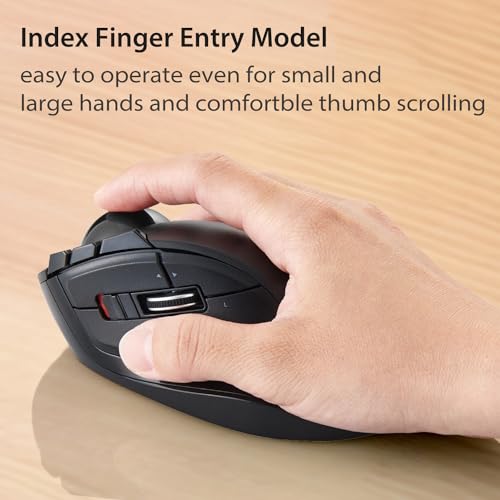
- •Design focused on 6 skeletal structures and muscles of hands provides new "publication feeling". It aimed and considered a fold/swelling in the 6 framework of hands provide new "publication feeling"
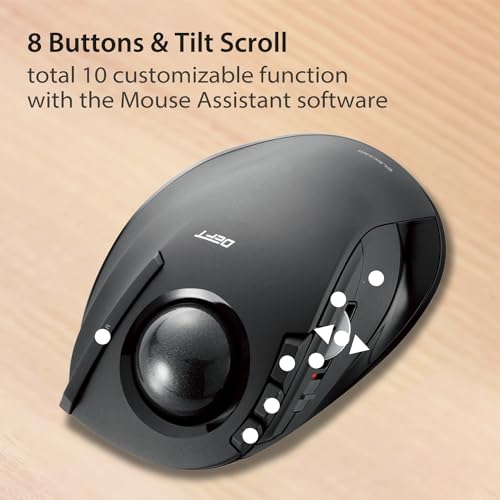
- •Cursor speed changeable (resolution HIGH:1500/LOW:750 counts) Install "ELECOM Mouse Assistant" to customize button functions. When cleaning, track ball can be easily removed from bottom side
- •Battery Remaining Light Lamp equipped. This is a simple package model to open easily
BrandELECOM
CategoryTrackballs
SizeWireless
ColorBlack / Black ball
WarrantyManufacturer Warranty Policy: This product has a 1-year warranty. In the unlikely event of a product defect, we offer a product warranty for quality issues for your convenience. Within 1 years of purchase, we will replace the defective product by applying
ELECOM DEFT Trackball Mouse, 2.4GHz Wireless, Finger Control, 8-Button Function with Smooth Tracking, Ergonomic Design, Optical Gaming Sensor, Windows11, macOS (M-DT2DRBK)
List Price: $78.30$70.47DEALYou Save: $7.83 (10%)
Free shippingFree Returns – 30 daysFree Order CancellationSecure Payment2–3 Days DeliveryGet It October 25, 2026In Stock (3)No marketing spamNo account requiredFulfilment by FedEx / Amazon / UPS / ShipwirePayPal / Card Buyer Protection
Customer Reviews
Reviews sourced from verified Amazon purchasers3.8
out of 5
Based on 20 reviews
5★
35%
4★
15%
3★
30%
2★
20%
1★
0%
Works just as advertised
john✓ Verified Purchase•September 16, 2017
Update after using this trackball: The comments about the thumb button being a little stiffer to use is correct. It is more difficult to click the 'left click' button with the thumb - as compared to my old Logitech trackball. The bigger frustration (fixable via key programming) is the 'back' key is easy to hit when using the scroll roller. But it is not so bad that I would change the 5-star rating.
I still like this trackball...
Five stars so far (1st day).
Con: Only one. The documentation in the box is not written in English. I assume it is in Kanji. However - I could go to the Elecom website and download the English version, along with the 'assistant' program that allows for the various buttons to be configured.
Pro: The manual was not needed. The assistant program was extremely user friendly and easy to use. I configured two of the buttons that are not assigned functions in the default mode. But it worked fine without even configuring.
The issues in the 'one star' don't seem to be valid - as the ball is just about the same size as my old Logitech trackball that failed. I don't find the trackball motion to be too fast or hard to use - it feels just like my old trackball. And the price is pretty good.
A big win for me is that my thumb is no longer controlling the ball. I loved my old Logitech trackball for this reason (with that they still made it).
This one seems to be a good substitute...
I still like this trackball...
Five stars so far (1st day).
Con: Only one. The documentation in the box is not written in English. I assume it is in Kanji. However - I could go to the Elecom website and download the English version, along with the 'assistant' program that allows for the various buttons to be configured.
Pro: The manual was not needed. The assistant program was extremely user friendly and easy to use. I configured two of the buttons that are not assigned functions in the default mode. But it worked fine without even configuring.
The issues in the 'one star' don't seem to be valid - as the ball is just about the same size as my old Logitech trackball that failed. I don't find the trackball motion to be too fast or hard to use - it feels just like my old trackball. And the price is pretty good.
A big win for me is that my thumb is no longer controlling the ball. I loved my old Logitech trackball for this reason (with that they still made it).
This one seems to be a good substitute...
I don't understand the hype.
G.Field✓ Verified Purchase•August 24, 2017
The ball is too small which makes accuracy difficult. The ball is very light and gets a little sticky, so for small movements it goes from not responding to over-responding. I often find that I have to click things twice - the first click doesn't register. The hand position seems OK at first, but over time it gets a little cramped as the controls are basically under the finger joints instead of under the finger pads. Moving the device is annoying because as you grip it, you end up clicking the left mouse button. The connection is not very good - it feels like the battery is going bad, but I tried a couple of new quality batteries and the issues persisted.
My experience with trackballs: Kensington Orbit, Kensington Slim Blade, Logitech Trackman. So far, the Orbit has been the best. The overall quality isn't the greatest, but the accuracy, ease of use, and features (scroll ring) make it perform the best. The button only lasted a year or so before it would double-click a lot, and the scroll wheel gets a bit of a gritty feel to it. But for the price and performance, it wins the race. I will try the wireless version which I think has some other sacrifices.
My experience with trackballs: Kensington Orbit, Kensington Slim Blade, Logitech Trackman. So far, the Orbit has been the best. The overall quality isn't the greatest, but the accuracy, ease of use, and features (scroll ring) make it perform the best. The button only lasted a year or so before it would double-click a lot, and the scroll wheel gets a bit of a gritty feel to it. But for the price and performance, it wins the race. I will try the wireless version which I think has some other sacrifices.
This is a good trackball for general use
Ramon Brundridge✓ Verified Purchase•June 1, 2017
This is a good trackball for general use; suitable for both productivity and recreation/gaming.
Pros: All buttons are assignable, scan rate has two modes, gestures can be established, ball tracking speed can be adjusted; it also has nice responsiveness and movement of the ball and buttons.
Cons: The user must download the driver software from the manufacturer's website (I would prefer that this had been supplied with the product); the settings made in the trackball driver interface screen are not retained and instead revert to their default settings with every system restart (even if a profile is made and assigned) - this is the most annoying feature; the right-click button is too thin and at times can become uncomfortable with prolonged use. If I were asked to recommend this product to another, it would depend upon the user's intentions. For everyday general use or casual gaming - then yes. For productivity and office use - yes if it is not heavy use. If for art/graphic design or hardcore gaming - then I would not recommend it.
I use it for casual gaming, when I'm composing lengthy documents, or when I'm developing new software in C++, C#, Java, ASMx86, etc. My fingering is as such: Thumb at left-click, wheel, and buttons 3, 4, & 5; Index finger at buttons 6, 7, & 8; Index & Middle fingers at the ball (for the greatest control); Ring finger at right-click; Pinky finger as support only. I would not hesitate to acquire a Kensington, but the one I want is not supported by Win7.
Pros: All buttons are assignable, scan rate has two modes, gestures can be established, ball tracking speed can be adjusted; it also has nice responsiveness and movement of the ball and buttons.
Cons: The user must download the driver software from the manufacturer's website (I would prefer that this had been supplied with the product); the settings made in the trackball driver interface screen are not retained and instead revert to their default settings with every system restart (even if a profile is made and assigned) - this is the most annoying feature; the right-click button is too thin and at times can become uncomfortable with prolonged use. If I were asked to recommend this product to another, it would depend upon the user's intentions. For everyday general use or casual gaming - then yes. For productivity and office use - yes if it is not heavy use. If for art/graphic design or hardcore gaming - then I would not recommend it.
I use it for casual gaming, when I'm composing lengthy documents, or when I'm developing new software in C++, C#, Java, ASMx86, etc. My fingering is as such: Thumb at left-click, wheel, and buttons 3, 4, & 5; Index finger at buttons 6, 7, & 8; Index & Middle fingers at the ball (for the greatest control); Ring finger at right-click; Pinky finger as support only. I would not hesitate to acquire a Kensington, but the one I want is not supported by Win7.
Another MS Trackball Explorer user giving the Elecom "DEFT" a shot. (UPDATE - OTHER OPTIONS IN LATE 2017)
NM✓ Verified Purchase•April 5, 2017
UPDATE 1: (old news..but still) There is a larger one of these available as of Aug 2017 - The "HUGE" Elecom mouse.
https://www.amazon.com/gp/product/B0735584RM. Wireless and Wired available. BUT UPDATE THE SOFTWARE!
UPDATE 2: Some people have purchased the M570 "light blue" ball to replace this mouse's "grey ball".
Another vendor is selling a "red ball" which is both M570 and Elecom M-DT2DRBK compatible. But the "red ball" did not work out for me and afterwards I read the not-so-encouraging reviews on the trackball mice the "red ball" came with.. So options for me would be either getting another M570 ball or sticking with the original "grey one".
Although not-so-much an issue now as I bought three of the "HUGE" mice and Elecom "DEFT" is now on Standby.
Having started back in the 90s with the MS Trackball Explorer, I am now Spoiled and getting used to other mice is a chore that I am too lazy to put 100% effort into. So far so good with the Elecom mouse. Have retired my backup mouse (Logitech Optical Trackman) and have moved the Elecom mouse in as #2. (Update: Replaced this Elecom with the "HUGE" ones in August 2017)
I plan on buying more Elecoms in the future, but have a few opinions to spew. Will come back later and update/edit/add comparison pictures, but just a few base observations: If you really like the MS Trackball Explorer and will settle for nothing else, then bite the bullet and buy one. The "new" ones run into ObamaCare territory, but the used ones start around $200. If you don't want to spend the $200, then it looks like for Early 2017, Elecom is the Best/Only(?) Finger Ball Mouse out there even remotely similar to the MS Trackball Explorer, so buy the Elecom wireless finger-ball mouse. (Update: Now Elecom has their "HUGE" one - MSTE users should get that!!!)
HOWEVER, there are the other possible Issues that might come up: #4 & #5 are the problem ones.
1) The "right" mouse button is on the other side of the ball, like it is with the Logitech Trackman. Can always remap the buttons.
2) The mouse is MUCH smaller and weighs a lot less, but if you use the "finger grooves" on the right, it holds up.
3) The "ball" is MUCH MUCH smaller, the size of the logitech M570 Ball. In fact, you can use an M570 ball in the Elecom.
4) ISSUE: Mouse Ball. Some customers have mentioned that the Elecom ball has tracking/accuracy issues. Other customers have purchased the "ball only" M570 mouse ball specifically to replace their Elecom's. My original purchase of this mouse had to be returned as the ball had an obvious visual defect. Could it be that the ball's quality varies, and the customers who complained about the ball actually have "failing" ones?
5) ISSUE: Receiver. Mouse seems to skip/stutter/slow down. I did have this issue with Mouse #2 and hooked up an M570 ball but had the same effect with either ball. I could move my fingers over the whole ball but see limited movement on the screen. Was using a new energizer battery, not the one that comes with the mouse. The receiver was 8 feet away from the mouse but NOT "Line Of Sight". Although this is supposed to be a longer-range receiver, I used a short usb extension cable to move the receiver into Line Of Sight. Movement returned to normal.
Also tried changing all the switch settings, both by the mouse wheel and L to H underneath. No effect. Moving receiver "corrected" issue.
6) Accuracy. Not sure on this as I am preprogrammed to use the MS trackball and cannot trust myself here. I would swear that the mouse was more accurate at a higher rate of speed. Ex: I would not slow down the mouse with software and used the faster switch setting. With the warp speed mouse cursor, it seemed to clumsy-fingers me that I could make small circular patterns with the mouse much easier at these higher speeds than lower ones. At lower speeds the circle was more of an squashed oval, etc. Cannot say for sure as not used to this mouse yet.
7) Buttons. The vendor offers software for download that allows customization of this mouse. That software is also needed to use the extra three buttons on top of the mouse. I am more interested in the finger-ball and standard buttons, so haven't tried the extra buttons yet. I use X-Mouse Button Control software to remap the "right" mouse button with button's 4&5 on the left, and can use the "mouse chording" feature to get extra button combinations off a single profile, so have no need of three extra buttons at present. Seems only vendor's software can use the three extra buttons.
Reasons the Logitech Trackman is "better" than Elecom to stay as 2nd String to the MS Mouse.
- Larger ball, bigger mouse, more solid, weighs more, can pair a logitech keyboard (Y-RK56A) to the same old style receiver
Reasons Logitech Mouse is NOT better than the Elecom.
- The buttons on the left side are thumb-killing scrawny little things that wear out. Have to rebuild the buttons from within.
- Logitech's mouse wheel isn't in the same location as the MS Trackball Explorer.
- Logitech's older-style KB/Mouse Receiver measures 3"x 2.5-3.0" (+ cable) and can also have some LOS issues.
Primary reason to put the Logitech Mouse in a drawer and plug in the Elecom
- Much LARGER/LONGER thumb-friendly buttons on the left side of the mouse. Bones in my thumb favor the Elecom!!
I am lucky to have bought some "extras" of MS mouse over the years, so when I want to crank up a trackball friendly game like Homeworld, the MS Trackball is ready. But I need an "every day trackball" to use when not gaming and extend/protect the life of the $$$$$ MS mouse. Also with my setup I could easily trip over the MS Mouse's tail (cable) and risk breaking it like I did with my first two mice. I think this Elecom mouse does an excellent job as a "standby" for the MS Mouse. I have been using a Logitech Optical Trackman as the "standby" mouse for the last 12 years and have the thumb to prove it, but just stashed the Logitech mouse and it's keyboard on a shelf and now have the MS Trackball Explorer on standby for gaming with the Elecom set up for everyday use. Elecom gets one (happier) Thumbs Up. (note again: In late 2017, MSTE users would like the "HUGE" Elecom mouse better!!)
Cabling Setup:
MS Mouse lives at the end of two "USB Extension cables" so have an extra 20+ feet of cable to move the mouse around. Not better than wireless, but not desk-bound, either. Just have to not trip over the cable. :)
Elecom mouse now lives at the end of a three foot USB extension cord to make it "line of sight" for better reception.
Also had to plug in a different wireless keyboard to take the place of the Logitech Y-RK56A Cordless Internet Pro that happened to successfully pair with the Logitech Cordless Trackman on a single USB (or PS/2) receiver.
Also read that "USB KBs/Mice Are Not Happy" when plugged into USB 3.x ports, so mine are plugged into USB 2.x ports.
https://www.amazon.com/gp/product/B0735584RM. Wireless and Wired available. BUT UPDATE THE SOFTWARE!
UPDATE 2: Some people have purchased the M570 "light blue" ball to replace this mouse's "grey ball".
Another vendor is selling a "red ball" which is both M570 and Elecom M-DT2DRBK compatible. But the "red ball" did not work out for me and afterwards I read the not-so-encouraging reviews on the trackball mice the "red ball" came with.. So options for me would be either getting another M570 ball or sticking with the original "grey one".
Although not-so-much an issue now as I bought three of the "HUGE" mice and Elecom "DEFT" is now on Standby.
Having started back in the 90s with the MS Trackball Explorer, I am now Spoiled and getting used to other mice is a chore that I am too lazy to put 100% effort into. So far so good with the Elecom mouse. Have retired my backup mouse (Logitech Optical Trackman) and have moved the Elecom mouse in as #2. (Update: Replaced this Elecom with the "HUGE" ones in August 2017)
I plan on buying more Elecoms in the future, but have a few opinions to spew. Will come back later and update/edit/add comparison pictures, but just a few base observations: If you really like the MS Trackball Explorer and will settle for nothing else, then bite the bullet and buy one. The "new" ones run into ObamaCare territory, but the used ones start around $200. If you don't want to spend the $200, then it looks like for Early 2017, Elecom is the Best/Only(?) Finger Ball Mouse out there even remotely similar to the MS Trackball Explorer, so buy the Elecom wireless finger-ball mouse. (Update: Now Elecom has their "HUGE" one - MSTE users should get that!!!)
HOWEVER, there are the other possible Issues that might come up: #4 & #5 are the problem ones.
1) The "right" mouse button is on the other side of the ball, like it is with the Logitech Trackman. Can always remap the buttons.
2) The mouse is MUCH smaller and weighs a lot less, but if you use the "finger grooves" on the right, it holds up.
3) The "ball" is MUCH MUCH smaller, the size of the logitech M570 Ball. In fact, you can use an M570 ball in the Elecom.
4) ISSUE: Mouse Ball. Some customers have mentioned that the Elecom ball has tracking/accuracy issues. Other customers have purchased the "ball only" M570 mouse ball specifically to replace their Elecom's. My original purchase of this mouse had to be returned as the ball had an obvious visual defect. Could it be that the ball's quality varies, and the customers who complained about the ball actually have "failing" ones?
5) ISSUE: Receiver. Mouse seems to skip/stutter/slow down. I did have this issue with Mouse #2 and hooked up an M570 ball but had the same effect with either ball. I could move my fingers over the whole ball but see limited movement on the screen. Was using a new energizer battery, not the one that comes with the mouse. The receiver was 8 feet away from the mouse but NOT "Line Of Sight". Although this is supposed to be a longer-range receiver, I used a short usb extension cable to move the receiver into Line Of Sight. Movement returned to normal.
Also tried changing all the switch settings, both by the mouse wheel and L to H underneath. No effect. Moving receiver "corrected" issue.
6) Accuracy. Not sure on this as I am preprogrammed to use the MS trackball and cannot trust myself here. I would swear that the mouse was more accurate at a higher rate of speed. Ex: I would not slow down the mouse with software and used the faster switch setting. With the warp speed mouse cursor, it seemed to clumsy-fingers me that I could make small circular patterns with the mouse much easier at these higher speeds than lower ones. At lower speeds the circle was more of an squashed oval, etc. Cannot say for sure as not used to this mouse yet.
7) Buttons. The vendor offers software for download that allows customization of this mouse. That software is also needed to use the extra three buttons on top of the mouse. I am more interested in the finger-ball and standard buttons, so haven't tried the extra buttons yet. I use X-Mouse Button Control software to remap the "right" mouse button with button's 4&5 on the left, and can use the "mouse chording" feature to get extra button combinations off a single profile, so have no need of three extra buttons at present. Seems only vendor's software can use the three extra buttons.
Reasons the Logitech Trackman is "better" than Elecom to stay as 2nd String to the MS Mouse.
- Larger ball, bigger mouse, more solid, weighs more, can pair a logitech keyboard (Y-RK56A) to the same old style receiver
Reasons Logitech Mouse is NOT better than the Elecom.
- The buttons on the left side are thumb-killing scrawny little things that wear out. Have to rebuild the buttons from within.
- Logitech's mouse wheel isn't in the same location as the MS Trackball Explorer.
- Logitech's older-style KB/Mouse Receiver measures 3"x 2.5-3.0" (+ cable) and can also have some LOS issues.
Primary reason to put the Logitech Mouse in a drawer and plug in the Elecom
- Much LARGER/LONGER thumb-friendly buttons on the left side of the mouse. Bones in my thumb favor the Elecom!!
I am lucky to have bought some "extras" of MS mouse over the years, so when I want to crank up a trackball friendly game like Homeworld, the MS Trackball is ready. But I need an "every day trackball" to use when not gaming and extend/protect the life of the $$$$$ MS mouse. Also with my setup I could easily trip over the MS Mouse's tail (cable) and risk breaking it like I did with my first two mice. I think this Elecom mouse does an excellent job as a "standby" for the MS Mouse. I have been using a Logitech Optical Trackman as the "standby" mouse for the last 12 years and have the thumb to prove it, but just stashed the Logitech mouse and it's keyboard on a shelf and now have the MS Trackball Explorer on standby for gaming with the Elecom set up for everyday use. Elecom gets one (happier) Thumbs Up. (note again: In late 2017, MSTE users would like the "HUGE" Elecom mouse better!!)
Cabling Setup:
MS Mouse lives at the end of two "USB Extension cables" so have an extra 20+ feet of cable to move the mouse around. Not better than wireless, but not desk-bound, either. Just have to not trip over the cable. :)
Elecom mouse now lives at the end of a three foot USB extension cord to make it "line of sight" for better reception.
Also had to plug in a different wireless keyboard to take the place of the Logitech Y-RK56A Cordless Internet Pro that happened to successfully pair with the Logitech Cordless Trackman on a single USB (or PS/2) receiver.
Also read that "USB KBs/Mice Are Not Happy" when plugged into USB 3.x ports, so mine are plugged into USB 2.x ports.
I love this mouse
Anita Agers-Brooks✓ Verified Purchase•April 3, 2017
I love this mouse. I saw a review on YouTube saying this mouse wouldn't be good for someone with large hands. I have large hands and this mouse still feels perfect for my hands. I love the programming buttons. I was a former Microsoft Explorer mouse user and the price on those are ridiculous now. So I was looking for an alternative and this mouse is perfect for that. I even love this mouse more as the feeling for my hands is perfect and this one even has 3 programming buttons that the explorer mouse didn't. I am a huge fan of this mouse and I'm even thinking of purchasing another for use with my other computer and will probably try the wireless version of it. I highly recommend this mouse for users that would like an explorer alternative or anyone looking for a trackball mouse, this one is amazing!
I wanted to make an edit about this mouse, I left one important and key feature out. The precision switch is amazing! It has a switch so that you can have the mouse cursor in "speed" mode that allows you to navigate from one side of the screen to the opposite side very fast with little movement. Then when you need more precision, you can move the switch quite easily with your thumb and when you toggle the switch it puts the mouse in precision mode where it moves quite a bit slower so you can be much more accurate.
So overall, if you like trackball mice, this one is amazing especially for the price. I highly recommend this one, you will not be disappointed, especially for the price compared to other "name brand" trackballs.
I wanted to make an edit about this mouse, I left one important and key feature out. The precision switch is amazing! It has a switch so that you can have the mouse cursor in "speed" mode that allows you to navigate from one side of the screen to the opposite side very fast with little movement. Then when you need more precision, you can move the switch quite easily with your thumb and when you toggle the switch it puts the mouse in precision mode where it moves quite a bit slower so you can be much more accurate.
So overall, if you like trackball mice, this one is amazing especially for the price. I highly recommend this one, you will not be disappointed, especially for the price compared to other "name brand" trackballs.
Page 1 of 4


