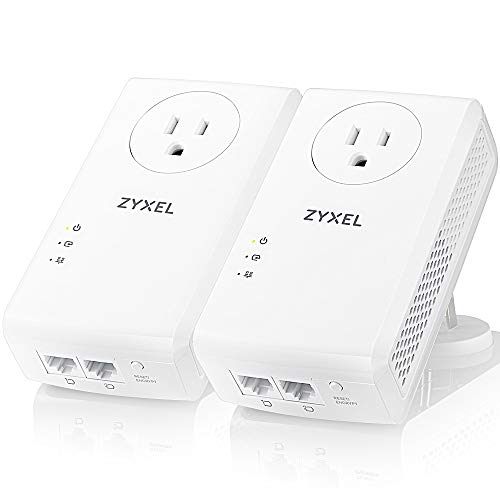
Zyxel AV2000 Powerline Ethernet Adapter Starter Kit | Pass-Thru Power | Plug & Play | MIMO | HomePlug AV2 | 2 x Gigabit Ethernet | Ideal for Smart TVs, On-Line Games, 4K Streaming | PLA5456KIT


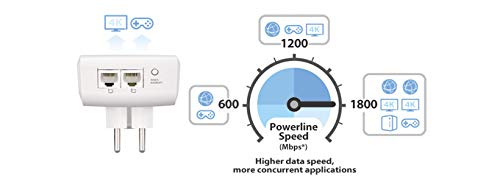
Key features
- •Expands your network for smooth 4K video streaming and lag-free online gaming
- •Gigabit Speed with Advanced HomePlug AV2 and MIMO technology
- •Two Gigabit Ethernet ports for connecting multiple devices
- •QoS for high bandwidth activities
- •Simple Plug and Play Setup
- •Pass-Thru Design for an extra power outlet
Zyxel AV2000 Powerline Ethernet Adapter Starter Kit | Pass-Thru Power | Plug & Play | MIMO | HomePlug AV2 | 2 x Gigabit Ethernet | Ideal for Smart TVs, On-Line Games, 4K Streaming | PLA5456KIT
List Price: $261.89$235.70DEALYou Save: $26.19 (10%)
Free shippingFree Returns – 30 daysFree Order CancellationSecure Payment2–3 Days DeliveryGet It October 26, 2026In Stock (1)No marketing spamNo account requiredFulfilment by FedEx / Amazon / UPS / ShipwirePayPal / Card Buyer Protection
Customer Reviews
Reviews sourced from verified Amazon purchasers4.2
out of 5
Based on 10 reviews
5★
30%
4★
60%
3★
0%
2★
0%
1★
10%
Literally Plug and Play!
P. D. Mehta✓ Verified Purchase•August 30, 2017
I had poor wireless signal in my office which is on the opposite end of the house from my primary Wireless Access Point. I was using a wireless repeater, but it was not doing enough to help with increasing the bandwidth.
I was always skeptical of these devices, but they had come down in price enough for me to take a shot. I had seen mixed reviews from all the brands, but most of my research mentioned people with issues had older homes or unusual wiring, or they were plugged into a surge protector.
I made sure to avoid those pitfalls and plugged directly into the wall on an outlet very close to the breaker box. The other unit is on the other end of the house on a different circuit - but the same panel. I was SHOCKED at the difference. I used to get only 4-5mbps at best over wireless, but using this device i was able to get 55 (which is the limit of my ISP). I am sure it can do a lot better. I connected a secondary AP to this and my far end of the house now has MUCH more reliable wifi signal. Netflix buffers less and always appears in HD.
I would definitely recommend these to anyone with dead zones or the need for a wired connection.
I was always skeptical of these devices, but they had come down in price enough for me to take a shot. I had seen mixed reviews from all the brands, but most of my research mentioned people with issues had older homes or unusual wiring, or they were plugged into a surge protector.
I made sure to avoid those pitfalls and plugged directly into the wall on an outlet very close to the breaker box. The other unit is on the other end of the house on a different circuit - but the same panel. I was SHOCKED at the difference. I used to get only 4-5mbps at best over wireless, but using this device i was able to get 55 (which is the limit of my ISP). I am sure it can do a lot better. I connected a secondary AP to this and my far end of the house now has MUCH more reliable wifi signal. Netflix buffers less and always appears in HD.
I would definitely recommend these to anyone with dead zones or the need for a wired connection.
ZyXEL's Horrible Warranty Policy
Peter✓ Verified Purchase•May 2, 2017
Ordered 2 pairs (4 units total) and used 3 units for two months when 1 unit broke (no power light). Called in for RMA replacement. Here are the reasons for 1 star:
1.) 1 unit broke within 2 months of use.
2.) ZyXEL did send a replacement unit right away provided I give them my credit card information to make sure I send back the defective unit.
3.) The replacement unit is a refurbished unit...
4.) You the customer is liable for shipping cost in sending unit back...
This doesn't make sense to me, I buy a brand new product and due to manufacturer defect, they replace with a refurbished unit and expect client to pay for shipping unit back. Buy TP-Link, Netgear, or other brands as I am sure they will honor 100% their manufacturer warranty and not nickel and dime their clients like ZyXEL.
1.) 1 unit broke within 2 months of use.
2.) ZyXEL did send a replacement unit right away provided I give them my credit card information to make sure I send back the defective unit.
3.) The replacement unit is a refurbished unit...
4.) You the customer is liable for shipping cost in sending unit back...
This doesn't make sense to me, I buy a brand new product and due to manufacturer defect, they replace with a refurbished unit and expect client to pay for shipping unit back. Buy TP-Link, Netgear, or other brands as I am sure they will honor 100% their manufacturer warranty and not nickel and dime their clients like ZyXEL.
They just work, and quite well.
Jim✓ Verified Purchase•May 2, 2017
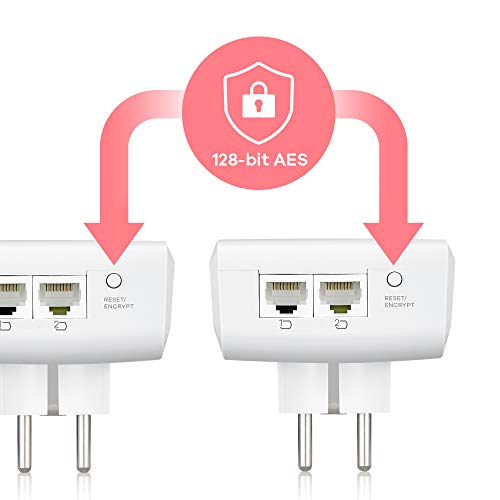
These are working very well for me; 6 of them now installed for two months, solving the problem of "wired Ethernet" networking in an older home. Plug them in, optionally enable encryption with a button push, and they just work. (Be sure that an Ethernet device is connected to each adapter when setting up encryption; if nothing is plugged in, encryption can't be enabled but you only need to do this when setting it up, the adapter will remember all settings if unplugged and moved.)
Due to a design oversight (it was originally designed for those huge, clunky Euro-Peon outlets), the housing is too big on the top, and will block the upper power outlet, as many others have mentioned. But there's an inexpensive workaround that not only fixes this issue but adds MORE outlets: 3-PACK - Axis YLCT-10 3-Outlet Heavy-Duty Grounding Adapter (wait for the 3-pack to go on sale for 10 bucks; the price is always jumping up and down). Just plug this into the lower outlet, then the ZyXel into this adapter to "stand off" from the wall, and voila - you've not only got clearance for the upper outlet, but two more side outlets as well. You can't do this with power strips, extension cords or some other outlet adapters, but I can vouch for this particular one working with the ZyXel adapters; we have 4 of them in place and zero problems with them.
I've run Speedtest.net performance testing on my computer, connected with an Ethernet cable directly to the router and through the ZyXel adapters on the other side of the house - we have 100 Mbps service and usually pull 80-90 Mbps, I could see no performance degradation when using the adapters vs. the Ethernet cable. Impressive!
On very rare occasions (twice so far total), an adapter will "drop out" and stop working - simply unplugging and reinserting into the power outlet brought it back online. An annoyance, but a small one and overall they're more reliable than many routers I've owned.
Given the number of negative reviews I've seen for other brands, I would say go with ZyXel; they just work. Gave a pair to my bro-in-law to switch his Roku connection from wireless to wired, thus solving all his video-buffering problems.
Due to a design oversight (it was originally designed for those huge, clunky Euro-Peon outlets), the housing is too big on the top, and will block the upper power outlet, as many others have mentioned. But there's an inexpensive workaround that not only fixes this issue but adds MORE outlets: 3-PACK - Axis YLCT-10 3-Outlet Heavy-Duty Grounding Adapter (wait for the 3-pack to go on sale for 10 bucks; the price is always jumping up and down). Just plug this into the lower outlet, then the ZyXel into this adapter to "stand off" from the wall, and voila - you've not only got clearance for the upper outlet, but two more side outlets as well. You can't do this with power strips, extension cords or some other outlet adapters, but I can vouch for this particular one working with the ZyXel adapters; we have 4 of them in place and zero problems with them.
I've run Speedtest.net performance testing on my computer, connected with an Ethernet cable directly to the router and through the ZyXel adapters on the other side of the house - we have 100 Mbps service and usually pull 80-90 Mbps, I could see no performance degradation when using the adapters vs. the Ethernet cable. Impressive!
On very rare occasions (twice so far total), an adapter will "drop out" and stop working - simply unplugging and reinserting into the power outlet brought it back online. An annoyance, but a small one and overall they're more reliable than many routers I've owned.
Given the number of negative reviews I've seen for other brands, I would say go with ZyXel; they just work. Gave a pair to my bro-in-law to switch his Roku connection from wireless to wired, thus solving all his video-buffering problems.
Decent product by a trusted company
planitnm✓ Verified Purchase•December 31, 2016
These work better than a another brand that I had tried and, from what I understand, they have a different chipset from most of the other brands on the market today. I do IT work and have used several of these types of items over the years from different manufacturers and have had varying results. Slingbox made a very good product but I cannot find it anymore. Netgear has been too hit and miss with this type of product for me to consider. Western Digital made one that worked well but I cannot find it either. This one replaced a TP-Link that was completely ineffective in the environment. I have had good luck with XyXEL products and have confidence that this will last. I rated it four stars only because of problems with using a VoIP phone through it. It has kept the wireless access point steadily online since it was installed.
I would only suggest using this type of solution if dropping an Ethernet line is unrealistic or impossible, a physical connection will always be a better option. Also, as has been mentioned in several reviews, make sure that the lines are in the same breaker box. If this is your only option then the XyXEL should work fine for most applications. If you are looking for a solution to hook up a VoIP phone then you may have problems with this.
I would only suggest using this type of solution if dropping an Ethernet line is unrealistic or impossible, a physical connection will always be a better option. Also, as has been mentioned in several reviews, make sure that the lines are in the same breaker box. If this is your only option then the XyXEL should work fine for most applications. If you are looking for a solution to hook up a VoIP phone then you may have problems with this.
Not bad, but not quite as good as I had hoped.
realitybytez✓ Verified Purchase•July 30, 2016
My home office is at the opposite end of the house from the Cable Modem/Router. The distance is about 40 feet from the router to my desktop computer. Until recently, I have been using a dual-band wireless USB adapter for my primary internet connection. Occasionally, when I had a need for a faster and more reliable connection, I would pull out my trusty 100-foot ethernet cable and run a direct connection from my computer to the router. I really liked the faster connection, but my wife hated the cable running across the house.
Recently, I saw this Powerline Adapter on sale, and I decided to give it a shot. This review is meant to show you my real-world results. I'm going to show you a comparison of the true speed of my internet connection under all three scenarios, so you can decide for yourself whether this product will meet your needs. The first screenshot I have posted shows the true download speed of my internet connection while using the 100-foot ethernet cable to connect my desktop computer directly to the router. The speed was 90.1 Mbps (which is 11.3MB/s). You can consider this to be my baseline. This is the speed that I would really like to see from this Powerline Adapter (or something close to it). After all, they claim speeds up to 1800Mbps, so 90.1Mbps doesn't seem out of the realm of possibility, does it?
The second screenshot shows you the speed I was getting with my dual-band wireless adapter. Now, the wireless adpter is supposed to be capable of speeds of up to 450Mbps. Obviously, that would be under ideal conditions. But I was asking a lot with this unit because the signal had to pass through three walls and a closet with a solid-core door. So I was not completely surprised to be only getting 11.7Mbps (or 1.5 MB/s) at my desktop.
And this brings us to the third screenshot - the one for this Powerline Adapter. While the speed is more than five times what I was getting with the wireless adapter, at 59.5Mbps (7.4 MB/s) it was still only about two-thirds of the speed that I was shooting for. It's good enough that I will probably keep the unit, but I was hoping for something better. I should disclose the fact that the two powerline adapter units are not on the same circuit breaker, but they are on two circuits that are connected by the same Main breaker.
I also want to say that "installing" this powerline adapter sytem was incredibly easy. I simply plugged one unit into the wall outlet closest to my router, and ran one of the two included ethernet patch cables from the unit to an open port on my router. Then I walked to the other end of my house and plugged the other unit into the wall outlet closest to my desktop computer. I ran the second ethernet patch cable from the unit to my desktop PC and turned on my computer. That's it. I had an immediate internet connection. No configuration was involved. It just worked.
Recently, I saw this Powerline Adapter on sale, and I decided to give it a shot. This review is meant to show you my real-world results. I'm going to show you a comparison of the true speed of my internet connection under all three scenarios, so you can decide for yourself whether this product will meet your needs. The first screenshot I have posted shows the true download speed of my internet connection while using the 100-foot ethernet cable to connect my desktop computer directly to the router. The speed was 90.1 Mbps (which is 11.3MB/s). You can consider this to be my baseline. This is the speed that I would really like to see from this Powerline Adapter (or something close to it). After all, they claim speeds up to 1800Mbps, so 90.1Mbps doesn't seem out of the realm of possibility, does it?
The second screenshot shows you the speed I was getting with my dual-band wireless adapter. Now, the wireless adpter is supposed to be capable of speeds of up to 450Mbps. Obviously, that would be under ideal conditions. But I was asking a lot with this unit because the signal had to pass through three walls and a closet with a solid-core door. So I was not completely surprised to be only getting 11.7Mbps (or 1.5 MB/s) at my desktop.
And this brings us to the third screenshot - the one for this Powerline Adapter. While the speed is more than five times what I was getting with the wireless adapter, at 59.5Mbps (7.4 MB/s) it was still only about two-thirds of the speed that I was shooting for. It's good enough that I will probably keep the unit, but I was hoping for something better. I should disclose the fact that the two powerline adapter units are not on the same circuit breaker, but they are on two circuits that are connected by the same Main breaker.
I also want to say that "installing" this powerline adapter sytem was incredibly easy. I simply plugged one unit into the wall outlet closest to my router, and ran one of the two included ethernet patch cables from the unit to an open port on my router. Then I walked to the other end of my house and plugged the other unit into the wall outlet closest to my desktop computer. I ran the second ethernet patch cable from the unit to my desktop PC and turned on my computer. That's it. I had an immediate internet connection. No configuration was involved. It just worked.
Page 1 of 2