Pantum P2502W Wireless Laser Printer Home Office Use, Black and White Printer with Mobile Printing (V8V77B)



Key features
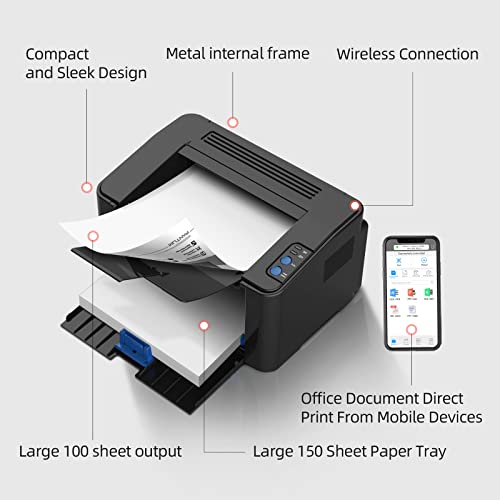
- •Single function laser printer. Fast and high definition printing up to 22ppm(A4) / 23ppm(Letter) in black and white. Support multiple media sizes, and media weight up to 163g/㎡.
- •Sleek design and compact size 337 x 220 x 178 mm (13.27'' x 8.66'' x 7.01'') fit nicely in any workspace. Metal frame structure built for long time use.
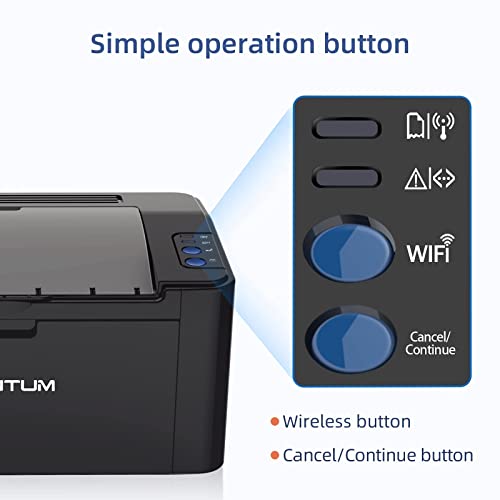
- •Easy one-step wireless installation. Connect with High-Speed USB 2.0 and WIFI. Mobile device printing with IOS and Android system, Pantum APP available. Google cloud printing ready.
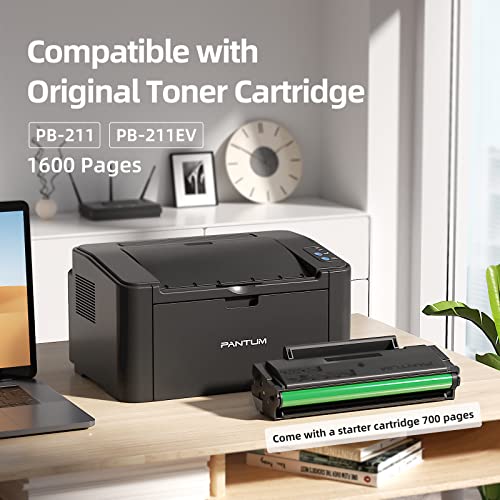
- •Come with a 700-page starter cartridge (at 5% coverage based on ISO 19752 standard).
- •1-year standard warranty from the date of purchase. Pantum online customer service available.
BrandPantum
CategoryLaser Printers
SizeLarge
ColorBlack
Warranty1-year standard warranty from the date of purchase
Pantum P2502W Wireless Laser Printer Home Office Use, Black and White Printer with Mobile Printing (V8V77B)
List Price: $144.05$129.65DEALYou Save: $14.40 (10%)
Free shippingFree Returns – 30 daysFree Order CancellationSecure Payment2–3 Days DeliveryGet It October 25, 2026In Stock (1)No marketing spamNo account requiredFulfilment by FedEx / Amazon / UPS / ShipwirePayPal / Card Buyer Protection
Customer Reviews
Reviews sourced from verified Amazon purchasers3.9
out of 5
Based on 10 reviews
5★
40%
4★
60%
3★
0%
2★
0%
1★
0%
A little bit of work too install according to which OS
tellfile✓ Verified Purchase•September 15, 2023
Using the Windows Install disk that came in the box, I had no trouble installing to windows 7 even without the SP1 upgrade, but on Windows 10, it failed to print anything. The fix on that was to reboot. The install file to click on the disk is "autorun.exe"
Sort of a different story installing to my Linux machines, and maybe below will give you some light for an attempt at that yourself.
My steps were :
(1) I went to the "driver - Pantum" site
(2) Then download the driver for my Linux machine by putting in the details of the Pantum printer model, etc.
(3) I unzipped the downloaded file
(4) Opened its Resource folder
( In my case, on a deb 64 bit machine, )
(5) I right clicked on the sub folder named "pantum_1.1.99-1_amd64.deb" and chose, "open with Gdeb package installer".
(On my other Linux machines which are 32 bit, I right clicked on the i386 deb install folder instead.)
(6) I clicked through all the continue buttons to complete the install.
(7) In my Linux Mint machine, I opened the Linux menu and looked for the installed Pantum printer and It was not there.
(8) So, on the printer dialog screen, I had to click the "ADD" printer button then locate the printer name from a list, then clicked it to add.
(9) After all the continue buttons, I hit "Print Test Page".
Mine worked, hopefully yours will. Linux can be stubborn sometimes when it comes to installing printers. My Linux Peppermint OS machine added the printer automatically without me having to look for it in a list. Note that when you click print, you'll think nothing is going to happen. That's because it takes about 5 or 6 seconds to load what it needs to begin.
Sort of a different story installing to my Linux machines, and maybe below will give you some light for an attempt at that yourself.
My steps were :
(1) I went to the "driver - Pantum" site
(2) Then download the driver for my Linux machine by putting in the details of the Pantum printer model, etc.
(3) I unzipped the downloaded file
(4) Opened its Resource folder
( In my case, on a deb 64 bit machine, )
(5) I right clicked on the sub folder named "pantum_1.1.99-1_amd64.deb" and chose, "open with Gdeb package installer".
(On my other Linux machines which are 32 bit, I right clicked on the i386 deb install folder instead.)
(6) I clicked through all the continue buttons to complete the install.
(7) In my Linux Mint machine, I opened the Linux menu and looked for the installed Pantum printer and It was not there.
(8) So, on the printer dialog screen, I had to click the "ADD" printer button then locate the printer name from a list, then clicked it to add.
(9) After all the continue buttons, I hit "Print Test Page".
Mine worked, hopefully yours will. Linux can be stubborn sometimes when it comes to installing printers. My Linux Peppermint OS machine added the printer automatically without me having to look for it in a list. Note that when you click print, you'll think nothing is going to happen. That's because it takes about 5 or 6 seconds to load what it needs to begin.
Good printer
Jodie ✓ Verified Purchase•September 10, 2023
I really like the printer but sometimes it don't want to connect to your phone but overall pretty good.
Excelente producto
ANDRES M.✓ Verified Purchase•August 25, 2023
Pequeña, rápida, confiable
driver disc
John S.✓ Verified Purchase•August 21, 2023
The driver disc in the packaging did not work when I attempted to install it on my computer. I've installed peripherals before. I figured computer problem.My IT guy came over finally downloaded the driver and it worked. It cost me $40 dollars for the the IT guy. Just great, half the cost of the printer!
Impressive cheap printer
angler✓ Verified Purchase•August 19, 2023
Can't believe how well this works for price. And cartridges are economical as well recommend 👌
Page 1 of 2