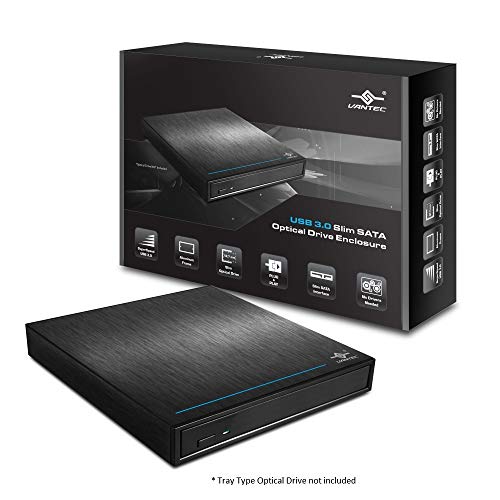
Vantec USB 3.0 Slim SATA Optical Drive Enclosure - 12.7mm (NST-520S3-BK), black


Key features
- •Support Standard SATA interface and specification
- •Design for Blu-Ray or DVD RW drive using SATA interface
- •Compatible with 12.7mm Slim SATA Optical drives
- •Support Tray Type Optical Drive Only, will not support Slot Optical Drive.
Vantec USB 3.0 Slim SATA Optical Drive Enclosure - 12.7mm (NST-520S3-BK), black
List Price: $38.78$34.90DEALYou Save: $3.88 (10%)
Free shippingFree Returns – 30 daysFree Order CancellationSecure Payment2–3 Days DeliveryGet It October 25, 2026In Stock (2)No marketing spamNo account requiredFulfilment by FedEx / Amazon / UPS / ShipwirePayPal / Card Buyer Protection
Customer Reviews
Reviews sourced from verified Amazon purchasers4.6
out of 5
Based on 10 reviews
5★
50%
4★
50%
3★
0%
2★
0%
1★
0%
Brought my old trusty Blueray burner back out of retirement
Gerry K✓ Verified Purchase•August 9, 2023
My new, smaller, case didn't have the room for a 3.5" drive and the radiator for my CPU cooler, so I ended up retiring my blueray burner, which honestly, I only use a few times a year. I put in one of those multi-reader hub things. Alas I still needed to use it a few times a year. I could have purchased an external slim-line drive for over a hundred. I haven't met a slimline that has the performance, error correction etc of my trust old drive. That thing read disks that would lock a slim-line up. I received this enclosure, and it took me 15 minutes to install my drive and have up and running. The 3.0 is plenty fast enough for my needs. It can sit vertically, so it takes less desktop, and it has a power switch, so I can just turn it off when not needed. This enclosure was just what I needed for a good price!!
Amazing for a leftover Internal Blyray/DVD drive.
Aleksandar Veljanov✓ Verified Purchase•August 7, 2023
Buy this thing if you wanna still find usage for your old devices. It's a thing of it's own and it's very easy setup too. I thought my Bluray will be obsolete upon upgrading to my new PC without drive, but it's found it's life in this box.
Great enclosure!
plymouth2014✓ Verified Purchase•August 4, 2023
I build my own computers and 5.25" optical drive bays in a computer tower are a thing of the past. So with my newest build I purchased this enclosure to house my HD Blu-ray drive. It looks great and can be oriented either vertically or horizontally. I also like the toggle power switch and Super Speed USB connection. It should give me years of service.
I had issues with it but....
Sean Esterlund✓ Verified Purchase•July 12, 2023
I purchased the 12.7 mm drive enclosure so that is what my review is about. The first one I received I followed the instructions to the letter. After everything was put together the instructions said that if you are unsure if your computers USB port can power the device with just the main cord, then use both cords. which I did. Then the device would continue to connect and disconnect repeatedly. I then disconnected the device waited for my computer to catch up because it seemed that it was getting the connect/disconnect at a very rapid pace which took about 30 seconds to catch up. I then only tried the main cable with the same results of connecting and disconnecting. I tried a different USB device in each port to verify they were working and they were. I believed the device was defective so I returned it for a replacement. it arrived in about 2 days and I honestly didn't have high hopes as I had seen someone else with the same issue, but I thought maybe it's just a fluke. I installed the drive again, used both power cords and the connect/disconnect happens again. tried with 1 cable, still happens. but I noticed something this time around. when I connected the first cable I watched the drive access with a connect sound. but go haywire after I connected the second cable for extra power. I unplugged the device again and this time restarted my PC. when I was booted up I tried only the main cable. it made a connected noise and that was it.. I attempted to open the drive and it did with no issue. I inserted media into the drive and it read it just fine. I think the Issue is something to do with windows 10, because it happened across all my pc's all with windows 10 installed. I believe that it tries to read the device across the second cable and becomes confused. also this didn't work from my USB Hub I had to connect it directly to my tower. So my final say about this is, it's a good device and if I had figured out the issue sooner I would have probably figured the first one actually worked. So if you have the same problem, simply restart your PC, and only use the main cable. I've had no other problems since then.
Quality Enclosure
Coop✓ Verified Purchase•June 28, 2023
Item exactly as described- replaced an older Vantec with a noisy cooling fan
Page 1 of 2