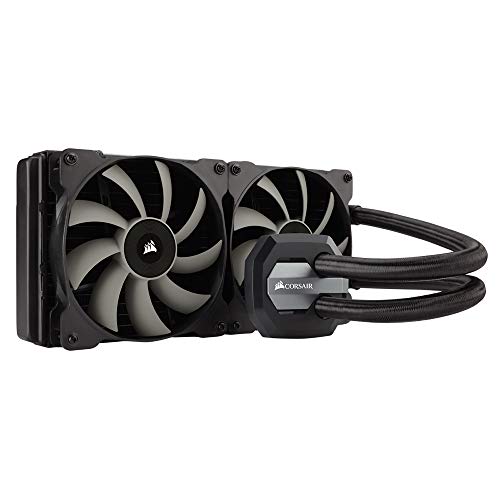
CORSAIR Hydro Series H115i AIO Liquid CPU Cooler, 280mm Radiator, Dual 140mm SP Series PWM Fans, Advanced RGB Lighting and Fan Software Control


Key features
- •Improved coldplate and pump design: better efficiency gives you lower temperatures with less noise
- •Advanced SP140L PWM fan design: better high-static pressure air delivery and customizable speed ; Radiator dimensions: 140 x 312 x 26 millimeter
- •Compatibility : AMD sockets FM1, FM2, AM2, AM3, AM4
CORSAIR Hydro Series H115i AIO Liquid CPU Cooler, 280mm Radiator, Dual 140mm SP Series PWM Fans, Advanced RGB Lighting and Fan Software Control
List Price: $327.35$294.62DEALYou Save: $32.73 (10%)
Free shippingFree Returns – 30 daysFree Order CancellationSecure Payment2–3 Days DeliveryGet It October 26, 2026In Stock (2)No marketing spamNo account requiredFulfilment by FedEx / Amazon / UPS / ShipwirePayPal / Card Buyer Protection
Customer Reviews
Reviews sourced from verified Amazon purchasers4.0
out of 5
Based on 10 reviews
5★
20%
4★
50%
3★
20%
2★
0%
1★
10%
Great AIO
leo98918✓ Verified Purchase•August 9, 2017
This is my first AIO liquid cooler, and I must say, I am impressed! The temps are very good, compared to an air cooler, which is great to keep heat at a minimum.
If stressing the CPU for long periods of time though, the temps would reach the same temps as an air cooler would, just an FYI for those who think it would keep their CPUs at 30°C LOL. This isn't due to the product, it's just the nature of the beast. It just takes longer for the heat from the CPU to eventually heat up the liquid to the same temps of an air cooler under heavy stress.
My only gripe is the RGB lighting effects. This is the NEWEST version of the H100i, hence the "v2", yet on the older model of the H100i, it has more RGB lighting effects. On the older model, you can set up to 2 different colors you want the lighting to cycle through when fading. With the newer model, you can only select 1 color. Correct me if I'm wrong, but shouldn't the newer model ADD to/improve on what the previous version did? Hopefully Corsair can fix this with an update to their software. I'm sure some would like to add at least another color if it matches their desktop's color scheme.
If stressing the CPU for long periods of time though, the temps would reach the same temps as an air cooler would, just an FYI for those who think it would keep their CPUs at 30°C LOL. This isn't due to the product, it's just the nature of the beast. It just takes longer for the heat from the CPU to eventually heat up the liquid to the same temps of an air cooler under heavy stress.
My only gripe is the RGB lighting effects. This is the NEWEST version of the H100i, hence the "v2", yet on the older model of the H100i, it has more RGB lighting effects. On the older model, you can set up to 2 different colors you want the lighting to cycle through when fading. With the newer model, you can only select 1 color. Correct me if I'm wrong, but shouldn't the newer model ADD to/improve on what the previous version did? Hopefully Corsair can fix this with an update to their software. I'm sure some would like to add at least another color if it matches their desktop's color scheme.
but the 4 stars is due to the crappy fans that come with the cooler
Amazon Customer✓ Verified Purchase•July 14, 2017
Okay, Corsair... I'm giving you another shot. I actually bought a couple of Corsair coolers over the past 2 years. One cooler being the H80i, and the other the H115i. So far, I'm impressed, but the 4 stars is due to the crappy fans that come with the cooler. They immediately go into my "donate" bin, for when I need to help out a friend in need. I'm currently using Thermaltake 140mm Riing fans, but I'm not 100% sold on them either. I fell into the Riing trend with my past couple of case builds, just because I think they look pretty good, and do a decent job pushing air.
I have the H80i on a i7-6700k at stock clocks. It gets the job done and is really quiet. I have the H115i on an i7-7700k clocked at 5.0GHz (not an insanely high overclock). It does a good job at keeping decent temps, but it tends to break 70C when stressing the CPU during video transcoding through Handbrake, or when doing a Burn test or Prime95.
The build quality is very nice. The radiator has some nice Corsair branding along the sides to make it look different from the competition. The hose has a braded covering on it, and the water block/cover looks really good for an all in one unit.
I have the H80i on a i7-6700k at stock clocks. It gets the job done and is really quiet. I have the H115i on an i7-7700k clocked at 5.0GHz (not an insanely high overclock). It does a good job at keeping decent temps, but it tends to break 70C when stressing the CPU during video transcoding through Handbrake, or when doing a Burn test or Prime95.
The build quality is very nice. The radiator has some nice Corsair branding along the sides to make it look different from the competition. The hose has a braded covering on it, and the water block/cover looks really good for an all in one unit.
Great Cooler, keeps your CPU temps where you want them.
Jon C.✓ Verified Purchase•June 29, 2017
Overall I have no complaints with this cooler. I had issues with the one I received from amazon. It was DOA. It also looked like it was previously installed, based on the stock thermal paste having obviously been disturbed by a CPU. I bought a new one locally, and returned the original one to Amazon with no problem.
That issue aside, this thing does it's job very well. I don't even have to turn the fans up above 40% or so to keep the CPU cool. I have it cooling an i7-7700k that's overclocked to 5GHz @ 1.35V and it keeps it in the low to mid 60s while gaming. It stays nice and quiet.
That issue aside, this thing does it's job very well. I don't even have to turn the fans up above 40% or so to keep the CPU cool. I have it cooling an i7-7700k that's overclocked to 5GHz @ 1.35V and it keeps it in the low to mid 60s while gaming. It stays nice and quiet.
Screws are too long, but otherwise seems solid.
Sean Reifschneider✓ Verified Purchase•June 21, 2017
Be very careful with the screws they provide, they were 1/8th inch too long and if you screw them all the way in it'll bend the backer plate and the radiator fins/body. There is a backer plate though, so it hopefully won't be too big a deal. I noticed it before it was a problem so I just got some nylon washers to space it out. This was also in a Corsair Carbide Air 240 case, FYI.
Otherwise, it seems pretty solid. I had an older version on my i7 875, and it has been running well for 5 years. My initial impressions are that it's a pretty easy install, and the results are quite quiet. I'm pairing this with a 65W CPU, so it should have tons of cooling capacity, allowing me to run the fans slow and quiet. I mounted it in the front of the Air 240 case, I would have liked it at the top blowing out, but there just isn't enough space. I'm mostly looking for something quiet, and I'm not generating that much heat -- I am hoping to just use the integrated graphics.
Otherwise, it seems pretty solid. I had an older version on my i7 875, and it has been running well for 5 years. My initial impressions are that it's a pretty easy install, and the results are quite quiet. I'm pairing this with a 65W CPU, so it should have tons of cooling capacity, allowing me to run the fans slow and quiet. I mounted it in the front of the Air 240 case, I would have liked it at the top blowing out, but there just isn't enough space. I'm mostly looking for something quiet, and I'm not generating that much heat -- I am hoping to just use the integrated graphics.
Needless to say I'm not happy. I've now been w/o my PC for over ...
MTH✓ Verified Purchase•April 2, 2017
I purchased this unit in Aug of 2016 and installed it into a fully brand new PC build on an Intel i7 6700K 4GHz processor on an Asus z71 Sabertooth MoBo with Corsair Dominator 16GB (8x2) 3200MHz DRAM, EVGA SuperNOVA 850P2 PSU into a Corsair Vengence C70 series mid tower. A week ago on 3/27 the pump completely failed. I submitted a ticket through Corsair's website and used thier interface to look up the part # for the H100iV2 which it populated with CW-9060009-WW. I choose expedited RMA and had a $120 hold put on my CC so I would get the new replacement cooler ASAP. It arrived today, but it was not the H100i V2. I promptly called Corsair support and was told it was my fault and I'd have to pay to ship both units back and then they'd ship out the replacement v2 unit. Or I could have another $129 hold placed on my CC and they'd ship me the new unit now but I'd still have to pay to ship both units back. Needless to say I'm not happy. I've now been w/o my PC for over a week, and it looks like it will be another week. At this point I'm considering buying a different unit from Amazon, and just selling the replacement unit when it finally arrives to try and cut my losses. I'm extraordinarily disappointed that the first unit failed after just about 7 months and my interaction with Corsair's Customer Service has now put me off of the company entirely. YMMV.
Page 1 of 2


