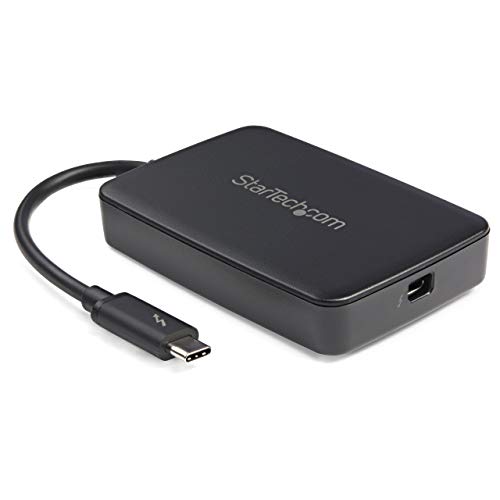
StarTech.com Thunderbolt 3 to Thunderbolt 2 Adapter (Non-Reversible) - TB3 Laptop to TB2 (20Gbps) or TB1 (10Gbps) Devices / Displays - Black - Windows/Mac (TBT3TBTADAP)


Key features
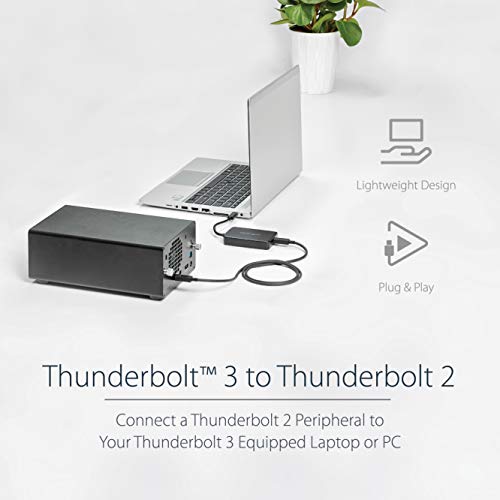
- •CONVENIENT COST SAVINGS: With this Thunderbolt 3 to Thunderbolt 2 adapter, you don't need to upgrade your older peripherals to make them compatible with your newer computer
- •POWER AND CHARGE: This USB-C to Thunderbolt 2 and Mini DisplayPort adapter supplies power to bus-powered devices
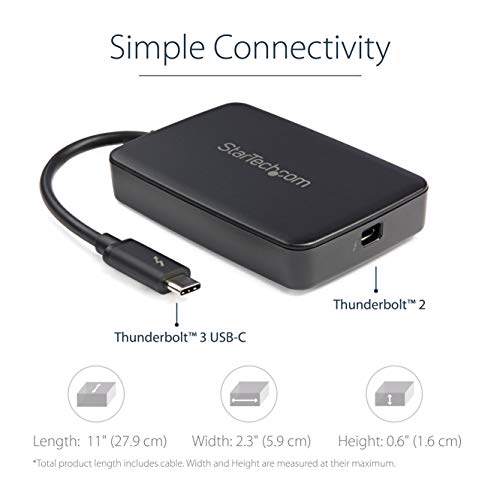
- •BACKWARD COMPATIBLE: Not only is this adapter compatible with Thunderbolt 2 devices at 20 Gbps, it also supports first-generation Thunderbolt devices at 10 Gbps
- •SLIM AND PORTABLE: With its slim profile and light weight, you won't even notice the Thunderbolt adapter in your laptop bag until you need it
- •RELIABLE AFTER-PURCHASE SUPPORT: StarTech.com offers free lifetime technical support and a competitive 2-year warranty on this adapter
StarTech.com Thunderbolt 3 to Thunderbolt 2 Adapter (Non-Reversible) - TB3 Laptop to TB2 (20Gbps) or TB1 (10Gbps) Devices / Displays - Black - Windows/Mac (TBT3TBTADAP)
List Price: $158.60$142.74DEALYou Save: $15.86 (10%)
Free shippingFree Returns – 30 daysFree Order CancellationSecure Payment2–3 Days DeliveryGet It October 24, 2026In Stock (43)No marketing spamNo account requiredFulfilment by FedEx / Amazon / UPS / ShipwirePayPal / Card Buyer Protection
Customer Reviews
Reviews sourced from verified Amazon purchasers4.1
out of 5
Based on 10 reviews
5★
60%
4★
40%
3★
0%
2★
0%
1★
0%
Apple Thunderbolt Display (Mini Displayport) to a Windows PC using a USB-C connector? This is the App for that. A+
jasonCbraatz✓ Verified Purchase•September 22, 2023
On a new PC build, using this motherboard: Gigabyte LGA1151 Intel Z170 2-Way SLI ATX DDR4 Motherboards GA-Z170X-Gaming 7 , I was itching to use my Thunderbolt display from Apple since about 2 years ago I spent over $1,000 at the Apple store for it (the one like this: Apple MC914LL/B 27-inch Thunderbolt Display ) - and well, it was meant to be more than just a pretty paperweight. Actually the newly-obsolete Apple Thunderbolt display itself is quite good. It's a shame that Apple didn't continue that business (for now). The downside is that it's a Thunderbolt 2 device that's - confusingly - a mini Display port. Even more confusingly, when I bought the motherboard and it came with a USB-C connector on the back. I thought "oh, I just need a cable.." not really. The motherboard is Thunderbolt 3 and the monitor is Thunderbolt 2. Fast forward to the end here: this product works GREAT to connect a PC/Laptop that has a Thunderbolt 3 USB-C connector (Dell, HP, etc) to an Apple Thunderbolt Display. Beyond the basics of it working as a display, I haven't invested time to get the drivers to work for the camera, speakers, etc inside the display, but there are some sites out there that document how to do it by borrowing drivers from bootcamp. As other viewers noted though, an Apple MacBook with a USB-C connector doesn't use Thunderbolt 3 signalling, so for that purpose this adapter is unlikely to do anything. Make no mistake: this adapter is expensive. But to spend about $75-80 to make an already-owned good Apple monitor work on a new Windows PC to me was worth it.
Works as advertised, no drama
N. Wright✓ Verified Purchase•September 18, 2023
These are the guys who make the good stuff. There are so many Apple/Mac peripherals that won't quite work with this or that - not the stuff from StarTech. It's well constructed and compatible with everything you have. I use this in a recording studio, where you literally can't afford to have things quit working during a session. You need absolute dependability and Star Tech is one of the only outfits beside Apple themselves who make stuff of this quality.
You can pay for the genuine Apple stuff (the best) or save some bucks and go for this. They don't give it away, but you get Apple type quality without the 'Apple Tax'. This won't let you down.
You can pay for the genuine Apple stuff (the best) or save some bucks and go for this. They don't give it away, but you get Apple type quality without the 'Apple Tax'. This won't let you down.
Use your Apple Thunderbolt Display with a Windows-Based Machine!
Amazon Customer✓ Verified Purchase•September 16, 2023
We have two beautiful 27" Apple Thunderbolt Displays that were deemed unusable when we migrated from our old MacBook to a more powerful Dell laptop. For anyone that has used the old Apple Thunderbolt or Cinema displays, you know how amazing they are. All of my research online said there was no way to use these displays with anything other than a Mac/MacBook. Then I discovered this magical little box. Because the new Dell laptop has a USB-C port (also known as Thunderbolt 3), we could, in theory, use this adapter to drive the Thunderbolt-2 Displays.
After receiving the adapter, we crossed our fingers as we connected it to the 1st Thunderbolt monitor (we had the 2nd monitor daisy chained). Instantly both monitors sprang to life! No speed issues, no flakiness. Just two beautiful 27" displays showing our Windows desktop.
So instead of spending another $1,000+ for 2 comparable monitors, we spent $70 on this device and salvaged the monitors we own and love.
I'd give it 6 stars if I could.
After receiving the adapter, we crossed our fingers as we connected it to the 1st Thunderbolt monitor (we had the 2nd monitor daisy chained). Instantly both monitors sprang to life! No speed issues, no flakiness. Just two beautiful 27" displays showing our Windows desktop.
So instead of spending another $1,000+ for 2 comparable monitors, we spent $70 on this device and salvaged the monitors we own and love.
I'd give it 6 stars if I could.
Works great, Dell XPS 9360 owners may have issues...
eric✓ Verified Purchase•September 7, 2023
Works as described, with sleek and solid build. Unit gets pretty warm after a while, but nothing alarming.
Caveat for owners of Dell XPS 9360 (13" Kaby Lake):
Even after updating the computer's BIOS, drivers, firmware, etc. I was NOT able to output to any monitor unless the computer was in airplane mode - in other words, I had to choose for the computer to be connected to the internet OR output to external monitors via the Thunderbolt 3 port. Dell technical support is still looking into this issue for me and I have not heard back, nor have I seen any solutions online (the previous generation wireless card allowed for a decrease in WiFi power output, but that is not an option on this card). In the meantime, I had to disable the onboard Killer 1535 wireless adapter, and am using a separate USB WiFi adapter to be able to be online AND have my monitors work. My laptop is plugged into my home "base station" 99% of the time, so this is an acceptable workaround for me, but if you're looking to regularly move your computer between stations and monitors, just be advised of the current technical limitation on the Dell side.
Caveat for owners of Dell XPS 9360 (13" Kaby Lake):
Even after updating the computer's BIOS, drivers, firmware, etc. I was NOT able to output to any monitor unless the computer was in airplane mode - in other words, I had to choose for the computer to be connected to the internet OR output to external monitors via the Thunderbolt 3 port. Dell technical support is still looking into this issue for me and I have not heard back, nor have I seen any solutions online (the previous generation wireless card allowed for a decrease in WiFi power output, but that is not an option on this card). In the meantime, I had to disable the onboard Killer 1535 wireless adapter, and am using a separate USB WiFi adapter to be able to be online AND have my monitors work. My laptop is plugged into my home "base station" 99% of the time, so this is an acceptable workaround for me, but if you're looking to regularly move your computer between stations and monitors, just be advised of the current technical limitation on the Dell side.
Connected an Apple Thunderbolt Display to a Windows 10 PC!
Walker Desing✓ Verified Purchase•July 23, 2023
NOTICE: This review is primarily for those who build their own computers or are looking to build one in the future (it's fun and not that hard!)
For anyone wondering if this will let you connect an Apple Thunderbolt 1440p display to your Windows PC, the answer is, well... maybe. It's a complicated process that will take up much more of your time than you would probably like, but after a bit of tinkering I got it to work, so it's definitely possible.
When I arrived at my new video editing job, my first task was to build a new video editing rig, since I wasn't too keen on the 2009 quad-core Mac Pro my predecessor had been using. The only thing was, sitting there unused and sad was a very nice 27" Thunderbolt Display. Since this is an excellent panel I wanted to use it on the Windows 10 rig I was about to build, but upon further research I discovered this may be a much more difficult task than plug-and-play.
See, Thunderbolt Displays will ONLY work with a thunderbolt port, you cannot simply get a mini Displayport to Displayport adapter like you can with an Apple Cinema Display, which are older and use mini Displayport instead of Thunderbolt (even though they look identical). Your options for buying motherboards with Thunderbolt equipped is very slim, but they do sell PCI cards that let you add Thunderbolt ports to your system. I purchased the Asus X99-Deluxe II motherboard, which comes with the Asus Thunderbolt EX3 card included.
I needed this adapter because the EX3's thunderbolt port is the latest standard, which uses the USB-C form factor. If I would have done more research I maybe wouldn't have needed to get this adapter, but no use complaining now and besides, the X99 deluxe II is a glorious beast.
However, when I first plugged everything in and fired up my machine, nothing happened. I downloaded the drivers, went through settings, enabled Intel Thunderbolt in my motherboard's BIOS, still nothing! I was ready to return this and give up, but I researched and researched, changed some more BIOS settings, then a day later--WHAMO--it worked! Now I have a beastly dual-1440p panel setup.
So, the important things to know if you're looking to purchase this card to connect an Apple Thunderbolt Display:
- You will have to tinker with it, possibly for multiple days before it works.
- It will require you to mess around in your computer's BIOS settings. This can be intimidating to first-timers.
- Do your research! This is an expensive adapter and you don't want to get it then find out you also have to purchase pricey computer components to make it work.
My system:
Mobo: Asus X99-Deluxe II
Expansion Card: Asus Thunderbolt EX3
CPU: Intel i7-5820K 4ghz overclock
GPU: EVGA GTX 1070 OC black edition w/thermal pad mod
RAM: 64GB G.Skill ripjaws V series DDR4-3200
Storage: OS on 1TB Samsung 850 EVO SSD, several other standard HDDs
Display 1: 27-inch 1440p BenQ BL2711U
Display 2: 27-inch 1440p Apple Thunderbolt Display
For anyone wondering if this will let you connect an Apple Thunderbolt 1440p display to your Windows PC, the answer is, well... maybe. It's a complicated process that will take up much more of your time than you would probably like, but after a bit of tinkering I got it to work, so it's definitely possible.
When I arrived at my new video editing job, my first task was to build a new video editing rig, since I wasn't too keen on the 2009 quad-core Mac Pro my predecessor had been using. The only thing was, sitting there unused and sad was a very nice 27" Thunderbolt Display. Since this is an excellent panel I wanted to use it on the Windows 10 rig I was about to build, but upon further research I discovered this may be a much more difficult task than plug-and-play.
See, Thunderbolt Displays will ONLY work with a thunderbolt port, you cannot simply get a mini Displayport to Displayport adapter like you can with an Apple Cinema Display, which are older and use mini Displayport instead of Thunderbolt (even though they look identical). Your options for buying motherboards with Thunderbolt equipped is very slim, but they do sell PCI cards that let you add Thunderbolt ports to your system. I purchased the Asus X99-Deluxe II motherboard, which comes with the Asus Thunderbolt EX3 card included.
I needed this adapter because the EX3's thunderbolt port is the latest standard, which uses the USB-C form factor. If I would have done more research I maybe wouldn't have needed to get this adapter, but no use complaining now and besides, the X99 deluxe II is a glorious beast.
However, when I first plugged everything in and fired up my machine, nothing happened. I downloaded the drivers, went through settings, enabled Intel Thunderbolt in my motherboard's BIOS, still nothing! I was ready to return this and give up, but I researched and researched, changed some more BIOS settings, then a day later--WHAMO--it worked! Now I have a beastly dual-1440p panel setup.
So, the important things to know if you're looking to purchase this card to connect an Apple Thunderbolt Display:
- You will have to tinker with it, possibly for multiple days before it works.
- It will require you to mess around in your computer's BIOS settings. This can be intimidating to first-timers.
- Do your research! This is an expensive adapter and you don't want to get it then find out you also have to purchase pricey computer components to make it work.
My system:
Mobo: Asus X99-Deluxe II
Expansion Card: Asus Thunderbolt EX3
CPU: Intel i7-5820K 4ghz overclock
GPU: EVGA GTX 1070 OC black edition w/thermal pad mod
RAM: 64GB G.Skill ripjaws V series DDR4-3200
Storage: OS on 1TB Samsung 850 EVO SSD, several other standard HDDs
Display 1: 27-inch 1440p BenQ BL2711U
Display 2: 27-inch 1440p Apple Thunderbolt Display
Page 1 of 2
![QGeeM USB C to HDMI Adapter 4K Cable, USB Type-C to HDMI Adapter [Thunderbolt 3/4] HDMI Adapter for Laptop MacBook Pro/Air, Galaxy S10/S9/S8, Dell XPS 13/15, Pixelbook, Surface Pro and More(Pink)](https://m.media-amazon.com/images/I/21V8dThK9rS._SL500_.jpg)


![WAVLINK USB 2.0 to VGA/DVI/HDMI Universal Video Graphics Card Adapter for Multiple Monitors Up to 1920x1080@60Hz for Windows, Mac OS & Chrome OS[Includes DVI-to-VGA,DVI-to-HDMI Converter]](https://m.media-amazon.com/images/I/41EpG2i9dhL._SL500_.jpg)

