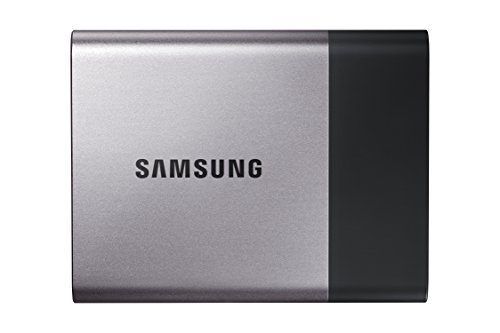
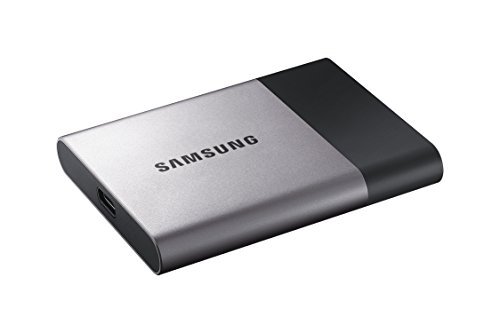
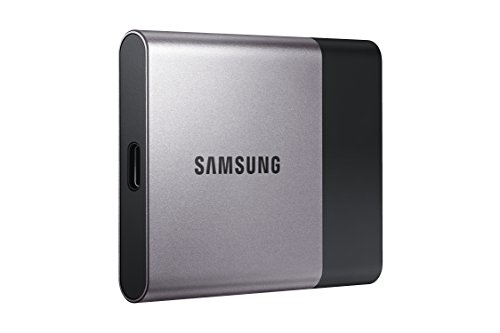
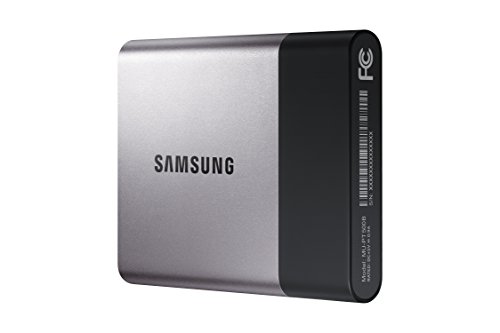
Samsung T3 Portable SSD - 250GB - USB 3.1 External SSD (MU-PT250B/AM)

Key features
- •Portable Design with Internal SSD-level Performance
- •Superfast Read-Write Speeds of up to 450 MB/s
- •Shock Resistant & Secure Encryption
- •Compatible with PC, Mac, & Android OS
Samsung T3 Portable SSD - 250GB - USB 3.1 External SSD (MU-PT250B/AM)
List Price: $458.31$412.48DEALYou Save: $45.83 (10%)
Free shippingFree Returns – 30 daysFree Order CancellationSecure Payment2–3 Days DeliveryGet It October 25, 2026In Stock (1)No marketing spamNo account requiredFulfilment by FedEx / Amazon / UPS / ShipwirePayPal / Card Buyer Protection
Customer Reviews
Reviews sourced from verified Amazon purchasers4.6
out of 5
Based on 10 reviews
5★
10%
4★
0%
3★
30%
2★
20%
1★
40%
Basically fine but runs scary hot
Jay✓ Verified Purchase•June 9, 2017
Basically fine but runs scary hot
Big dissapointment. Won't work as a NAS device, and Samsung support sucks donkey balls.
Tony Ams✓ Verified Purchase•March 12, 2017
Pros: The drive is small with an inoffensive minimalist design. It's 2.25" wide, just under 3" long, and 3/8" thick. The included cable is neither long nor flexible, but it is a quality cable, complete with a velcro strap. Unfortunately, the drive has no protective sleeve or case, which leaves its cable connection port open to debris or moisture. This is not a strong feature for a "portable" drive that will presumably be transported in purses, backpacks, briefcases, etc. - places far dirtier than the average desktop. The included software, which allows you to set a password for the drive, is straightforward and not intimidating, and it's easy to cancel the password protection if you find you don't like it. Does the T3 hold data? Yes, but even a $2 thumb drive will do that. No points for basic attributes, especially on an expensive SSD.
Cons:
The acclaimed data rate of "up to" 450MB/second is unmitigated BS. Using a new, very fast Dell desktop with 64 GB (yes, 64) of RAM and 2 TB internal SSD with only 359 GB of data on it, the T3's fastest transfer rate (of typical office data: videos, pictures, spreadsheets, docs, PDFs, etc.) I found was at best 45MB/second, and usually down around 20 MB/s or less. Yes, I was using the supplied cable and was connected via USB 3.0. I fully expect the Samsung advertised transfer rate to be a bit optimistic. But Samsung's claim of 450MB/sec is ludicrous. My experience was one tenth of that, at best. It took 3.5 hours to copy the aforementioned 359 GB of data.
The T3 also does not appear to be compatible with our standard Netgear wireless router, so we can't use the T3 as a network attached storage (NAS) device, which is why we bought it.
Adding insult to injury, contacting Samsung customer support turned out to be an utter waste of time: First, I went online to chat with Samsung tech support. However, the chat support personnel are not equipped to help with SSD devices. They gave me a number to call, and provided phone menu option numbers so I could quickly wade through the phone system. When I called, however, the phone menu is all voice activated, which made the menu numbers useless. Moreover, after having to say and spell answers to a bunch of questions like my name, email address, etc., the phone menu voice said "We are closed for the holiday. Goodbye." and terminated my call. All I could do was laugh. It's Tuesday, March 13th, and I called in the middle of their stated hours. As far as I can tell, there is no recognized holiday in the US or South Korea (where Samsung is based) on or about March 13th.
Cons:
The acclaimed data rate of "up to" 450MB/second is unmitigated BS. Using a new, very fast Dell desktop with 64 GB (yes, 64) of RAM and 2 TB internal SSD with only 359 GB of data on it, the T3's fastest transfer rate (of typical office data: videos, pictures, spreadsheets, docs, PDFs, etc.) I found was at best 45MB/second, and usually down around 20 MB/s or less. Yes, I was using the supplied cable and was connected via USB 3.0. I fully expect the Samsung advertised transfer rate to be a bit optimistic. But Samsung's claim of 450MB/sec is ludicrous. My experience was one tenth of that, at best. It took 3.5 hours to copy the aforementioned 359 GB of data.
The T3 also does not appear to be compatible with our standard Netgear wireless router, so we can't use the T3 as a network attached storage (NAS) device, which is why we bought it.
Adding insult to injury, contacting Samsung customer support turned out to be an utter waste of time: First, I went online to chat with Samsung tech support. However, the chat support personnel are not equipped to help with SSD devices. They gave me a number to call, and provided phone menu option numbers so I could quickly wade through the phone system. When I called, however, the phone menu is all voice activated, which made the menu numbers useless. Moreover, after having to say and spell answers to a bunch of questions like my name, email address, etc., the phone menu voice said "We are closed for the holiday. Goodbye." and terminated my call. All I could do was laugh. It's Tuesday, March 13th, and I called in the middle of their stated hours. As far as I can tell, there is no recognized holiday in the US or South Korea (where Samsung is based) on or about March 13th.
Can't seem to get it to do what I wanted
Amazon Customer✓ Verified Purchase•March 5, 2017
Bought a new laptop (HP 14-an013nr 14-Inch Notebook, AMD E2-7110 QC, 4GB RAM, 32 GB eMMC Hard Drive, Windows 10 Home 64). So far I'm very happy with this basic laptop. I wanted to have more memory available and saw that it was possible to add a bootable INTERNAL SSD. My plan was a little different so I got Samsung T3 Portable SSD - 250GB - USB 3.1 External SSD. The plan was to clone the 32GB internal drive to the T3 and then use the T3 as an EXTERNAL boot drive. Cloning was done using Macrium Reflect Free software program and BIOS boot order was changed appropriately. Unfortunately, the result was a blue screen showing an "Inaccessable boot device" error. Anyone succeeded in doing what I tried with this specific (or similar) HP model using the Samsung T3 (or other external SSD) drive?
Don't get this drive if you rely upon encryption!
P. KAT✓ Verified Purchase•January 14, 2017
I purchased this item to use with my Mac laptop. While it's small and sleek, when you use it with the encryption app that it comes with, it is extremely buggy. Specifically, at first I could only log into the drive through the original laptop that I encrypted it on. Soon thereafter, I sold that laptop and could no longer get into the drive. Try as I might, it kept ejecting the drive when I entered the password. Then I had to deal with Samsung to have the device replaced under warranty. After the 45 minutes on hold (i.e. a call that can only be made during office hours during the week which is a pain since I'm working during the week during the day and had to put off the call for a couple of weeks until I had time during a weekday to make the call) I gave up. Samsung really sucks, I hate to say.
UPDATE: I finally got a Samsung Representative, and it turns out that their drive doesn't work with Mac OS. Sierra. They suggested I downgrade! It's ludicrous that they can't figure this out. They told me that the issue affects the T1 and T3 drives. Beware!
UPDATE: I finally got a Samsung Representative, and it turns out that their drive doesn't work with Mac OS. Sierra. They suggested I downgrade! It's ludicrous that they can't figure this out. They told me that the issue affects the T1 and T3 drives. Beware!
Wow it's fast (as expected), using for Time Machine backup
Drawring Simon✓ Verified Purchase•November 19, 2016
Lesson learned, use the right cable. The included cable provides good speed, but since I was on a usb c only computer, I just grabbed the first usb c cable I could find and I knew it was a mistake. Don't use the Apple usb c cable if you want the max speed. Fortunately I made the correct assumption that this was user error and not a defective drive.
I'm using this as my Time Machine backup on my 2016 MBP. But first I wanted to test the speed that I paid for. I compared this to a relatively fast Toshiba external HDD, transferring files from my internal SSD to the Toshiba HDD and to this T3 SSD. The traditional HDD transferred at 105 MB/s. Then my first test on this drive gave me 41 MB/s, slower than the HDD! This was the Apple cable included as a usb c power cable. I tried the included cable with a usb c to a adapter and I got 422 MB/s, more in line with expectations. Next I tried a spare usb c cable I had from my Kensington dock and I got the same 422 MB/s as the included cable. 4x the speed of the HDD.
For Time Machine specifics, I tested this against the HDD. Using the journaled, encrypted backup, you don't get the same speed differences. Apparently, the encryption is as much as a bottleneck as the transfer. Compared to the usb 2.0 Apple cable, I got about a 50%-100% speed increase. The HDD was similar to the SSD speed. Basically, it's a waste to use this on Time Machine for encrypted backups.
This being my first external SSD drive, it is obviously the fastest portable drive I've ever used. It's a shame I'm using it only to back up my computer and not for speed sensitive needs. This has so many possibilities. As soon as I find another need, this will be repurposed for more glamorous work.
Edit: Time Machine actually backs up at about 2-3x the speed of a HDD. Pretty significant on the first backup, but isn't a big advantage with each subsequent backup which only copies incremental changes if backed up regularly. Still undecided on how much I need to use this for backups.
I'm using this as my Time Machine backup on my 2016 MBP. But first I wanted to test the speed that I paid for. I compared this to a relatively fast Toshiba external HDD, transferring files from my internal SSD to the Toshiba HDD and to this T3 SSD. The traditional HDD transferred at 105 MB/s. Then my first test on this drive gave me 41 MB/s, slower than the HDD! This was the Apple cable included as a usb c power cable. I tried the included cable with a usb c to a adapter and I got 422 MB/s, more in line with expectations. Next I tried a spare usb c cable I had from my Kensington dock and I got the same 422 MB/s as the included cable. 4x the speed of the HDD.
For Time Machine specifics, I tested this against the HDD. Using the journaled, encrypted backup, you don't get the same speed differences. Apparently, the encryption is as much as a bottleneck as the transfer. Compared to the usb 2.0 Apple cable, I got about a 50%-100% speed increase. The HDD was similar to the SSD speed. Basically, it's a waste to use this on Time Machine for encrypted backups.
This being my first external SSD drive, it is obviously the fastest portable drive I've ever used. It's a shame I'm using it only to back up my computer and not for speed sensitive needs. This has so many possibilities. As soon as I find another need, this will be repurposed for more glamorous work.
Edit: Time Machine actually backs up at about 2-3x the speed of a HDD. Pretty significant on the first backup, but isn't a big advantage with each subsequent backup which only copies incremental changes if backed up regularly. Still undecided on how much I need to use this for backups.
Page 1 of 2