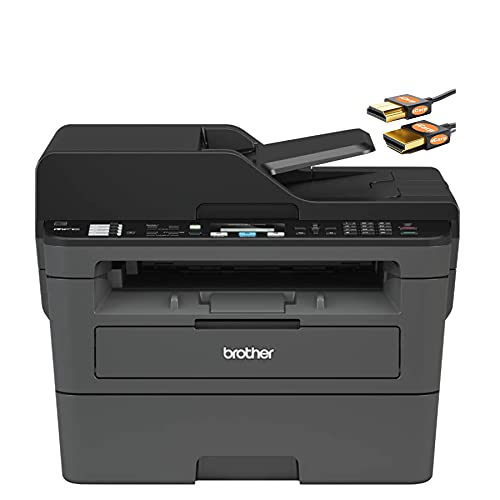
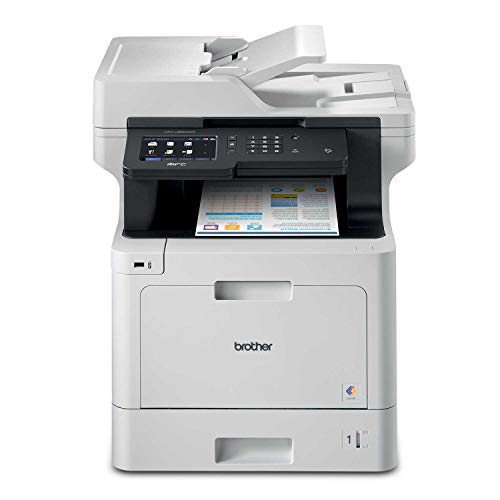
Brother MFC-L8900CDW Business Color Laser All-in-One Printer, Amazon Dash Replenishment Ready


Key features
- •ALL-IN-ONE SOLUTION: The Brother MFC-L8900CDW Color Laser All-in-One is an exceptional printer for businesses that require large print and copy volume
- •BUSINESS PRINTING & COPYING: This printer increases productivity with print speeds up to 33 ppm and scan speeds for double-sided pages up to 58 ipm
- •CONNECTIVITY: Built-in wireless 802.11b/g/n and Gigabit Ethernet network interface allows for easy set up and sharing on a wireless or wired network
- •ADVANCED SCANNING: Wirelessly scan to mobile devices with the Brother iPrint&Scan or popular destinations including SharePoint and more
- •5" COLOR TOUCHSCREEN: The 5" color Touchscreen display offers easy navigation of the menu and creation of up to 64 customized shortcuts
Brother MFC-L8900CDW Business Color Laser All-in-One Printer, Amazon Dash Replenishment Ready
List Price: $1461.46$1315.31DEALYou Save: $146.15 (10%)
Free shippingFree Returns – 30 daysFree Order CancellationSecure Payment2–3 Days DeliveryGet It October 25, 2026In Stock (7)No marketing spamNo account requiredFulfilment by FedEx / Amazon / UPS / ShipwirePayPal / Card Buyer Protection
Customer Reviews
Reviews sourced from verified Amazon purchasers4.1
out of 5
Based on 10 reviews
5★
70%
4★
0%
3★
10%
2★
0%
1★
20%
Best Machines
Amazon Customer•November 8, 2017
I love brother brand. They are the best quality machines for the best price ever. Toners lasts and for a great price. I am a proud owner of 12 of different brother types for both business and home.
Five Stars
Anthony•November 3, 2017
Good, fine and first!
Good all in one!
pudgecake•September 19, 2017
Nice features and print is sharp.
Great printer for a business that prints alot
Charles Forell•September 13, 2017
This is a great printed for someone who runs a business and prints a lot of documents on a daily basis.
Great machine, not so Cloud friendly
N. Demarco•July 24, 2017
Brother MFC-L8900CDW review
This machine makes a lot of promises and lives up to most of them. I needed a new multi-function machine. My inkjet-based Epson was no longer cutting it. The ink cartridges were a pain, with nozzles drying up. The world had moved forward, and the Epson couldn't scan directly to Google Drive. I was doing the USB drive shuffle to move files.
A new machine would have to be laser. Color was a must. It had to scan and print duplex. The consumables had to be reasonably priced. Most importantly, it had to support web services like scanning to Google Drive, Dropbox, Box. It had to support cloud printing like Google Cloud Print. Hint: It does, but is not perfect.
The Brother MFC-L8900CDW had just been released. Specwise, it met my needs. It's a color laser printer with a duplex ADF scanner. The consumables are individually replaceable, and it supported web scanning and printing. It was also available on Amazon, so I knew I wouldn't be stuck with it if I was disappointed.
The machine is solid and attractive. The build quality is typical of other Brother products. The design is minimal and clean. Setup was mostly simple. Pull it out of the box, remove a few strips of tape, plug it in and start printing. Print and scan quality are great, but that's expected by now. The machine is appropriately fast and quiet. I've printed 350 pages. To date, not one has jammed.
Cloud services work, but with some difficulties. Here's where Brother could make some improvements. Sure, the services are there. Finding and enabling them is tough. Scanning to Google Drive is not so great.
Enabling Cloud Print isn't a simple matter. First, it isn't well documented. It can't be done from the control panel. You have to sign on to the web interface. You have to go to Network tab, then to the Protocol section, where you'll find the Google Cloud Print protocol setup information. Not obvious, and not simple. Once you've set it up, however, cloud printing works perfectly.
Scanning to Google Drive was one of the main reasons I needed a new MFC. Scanning works, but has a few flaws. Many days, I'm scanning a few documents, each with a few pages. Getting through each document involves pressing a button, waiting for a "Connecting"¦" message, then pressing another button, waiting for another "Connecting"¦" message. Worse, once the document has been scanned, it then uploads the document, page by page. The upload is slow, taking 5-10 seconds per page. You're blocked from doing anything else (like scanning your next document) during this time.
I'm tempted to walk away during scans, but cannot. If the scan doesn't upload, I get no persistent error message. The error appears, then disappears, so I'm not sure if the scan completed. The only way to know for sure is to go to Google Drive and verify all scanned documents are present.
Reaching out to Brother, I explained the scanning difficulties. Their tech support team responded like a large company. I was told this is the way it works, and nothing can be done.
In the end, I chose to keep the Brother MFC-L8900CDW. Its benefits outweighed the scanning issues. I use it daily, and without further issue. I'm hopeful Brother will improve the documentation for web services setup. Before writing this review, I updated the machine to firmware version 1.05
I'm mostly hopeful they'll revisit the scanning workflow and error reporting. It seems like a small issue on an otherwise fantastic machine.
This machine makes a lot of promises and lives up to most of them. I needed a new multi-function machine. My inkjet-based Epson was no longer cutting it. The ink cartridges were a pain, with nozzles drying up. The world had moved forward, and the Epson couldn't scan directly to Google Drive. I was doing the USB drive shuffle to move files.
A new machine would have to be laser. Color was a must. It had to scan and print duplex. The consumables had to be reasonably priced. Most importantly, it had to support web services like scanning to Google Drive, Dropbox, Box. It had to support cloud printing like Google Cloud Print. Hint: It does, but is not perfect.
The Brother MFC-L8900CDW had just been released. Specwise, it met my needs. It's a color laser printer with a duplex ADF scanner. The consumables are individually replaceable, and it supported web scanning and printing. It was also available on Amazon, so I knew I wouldn't be stuck with it if I was disappointed.
The machine is solid and attractive. The build quality is typical of other Brother products. The design is minimal and clean. Setup was mostly simple. Pull it out of the box, remove a few strips of tape, plug it in and start printing. Print and scan quality are great, but that's expected by now. The machine is appropriately fast and quiet. I've printed 350 pages. To date, not one has jammed.
Cloud services work, but with some difficulties. Here's where Brother could make some improvements. Sure, the services are there. Finding and enabling them is tough. Scanning to Google Drive is not so great.
Enabling Cloud Print isn't a simple matter. First, it isn't well documented. It can't be done from the control panel. You have to sign on to the web interface. You have to go to Network tab, then to the Protocol section, where you'll find the Google Cloud Print protocol setup information. Not obvious, and not simple. Once you've set it up, however, cloud printing works perfectly.
Scanning to Google Drive was one of the main reasons I needed a new MFC. Scanning works, but has a few flaws. Many days, I'm scanning a few documents, each with a few pages. Getting through each document involves pressing a button, waiting for a "Connecting"¦" message, then pressing another button, waiting for another "Connecting"¦" message. Worse, once the document has been scanned, it then uploads the document, page by page. The upload is slow, taking 5-10 seconds per page. You're blocked from doing anything else (like scanning your next document) during this time.
I'm tempted to walk away during scans, but cannot. If the scan doesn't upload, I get no persistent error message. The error appears, then disappears, so I'm not sure if the scan completed. The only way to know for sure is to go to Google Drive and verify all scanned documents are present.
Reaching out to Brother, I explained the scanning difficulties. Their tech support team responded like a large company. I was told this is the way it works, and nothing can be done.
In the end, I chose to keep the Brother MFC-L8900CDW. Its benefits outweighed the scanning issues. I use it daily, and without further issue. I'm hopeful Brother will improve the documentation for web services setup. Before writing this review, I updated the machine to firmware version 1.05
I'm mostly hopeful they'll revisit the scanning workflow and error reporting. It seems like a small issue on an otherwise fantastic machine.
Page 1 of 2