Fujitsu PA03656-B305 ScanSnap iX500 Color Duplex Desk Scanner for Mac and PC


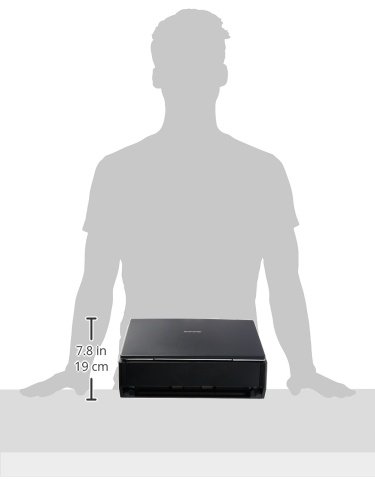


Key features
- •Quickly declutter your workspace - create searchable, multi-page PDFs with the click of a button
- •Double-sided scanning with advanced paper feeding system - insert up to 50 sheets of paper on automatic document feed (ADF)
- •Intelligent scan correction performs a quick quality check on your scans - features include auto color detection, auto rotation for upside down documents, and blank page removal.
- •Easy to use software with color, grayscale, and monochrome scan speeds of up to 25 double-sided pages per minute
- •Scan your documents directly into integrated cloud services (Dropbox, Google drive, Evernote, and more) to access your files from anywhere
- •Compatible with iOS and Windows devices - scan via USB cord or Wi-Fi to laptop, tablet, and smartphone devices.Display Resolution:1,024 × 768 pixels or more
Fujitsu PA03656-B305 ScanSnap iX500 Color Duplex Desk Scanner for Mac and PC
List Price: $755.86$680.27DEALYou Save: $75.59 (10%)
Free shippingFree Returns – 30 daysFree Order CancellationSecure Payment2–3 Days DeliveryGet It October 25, 2026In Stock (4)No marketing spamNo account requiredFulfilment by FedEx / Amazon / UPS / ShipwirePayPal / Card Buyer Protection
Customer Reviews
Reviews sourced from verified Amazon purchasers4.6
out of 5
Based on 10 reviews
5★
90%
4★
10%
3★
0%
2★
0%
1★
0%
A seriously amazing scanner! Opinion from an IT admin who thinks all scanners are utter junk.
Jason R✓ Verified Purchase•August 4, 2023
I cannot say enough great things about this scanner, so i will jump into the finer points:
1. It's a workhorse. We've been digitizing our entire paper archive of about 500 sheet PER DAY and this scanner has kept up.
2. It's a thoughtful device. When you scan as much as we do, little annoyances become a big deal. Whoever designed this thing thought through all those little annoyances and made most of them go away. I like how the unit recovers from jams and understands which pages to keep and which pages to toss. I like how the one-touch scan button understands when I want to begin a scan and resume a scan. That means I don't have to click over the PC software in order to recover. The unit really does auto-straighten, auto-contrast, auto-2-side, auto-1-side, auto-orientation. It's hard to screw up a scan. The scanning engine even knows how to look for ink/toner bleed through from one side of a page to the other and contrast it out. Wow!
3. Cleaning and care is pretty easy. After 500 pages, there's going to be a little debris in the scanner. The eject button and fold out top is designed well enough that it's easy to gently blow out particles and carefully clean the top and bottom scan heads. No special tools required. It's hard to go wrong here.
4. Scanning to searchable PDF works incredibly well. I'm very impressed. The OCR module does a pretty admirable job of scanning text and making it searchable in a PDF. This is the godsend feature we need. Pro tip: if you're on Windows and you want to use Windows Search to look for text in PDF you need to go download Adobe's PDF iFilter app and install it on every computer that needs to search the PDFs, not just the server or workstation where the PDFs reside. Installing the iFilter *should* turn on Windows Search settings to search the entire PDF and not just the file properties.
There are a couple of annoyances, however:
4. Software installation is clumsy and requires a bunch of updates. Whoever designed the installer/updater wasn't nearly as thoughtful as whoever designed the hardware. It takes a good 30 minutes of downloading and installing and updating to get the software online. Really, there's no excuse for it. Just package the updates into the latest installer and make it easy for those of us who are purchasing later rather than earlier.
5. The actual app software is also clumsy. The ONE THING this scanner needs to do right is to scan to searchable PDF. In order to do this, I had to turn off all the "quick button" features and change the app to scan to application: save to a folder. I pick the folder and now I don't deal with the software at all. I just put documents in the scanner, press the blue button and walk away.
6. Wi-fi setup is clunky and difficult thanks to the bad installer. Wi-fi should be one of the awesome features of this unit, but it's painful to setup because of the stupid software. Also, I had trouble keeping this unit connected to my UniFi mesh wi-fi network. Occasionally the UniFi changes the channel of a particular SSID and this throws off the scanner's wi-fi. I then have to go in to the software and setup wi-fi again. Repeat every time I make config changes to or restart the UniFi access points. Kind of a bummer.
All in all, this crazy little box has saved us so much time and frustration. The best part? I demo'd it before some scanning/archiving company tried to bid us $10,000 to do our scanning work for us and their demo system did far worse than this little scanner. They walked away in utter shame. I love doing that to crummy companies :)
1. It's a workhorse. We've been digitizing our entire paper archive of about 500 sheet PER DAY and this scanner has kept up.
2. It's a thoughtful device. When you scan as much as we do, little annoyances become a big deal. Whoever designed this thing thought through all those little annoyances and made most of them go away. I like how the unit recovers from jams and understands which pages to keep and which pages to toss. I like how the one-touch scan button understands when I want to begin a scan and resume a scan. That means I don't have to click over the PC software in order to recover. The unit really does auto-straighten, auto-contrast, auto-2-side, auto-1-side, auto-orientation. It's hard to screw up a scan. The scanning engine even knows how to look for ink/toner bleed through from one side of a page to the other and contrast it out. Wow!
3. Cleaning and care is pretty easy. After 500 pages, there's going to be a little debris in the scanner. The eject button and fold out top is designed well enough that it's easy to gently blow out particles and carefully clean the top and bottom scan heads. No special tools required. It's hard to go wrong here.
4. Scanning to searchable PDF works incredibly well. I'm very impressed. The OCR module does a pretty admirable job of scanning text and making it searchable in a PDF. This is the godsend feature we need. Pro tip: if you're on Windows and you want to use Windows Search to look for text in PDF you need to go download Adobe's PDF iFilter app and install it on every computer that needs to search the PDFs, not just the server or workstation where the PDFs reside. Installing the iFilter *should* turn on Windows Search settings to search the entire PDF and not just the file properties.
There are a couple of annoyances, however:
4. Software installation is clumsy and requires a bunch of updates. Whoever designed the installer/updater wasn't nearly as thoughtful as whoever designed the hardware. It takes a good 30 minutes of downloading and installing and updating to get the software online. Really, there's no excuse for it. Just package the updates into the latest installer and make it easy for those of us who are purchasing later rather than earlier.
5. The actual app software is also clumsy. The ONE THING this scanner needs to do right is to scan to searchable PDF. In order to do this, I had to turn off all the "quick button" features and change the app to scan to application: save to a folder. I pick the folder and now I don't deal with the software at all. I just put documents in the scanner, press the blue button and walk away.
6. Wi-fi setup is clunky and difficult thanks to the bad installer. Wi-fi should be one of the awesome features of this unit, but it's painful to setup because of the stupid software. Also, I had trouble keeping this unit connected to my UniFi mesh wi-fi network. Occasionally the UniFi changes the channel of a particular SSID and this throws off the scanner's wi-fi. I then have to go in to the software and setup wi-fi again. Repeat every time I make config changes to or restart the UniFi access points. Kind of a bummer.
All in all, this crazy little box has saved us so much time and frustration. The best part? I demo'd it before some scanning/archiving company tried to bid us $10,000 to do our scanning work for us and their demo system did far worse than this little scanner. They walked away in utter shame. I love doing that to crummy companies :)
ScanSnap iX500: Excellent for digitizing large amounts of basic documents
UT Gasman✓ Verified Purchase•July 19, 2023
The Fujitsu iX500 ScanSnap Scanner is worth the money and work to set up. It performs as expected, which is to say it scans regular size documents very quickly and with good resolution, single or double sided.
I am a bit of a sentimental hoarder and have had as a project for awhile digitizing my kids' schoolwork. I first bought a NEAT scanner for this task before they started their cloud service, and once that happened I no longer wanted to use that scanner. The functionality was fine if you used the proprietary software for organizing things, but once they stopped supporting it to push people to use their cloud service I found the scanner substandard when scanning documents directly to PDFs (because you had to pick a file name each time you scanned a new group of documents). I had heard good reviews of the scansnap ix500, and with the piles of paper I needed to scan piling up I decided to try it out even though I didn't like the sound of it being a device that didn't support the TWAIN thing (background on me: I'm middle aged, so even though I don't work in IT I do consider myself reasonably savvy with electronics because I've spent most of my life having to use computers). In the interim I bought a new cheap printer at Costco that also has scanning capability on the recommendation of a friend (EPSON Workforce WF-3640) and I felt the printer was doing a decent job (despite the headaches of setting it up) and almost returned the ScanSnap before I opened it.
I am SO glad I did not return the ScanSnap. When I set it up and started using it I was blown away. It is faster than the printer scanning at 50 dpi resolution, the resolution of the PDF files is excellent, and it duplex scans at a speed that is similar to what is advertised (I haven't clocked it but I scan stacks of 50 sheets of paper each and it doesn't take longer than 70 seconds in my estimation). The software bundle is adequate for what I want (saving to a local external hard drive), though it has options for scanning to email, Google Drive, etc., and given how the rest of the thing has performed I feel confident that that would work well too. The only issue I have had with the scanner is that it is supposed to be able to scan wirelessly to a computer, and I have been unsuccessful doing this despite correct setup with the directions included. For some reason the software recommends having the scanner connected via USB cable when setting up the wireless, and everything appeared fine and working after the wireless setup was done with the cable connected, but as soon as I unplugged the scanner and moved it to the location where I want it to be the software was able to detect the scanner but was saying that it does not support wireless functioning. I cleared a spot off on my computer desk for it and once I saw how awesome a job it was doing I didn't care so much about the wireless not working.
So in summary it's an excellent scanner for scanning basic documents. It scans very fast, even when duplex scanning, with excellent resolution. I was unable to get the wireless to work, but it was well worth the effort to clear a spot off on my computer table for it because once it was in action I was very happy with it!
I am a bit of a sentimental hoarder and have had as a project for awhile digitizing my kids' schoolwork. I first bought a NEAT scanner for this task before they started their cloud service, and once that happened I no longer wanted to use that scanner. The functionality was fine if you used the proprietary software for organizing things, but once they stopped supporting it to push people to use their cloud service I found the scanner substandard when scanning documents directly to PDFs (because you had to pick a file name each time you scanned a new group of documents). I had heard good reviews of the scansnap ix500, and with the piles of paper I needed to scan piling up I decided to try it out even though I didn't like the sound of it being a device that didn't support the TWAIN thing (background on me: I'm middle aged, so even though I don't work in IT I do consider myself reasonably savvy with electronics because I've spent most of my life having to use computers). In the interim I bought a new cheap printer at Costco that also has scanning capability on the recommendation of a friend (EPSON Workforce WF-3640) and I felt the printer was doing a decent job (despite the headaches of setting it up) and almost returned the ScanSnap before I opened it.
I am SO glad I did not return the ScanSnap. When I set it up and started using it I was blown away. It is faster than the printer scanning at 50 dpi resolution, the resolution of the PDF files is excellent, and it duplex scans at a speed that is similar to what is advertised (I haven't clocked it but I scan stacks of 50 sheets of paper each and it doesn't take longer than 70 seconds in my estimation). The software bundle is adequate for what I want (saving to a local external hard drive), though it has options for scanning to email, Google Drive, etc., and given how the rest of the thing has performed I feel confident that that would work well too. The only issue I have had with the scanner is that it is supposed to be able to scan wirelessly to a computer, and I have been unsuccessful doing this despite correct setup with the directions included. For some reason the software recommends having the scanner connected via USB cable when setting up the wireless, and everything appeared fine and working after the wireless setup was done with the cable connected, but as soon as I unplugged the scanner and moved it to the location where I want it to be the software was able to detect the scanner but was saying that it does not support wireless functioning. I cleared a spot off on my computer desk for it and once I saw how awesome a job it was doing I didn't care so much about the wireless not working.
So in summary it's an excellent scanner for scanning basic documents. It scans very fast, even when duplex scanning, with excellent resolution. I was unable to get the wireless to work, but it was well worth the effort to clear a spot off on my computer table for it because once it was in action I was very happy with it!
Great for photos
John R. Stowe III✓ Verified Purchase•July 12, 2023
I have scanned over 1,000 photos with this scanner. It works great and comes with software that helps keep your scans organized. I highly recommend it. Send your family digital photos instead of paper ones.
Highly recommended intelligent scanner eliminates office clutter. Efficient. Dependable. One of my best investments ever!
campbellcreek✓ Verified Purchase•June 5, 2023
This is my second purchase for an additional office location. My previous scanner purchase wasn't wireless and though this is more convenient, I love them both. With one button convenience it auto feeds muti-size documents with ease while scanning both sides of documents in a flash and simultaneously evaluates and performs adjustments for each page size as it's scanned. It automatically de-skews page to straighten if fed off kilter or flips image right up side if fed upside down. Scans color or black and white at 7-25 pages per minute depending on scan quality selected. This is lightening fast and much quicker than a flatbed scanner but documents have to be flat as they feed through scanner and don't lie flat on top of a scanner bed. It will scan irregular sized documents and those as small as 2" or protect photos by using carrier sheet included with product. Document feed slot scans up to 8.5" wide and almost 12" in long. I've scanned up to 50 pages in one batch and then combined batches for unlimited pages within a single large file.
I now have "paperless" offices and got rid of all but one small file cabinet. Organization software is remarkable and was included with product. It's simple to use and documents can be created as searchable PDFs which are quick to retrieve for future reference. Organizational software system is like a file cabinet organizing by levels; cabinet, file, folder system which can be easily customized on all levels. Different scanning modes allow such convenience as direct scan to cloud, email, print, mobile, Word, Excel, PowerPoint, picture folders, etc. I quickly attach all receipts or financial documents I need to save to my QuickBooks for future reference and tax documentation.
I have cabinets for everything; financial, investments, medical, family history, tenant and property files, ideas, education, inventories, insurance, etc. My life after ScanSnap is more organized and much less cluttered than my life before ScanSnap. I save numerous hours not "looking" for things! I now know right where to find them. I hope never to be without one. I would recommend it to anyone. I have found it to be surprisingly dependable and easy to use. I have never had to make a repair to it outside of buying new carrier sheets as they wore. Buy one. You'll love it.
I now have "paperless" offices and got rid of all but one small file cabinet. Organization software is remarkable and was included with product. It's simple to use and documents can be created as searchable PDFs which are quick to retrieve for future reference. Organizational software system is like a file cabinet organizing by levels; cabinet, file, folder system which can be easily customized on all levels. Different scanning modes allow such convenience as direct scan to cloud, email, print, mobile, Word, Excel, PowerPoint, picture folders, etc. I quickly attach all receipts or financial documents I need to save to my QuickBooks for future reference and tax documentation.
I have cabinets for everything; financial, investments, medical, family history, tenant and property files, ideas, education, inventories, insurance, etc. My life after ScanSnap is more organized and much less cluttered than my life before ScanSnap. I save numerous hours not "looking" for things! I now know right where to find them. I hope never to be without one. I would recommend it to anyone. I have found it to be surprisingly dependable and easy to use. I have never had to make a repair to it outside of buying new carrier sheets as they wore. Buy one. You'll love it.
5 Stars - With A Caveat
Dr. Bubba hisownself✓ Verified Purchase•June 4, 2023
I've used a Fujitsu ScanSnap S300M for many years and it was a revelation that completely changed my workflow and allowed me to get rid of two file cabinets of paper. I recently upgraded my computer and the S300M software would no longer work with my new operating system, so I decided to "upgrade" my scanner to a Fujitsu IX500. WOW! Compared with the S300M the IX500 is fast, it automatically performs OCR on the scans, and it has yet to create a paper feed jam. However, there are a few negatives based on my experience with it:
1. The glossy, piano black finish around the scan button is a fingerprint magnet.
2. The entire scanner is a dust magnet. Every scan produces a fine mist of paper dust
that requires constant cleaning.
3. The ScanSnap Manager software inverts scanned images and mis-scans pages,
seemingly at random. It will scan several pages and then produce a scan that's
out of scale with the rest of the scanned images, or the images will be out of
rotation with the rest of the scanned images. Both of these problems are easily
remedied by re-scanning or adjusting the page rotation, but it is a nuisance that
interrupts and thus slows down the workflow.
4. The output paper "tray" has a fold-out "leaf" with a flawed design. Any page that
is approximately the same width as the "leaf" will catch on the small space where
you insert your thumb to unfold the "leaf" and create a paper output jam. In fact,
if the paper is a relatively heavy weight, when it jams the force will dislodge the
paper output tray and disconnect it from the scanner completely. It's a real "treat"
to try to reinstall the tray on the scanner chassis. I've had to do this at least three
times. If you don't unfold the "leaf," paper doesn't jam, but it will overflow the
output "tray." This is a problem that a better design could have averted.
Overall - even with the above problems - I love, love, love this scanner and I'd buy it
again in a New York minute. The ScanSnap IX500 does almost everything I want in a
scanner and I rate it a true 5-Star product - with the caveat that it has a few "glitches."
1. The glossy, piano black finish around the scan button is a fingerprint magnet.
2. The entire scanner is a dust magnet. Every scan produces a fine mist of paper dust
that requires constant cleaning.
3. The ScanSnap Manager software inverts scanned images and mis-scans pages,
seemingly at random. It will scan several pages and then produce a scan that's
out of scale with the rest of the scanned images, or the images will be out of
rotation with the rest of the scanned images. Both of these problems are easily
remedied by re-scanning or adjusting the page rotation, but it is a nuisance that
interrupts and thus slows down the workflow.
4. The output paper "tray" has a fold-out "leaf" with a flawed design. Any page that
is approximately the same width as the "leaf" will catch on the small space where
you insert your thumb to unfold the "leaf" and create a paper output jam. In fact,
if the paper is a relatively heavy weight, when it jams the force will dislodge the
paper output tray and disconnect it from the scanner completely. It's a real "treat"
to try to reinstall the tray on the scanner chassis. I've had to do this at least three
times. If you don't unfold the "leaf," paper doesn't jam, but it will overflow the
output "tray." This is a problem that a better design could have averted.
Overall - even with the above problems - I love, love, love this scanner and I'd buy it
again in a New York minute. The ScanSnap IX500 does almost everything I want in a
scanner and I rate it a true 5-Star product - with the caveat that it has a few "glitches."
Page 1 of 2


