Whistler TRX-1 Handheld Digital Police Scanner Radio – Portable Scanner with EZ Scan, APCO P25 Phase I & II, DMR, NXDN, and USA/Canada Database – Black



Key features
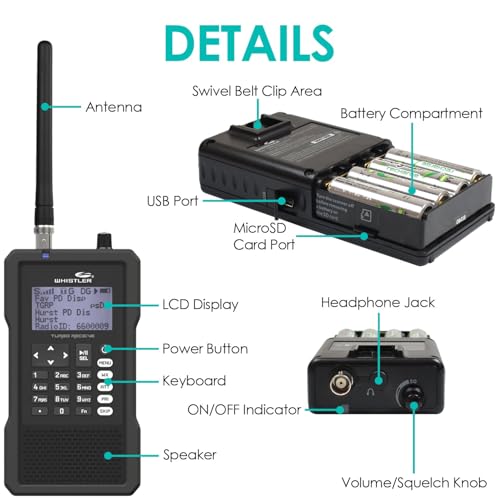
- •Simple Zip Code programming. Preloaded USA/Canada MicroSD card included. Easy updating via Internet. User upgradable CPU firmware. Spectrum Sweeper. Clock / Calendar.
- •APCO P25 Digital Phase I & II.SYSTEM REQUIREMENTS: Only for use on Windows Operating Systems. CTCSS and DCS subaudible decoder. Dedicated SKYWARN/Weather button.
- •Dedicated SKYWARN/Weather button. IF Discriminator Out. Tuning Steps: 2.5, 3.125, 5, 6.25, 7.5, 8.33, 10, 12.5 ad 25 kHz. Record up to 50 hours of audio on the 2 GB microSDr. Date and time stamp recorded audio files
- •Strong signal overload from nearby transmitter.Check performance with and without attenuator activated, use setting with best reception. Loose or defective antenna. Inspect antenna and connectors and correct any problems found.Incorrect modulation mode selected. Ensure that proper modulation mode is selected for the type of system being monitored. If necessary, use the PC Application to change modulation mode.
- •The scanner does not function.Ensure that the scanner is equipped with fresh batteries. If powering the scanner from external power, make certain that the USB power plug is fully inserted into the scanners USB jack. Weak signals from distant stations. Reposition for best reception. 2-Way radio reception is line-of-sight. Consider an outdoor antenna; the first 30 feet of elevation makes the most difference. Attenuator in use on weak signals. Check performance with and without attenuator activated,use setting with best reception.
BrandWhistler
CategoryCB Radios & Scanners
Size7.75in. x 7.31in. x 5.75in.
ColorBlack
Warranty1 Year Limited
Whistler TRX-1 Handheld Digital Police Scanner Radio – Portable Scanner with EZ Scan, APCO P25 Phase I & II, DMR, NXDN, and USA/Canada Database – Black
List Price: $858.44$772.60DEALYou Save: $85.84 (10%)
Free shippingFree Returns – 30 daysFree Order CancellationSecure Payment2–3 Days DeliveryGet It August 10, 2026In Stock (1)No marketing spamNo account requiredFulfilment by FedEx / Amazon / UPS / ShipwirePayPal / Card Buyer Protection
Customer Reviews
Reviews sourced from verified Amazon purchasers3.7
out of 5
Based on 10 reviews
5★
60%
4★
30%
3★
10%
2★
0%
1★
0%
Steep learning curve but well worth the effort!
Just some guy in California✓ Verified Purchase•October 11, 2017
What a great scanner.... I have waited for many years to purchase a trunking scanner that is capable of listening to APCO25 and finally bit the bullet. I have owned scanners since the days of crystals and currently have a number of Realistic and Uniden scanners in my toybox. This is my first whistler scanner and I must say I'm impressed with the speed of scanning and the receiver quality. I'm a pretty technical guy and I found the programming to be quite cumbersome at first. But 24 hours later and I have a great understanding of the functionality of the unit.
My advice is to follow the instructions that come with the unit to get it up and running when you first get it. After that, start playing with the free software that Whistler provides from their support site. It'll be pretty confusing at first but, if you download from the radio the programming that you completed on startup (without the software) it should shed some light on how the scan-lists are organized. I must admit, that I spent a couple of hours playing with the PC software before I started feeling comfortable with it but, It's all coming together now. (Thus the deduction of one star)
My advice is to follow the instructions that come with the unit to get it up and running when you first get it. After that, start playing with the free software that Whistler provides from their support site. It'll be pretty confusing at first but, if you download from the radio the programming that you completed on startup (without the software) it should shed some light on how the scan-lists are organized. I must admit, that I spent a couple of hours playing with the PC software before I started feeling comfortable with it but, It's all coming together now. (Thus the deduction of one star)
Overall, very good scanner. I would buy again
Kurt Rees✓ Verified Purchase•April 25, 2017
I've had this about a day and my initial impressions are:
Pro - Very flexible programing. I'm using the scan sets in conjunction with the scan lists to tailor different scanning objects
The unit is very configurable on its own without the EZ-Scan software
Good interface in the scanner to quickly get up and running by zip code, county or city
The unit is really high quality - good sound, easy to read buttons and great case for protection.
You can charge while listening.
You can create v-scanner folders with different scanner frequencies which are selectable on the fly. I use one folder per state.
Con- That EZ- Scan software. It is powerful and you can do a lot, but it is NOT intuitive. It took me several hours to figure it out (even when using documentation.
It can take a bit of time to go operational when it is turned on. Mine takes about 30 seconds as it parses through the config files / databases. Instant scanning when turned on is not possible. I suppose it would take less time with less frequencies though
I would prefer a knob for volume control, rather than the up and down arrows.
Pro - Very flexible programing. I'm using the scan sets in conjunction with the scan lists to tailor different scanning objects
The unit is very configurable on its own without the EZ-Scan software
Good interface in the scanner to quickly get up and running by zip code, county or city
The unit is really high quality - good sound, easy to read buttons and great case for protection.
You can charge while listening.
You can create v-scanner folders with different scanner frequencies which are selectable on the fly. I use one folder per state.
Con- That EZ- Scan software. It is powerful and you can do a lot, but it is NOT intuitive. It took me several hours to figure it out (even when using documentation.
It can take a bit of time to go operational when it is turned on. Mine takes about 30 seconds as it parses through the config files / databases. Instant scanning when turned on is not possible. I suppose it would take less time with less frequencies though
I would prefer a knob for volume control, rather than the up and down arrows.
OK scanner, bad software
Zanzara✓ Verified Purchase•March 19, 2017
The Whistler TRX-1 is an OK scanner, hobbled by bad software and some questionable design decisions. The bottom line is that if you just want an easy-to-use, works-out-of-the-box scanner you probably should avoid this one. If you are experienced with tweaking scanner settings and computer software, need the advanced digital trunking features, and have some time and patience, this might be for you. Read reviews and especially the RadioReference.com Whistler forum, to help you decide if you want this scanner.
One of the commenters on the RadioReference.com Whistler forum asked why scanners seem locked into 1970s technology. I'd place the tech level at the mid-80s, e.g. DOS command lines, serial ports, and primitive software. Consider that for about the same $500 price we can buy a state-of-the-art phone/computer with fast processor, lots of memory, great screen, advanced battery, and reliable software, and the phone transmits as well as receives on similar frequencies.
Whistler, a company best known for cheap radar detectors, bought the GRE scanner business. But apparently they're having some struggles with modern technology, especially reliable, user-friendly software. I have a GRE-PSR500 and it's been great. But most of my county's police, fire, EMS, and other government recently moved to a P25 Type II system which the GRE-PSR500 doesn't track.
I'm retired now after 30+ years in software development, so I figured I could handle the quirks and tweaks of the TRX-1. Having written both good and bad software myself, I think I can tell the difference. But I was not prepared for what was involved. Here's the quick overview.
The good:
- Uses downloaded RadioReference database.
- Receives modern digital trunking systems - P25 Type I and II, LTR, DMR, NXDN, etc.
- Good sensitivity and sound quality.
- Records reception to SD card and plays it back.
- Can store multiple "virtual" scanners, i.e. different configurations
The bad:
- Buggy, unreliable, unsigned USB driver.
- Manual onboard programming of scanner is for masochists only.
- Undocumented Function-key combinations.
- Entering alphabetic characters via keypad uses bizarre, non-standard method.
- In-scanner battery charging is via a time setting and not via voltage/current monitoring.
The ugly:
- Tiny, low contrast, black and white display, with lots of cryptic symbols.
- Protective rubber case with aesthetics of a brick.
- Useless ugly plastic inserts to rubber case.
The merely annoying:
- EZ-Scan program does not scale to screen resolution above 1080.
- Have to remove protective rubber case to access batteries and SD card.
- Volume change is by up/down key press.
Let me give some further detail:
When you open the box and insert batteries, you can turn it on and use the pre-installed software and database. I suggest you only do this to be sure the scanner powers up. You can also manually change things using the tiny screen and minimal keypad. But manual onboard programming of the scanner is for masochists only, and you really need to use the EZ-Scan program. The on-board menus are inconsistent as are the key presses. Sometimes "back" takes you back one step, sometimes back to a menu to start over.
DO NOT connect the scanner to your computer until you have read the instructions for downloading and installing the latest software. Installing/updating in the wrong sequence will cause major problems. I also suggest you spend time on the RadioReference.com Whistler forum to see what others have found out the hard way.
Almost every USB device - MP3 player, printer, thumb drive, portable hard drive - is just plug-and-play. You connect it, the device is recognized, a driver is installed, and off you go. But not this device. For some reason you must hold down the "menu" key while inserting the USB cable. The USB driver is unsigned and requires a multi-step workaround to get it to install on Windows 10. I have not been able to get it working on my Windows 7 Pro 64 bit desktop. But that's just as well, since the EZ-Scan program does not scale to my 2560x1440 monitor and garbles the display image.
The USB driver emulates a serial port, so the scanner shows up in Device Manager under "Ports (COM & LPT)" as a serial device, e.g. COM1 or COM3. Really? In 2017 they are still using this ancient protocol instead of a modern USB interface? It also transfers data at a very slow speed.
Even though I managed to get the unsigned driver installed in Windows 10, the connection is unreliable. Too many times the scanner screen shows a "waiting for USB" message and seems to be locked up. Pressing keys does nothing - even the power off key is unresponsive. You have to remove the batteries, and the screen goes blank. But when you put the batteries back in, you're right back at the same message, still locked up. It looks like you've bricked the scanner. Apparently this has happened and continues to happen enough that Whistler provides a "fix-it" program on their web site to reload the scanner CPU software, which is apparently getting hosed by the buggy USB interface. Really? They can take the time to write a patching program, but can't take the time to fix the bug?
I found that the best way to avoid the USB driver hell is to remove the SD card from the scanner and connect it directly to my laptop. The EZ-Scan program can then read/write the SD card as drive G: using native USB at a reasonable speed. However repeated removal/insertion may lead to reduced life of the SD card, so you need to have a backup. I tried to use the EZ-Scan program to format a Samsung 16gb class 10 card as backup. The program said it formatted and copied all the data files over, but the scanner refused to boot from it. Comparing to the original SD card showed that some folders and files were missing, and I still haven't got it to work. Another example of bad software.
Although you can charge NIMH batteries in the scanner, you should not do this in order to reduce the possibility of damage to the radio. The charging option uses a charging hours setting rather than voltage/current monitoring, and given the other buggy software, I would not trust it. Use some eneloop batteries and a good standalone external charger.
Between needing to swap batteries and pulling the SD card, you'll come to hate and avoid the rubber protective case. It looks like a brick, but it's not as ugly as the useless plastic inserts, particularly the puke green one. It's too bad Whistler could not spend the money to do the software right instead of wasting it on junk.
They also saved a few cents by removing the volume knob and requiring use of the up/down arrows on the keypad. The old GRE-PSR scanners had a more convenient way with concentric volume and squelch knobs.
I really want to like this scanner, but I'm disappointed and now just tolerating it. I've managed to work around the problems and get it set up to my liking. But I'm wary of the software, so I won't be changing much until Whistler provides a fix for the USB problems.
One of the commenters on the RadioReference.com Whistler forum asked why scanners seem locked into 1970s technology. I'd place the tech level at the mid-80s, e.g. DOS command lines, serial ports, and primitive software. Consider that for about the same $500 price we can buy a state-of-the-art phone/computer with fast processor, lots of memory, great screen, advanced battery, and reliable software, and the phone transmits as well as receives on similar frequencies.
Whistler, a company best known for cheap radar detectors, bought the GRE scanner business. But apparently they're having some struggles with modern technology, especially reliable, user-friendly software. I have a GRE-PSR500 and it's been great. But most of my county's police, fire, EMS, and other government recently moved to a P25 Type II system which the GRE-PSR500 doesn't track.
I'm retired now after 30+ years in software development, so I figured I could handle the quirks and tweaks of the TRX-1. Having written both good and bad software myself, I think I can tell the difference. But I was not prepared for what was involved. Here's the quick overview.
The good:
- Uses downloaded RadioReference database.
- Receives modern digital trunking systems - P25 Type I and II, LTR, DMR, NXDN, etc.
- Good sensitivity and sound quality.
- Records reception to SD card and plays it back.
- Can store multiple "virtual" scanners, i.e. different configurations
The bad:
- Buggy, unreliable, unsigned USB driver.
- Manual onboard programming of scanner is for masochists only.
- Undocumented Function-key combinations.
- Entering alphabetic characters via keypad uses bizarre, non-standard method.
- In-scanner battery charging is via a time setting and not via voltage/current monitoring.
The ugly:
- Tiny, low contrast, black and white display, with lots of cryptic symbols.
- Protective rubber case with aesthetics of a brick.
- Useless ugly plastic inserts to rubber case.
The merely annoying:
- EZ-Scan program does not scale to screen resolution above 1080.
- Have to remove protective rubber case to access batteries and SD card.
- Volume change is by up/down key press.
Let me give some further detail:
When you open the box and insert batteries, you can turn it on and use the pre-installed software and database. I suggest you only do this to be sure the scanner powers up. You can also manually change things using the tiny screen and minimal keypad. But manual onboard programming of the scanner is for masochists only, and you really need to use the EZ-Scan program. The on-board menus are inconsistent as are the key presses. Sometimes "back" takes you back one step, sometimes back to a menu to start over.
DO NOT connect the scanner to your computer until you have read the instructions for downloading and installing the latest software. Installing/updating in the wrong sequence will cause major problems. I also suggest you spend time on the RadioReference.com Whistler forum to see what others have found out the hard way.
Almost every USB device - MP3 player, printer, thumb drive, portable hard drive - is just plug-and-play. You connect it, the device is recognized, a driver is installed, and off you go. But not this device. For some reason you must hold down the "menu" key while inserting the USB cable. The USB driver is unsigned and requires a multi-step workaround to get it to install on Windows 10. I have not been able to get it working on my Windows 7 Pro 64 bit desktop. But that's just as well, since the EZ-Scan program does not scale to my 2560x1440 monitor and garbles the display image.
The USB driver emulates a serial port, so the scanner shows up in Device Manager under "Ports (COM & LPT)" as a serial device, e.g. COM1 or COM3. Really? In 2017 they are still using this ancient protocol instead of a modern USB interface? It also transfers data at a very slow speed.
Even though I managed to get the unsigned driver installed in Windows 10, the connection is unreliable. Too many times the scanner screen shows a "waiting for USB" message and seems to be locked up. Pressing keys does nothing - even the power off key is unresponsive. You have to remove the batteries, and the screen goes blank. But when you put the batteries back in, you're right back at the same message, still locked up. It looks like you've bricked the scanner. Apparently this has happened and continues to happen enough that Whistler provides a "fix-it" program on their web site to reload the scanner CPU software, which is apparently getting hosed by the buggy USB interface. Really? They can take the time to write a patching program, but can't take the time to fix the bug?
I found that the best way to avoid the USB driver hell is to remove the SD card from the scanner and connect it directly to my laptop. The EZ-Scan program can then read/write the SD card as drive G: using native USB at a reasonable speed. However repeated removal/insertion may lead to reduced life of the SD card, so you need to have a backup. I tried to use the EZ-Scan program to format a Samsung 16gb class 10 card as backup. The program said it formatted and copied all the data files over, but the scanner refused to boot from it. Comparing to the original SD card showed that some folders and files were missing, and I still haven't got it to work. Another example of bad software.
Although you can charge NIMH batteries in the scanner, you should not do this in order to reduce the possibility of damage to the radio. The charging option uses a charging hours setting rather than voltage/current monitoring, and given the other buggy software, I would not trust it. Use some eneloop batteries and a good standalone external charger.
Between needing to swap batteries and pulling the SD card, you'll come to hate and avoid the rubber protective case. It looks like a brick, but it's not as ugly as the useless plastic inserts, particularly the puke green one. It's too bad Whistler could not spend the money to do the software right instead of wasting it on junk.
They also saved a few cents by removing the volume knob and requiring use of the up/down arrows on the keypad. The old GRE-PSR scanners had a more convenient way with concentric volume and squelch knobs.
I really want to like this scanner, but I'm disappointed and now just tolerating it. I've managed to work around the problems and get it set up to my liking. But I'm wary of the software, so I won't be changing much until Whistler provides a fix for the USB problems.
best scanner on the market
S. Martin✓ Verified Purchase•March 17, 2017
Best scanner on the market. This thing picks it All up. This is only my second scanner. My first one was a twenty year old radio shack pro-25. I decided to upgrade because local law went digital trunking and my old scanner would no longer work. I will say this scanner did take some time to figure out, but after a few hours i had enough learned to start hearing the action. I can now do just about anything i need to with it. Not that hard to learn if you just put some effort into it. My advice.. RTFM!!!! Read the freakin manual!! Read it a few times then learn to do one thing at a time on the scanner in the order it is written. Don't sorry about the computer program at first until you are familiar with operating the scanner alone. Other than updating the scanner, you can do everything right on the scanner. One you figure it out it is easy to program. Don't give up, it's really not that hard. I have very little experience and I am very happy with it. If you just can't figure it out, go to the forums on redioreference.com and ask for help. Lots of great folks there that can help you. You may even find someone local willing to meet you at your local McDonald's for a quick programing lesson.
Good little scanner, not without it's faults.
Chorca✓ Verified Purchase•September 18, 2016
Quite like this scanner. The interface takes a little getting used to, and you have to understand how the system is laid out, but once you 'get' how the memory system works, it's an easy-to-operate scanner. Being able to toss frequencies in from the database without a computer is great.
Pros:
Fast scanning: The sweeper and actual scanning are very fast
Excellent voice quality
Receives nearly all digital modes in use today (excluding ProVoice and NXDN)
Huge amounts of memory, the entire RadioReference database onboard the SD card
Charges/runs off MiniUSB port (NOT MicroUSB, which most phones use). Makes it easy to power from any USB charger.
Great reception
Cons:
Start-up speed: The larger the SD Card, the longer it will take to boot, regardless of how much space you have actually used for recordings, systems, and frequencies.
Battery life: When scanning, the unit will chew through batteries. Better get a few sets of Eneloops and a charger, or keep a simple USB charger and cord handy.
Interface: It's got a steep learning curve. I'm very technically minded and I had to read through the manual a few times to get the picture, but once you understand it's not bad.
Price: It's nearly $100 more than for the model with less buttons. Seems steep for identical internals, software, and just a few more added buttons on the front.
EZ-Scan software: While it works well, it's a bit clunky and buggy, and windows-only. Will run through WINE, but not without issues.
Overall, probably one of the best scanners you can buy. Has some neat features like I/F output from the headphone port for those who want to decode their own audio on a computer, V-Scanner (which lets you save entire virtual scanner setups), and the broad functionality of the spectrum sweeper and trunking systems, as well as being able to record directly to the onboard SD card.
It's got it's downsides, but every scanner does, and this one works well for me.
Pros:
Fast scanning: The sweeper and actual scanning are very fast
Excellent voice quality
Receives nearly all digital modes in use today (excluding ProVoice and NXDN)
Huge amounts of memory, the entire RadioReference database onboard the SD card
Charges/runs off MiniUSB port (NOT MicroUSB, which most phones use). Makes it easy to power from any USB charger.
Great reception
Cons:
Start-up speed: The larger the SD Card, the longer it will take to boot, regardless of how much space you have actually used for recordings, systems, and frequencies.
Battery life: When scanning, the unit will chew through batteries. Better get a few sets of Eneloops and a charger, or keep a simple USB charger and cord handy.
Interface: It's got a steep learning curve. I'm very technically minded and I had to read through the manual a few times to get the picture, but once you understand it's not bad.
Price: It's nearly $100 more than for the model with less buttons. Seems steep for identical internals, software, and just a few more added buttons on the front.
EZ-Scan software: While it works well, it's a bit clunky and buggy, and windows-only. Will run through WINE, but not without issues.
Overall, probably one of the best scanners you can buy. Has some neat features like I/F output from the headphone port for those who want to decode their own audio on a computer, V-Scanner (which lets you save entire virtual scanner setups), and the broad functionality of the spectrum sweeper and trunking systems, as well as being able to record directly to the onboard SD card.
It's got it's downsides, but every scanner does, and this one works well for me.
Page 1 of 2