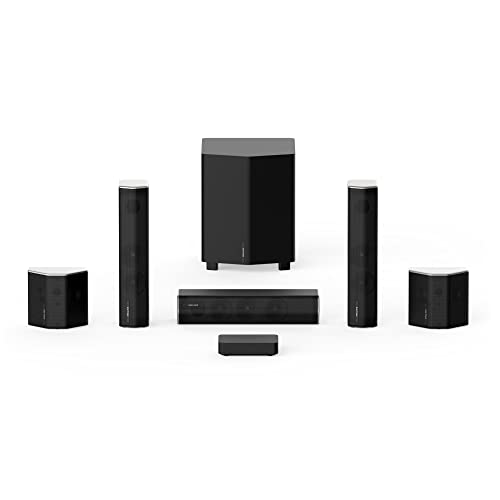
beFree Sound 5.1 Channel Surround Sound Bluetooth Speaker System in Black




Key features
- •Enjoy the ultimate home theater experience with beFree Sound 5.1 channel
- •This speaker system is sophistication and style, featuring a sleek look and smooth sound
- •With Bluetooth, sub, SD and FM radio capability, the system offers the best listening options
- •SD/FM/Bluetooth/remote
beFree Sound 5.1 Channel Surround Sound Bluetooth Speaker System in Black
List Price: $135.24$121.72DEALYou Save: $13.52 (10%)
Free shippingFree Returns – 30 daysFree Order CancellationSecure Payment2–3 Days DeliveryGet It October 25, 2026In Stock (5)No marketing spamNo account requiredFulfilment by FedEx / Amazon / UPS / ShipwirePayPal / Card Buyer Protection
Customer Reviews
Reviews sourced from verified Amazon purchasers3.4
out of 5
Based on 10 reviews
5★
40%
4★
20%
3★
10%
2★
20%
1★
10%
No they aren't super loud but they do get the job done
Nehemias Lugo-Cheverez•February 18, 2018
For the price they are what they are. No they aren't super loud but they do get the job done! I am happy with the purchase.
Five Stars
marketplace usa•January 23, 2018
Best sound, I was surprised.
XBOX ONE S HOOK-UP NOTES + REASONS NOT TO BUY THIS UNIT
Samson Simpson•December 19, 2017
REALLY disappointed with this purchase! Hooking this thing up to an XBOX ONE S has been a nightmare and I'm going to have to buy a new surround sound system anyway since there is no bass control on the sub itself and the volume control for the sub via the remote only turns down so much, you can't even turn it down all the way! If you live in an apartment, controlling the sub volume is very important as your intent isn't to bother your neighbors.
XBOX ONE S HOOK UP: This unit only comes with RCA connections (really? no 3.5mm aux input in 2017?) So, I had to buy a digital-to-analog converter box (another $30) just to get the system to play sound from the xbox. Before the converter, I had to dance around with different types of cables, hoping one of them would work (hdmi-to-aux, toslink-to-aux, hdmi-to-rca ----> none of them worked).
My final setup ending up being toslink output on xbox--->RCA input on converter box---> rca aux input on surround sound unit. The kicker is that the small converter boxes don't support 5.1 surround sound, meaning your surround sound speakers are duplicating the left and right speaker output instead of playing the surround sound.
REMOTE CONTROL: Nice to have, but if I'm more than 10 ft. away from the unit, the remote doesn't work. There are volume controls for each speaker, but you don't have the ability to turn it down all the way. Each volume setting has a -10db to +10db setting. Even with the sub turned all the way down and the other speakers turned all the way up, the sub is still too loud. I ended up having to open the sub unit and cut the sub cable, rendering the sub useless until I can get a unit that allows me to turn the sub all the way down if I need to. There's an EQ control, which I hoped I could use to lower the sub level, but it's only accessible on one channel (bluetooth) I believe. You can't use it for the radio, aux, etc.
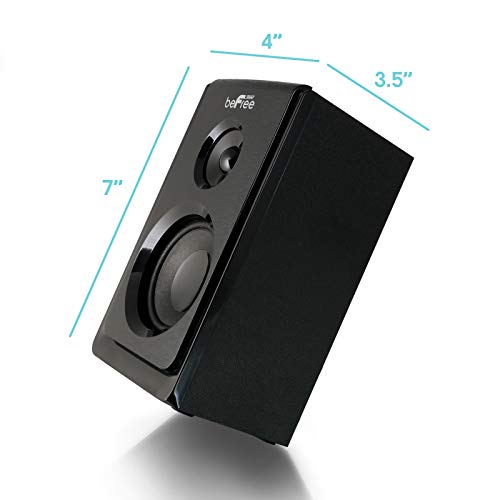
SPEAKERS: The volume is enough for a 1 bedroom apartment, but the wires are way too short. The front speakers are about 6ft long while the satellite speakers are maybe 10-12ft at best, so I had to add additional wire and shrink tubing to every speaker. I've already mounted the speakers and drilled various holes so I'm unable to return the unit for a refund.
My mistake was buying a unit without seeing the available outputs/inputs on the back. DON'T MAKE THE SAME MISTAKE I DID!
Unless you already have a surround sound top box that allows you to connect your surround sound system to the top box and then the tv, you're going to have to deal with some variation of a workaround via cables, converter boxes, etc.
My advice is to pick a unit that has an 3.5mm AUX input, TOSLINK input, and RCA connections. Part of my dilemma is the fault of Microsoft for not putting a 3.5mm Aux input/out or RCA output on the xbox console so other buyers may not run into the same issues I did.
All in all, this whole process has been a headache and I ended up paying somewhere close to $120 when everything was said and done. For that kind of money I could have gotten a much better unit and plan on doing exactly that.
XBOX ONE S HOOK UP: This unit only comes with RCA connections (really? no 3.5mm aux input in 2017?) So, I had to buy a digital-to-analog converter box (another $30) just to get the system to play sound from the xbox. Before the converter, I had to dance around with different types of cables, hoping one of them would work (hdmi-to-aux, toslink-to-aux, hdmi-to-rca ----> none of them worked).
My final setup ending up being toslink output on xbox--->RCA input on converter box---> rca aux input on surround sound unit. The kicker is that the small converter boxes don't support 5.1 surround sound, meaning your surround sound speakers are duplicating the left and right speaker output instead of playing the surround sound.
REMOTE CONTROL: Nice to have, but if I'm more than 10 ft. away from the unit, the remote doesn't work. There are volume controls for each speaker, but you don't have the ability to turn it down all the way. Each volume setting has a -10db to +10db setting. Even with the sub turned all the way down and the other speakers turned all the way up, the sub is still too loud. I ended up having to open the sub unit and cut the sub cable, rendering the sub useless until I can get a unit that allows me to turn the sub all the way down if I need to. There's an EQ control, which I hoped I could use to lower the sub level, but it's only accessible on one channel (bluetooth) I believe. You can't use it for the radio, aux, etc.
SPEAKERS: The volume is enough for a 1 bedroom apartment, but the wires are way too short. The front speakers are about 6ft long while the satellite speakers are maybe 10-12ft at best, so I had to add additional wire and shrink tubing to every speaker. I've already mounted the speakers and drilled various holes so I'm unable to return the unit for a refund.
My mistake was buying a unit without seeing the available outputs/inputs on the back. DON'T MAKE THE SAME MISTAKE I DID!
Unless you already have a surround sound top box that allows you to connect your surround sound system to the top box and then the tv, you're going to have to deal with some variation of a workaround via cables, converter boxes, etc.
My advice is to pick a unit that has an 3.5mm AUX input, TOSLINK input, and RCA connections. Part of my dilemma is the fault of Microsoft for not putting a 3.5mm Aux input/out or RCA output on the xbox console so other buyers may not run into the same issues I did.
All in all, this whole process has been a headache and I ended up paying somewhere close to $120 when everything was said and done. For that kind of money I could have gotten a much better unit and plan on doing exactly that.
Good experience
Rebecca•December 8, 2017
It seemed like a nice little stereo system. The item I received had a faulty Bluetooth issue, but the experience of calling the beFree support line was wonderfully surprising... They didn't have a robot answering the phone! I was talking with a real human technician within moments after dialing. She was very patient in figuring out my problem. The return was handled promptly and I received a gift card refund from Amazon just minutes after the mailman picked up the package.
I think I would have liked this system otherwise. The remote was a bit weak - you have to point it directly at the screen.
I think I would have liked this system otherwise. The remote was a bit weak - you have to point it directly at the screen.
Not worth the price
MMM•December 5, 2017
Cords were very short and the sound was not very loud at all. It uses the av style red white yellow kind of cord to connect to the speakers, not normal speaker wire. I could not find many good priced cords of a good legnth for a room that was about 5x3yards sized room.
Page 1 of 2