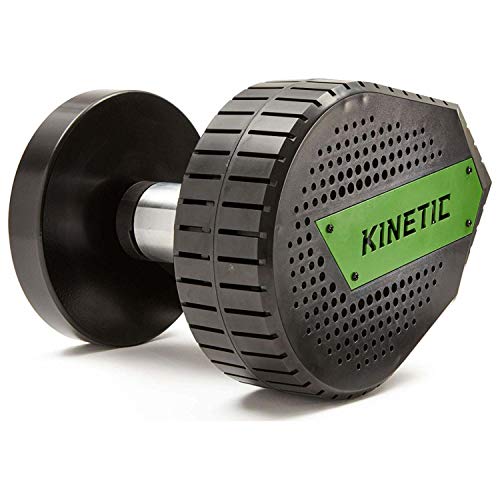
Kinetic Smart Control Bike Trainer Resistance Unit
Key features
- •Upgrade any Kinetic trainer frame to an electronically-controlled trainer
- •Controlled resistance to simulate terrain or interval workouts, controlled resistance to simulate terrain changes in workouts and on virtual courses
- •Includes 6 months of free access to the Kinetic fit app smart package. Also compatible with third-party training software
- •Massive flywheel with highest inertial mass in the category
- •Pairs with devices using Bluetooth smart
BrandKinetic by Kurt
CategoryBike Trainers & Accessories
Kinetic Smart Control Bike Trainer Resistance Unit
List Price: $523.65$471.29DEALYou Save: $52.36 (10%)
Free shippingFree Returns – 30 daysFree Order CancellationSecure Payment2–3 Days DeliveryGet It October 25, 2026In Stock (3)No marketing spamNo account requiredFulfilment by FedEx / Amazon / UPS / ShipwirePayPal / Card Buyer Protection
Customer Reviews
Reviews sourced from verified Amazon purchasers3.2
out of 5
Based on 3 reviews
5★
33%
4★
33%
3★
0%
2★
0%
1★
33%
Why would you buy this?
Nick H•October 14, 2017
A new trainer with this included is only $100 more, and I'm sure you could easily sell your current Kurt Kinetic trainer (as you must have one to consider buying this) for a lot more than $100, so it begs the question, why buy it? If it were much cheaper it would be an obvious upgrade, shame.
Now ready for prime time
Russell Tanton•May 4, 2017
I purchased this to "upgrade" my Rock and Roll. Unfortunately the new "smart" power trainer has much to learn before it is smart. Connecting to either their own Fit app or Zwift is hit and miss. At a constant pedal speed power output varied widely from 75W to 275W. These problems do not occur with their original fluid resistance unit. When climbing hills I appreciated the increased effort required, but the resistance did not drop on the downhill. Perhaps after their problems are sorted they can reintroduce version 2.
UPDATE: 9/26/2017
Great support from Kurt's customer service team, and this unit now performs. Constant power numbers and quiet operation make this a strong competitor to the much pricer wheel-off trainers. I have now used it on several Zwift routes and understand why "smart" trainers are much preferred. I originally went with this because my older bike with 125mm rear drop outs was not compatible with any wheel-off unit. Although I have upgraded my bike, I see no need to switch to a wheel-off unit.
UPDATE: 9/26/2017
Great support from Kurt's customer service team, and this unit now performs. Constant power numbers and quiet operation make this a strong competitor to the much pricer wheel-off trainers. I have now used it on several Zwift routes and understand why "smart" trainers are much preferred. I originally went with this because my older bike with 125mm rear drop outs was not compatible with any wheel-off unit. Although I have upgraded my bike, I see no need to switch to a wheel-off unit.
Great, but Instructions Suck
Brad•December 18, 2016
I have this, it does work great ,however, the Directions suck. I show how to get it set up on zwift using android below. The System works well, but I am disappointed in the propitiatory language it uses to talk to the apps. and the fact that it was rolled out unfinished. They seem to worked out most of the bugs and Now that I spent the time figuring it out, I hope I can save someone the issues. The trainer is near silent and the road feel is just amazing. Ive used it now for a few hours and Ill never go back, but set up with no instructions was a pain. Id give it 3.5 starts, but cant, and its only losing those stars for the lack of instructions.
So As no one has done this, I figured I could try to help those of you having trouble. I think I have flushed out how to get this set up on Zwift, At least with Android.
A couple of Notes:
1. The built in Cadence is an Algorithm, Its going to fluctuate, I just unpaired the trainer as the cadence sensor and used my garmin speed/cadence sensor for that. I would recommend you do the same
2. It is imparitive that you calibrate the trainer before you connect to zwift.
3. Make sure you have your tire aired up to the right pressure and tighten the resistance so when you pull on the tire making it spin, it doesnt slip past the roller
Ok Onto making it Work:
1. Power on the trainer(im assuming you already have the bike on the trainer and resistance set)
2. Without being connected to the Zwift app, Open the Kurt Kinetic Fit app
3. Select the Menu Bars and then select sensors
4.Next to the Smart Control Trainer, There will be a green "chain" link, Click on that to Connect to the trainer
5.Click on the Small Settings gear below the chain link
6. In the settings menu, There will be an option to Calibrate, Click on the button
7. Dont let the phone go to sleep, or you will have to reconnect to the trainer and recalibrate
8.Follow the directions to calibrate and adjust as it tells you to, it will tell you to change the tension based on calibrate or say calibration successful
9. Disconnect trainer from Kurt Kinetic and close app
10. Start Zwift on your computer and log in
11. Start the Zwift Mobile Companion app
12. click on the bluetooth symbol in the companion app and select the smart control trainer
13. start ride like normal
This has worked for me. The Calibration step is important to do, though i seem to be able to keep it close on the calibration front by keeping the tension and air pressure the same, but if you are training by power the extra 2 minutes isnt a big deal. Using this set up, It has been very quick to work and consistant power. Compared to a Stages, It reads a bit different but only by about 5% now that i am calibrating it every ride.
Hope this is helpful, and again this is the set up for using it with android, I havent tried with any other system.
So As no one has done this, I figured I could try to help those of you having trouble. I think I have flushed out how to get this set up on Zwift, At least with Android.
A couple of Notes:
1. The built in Cadence is an Algorithm, Its going to fluctuate, I just unpaired the trainer as the cadence sensor and used my garmin speed/cadence sensor for that. I would recommend you do the same
2. It is imparitive that you calibrate the trainer before you connect to zwift.
3. Make sure you have your tire aired up to the right pressure and tighten the resistance so when you pull on the tire making it spin, it doesnt slip past the roller
Ok Onto making it Work:
1. Power on the trainer(im assuming you already have the bike on the trainer and resistance set)
2. Without being connected to the Zwift app, Open the Kurt Kinetic Fit app
3. Select the Menu Bars and then select sensors
4.Next to the Smart Control Trainer, There will be a green "chain" link, Click on that to Connect to the trainer
5.Click on the Small Settings gear below the chain link
6. In the settings menu, There will be an option to Calibrate, Click on the button
7. Dont let the phone go to sleep, or you will have to reconnect to the trainer and recalibrate
8.Follow the directions to calibrate and adjust as it tells you to, it will tell you to change the tension based on calibrate or say calibration successful
9. Disconnect trainer from Kurt Kinetic and close app
10. Start Zwift on your computer and log in
11. Start the Zwift Mobile Companion app
12. click on the bluetooth symbol in the companion app and select the smart control trainer
13. start ride like normal
This has worked for me. The Calibration step is important to do, though i seem to be able to keep it close on the calibration front by keeping the tension and air pressure the same, but if you are training by power the extra 2 minutes isnt a big deal. Using this set up, It has been very quick to work and consistant power. Compared to a Stages, It reads a bit different but only by about 5% now that i am calibrating it every ride.
Hope this is helpful, and again this is the set up for using it with android, I havent tried with any other system.