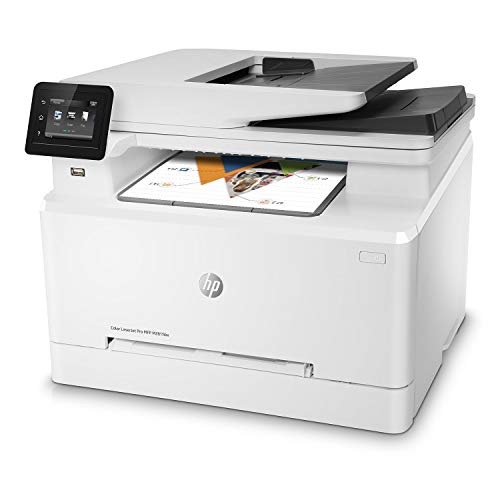
HP LaserJet Pro M130fw All-in-One Wireless Laser Monochrome Printer, Works with Alexa (G3Q60A). Replaces HP M127fw Laser Printer


Key features
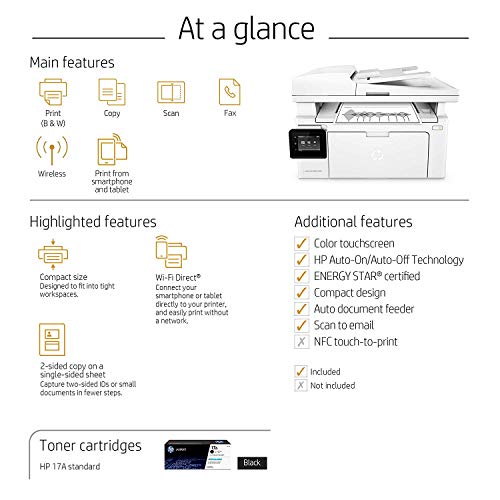
- •Main functions of this HP multi-function laser printer: monochrome print, scan, copy, fax, wireless printing, color touchscreen, and more
- •Prints up to 23 pages per minute, input tray paper capacity up to 150 sheets, duty cycle up to 1,500 pages per month
- •Mobile printing: print from anywhere using your smartphone or tablet with the free HP ePrint app, easily print from your iPhone or iPad with AirPrint, print even without a network using Wireless Direct printing
- •Keep things simple with a compact HP LaserJet Pro powered by JetIntelligence Toner cartridges. Print professional documents from a range of mobile devices, plus scan, copy, fax, and help save energy with a wireless MFP designed for efficiency
- •Original HP Toner cartridges with JetIntelligence - engineered to help your printer print up to 40% faster and 33% more prints
- •Choose Original HP 17A Toner cartridges specially designed to work with your printer and avoid frustrating reprints, wasted supplies, and delays
HP LaserJet Pro M130fw All-in-One Wireless Laser Monochrome Printer, Works with Alexa (G3Q60A). Replaces HP M127fw Laser Printer
List Price: $566.00$509.40DEALYou Save: $56.60 (10%)
Free shippingFree Returns – 30 daysFree Order CancellationSecure Payment2–3 Days DeliveryGet It October 26, 2026In Stock (1)No marketing spamNo account requiredFulfilment by FedEx / Amazon / UPS / ShipwirePayPal / Card Buyer Protection
Customer Reviews
Reviews sourced from verified Amazon purchasers3.6
out of 5
Based on 10 reviews
5★
10%
4★
30%
3★
20%
2★
10%
1★
30%
robust multi-function capabilities in a compact form factor
ransur0t✓ Verified Purchase•February 19, 2018
Of the printers that I hands on tested, for it's price class, this printer had the best build quality by a pronounced margin. The unit is very well designed, offering robust multi-function capabilities in a compact form factor. I did nearly all configuration after initial installation using the web server UI and found it to be effective, comprehensive, and responsive.
The touchscreen is well sized, intuitive, and an effective tool for controlling the printer. The HP Smart app is very useful and convenient, and also well designed.
So glad to have upgraded to a Pro class printer offering full range networking and user control. It scans to local NAS, email/cloud, and mobile devices effortlessly after initial setup and configuration.
The touchscreen is well sized, intuitive, and an effective tool for controlling the printer. The HP Smart app is very useful and convenient, and also well designed.
So glad to have upgraded to a Pro class printer offering full range networking and user control. It scans to local NAS, email/cloud, and mobile devices effortlessly after initial setup and configuration.
4 out of 4 all broke after return window closed!! BEWARE!
Amazon Customer✓ Verified Purchase•January 30, 2018
I purchased 3 at the same time for small office use. 1 out of the 3 broke after about a week of use. Something came lose or broke on the inside and everytime you tried to print something it would make loud clicking noise from inside and would end in error. I have returned the broken one and continue to use the other 2 with no issues so far. The all in one is really nice, instead of having a printer and separate scanner on the desk. This opened up a lot of desk space. Print and scanning is faster then the old ones and the office girls like them so far. Will report back here if I have an issue with the other 2.
UPDATE 2/7/18 So the other 2 and the 1 I had replaced all broke!! 1 broke on monday and the other 2 including the new replacement broke on thursday, of course the return period for the first 2 ran out on the 31st gonna try and refund the new replacement.
I did talk with HP support we tried several different methods including plugging them straight into a wall outlet nothing worked! They said maybe I got a bad batch! Quality control anyone??!?!! Waiting on a call back to try and get refunds. I would not recommend using the printer in an office environment maybe for home use only with little use it might last.... I have lost faith in HP and will find another company for my printers.
UPDATE 2/7/18 So the other 2 and the 1 I had replaced all broke!! 1 broke on monday and the other 2 including the new replacement broke on thursday, of course the return period for the first 2 ran out on the 31st gonna try and refund the new replacement.
I did talk with HP support we tried several different methods including plugging them straight into a wall outlet nothing worked! They said maybe I got a bad batch! Quality control anyone??!?!! Waiting on a call back to try and get refunds. I would not recommend using the printer in an office environment maybe for home use only with little use it might last.... I have lost faith in HP and will find another company for my printers.
Sleep Mode Killer
G. A. OHara✓ Verified Purchase•January 12, 2018
I can not complain about the quality of the printer or ease of setup. Unfortunately the sleep mode and auto powerdown are deal breakers. The longest you can keep the printer from sleeping is 1 hour and longest from power down is 8 hours. I use the printer wirelessly 100%. This means that I must physically touch the printer to wake it up every hour. Once asleep it will not respond to a print command. I have tried all the posted fixes but to no avail. This creates a situation where I can not print while away from the site. I must store everything on my device, come home, activate printer and then do all my jobs rather than have them waiting for me. I agree with energy efficiency but a remote power up should be available..
Likable product but has some kinks
Ray✓ Verified Purchase•January 4, 2018
The wireless printing is okay, but slow to wake after the printer goes to sleep. I decided to hook the printer directly to my modem via a LAN cable. I assigned a fixed IP address and set the sleep mode for a longer time. I also disabled the fax because every time my phone rings and the call is not a fax the printer hangs and needs to be reset. Also, the auto or manual update does not find the web. I checked for firmware updates, but there are none since August 2017. I went with a black and white laser printer because those color inkjet cartridges are not worth the money. Inkjet printers seem to sell very well, so HP does not seem motivated to perfect more economical laser printers like the M130fw.
Great printer if you aren't constantly using it
Sam Swire✓ Verified Purchase•November 24, 2017
The HP LaserJet Pro M130fw is a great printer if you are occasionally printing papers. It's fast, it connects to your email accounts, it has a scanner, printer, and fax all built into one, and you can print from your smartphone. It is also very fast and energy efficient. The reason I give it 4 stars instead of 5 is because there is no sleep mode for the printer. It's either on or off so if you want to print you have to go to the printer to turn it on. If you leave the printer on, then the screen is on 24/7 which can be annoying, otherwise, I highly suggest this product.
Page 1 of 2