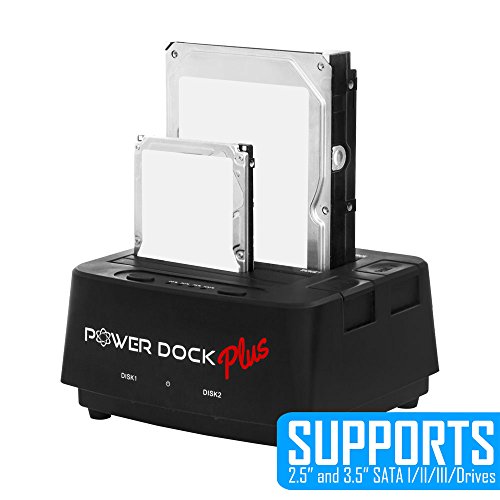
Kingwin USB 3.0 to Dual Bay SATA/SSD Hard Drive Dock w/ Offline Clone Function. Compatible w/ 2.5”/3.5” SATA HDD/SSD (SATA I/II/III). Build in USB 3.0 Hub, SD Card Reader, Support 2x8TB Drives & UASP




Key features
- •Dual-Bay 2.5"/3.5" SATA Hard Drive (HDD) & Solid State Drive (SSD) Docking Station;Screw-less and Easy-to-Plug Top-Loading Design (Hot-Swap Capability); SD Card Reader
- •Super-Speed USB 3.0 interface offers 10X faster performance (up to 5Gbps);Vertical HDD insertion allows faster heat dissipation and cooling solution
- •Standalone Drive Duplicator Dock (no need for PC connection); LED indicator for HDD Access and Power status
- •Supports 2.5" and 3.5" SATA I/II/III Drives;Backward compatible with PC USB 2.0 ports (USB 3.0 cable compatible with USB 2.0 ports); 2 Port USB 3.0 Hub
- •Supports up to 4 TB SATA HDD;Fully compatible with Windows 7, 8, 10, Mac OS X, Linux;Includes PD-2537U3, USB 3.0 cable, power adapter, and User Manual (HDD not included)
Kingwin USB 3.0 to Dual Bay SATA/SSD Hard Drive Dock w/ Offline Clone Function. Compatible w/ 2.5”/3.5” SATA HDD/SSD (SATA I/II/III). Build in USB 3.0 Hub, SD Card Reader, Support 2x8TB Drives & UASP
List Price: $61.09$54.98DEALYou Save: $6.11 (10%)
Free shippingFree Returns – 30 daysFree Order CancellationSecure Payment2–3 Days DeliveryGet It October 24, 2026In Stock (1)No marketing spamNo account requiredFulfilment by FedEx / Amazon / UPS / ShipwirePayPal / Card Buyer Protection
Customer Reviews
Reviews sourced from verified Amazon purchasers4.3
out of 5
Based on 10 reviews
5★
40%
4★
60%
3★
0%
2★
0%
1★
0%
Works as designed; best suited for technicians
ariy✓ Verified Purchase•October 2, 2023
Since i don't see well, I bought this without a clear picture of what i was buying. I was replacing a an enclosure that I bought to use a spare internal drive as a backup drive that never was entirely reliable. This one has worked flawlessly, but the design is better suited for someone with the need to set up internal drives without having to install them in computers first. The drive just sits exposed in the top of the unit as shown, and there is nothing to secure it in place. Jostling the drive at the wrong time could cause bad things to happen. An additional part to add a little stability without compromising the intended ease of use would make it better.
Great Item for the Price!!!
Joshua Robinson✓ Verified Purchase•August 30, 2023
Two Year Update:
I have been using the Kingwin EZ-Dock for more than 2-years with about 5 different computers. I have at least 5 of these docs (I've lost count), and I've not had any major problems. I've used them with both USB and eSATA, I've used them on Mac and PC, I've used them on various operating systems (Mac: Snow Leopard, Lion, Mountain Lion, Mavericks; PC: XP, Windows 7), and they've been through the ringer. Even so, I still haven't had any device failures, and all of the drives I've put in them read fine. I know not every unit is going to work perfectly, but I think that most issues have to do with the connection to the computer. I have times I have to check the connections, but I still blame that more on the cables connecting the devices, and not the dock itself. I still HIGHLY recommend this item! For the money, you are getting a great deal!
************************************
I own 4 of these docks and use them for different applications on both Mac and PCs. Everyone one of them has worked great, and I love the addition of the eSATA port! If you have a computer that has an eSATA port or you can put in a PCIe card to create an eSATA connection, I highly suggest using it that way. It beats the heck out of using the USB 2.0 connection! Also, these are pretty durable devices. I've moved them around quite a bit and even dropped them once or twice with no problems. Overall, if you tend to use external drives for backup or cloning purposes, this is a great buy!
I have been using the Kingwin EZ-Dock for more than 2-years with about 5 different computers. I have at least 5 of these docs (I've lost count), and I've not had any major problems. I've used them with both USB and eSATA, I've used them on Mac and PC, I've used them on various operating systems (Mac: Snow Leopard, Lion, Mountain Lion, Mavericks; PC: XP, Windows 7), and they've been through the ringer. Even so, I still haven't had any device failures, and all of the drives I've put in them read fine. I know not every unit is going to work perfectly, but I think that most issues have to do with the connection to the computer. I have times I have to check the connections, but I still blame that more on the cables connecting the devices, and not the dock itself. I still HIGHLY recommend this item! For the money, you are getting a great deal!
************************************
I own 4 of these docks and use them for different applications on both Mac and PCs. Everyone one of them has worked great, and I love the addition of the eSATA port! If you have a computer that has an eSATA port or you can put in a PCIe card to create an eSATA connection, I highly suggest using it that way. It beats the heck out of using the USB 2.0 connection! Also, these are pretty durable devices. I've moved them around quite a bit and even dropped them once or twice with no problems. Overall, if you tend to use external drives for backup or cloning purposes, this is a great buy!
2+ year update... solid workhorse dock
Outcast✓ Verified Purchase•August 21, 2023
purchased ~8/2019
ended up using to attach 500GB disk permenantly for AirTV (local DVR drive). disk & this docking station basically stays plugged in & running 24x7 (except for a couple of power blips due to storms and few times turned off everything for few days due to moving, etc).
few times AirTV complained about disk going off-line. can't definately point finger at the dock. in all cases, a power reset of dock & AirTV did the trick. over last 2 years... maybe needed to do this once every ?2 or 3? months.
not happening often enough that it really sticks in memory. bottom line, dock has been stable enough to consider it as a solid "workhorse"
ended up using to attach 500GB disk permenantly for AirTV (local DVR drive). disk & this docking station basically stays plugged in & running 24x7 (except for a couple of power blips due to storms and few times turned off everything for few days due to moving, etc).
few times AirTV complained about disk going off-line. can't definately point finger at the dock. in all cases, a power reset of dock & AirTV did the trick. over last 2 years... maybe needed to do this once every ?2 or 3? months.
not happening often enough that it really sticks in memory. bottom line, dock has been stable enough to consider it as a solid "workhorse"
Works like a charm.
Dan✓ Verified Purchase•August 12, 2023
I will not comment on the long term reliability, as I have only just received the item today. I wanted to share my thoughts on it thus far. The product has a decent footprint, which makes it stable for 3.5" hard drives. The provided cables and power supply are all very short. Comes with the USB and eSATA cables, and the power supply. Honestly, I didn't expect much for the price, but the unit has exceeded my expectations. Transferring my music from a 500GB 3.5" hard drive to my laptop, I am averaging 18MB/Second, which is faster than some of my older dedicated external drives, and somewhat slower than my newest external drives. Some of this could be from the drives being older, and fragmented, Some is undoubtedly related to load on my laptop, and some is from the bandwidth of the product itself. One-Touch backup seems to work fine, though I will never actually use the feature, the power button is convenient, but awkwardly located. I'll probably relocate the button to the front of the unit for convenience. At the price I paid for the unit, if it breaks, it wouldn't be cost effective to ship it back, but unlike some of the docks I've used, I am not seeing random disconnects and have no errors to report. I've transferred two full 500gb hard drives back to back with no errors or problems. The unit does get warm, but nothing alarming so far.
All in all, a decent buy, there are undoubtedly better units on the market, and your mileage may vary, but this unit has exceeded my expectations, and filled my needs quite nicely. Plan on using it to image the drives in my laptops for archival purposes next.
All in all, a decent buy, there are undoubtedly better units on the market, and your mileage may vary, but this unit has exceeded my expectations, and filled my needs quite nicely. Plan on using it to image the drives in my laptops for archival purposes next.
Worth the price with good functionality
GObonzo✓ Verified Purchase•July 27, 2023
For the price and USB 3.0 it's a good deal.
Don't quite get normal USB 3.0 speeds, ~90MB/s. Where my other external USB 3.0 drives average ~ 120MB/s.
Has no cover for the SATA slots. If you leave drives plugged in the the drives are exposed and if you take them out the SATA slots are exposed. Seeing this in the picture i can't detract from the overall rating. For now using a grocery bag to keep it covered when not in use, will make something more permanent.
edit:
A few weeks later and I'm not so impressed by the performance. Copying a few hundred audio files(~200GB) took around 10 hours. Over and over the dock's USB connection was terminated with an error that device had failed. Tried the same drive with a 2nd computer and no problems at all. Tried the dock with the drive plugged in the 2nd computer and got the same error happening about every 40GB of files copied.
edit #2:
turns out the USB 3.0 cable was failing and a couple months later finally failed altogether. contacting KingWin was very easy and they were very quick and gracious with their response.
within a week KingWin had sent me a new set of cables; actually 2 sets of USB 3.0, a new power brick and a new power cable. PLUS they added a little something extra for my troubles; a Kingwin Aluminum 6-Port USB 3.0 Hub with 1 IQ Smart Charging Port for Tablets (KWZ-700) (needs external power for IQ charging option).
the fact that this drive gets lower speeds than my other external options will keep it from receiving 5 stars but it's functionality and KingWin's exceptional customer service definitely makes it a 4.5/5, too bad i can't choose .5 options.
Don't quite get normal USB 3.0 speeds, ~90MB/s. Where my other external USB 3.0 drives average ~ 120MB/s.
Has no cover for the SATA slots. If you leave drives plugged in the the drives are exposed and if you take them out the SATA slots are exposed. Seeing this in the picture i can't detract from the overall rating. For now using a grocery bag to keep it covered when not in use, will make something more permanent.
edit:
A few weeks later and I'm not so impressed by the performance. Copying a few hundred audio files(~200GB) took around 10 hours. Over and over the dock's USB connection was terminated with an error that device had failed. Tried the same drive with a 2nd computer and no problems at all. Tried the dock with the drive plugged in the 2nd computer and got the same error happening about every 40GB of files copied.
edit #2:
turns out the USB 3.0 cable was failing and a couple months later finally failed altogether. contacting KingWin was very easy and they were very quick and gracious with their response.
within a week KingWin had sent me a new set of cables; actually 2 sets of USB 3.0, a new power brick and a new power cable. PLUS they added a little something extra for my troubles; a Kingwin Aluminum 6-Port USB 3.0 Hub with 1 IQ Smart Charging Port for Tablets (KWZ-700) (needs external power for IQ charging option).
the fact that this drive gets lower speeds than my other external options will keep it from receiving 5 stars but it's functionality and KingWin's exceptional customer service definitely makes it a 4.5/5, too bad i can't choose .5 options.
Page 1 of 2