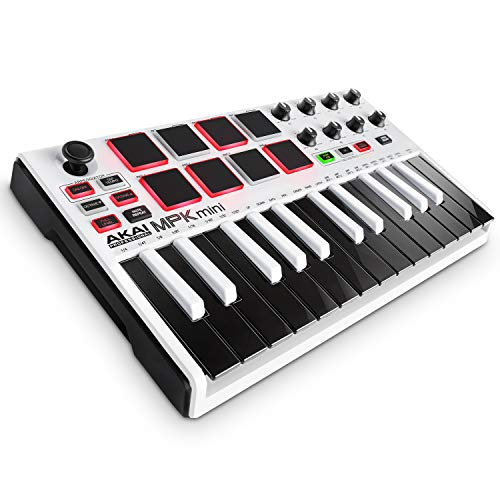
Akai Professional MPK Mini MKII | 25 Key USB MIDI Keyboard Controller With 8 Drum Pads and Pro Software Suite Included – Limited Edition White Finish


Key features
- •Limited Edition 25-Key Ultra-Portable USB MIDI Drum Pad & Keyboard Controller with sleek color change
- •Compact keyboard controller easily fits backpack and studio production desk (12.4" long, 1.6 lbs)
- •Powered by USB connection to computer, with free virtual-instrument download packages
- •25-synth-action mini-keys, 8 velocity-sensitive rubber drum pads with two banks, and eight assignable control knobs
- •Limited time Promotion | Register your MPK Mini MKII LE White before the 31st December 2019 & get the Ultimate Production Starter Pack including content from Splice, Loopcloud and Serato Studio
Akai Professional MPK Mini MKII | 25 Key USB MIDI Keyboard Controller With 8 Drum Pads and Pro Software Suite Included – Limited Edition White Finish
List Price: $288.00$259.20DEALYou Save: $28.80 (10%)
Free shippingFree Returns – 30 daysFree Order CancellationSecure Payment2–3 Days DeliveryGet It October 24, 2026In Stock (1)No marketing spamNo account requiredFulfilment by FedEx / Amazon / UPS / ShipwirePayPal / Card Buyer Protection
Customer Reviews
Reviews sourced from verified Amazon purchasers3.9
out of 5
Based on 10 reviews
5★
50%
4★
10%
3★
20%
2★
0%
1★
20%
Beautiful Aesthetics, Incredibly Pathetic Design and Durability.
philipawalker✓ Verified Purchase•June 13, 2018
This item, while it looks beautiful and functions well for a time, is built with incredibly poor and flimsy design. The keys are not supported in any way, with 1mm thick plastic holding each key to the controller. This plastic does not rotate when pressed, instead, it flexes, constantly putting the thin plastic under extreme tension.
In less than a year of use, a ridiculous amount of keys have snapped off. This is a common problem, and no amount of super glue has been able to keep them on with such pathetic design quality.
I urge you to search up: "Akai MK2 Mini keys snapping off"
Take a look at a couple threads on the official akai community boards and you'll see that this is a very common and inherent design problem.
In less than a year of use, a ridiculous amount of keys have snapped off. This is a common problem, and no amount of super glue has been able to keep them on with such pathetic design quality.
I urge you to search up: "Akai MK2 Mini keys snapping off"
Take a look at a couple threads on the official akai community boards and you'll see that this is a very common and inherent design problem.
My favorite portable MIDI controller
Pessex✓ Verified Purchase•March 20, 2018
This is a seriously sweet controller! Not perfect, but excellent for portable work with a MacBook or an iPad. I would say I don't understand why there are so many negative reviews, but I do. They are mostly from folks who just didn't understand what they were getting into...
This is a MIDI controller. As such, it must be attached to a device that can interpret it and produce sound (Logic/GarageBand on a Mac, or GarageBand on an iPad, for instance). If you just want to tinkle the keys it'll work out of the box with either, but to really get some use out of it you're going to have to load the Editor software and dig in a little bit.
I did a bit of research, and was able to map out the things I wanted to do. As it turns out, Apple has 16 drum sounds that are available for the drum kits (not drum machines) in both GarageBands (Mac & iOS) and Logic. Better yet, they share 16 note numbers to trigger them. So I was able to setup the 8 pads with all 16 sounds using the A/B switch, and was able to group the sounds physically on the pads so it worked for me. I used two different "Prog"s, so I could have 2 different layouts, and then used my P-Touch label maker on the smallest font to create labels that tell me which sounds are where. I had to cut the labels with scissors to make them fit between the pads, but it worked and now I can see exactly what's where even when I haven't used it for weeks or months.
I did the same thing with the knobs. Assigned basic values (Channel Vol, Pan, Modulation) to the most convenient knobs, then picked some of the more esoteric MIDI CC values so I could play with them for the other knobs. And labelled the whole mess so I would remember it.
The sensitivity of the keys and the pads is great; better than the LPK25 or the LPD8 I think. Doesn't have aftertouch, but that's about all I can see missing (and that isn't a reasonable expectation at this price point).
My only problem was connecting it to an iPad Pro, but I think I've got that figured out. Using just the Apple Lightning to USB Camera Adapter didn't work; I got "Cannot Use Device. MPKmini2: The connected device requires too much power." Turns out I needed to connect it through a USB hub. I used an unpowered Satechi hub I had handy and it worked. That's got a long cord, though, so I'm going to try using a very inexpensive Sabrent 4-port unpowered USB 2.0 hub with a 6" cord. That should do the trick. The AmazonBasics 4-port 2.0 hub would be another option...
The Editor software for this is MUCH easier to use than many I have tried. It's more straightforward than the editors for the LPK25 or the LPD8, and beats the Korg nano editors shamefully. And don't get me started on the Roli BLOCKS editor...
Overall, this is the nicest portable MIDI controller I've found. Get the Khanka case for it and you'll be all set. Just make sure to put some dryer sheets or something in the Khanka case before you put the MPKmini in there; the case smells like something died... :)
This is a MIDI controller. As such, it must be attached to a device that can interpret it and produce sound (Logic/GarageBand on a Mac, or GarageBand on an iPad, for instance). If you just want to tinkle the keys it'll work out of the box with either, but to really get some use out of it you're going to have to load the Editor software and dig in a little bit.
I did a bit of research, and was able to map out the things I wanted to do. As it turns out, Apple has 16 drum sounds that are available for the drum kits (not drum machines) in both GarageBands (Mac & iOS) and Logic. Better yet, they share 16 note numbers to trigger them. So I was able to setup the 8 pads with all 16 sounds using the A/B switch, and was able to group the sounds physically on the pads so it worked for me. I used two different "Prog"s, so I could have 2 different layouts, and then used my P-Touch label maker on the smallest font to create labels that tell me which sounds are where. I had to cut the labels with scissors to make them fit between the pads, but it worked and now I can see exactly what's where even when I haven't used it for weeks or months.
I did the same thing with the knobs. Assigned basic values (Channel Vol, Pan, Modulation) to the most convenient knobs, then picked some of the more esoteric MIDI CC values so I could play with them for the other knobs. And labelled the whole mess so I would remember it.
The sensitivity of the keys and the pads is great; better than the LPK25 or the LPD8 I think. Doesn't have aftertouch, but that's about all I can see missing (and that isn't a reasonable expectation at this price point).
My only problem was connecting it to an iPad Pro, but I think I've got that figured out. Using just the Apple Lightning to USB Camera Adapter didn't work; I got "Cannot Use Device. MPKmini2: The connected device requires too much power." Turns out I needed to connect it through a USB hub. I used an unpowered Satechi hub I had handy and it worked. That's got a long cord, though, so I'm going to try using a very inexpensive Sabrent 4-port unpowered USB 2.0 hub with a 6" cord. That should do the trick. The AmazonBasics 4-port 2.0 hub would be another option...
The Editor software for this is MUCH easier to use than many I have tried. It's more straightforward than the editors for the LPK25 or the LPD8, and beats the Korg nano editors shamefully. And don't get me started on the Roli BLOCKS editor...
Overall, this is the nicest portable MIDI controller I've found. Get the Khanka case for it and you'll be all set. Just make sure to put some dryer sheets or something in the Khanka case before you put the MPKmini in there; the case smells like something died... :)
Lousy Action
Larns✓ Verified Purchase•February 1, 2018
I bought this for a music composition course, and it worked perfectly for that.
On the Mac, it's a simple "plug it in and it works". I used it with Garage Band and a bunch of other Midi software. It was incredibly easy. It's also a great looking device. It is robust, and I never worried about breaking it.
The bad is the key action/feel. The keys feel like I'm pressing down on brings made of molded plastic. And that's my guess on how it works. It is a small keyboard, but it in no way feels anything at all resembling a keyboard. I've used cheapo MIDI keyboards in the past - this one feels the worst.
So all good except the action, which stinks, which results in 3 stars.
On the Mac, it's a simple "plug it in and it works". I used it with Garage Band and a bunch of other Midi software. It was incredibly easy. It's also a great looking device. It is robust, and I never worried about breaking it.
The bad is the key action/feel. The keys feel like I'm pressing down on brings made of molded plastic. And that's my guess on how it works. It is a small keyboard, but it in no way feels anything at all resembling a keyboard. I've used cheapo MIDI keyboards in the past - this one feels the worst.
So all good except the action, which stinks, which results in 3 stars.
Maybe worth it if you are constantly on the move
Martinius✓ Verified Purchase•October 20, 2017
I wanted to love this product, but it is just not worth it. You're much better off with full size keys.
The arpeggiator is useless, as it doesn't sync with your DAW. The tap tempo only controls the tempo for the built in arpeggiator. The joystick didn't work well for me. The controllers seemed cool, but in reality they are not effecient to use as they are not labelled and are too much of a hassle to assign to anything useful.
The keys are very hard, feels like they are resisting me all the way through and you're not really able to play anything on them except simple melodies.
The pads are alright, but I found them very limiting. First of all, they can't do anything the keys cannot. They have the same sounds assigned to them as the keys. Second, there are only 8 of them and 2 banks. So let's say you have a drum machine on there and you want to play a beat. All the sounds you need for your beat will not be on one bank, so you have to switch banks to play the rest of your beat. But a drum machine usually has more than 16 sounds, so you will have to find out where all your sounds are in the drum machine, open another program and then assign all the sounds you want to the pads manually. You will most likely have to do this everytime you change instruments. Which you won't, because it is much easier to just use the keys which there is 25 of.
So now that you are only using the keys anyway, why not but a keyboard that actually has decent keys? That you can play chords on comfortably and don't have to change octave to access all the sounds in the drum machine?
I'm returning this for a Nektar Impact GX49.
The arpeggiator is useless, as it doesn't sync with your DAW. The tap tempo only controls the tempo for the built in arpeggiator. The joystick didn't work well for me. The controllers seemed cool, but in reality they are not effecient to use as they are not labelled and are too much of a hassle to assign to anything useful.
The keys are very hard, feels like they are resisting me all the way through and you're not really able to play anything on them except simple melodies.
The pads are alright, but I found them very limiting. First of all, they can't do anything the keys cannot. They have the same sounds assigned to them as the keys. Second, there are only 8 of them and 2 banks. So let's say you have a drum machine on there and you want to play a beat. All the sounds you need for your beat will not be on one bank, so you have to switch banks to play the rest of your beat. But a drum machine usually has more than 16 sounds, so you will have to find out where all your sounds are in the drum machine, open another program and then assign all the sounds you want to the pads manually. You will most likely have to do this everytime you change instruments. Which you won't, because it is much easier to just use the keys which there is 25 of.
So now that you are only using the keys anyway, why not but a keyboard that actually has decent keys? That you can play chords on comfortably and don't have to change octave to access all the sounds in the drum machine?
I'm returning this for a Nektar Impact GX49.
Drum pads need tape under them
qbo✓ Verified Purchase•October 4, 2017
4/5
I have been having a lot of fun and diving into my software more than ever now that I have this awesome controller. But in this review, I will start by focusing on the negatives.
The disappointment I have with this keyboard is its playing action. It works fine as a tool, but the keys are strange to someone who is used to a traditional electric keyboard. When I play my Yamaha keyboard, the notes are struck when the key is fully pressed down. This gives you a tactile feel and allows you to press keys repeatedly without lifting the key all the way up. On the Akai, I was surprised to find that notes are triggered about halfway down the stroke. This means that you have to really worry about whether you have lifted the key high enough before you can trigger a new note. It will result in missed notes if you are not used to it, and it replaces some of the tactile feel with one that requires more thought. This type of keys makes it feel more like a tool than an instrument.
The other aspect that disappointed me (until I fixed it) is the low sensitivity of the pads. The threshold for triggering them is quite high, so you can't play by lightly tapping them, or it will miss many hits. This means it's not worth it to vary the power of your hits, because you risk not triggering notes. Fixing this is possible by putting 3 layers of electrical tape under the pads. Youtube videos show how to do this on the original Akai Mini. The Mark II is more difficult to take apart, but it is entirely possible to do this mod with just a screwdriver and tape.
When I tore the keyboard apart (4 separate times) I learned that it is very well made and simple in construction. All of the screws are the same size, none of the holes they go into are easily stripped, and it goes together tightly and solidly. There is internal support under the drum pads. It is a very impressive device.
SOFTWARE: I see many comments in these reviews talking about the painful registration process. If you have any recent MIDI sequencing software, you will not need to do any registration, and you don't need to register in order to use the Akai Editor application for programming the buttons. Apparently, by registering, you get some software to generate sounds, but I think it would be far easier just to download a trial version of FL Studio.
Overall, this device has really helped me dive into these programs. I would recommend it, with the caveat that you should do the drum pad mod to get the best playability from it.
I have been having a lot of fun and diving into my software more than ever now that I have this awesome controller. But in this review, I will start by focusing on the negatives.
The disappointment I have with this keyboard is its playing action. It works fine as a tool, but the keys are strange to someone who is used to a traditional electric keyboard. When I play my Yamaha keyboard, the notes are struck when the key is fully pressed down. This gives you a tactile feel and allows you to press keys repeatedly without lifting the key all the way up. On the Akai, I was surprised to find that notes are triggered about halfway down the stroke. This means that you have to really worry about whether you have lifted the key high enough before you can trigger a new note. It will result in missed notes if you are not used to it, and it replaces some of the tactile feel with one that requires more thought. This type of keys makes it feel more like a tool than an instrument.
The other aspect that disappointed me (until I fixed it) is the low sensitivity of the pads. The threshold for triggering them is quite high, so you can't play by lightly tapping them, or it will miss many hits. This means it's not worth it to vary the power of your hits, because you risk not triggering notes. Fixing this is possible by putting 3 layers of electrical tape under the pads. Youtube videos show how to do this on the original Akai Mini. The Mark II is more difficult to take apart, but it is entirely possible to do this mod with just a screwdriver and tape.
When I tore the keyboard apart (4 separate times) I learned that it is very well made and simple in construction. All of the screws are the same size, none of the holes they go into are easily stripped, and it goes together tightly and solidly. There is internal support under the drum pads. It is a very impressive device.
SOFTWARE: I see many comments in these reviews talking about the painful registration process. If you have any recent MIDI sequencing software, you will not need to do any registration, and you don't need to register in order to use the Akai Editor application for programming the buttons. Apparently, by registering, you get some software to generate sounds, but I think it would be far easier just to download a trial version of FL Studio.
Overall, this device has really helped me dive into these programs. I would recommend it, with the caveat that you should do the drum pad mod to get the best playability from it.
Page 1 of 2