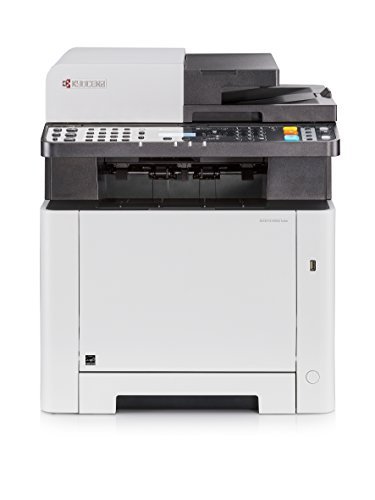
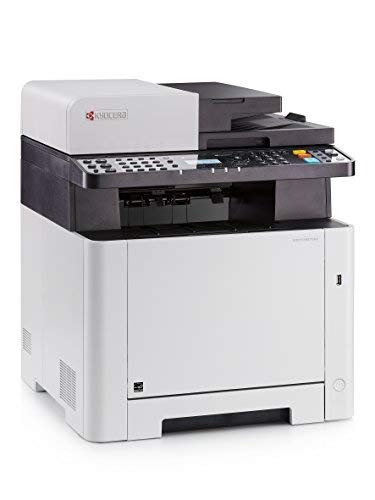
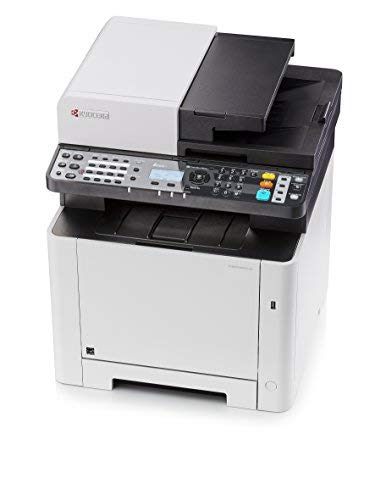
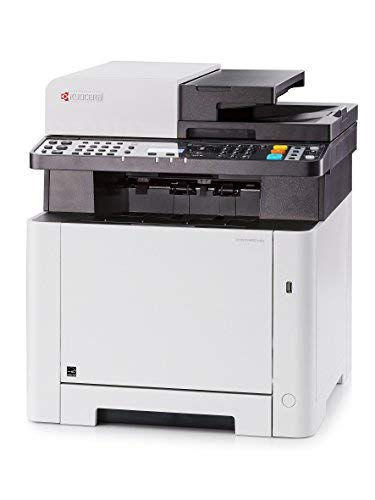
Kyocera 1102R92US0 Model ECOSYS M5521CDW Multifunctional Printer; Up to 21 PPM, 1200 Dpi Printing Quality, Mobile Printing Support, Direct Printing from and Scanning to USB Flash Memory
Key features
- •Up To 21 Pages Per Minute In Color And B/W
- •Wi-Fi And Wi-Fi Direct As Standard
- •Mobile printing support including AirPrint, Mopria, KYOCERA Mobile Print
- •Print, Copy, Scan And Fax Functionality As Standard
- •Direct Printing From And Scanning To USB Flash Memory
- •Up to 21 pages per minute in color and b/w
- •1200 dpi printing quality
- •Wi-Fi and Wi-Fi Direct as standard
- •Mobile printing support including AirPrint, Mopria, KYOCERA Mobile Print
- •Print, copy, scan and fax functionality as standard
- •Direct printing from and scanning to USB flash memory
- •Compact design with low-noise printing
- •Exceptionally low printing costs in its class
- •Technology: KYOCERA ECOSYS, Color Laser
- •General Type: Color Multifunctional Printer
- •Engine speed: Up to 21 pages per minute in color and b/w
- •Resolution: 1,200 x 1,200 dpi print at reduced speed, multibit technology for print quality of up to 9,600 x 600 dpi (print), 600 x 600 dpi, 256 greyscales per colour (scan/copy)
- •Warm-up time: Approximately 32 seconds or less from power on
- •Time to first print: Approximately 12.5 seconds or less
- •Time to first copy: Approximately 12 seconds or less
- •General memory: Standard 512 MB, max. 1536 MB
- •Standard Interface: USB 2.0 (Hi-Speed), USB Host Interface, Gigabit Ethernet (10BaseT/100BaseTX/1000BaseT), Wireless LAN
- •Dimensions (W x D x H): 417 x 429 x 495 mm
- •Weight: Approx. 57.7 Pounds
- •Power consumption: Printing: 345 W, Ready mode: 41 W, Sleep-mode: 1 W
BrandKyocera
CategoryPrinters & Accessories
Kyocera 1102R92US0 Model ECOSYS M5521CDW Multifunctional Printer; Up to 21 PPM, 1200 Dpi Printing Quality, Mobile Printing Support, Direct Printing from and Scanning to USB Flash Memory
List Price: $696.93$627.24DEALYou Save: $69.69 (10%)
Free shippingFree Returns – 30 daysFree Order CancellationSecure Payment2–3 Days DeliveryGet It October 26, 2026In Stock (17)No marketing spamNo account requiredFulfilment by FedEx / Amazon / UPS / ShipwirePayPal / Card Buyer Protection
Customer Reviews
Reviews sourced from verified Amazon purchasers2.0
out of 5
Based on 1 reviews
5★
0%
4★
0%
3★
0%
2★
100%
1★
0%
Was easy to unpack and setup the printer function
Amazon Customer•March 29, 2017
Mixed feelings about this printer. Was easy to unpack and setup the printer function.This printer defaults to DHCP IP which is fine for some, however I prefer to setup a static IP address. As you will see in the comments below, the user interface leaves a lot to be desired. Even though you can select you want a static IP, you must go in to the DHCP section first and disable otherwise you can't edit. Kyocera need to become more user friendly and if you choose static IP, disable DHCP for you automatically because its going to be one or the other.
Scanning and "Send to email" were somewhat more complicated than it needed to be. Having experienced setting up MFP functions on various other brands such as HP, Epson and Samsung the Kyocera menu system is archaic, slow and 10 years behind the times. They have over complicated the menus to the point an experienced IT person had troubles. The printer menu system to scan/email is antiquated and is not user friendly. The PDF manuals don't explain in any detail how to configure the scanning/email abilities. What takes me 5 minutes to setup scan to email and scan to folders on other brands took hours trying to figure things out. (Tip - if you get connection errors trying to setup scan to email, increase the timeout period to 90 seconds).
Also, though I spent hours looking up the specs and reviews, what is ambiguous is this printers duplex functions. To be clear, this printer can only duplex print. It is NOT capable of scanning or copying double sided pages via the ADF.
Print quality is good, no complaints. Can't comment on the reliability yet as I only just got it. Size and weight is similar to other MFP in this class.
Having over 20 years IT experience, I found this printer a pain in the backside to setup and use. On that basis alone, I would choose something else next time. The last time I owned a Kyocera printer was over 10 years ago. It was a reliable printer which is why I thought I would give them another go. Dealing with other printer brands on a regular basis, I thought their interface would be similar to other brands - how wrong could I be. My fault for not checking it out in person and just using the internet to compare specs.
Scanning and "Send to email" were somewhat more complicated than it needed to be. Having experienced setting up MFP functions on various other brands such as HP, Epson and Samsung the Kyocera menu system is archaic, slow and 10 years behind the times. They have over complicated the menus to the point an experienced IT person had troubles. The printer menu system to scan/email is antiquated and is not user friendly. The PDF manuals don't explain in any detail how to configure the scanning/email abilities. What takes me 5 minutes to setup scan to email and scan to folders on other brands took hours trying to figure things out. (Tip - if you get connection errors trying to setup scan to email, increase the timeout period to 90 seconds).
Also, though I spent hours looking up the specs and reviews, what is ambiguous is this printers duplex functions. To be clear, this printer can only duplex print. It is NOT capable of scanning or copying double sided pages via the ADF.
Print quality is good, no complaints. Can't comment on the reliability yet as I only just got it. Size and weight is similar to other MFP in this class.
Having over 20 years IT experience, I found this printer a pain in the backside to setup and use. On that basis alone, I would choose something else next time. The last time I owned a Kyocera printer was over 10 years ago. It was a reliable printer which is why I thought I would give them another go. Dealing with other printer brands on a regular basis, I thought their interface would be similar to other brands - how wrong could I be. My fault for not checking it out in person and just using the internet to compare specs.