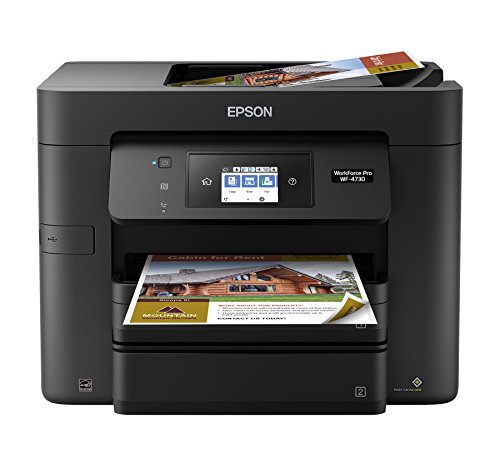
Epson WorkForce Pro WF-4730 Wireless All-in-One Color Inkjet Printer, Copier, Scanner with Wi-Fi Direct, Amazon Dash Replenishment Ready


Key features
- •This printer is designed for use with Epson cartridges only, not third party cartridges or ink. Cartridges described as Compatible, Remanufactured, refilled or refillable may not work properly or at all. See product description for more details.
- •Get performance beyond laser - the workforce Pro wf-4730, powered by Precision Core.
- •Lightning fast Color Print speeds - fastest in its class (1); 20 ISO ppm (black) and 20 ISO ppm (color) ().
- •Easy on the budget - up to 50 percent lower printing costs vs. Color laser (2).
- •Never run out of ink again - printer features Dash Replenishment which, after activation, keeps track of your ink usage and orders more from when you are running low.
- •Note: This printer is designed for use with Epson cartridges only, not third-party cartridges or ink. See product description for more details
BrandEpson
CategoryInk Tank Printers
SizeRegular
ColorBlack
Warranty1-year limited warranty in the U.S. and Canada
Epson WorkForce Pro WF-4730 Wireless All-in-One Color Inkjet Printer, Copier, Scanner with Wi-Fi Direct, Amazon Dash Replenishment Ready
List Price: $478.70$430.83DEALYou Save: $47.87 (10%)
Free shippingFree Returns – 30 daysFree Order CancellationSecure Payment2–3 Days DeliveryGet It October 25, 2026In Stock (3)No marketing spamNo account requiredFulfilment by FedEx / Amazon / UPS / ShipwirePayPal / Card Buyer Protection
Customer Reviews
Reviews sourced from verified Amazon purchasers3.6
out of 5
Based on 5 reviews
5★
40%
4★
40%
3★
20%
2★
0%
1★
0%
WHAT THEY DON'T TELL YOU
John C.•August 8, 2017
I bought this based on a fair amount of good reviews. My only complaint with the printer itself is that printing on plain paper looks washed out compared with my old HP 8620. My biggest complaint (hence 3 stars and I.m contemplating returning it) is that compatible non-oem inks are virtually nonexistent in the US. I've found compatible non-oem inks to give as good results as oem inks, if you buy wisely. Being forced to buy Epson oem inks is not going to work for me. Outside of my Epson scanners, every time I try an Epson printer, it goes sideways somehow, someway.
Fast machine, limited desktop ability
Sandra J. Holder•August 4, 2017
Overall it is a good printer for the price. What I did not like is there is limited desktop interface/icon to scan or email from your desktop. I had the HP 6700 and it had a beautiful, easy to use interface for your desktop as well as the walkup on the unit itself. Unless I am missing something, I found one icon called Epson Scan 2 and that was about it. If there is any more information, please share. Thanks
set up is easy. you can print from an android phone etc
Paul L.•August 4, 2017
i think for the money this is a fab printer. set up is easy. you can print from an android phone etc. scans, copies super fast. cant tell how long the ink will last or what it costs. high quality printer.
*updated* A little less than the 4740, a little more than the 4720. Twin trays. But its ADF scans only one side
copacetic•July 21, 2017
This is the 23 August 2017 revised review of a WF-4730 I bought on Amazon Prime @ $100 about a month ago. Of the new WorkForce Pro 47XX-series family this 4730 is a value if you don't really need an automatic document feeder that copies both sides. Like the superior and presently only $50 more expensive 4740, this printer has two paper trays to hold up to 500 sheets of 20lb paper. The print quality of the family of 4720, 4730 and 4740 is identical.
Because this printer series uses the same new 802 cartridges, and the 47XX series is so relatively new, =there are no refilled cartridges on the market yet= You are going to have to buy genuine, costly, Epson ink. The best value in genuine Epson ink is the XL black cartridge, physically a double-wide cartridge. An Epson kit of one XL black with three Standard Capacity color cartridges costs about $120 here on Amazon or at the Epson site and is rated to print 2,600 black pages. The Standard Capacity black with standard capacity color cartridge set costs only about twelve dollars less, yet will print only 900 black pages.
Clogging. My WF-4730, despite lots of use, developed a single, stubbornly-clogged magenta nozzle. No big deal, but it spoiled image quality of dark fields and photos with a thin white or light colored streak. Epson replaced the printer with a like-new refurb, which I prefer to new, anyway, and it did not cost a penny. Well, I was going to suggest that clogging will be avoided by regular printing. But it can happen, anyway, my small experience shows me. Still, once every few days, it is surely a good plan to print a nozzle check test page. It will activate every nozzle, use only a minimum of ink and may possibly help keep the tiny orifices open, for, pigmented ink dries aggressively. More importantly, printing a nozzle check test page alerts you early to a trend of trouble you might not otherwise notice. For me, it got me a new printer, pronto. We know these devices are not really wanted to last more than a year without print quality issues, so take advantage of Epson's one year warranty. I do not know if they pay the shipping both ways after the first month, but for me they did when the trouble developed in the second week of operation. At any rate, it is said to be important by inkjet gurus to print regularly, to keep the printhead nozzles of any pigmented ink printer open and in good condition, or nozzle clogs will surely result in time and streaks in the output become evident. Pigmented ink printers are not meant to fail, but they are not so forgiving as some dye ink printers. The benefit of pigmented ink is in part that the ink stays more on the surface and can give better, denser black and colors today generally superior to dye inks. Plus, pigmented ink is water resistant and more archivally permanent. My needs are not archival. I just want it to keep producing perfect output.
WHEN a single color runs out, the printer will continue to print "temporarily" (the touchscreen admonishes), in monochrome. Happened to me. I don't know how long I could have printed with a flat-out-empty magenta cartridge, but I was able to print quite a few black pages before new cartridges arrived.
The photos show the outer box official statement of what we may expect from the "full capacity" 802i (initial) cartridges. A big dose of initial ink goes to prime the permanent printheads. The 802i cartridge chip causes display of "full" ink levels after priming, despite the initial expense of ink. The chip, in other words, is smart in its way and knows not only what color it is managing, but also the number of total prints and the average ink density per print so that the ink supply can be relatively well managed. You will get more printing from 802 carts than the supplied 802i carts because your printer is already primed by the 802initial cartridges.
By shake-up feel and by actual weight, the 802i black is probably full. The 802i color carts, physically identical to the black cart, are notably less than full. They weigh about 8 grams less than the 802i black. When the first cartridge runs out, stopped by its onboard chip programming (considerable ink may yet remain, however) your printing in color will be halted until that disabled cartridge is replaced. There is a reason; permanent printheads must never run dry.
I am happy with (my WF-4730) output quality and happy with the ease of setup. There have been no issues here with wireless printing. I leave the printer ON although there is no harm in turning it off. By default, it goes to sleep after a user-selectable, x number of minutes. It instantly awakes when it gets a wireless print order. The WF-47XX series is quick on the draw and looks good in the home office. I print from an android phone, but mostly I print from a Chromebook, via Google Cloud Print or the free Epson iPrint app. I don't have a Windows computer. This is a great printer only for a regular user. That is, don't neglect to use it weekly, or more often, to prevent clogged nozzles.
Have printed several (Library of Congress-sourced, Internet Archive hosted) books in PDF form: relatively big print jobs of hundreds of pages, all printed just fine on the WF-4730. And all of the 4700 series print identically well, print page after page, flawlessly, with none of the ink starvation issues that home-use-intended, sponge-fed integral printhead-cartridge printers are apt to develop on continuous printing. Even Epson Ecotank models reputedly starve the print heads of ink on continuous high ink-demand printing. But this printer, and of course the WF-4740 and WF-4720 too, print page after page of dense output without ink supply issues, without banding, without streaks, without inkjet issues at all -- at least when new. But, only genuine Epson ink cartridges are available at this time and they are expensive.
Because this printer series uses the same new 802 cartridges, and the 47XX series is so relatively new, =there are no refilled cartridges on the market yet= You are going to have to buy genuine, costly, Epson ink. The best value in genuine Epson ink is the XL black cartridge, physically a double-wide cartridge. An Epson kit of one XL black with three Standard Capacity color cartridges costs about $120 here on Amazon or at the Epson site and is rated to print 2,600 black pages. The Standard Capacity black with standard capacity color cartridge set costs only about twelve dollars less, yet will print only 900 black pages.
Clogging. My WF-4730, despite lots of use, developed a single, stubbornly-clogged magenta nozzle. No big deal, but it spoiled image quality of dark fields and photos with a thin white or light colored streak. Epson replaced the printer with a like-new refurb, which I prefer to new, anyway, and it did not cost a penny. Well, I was going to suggest that clogging will be avoided by regular printing. But it can happen, anyway, my small experience shows me. Still, once every few days, it is surely a good plan to print a nozzle check test page. It will activate every nozzle, use only a minimum of ink and may possibly help keep the tiny orifices open, for, pigmented ink dries aggressively. More importantly, printing a nozzle check test page alerts you early to a trend of trouble you might not otherwise notice. For me, it got me a new printer, pronto. We know these devices are not really wanted to last more than a year without print quality issues, so take advantage of Epson's one year warranty. I do not know if they pay the shipping both ways after the first month, but for me they did when the trouble developed in the second week of operation. At any rate, it is said to be important by inkjet gurus to print regularly, to keep the printhead nozzles of any pigmented ink printer open and in good condition, or nozzle clogs will surely result in time and streaks in the output become evident. Pigmented ink printers are not meant to fail, but they are not so forgiving as some dye ink printers. The benefit of pigmented ink is in part that the ink stays more on the surface and can give better, denser black and colors today generally superior to dye inks. Plus, pigmented ink is water resistant and more archivally permanent. My needs are not archival. I just want it to keep producing perfect output.
WHEN a single color runs out, the printer will continue to print "temporarily" (the touchscreen admonishes), in monochrome. Happened to me. I don't know how long I could have printed with a flat-out-empty magenta cartridge, but I was able to print quite a few black pages before new cartridges arrived.
The photos show the outer box official statement of what we may expect from the "full capacity" 802i (initial) cartridges. A big dose of initial ink goes to prime the permanent printheads. The 802i cartridge chip causes display of "full" ink levels after priming, despite the initial expense of ink. The chip, in other words, is smart in its way and knows not only what color it is managing, but also the number of total prints and the average ink density per print so that the ink supply can be relatively well managed. You will get more printing from 802 carts than the supplied 802i carts because your printer is already primed by the 802initial cartridges.
By shake-up feel and by actual weight, the 802i black is probably full. The 802i color carts, physically identical to the black cart, are notably less than full. They weigh about 8 grams less than the 802i black. When the first cartridge runs out, stopped by its onboard chip programming (considerable ink may yet remain, however) your printing in color will be halted until that disabled cartridge is replaced. There is a reason; permanent printheads must never run dry.
I am happy with (my WF-4730) output quality and happy with the ease of setup. There have been no issues here with wireless printing. I leave the printer ON although there is no harm in turning it off. By default, it goes to sleep after a user-selectable, x number of minutes. It instantly awakes when it gets a wireless print order. The WF-47XX series is quick on the draw and looks good in the home office. I print from an android phone, but mostly I print from a Chromebook, via Google Cloud Print or the free Epson iPrint app. I don't have a Windows computer. This is a great printer only for a regular user. That is, don't neglect to use it weekly, or more often, to prevent clogged nozzles.
Have printed several (Library of Congress-sourced, Internet Archive hosted) books in PDF form: relatively big print jobs of hundreds of pages, all printed just fine on the WF-4730. And all of the 4700 series print identically well, print page after page, flawlessly, with none of the ink starvation issues that home-use-intended, sponge-fed integral printhead-cartridge printers are apt to develop on continuous printing. Even Epson Ecotank models reputedly starve the print heads of ink on continuous high ink-demand printing. But this printer, and of course the WF-4740 and WF-4720 too, print page after page of dense output without ink supply issues, without banding, without streaks, without inkjet issues at all -- at least when new. But, only genuine Epson ink cartridges are available at this time and they are expensive.
Good printer except for wireless capability
Einstein's Pack•July 21, 2017
Prints great but wireless was impossible to connect. Resorted to wired connection.


