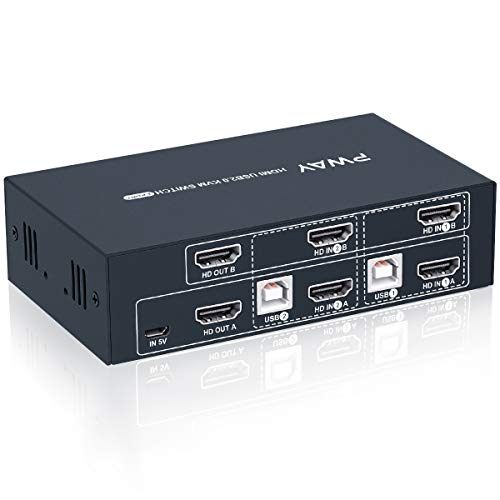
MiraBox KVM HDMI USB Extender, USB2.0 Pass Through, with POC Function, 262ft (80m) Over Cat5 Cat5e Cat6 Cat6e Single LAN Cable Lossless No-Delay for DVR,Computer,Loptop



Key features
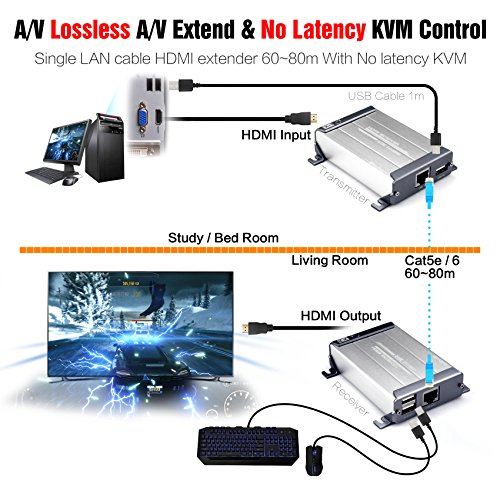
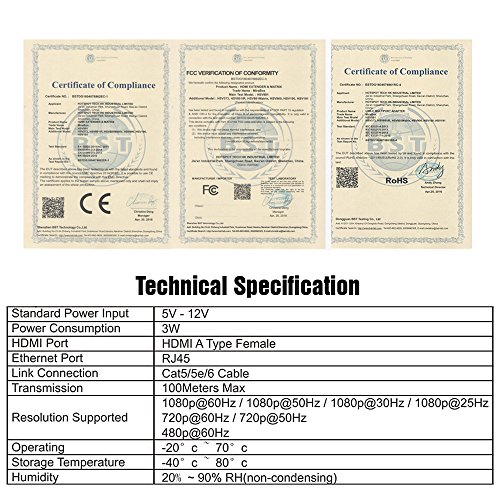
- •【300FT HDMI Extension】Extend FULL HD HDMI signal over 300 feet (100 meters) via single CAT cable, you can watch the HD video from 300 feet (100 Meters) far away place by using this product.
- •【262FT KVM and HDMI Extension】【USB2.0 Pass Through】Extend USB signal over (262 feet)80 meters simultaneous, you can control your computer from 80m far away place by using this KVM HDMI Extender.
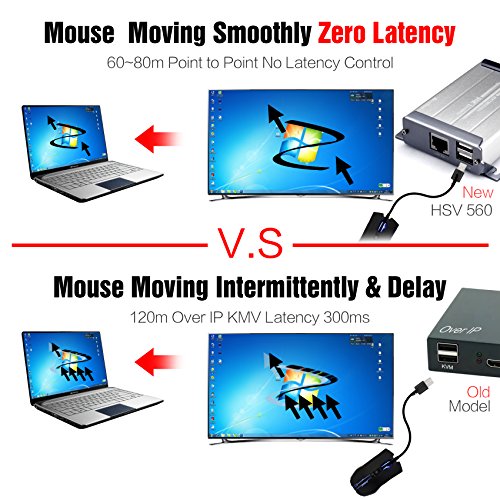
- •【LossLESS No Latency】No video loss, no time delay, enjoy no noise 1080P HD video synchronize 80-100m transmission.
- •【12V POC Power Supply】12V POC point to point power supply,can not support pass through lan switch, just use one power adapter, you can transmit your HD Video Signal up to 80-100m far away place.Engineering level 5-12V wide range power supply, more safe, more stable.
- •【Noted:】This product support POC function, so only need one power adapter can power TX and RX. Packaging may be different with the photo.
MiraBox KVM HDMI USB Extender, USB2.0 Pass Through, with POC Function, 262ft (80m) Over Cat5 Cat5e Cat6 Cat6e Single LAN Cable Lossless No-Delay for DVR,Computer,Loptop
List Price: $145.49$130.94DEALYou Save: $14.55 (10%)
Free shippingFree Returns – 30 daysFree Order CancellationSecure Payment2–3 Days DeliveryGet It October 25, 2026In Stock (1)No marketing spamNo account requiredFulfilment by FedEx / Amazon / UPS / ShipwirePayPal / Card Buyer Protection
Customer Reviews
Reviews sourced from verified Amazon purchasers3.3
out of 5
Based on 10 reviews
5★
40%
4★
30%
3★
10%
2★
10%
1★
10%
Camera wise it will only transmit 720 and not 1080 ...
Cyruss✓ Verified Purchase•May 15, 2018
Camera wise it will only transmit 720 and not 1080 in any format. If considering using with computer software in 720 you may get a green tent. I will transmit 720 straight to monitor.
Doesn't work !
Shopping is a hobby too✓ Verified Purchase•May 10, 2018
Does not work , had to return it.
They get Hot and don't work with some things ...
Rawze✓ Verified Purchase•February 26, 2018
I have the HSV560 KVM switch. It took me more than a day of fiddling with it just to get them to work. first of all, I would like to say that some video resolutions did not even show up for me. 1366x768 would not even work. I had to choose 1920x1080, 1280x1024, 1024x768, or 800x600. The 1920x1080 worked the best actually. No big deal, just mentioning this as it was one of the reasons I could not get the video to work at all.
Next, I am using this on a NVR security system. I could connect the monitor directly to the security system and it worked fine but through the hsv560, I never could get the HDMI video to enable. I even tried updating firmware on both devices to too. I hokked up the 560 to a PC with HDMI output and it worked well though.
Eventually I had to resort to using a VGA to HDMI adapter on the security system and give up on its HDMI output. VGA to HDMI to the hsv560 box worked for getting the video to the other end. The usb worked flawlessly during this whole time I had trouble.
- After ironing out the video problems and getting it to work, I do have to say I was at first quite impressed. There seems to be little to no lag that I could notice. After an hour or so though, the unit that attaches to the monitor got quite warm and the video is doing this sort of "pulsating" of color hue that is quite annoying on at end only. It did not matter cable length or any other factor except for the fact that the unit is getting quite warm compared to its surroundings. Since I do not plan on sending it back, I think what I am going to have to do is resort to opening up this thing and installing a heat sink on whatever component(s) that are getting hot to fix it. Other than that it works great.
Next, I am using this on a NVR security system. I could connect the monitor directly to the security system and it worked fine but through the hsv560, I never could get the HDMI video to enable. I even tried updating firmware on both devices to too. I hokked up the 560 to a PC with HDMI output and it worked well though.
Eventually I had to resort to using a VGA to HDMI adapter on the security system and give up on its HDMI output. VGA to HDMI to the hsv560 box worked for getting the video to the other end. The usb worked flawlessly during this whole time I had trouble.
- After ironing out the video problems and getting it to work, I do have to say I was at first quite impressed. There seems to be little to no lag that I could notice. After an hour or so though, the unit that attaches to the monitor got quite warm and the video is doing this sort of "pulsating" of color hue that is quite annoying on at end only. It did not matter cable length or any other factor except for the fact that the unit is getting quite warm compared to its surroundings. Since I do not plan on sending it back, I think what I am going to have to do is resort to opening up this thing and installing a heat sink on whatever component(s) that are getting hot to fix it. Other than that it works great.
This works fine. The only problem I have is the Ir ...
Don Schueler✓ Verified Purchase•January 20, 2018
This works fine. The only problem I have is the Ir blaster seems really weak...hard to get in right position. Wondering if I buy a standard two headed emitter and plug that in so I can connect each emitter direct to each device?
Great Buy
xdcowboysx✓ Verified Purchase•December 11, 2017
I upgraded my security cameras and needed a way to have my monitor reach my dvr with existing connections. This was the answer. It was a fast easy setup. There is zero delay. If you are looking for high definition with zero lag this what you need. The only con I would give it is that the boxes are a little bit. They are a little hard to hide behind a television. But other than that I would definitely purchase again.
Page 1 of 2