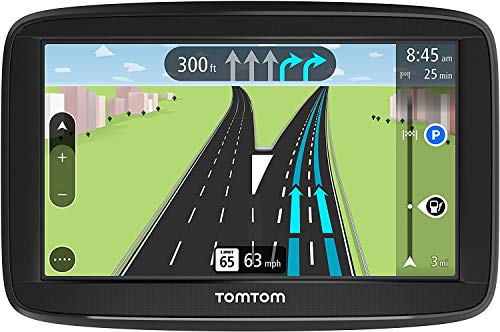
TomTom Via 1625TM 6-Inch GPS Navigation Device with Free Traffic, Free Maps of North America, Advanced Lane Guidance and Spoken Turn-By-Turn Directions


Key features
- •TOUCHSCREEN DISPLAY: 6-inch touchscreen display with split screen junction view
- •FREE LIFETIME MAP UPDATES: Enjoy free map updates with the latest road changes for the life of your navigation Device at no extra cost
- •FREE LIVE TRAFFIC UPDATES: With detailed information about delays and alternative routes that keep you moving, TomTom via GPS navigation system will get you there the faster!
- •CLEAR AND EASY NAVIGATION: Never miss a turn again with advanced lane guidance. Get extra clarity when navigating complex junctions.
- •EXPANSIVE MAP COVERAGE: Ready to navigate with the latest maps of the US, Canada, and Mexico already installed.
TomTom Via 1625TM 6-Inch GPS Navigation Device with Free Traffic, Free Maps of North America, Advanced Lane Guidance and Spoken Turn-By-Turn Directions
List Price: $726.05$653.45DEALYou Save: $72.60 (10%)
Free shippingFree Returns – 30 daysFree Order CancellationSecure Payment2–3 Days DeliveryGet It October 29, 2026In Stock (1)No marketing spamNo account requiredFulfilment by FedEx / Amazon / UPS / ShipwirePayPal / Card Buyer Protection
Customer Reviews
Reviews sourced from verified Amazon purchasers3.5
out of 5
Based on 10 reviews
5★
10%
4★
10%
3★
30%
2★
30%
1★
20%
Map Updates Definitely Worth the Extra Cost.
JustAnOldGuy✓ Verified Purchase•May 17, 2018
Purchased to replace TomTom XL350TM that is no longer supported by Map Update. Installed 32GB memory in this device to handle future increases in Map sizes! Controls are a bit different than XL350 but functionality is almost the same. Use the City Center selection for motorcycle Touring to distant cities in place of specific street address (that is unknown). Will install female audio out jack to connect to headset earbuds in order to be able to hear navigation instructions.
Not as many options as older TomTom GPS devices I've used.
Bapsplat✓ Verified Purchase•May 13, 2018
I tried updating the maps on an older TomTom 540TM that was still working perfectly, other than the maps needing updated and got a message when I connected it that because of the "age of the device, it can no longer be updated". I was not happy about this, but decided to "upgrade" to the 1625TM. I am happy about the clarity of the display and how much quicker I was able to update it when I first received it. However, the number of options, especially for what I want to actually display on the screen, is far more limited than my older model. I could make all kinds of changes of what I wanted to display on the older one, but with this there doesn't seem to be any options for what you want displayed on the screen and/or are very limited in comparison. With the older version, they eventually had to split the maps in areas in order for them to fit and this was a fine option. I would like to just have maps of the U.S. on this updated version, but it doesn't seem I can split up North America into separate map areas. In addition the border around the screen is not near as "thin" as I expected for a newer model and actually makes the device quite a bit larger despite the screen being only 1" bigger than my old model.
I am happy with the directions and lane assist, but wish there more options than there currently is for this device.
I am happy with the directions and lane assist, but wish there more options than there currently is for this device.
old unit vs. new
greg k✓ Verified Purchase•May 6, 2018
With having previous Tomtom units. this one is disappointing.
#1 touch screen is slow, you hit the button and nothing happens so you hit it again. Then all the letters start showing up, backspace and start over!
#2 New unit start off in address search in the USA and narrow it down from there.
Old unit (Tomtom) already had my state with cities I most used.
#3 Info bar on right is too wide maybe 1/3 of the screen all of the time except when turning.
Old unit was maybe 1/2" and I never had a problem seeing my traffic alerts.
#4 New unit have to touch a little menu button to start prompts, and then it only shows you 3 @ a time.
Old unit touch any part of the screen and it showed you 6 @ a time.
My unit is going back to Amazon and I will review other products better in the future.
#1 touch screen is slow, you hit the button and nothing happens so you hit it again. Then all the letters start showing up, backspace and start over!
#2 New unit start off in address search in the USA and narrow it down from there.
Old unit (Tomtom) already had my state with cities I most used.
#3 Info bar on right is too wide maybe 1/3 of the screen all of the time except when turning.
Old unit was maybe 1/2" and I never had a problem seeing my traffic alerts.
#4 New unit have to touch a little menu button to start prompts, and then it only shows you 3 @ a time.
Old unit touch any part of the screen and it showed you 6 @ a time.
My unit is going back to Amazon and I will review other products better in the future.
Freezes up-Useless
Betty Jane Gallagher✓ Verified Purchase•April 16, 2018
Brand New! The screen has frozen solid as soon as connected it to "my drive connect" to update it. It has been frozen. Unable to use it. I tried all the fixes that TOMTOM had suggested. Nothing has worked. Tomtom support is not there. When you turn it on it freezes after the drum roll sound and the map is on screen. It worked until I connected it to the TomTom App. Now I am out $120. and it's useless. Product is TomTom VIA1625TM 6 Inch GPS Navigation Device.
I like my old TomTom XL350 much better
Mr.C.✓ Verified Purchase•April 3, 2018
This device is just ok. I like my old TomTom XL350 much better.
The display is somewhat washed out and not as vibrant as the old TomTom. Software is buggy, I can't use the turn off function most of the time as it just flashed from black screen to map screen and back. Device will move too slow, and I need to reset several times. New software interface to make updates is not as user friendly as old version. Navigation works fine although I don't find lane guidance or traffic warnings as good as old XL350. The device is fine, but TomTom can do better
The display is somewhat washed out and not as vibrant as the old TomTom. Software is buggy, I can't use the turn off function most of the time as it just flashed from black screen to map screen and back. Device will move too slow, and I need to reset several times. New software interface to make updates is not as user friendly as old version. Navigation works fine although I don't find lane guidance or traffic warnings as good as old XL350. The device is fine, but TomTom can do better
Page 1 of 2