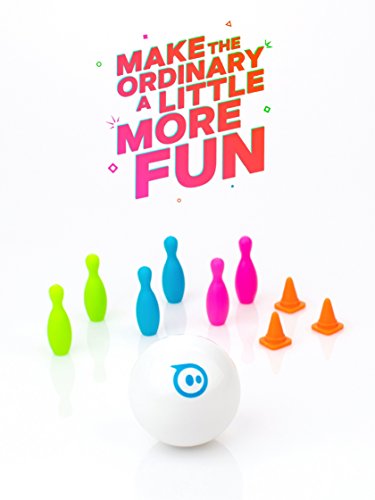
Sphero Mini White: The App-Controlled Robot Ball



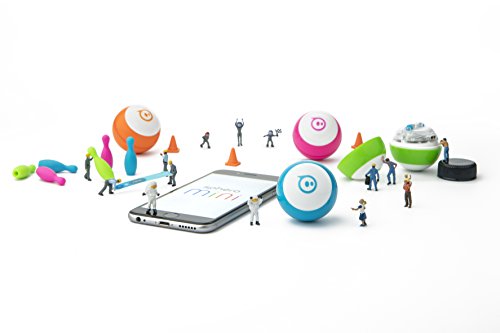
Key features
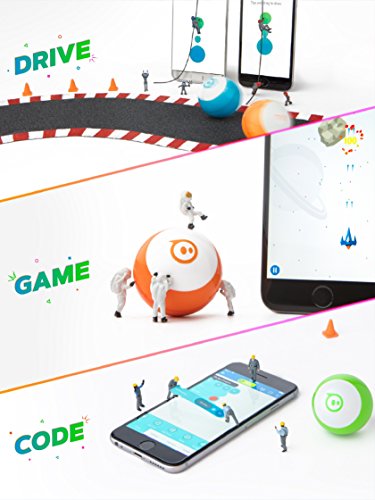
- •Drive - Drive Mini several ways with the Sphero Mini app - Joystick, Tilt, Slingshot, or Face Drive.
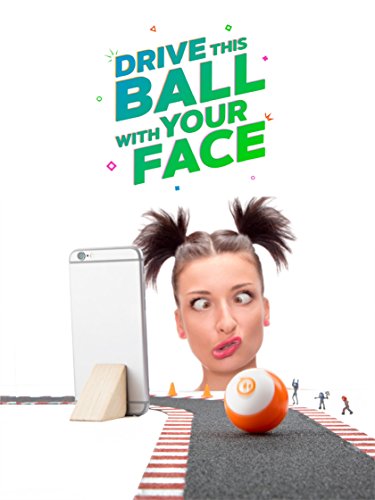
- •Face Drive - Face Drive is a hilarious new feature that uses your facial expressions to drive the ball.
- •Gaming - Sphero Mini can be used with the app as a video game controller. Play 3 games with more updates on the way.
- •Coding - Download the Sphero Edu app and program your Sphero Mini bot using JavaScript.
- •Interchangeable Shells - Colorful, interchangeable shells allow you to switch one out to suit your mood.
Sphero Mini White: The App-Controlled Robot Ball
List Price: $57.71$51.94DEALYou Save: $5.77 (10%)
Free shippingFree Returns – 30 daysFree Order CancellationSecure Payment2–3 Days DeliveryGet It October 25, 2026In Stock (5)No marketing spamNo account requiredFulfilment by FedEx / Amazon / UPS / ShipwirePayPal / Card Buyer Protection
Customer Reviews
Reviews sourced from verified Amazon purchasers3.5
out of 5
Based on 10 reviews
5★
70%
4★
0%
3★
10%
2★
20%
1★
0%
Bluetooth connection problems
SmallNetBuilder✓ Verified Purchase•October 25, 2017
I had a hard time getting it to connect to a Moto X gen 2 phone. After I finally succeeded, it wouldn't stay connected for long.
Got to try it a little. As other reviewers have noted, it will be challenged on floors (no grip) and moving onto carpet (need to get a "running" start).
The little time I tried to use it, one of our cats ran away instead of stalking it.
Got to try it a little. As other reviewers have noted, it will be challenged on floors (no grip) and moving onto carpet (need to get a "running" start).
The little time I tried to use it, one of our cats ran away instead of stalking it.
Kids love the miniSphero
soundmind✓ Verified Purchase•October 14, 2017
as written by the 10 year old who uses Sphero mini:
Sphero mini is an evolutionary device for the whole family. The perfect size makes it easily transportable for on the go fun! From the fun of building courses and playing "hide and seek" possibilities are endless. It's not only a toy but it's a game! I love the different ways you can control it; tilt, slingshot, face drive, and much more! I have an original Sphere, too. this one is similar, but a whole lot different. Mini seems faster and quicker. Also, the LED inside Sphero-mini is cool. Sphero mini is a great product.
Sphero mini is an evolutionary device for the whole family. The perfect size makes it easily transportable for on the go fun! From the fun of building courses and playing "hide and seek" possibilities are endless. It's not only a toy but it's a game! I love the different ways you can control it; tilt, slingshot, face drive, and much more! I have an original Sphere, too. this one is similar, but a whole lot different. Mini seems faster and quicker. Also, the LED inside Sphero-mini is cool. Sphero mini is a great product.
I had great expectations. However
Amazon Shopper✓ Verified Purchase•October 11, 2017
As an amateur robot builder, I bought this on the first day it was available. I had great expectations.
However, it simply does not perform.
Here is what happens.
1) Unbox. Quality looks good.
2) Open and charge Sphero mini. Good.
3) Install phone app. Good.
4) Connect to the sphero with phone app. Good.
5) Calibrate the sphero mini by orienting a LED to point at you. Good.
6) Drive the sphero mini in a given direction. Passable.
7) Drive the sphero mini in a different direction. You can hear the wheels spinning inside the shell as it tries to adjust. Lucky if it goes within 30 degrees of the intended direction.
8) Each successive change in direction is less and less accurate. After three direction changes, it is pretty much random.
Watching various video reviews would make you think that the reviewers are not good drivers. In fact, they think they are bad drivers. But in reality, the sphero mini is not a good direction follower.
The issue is the calibration (see step #5 above) does not last long. If you try to re-calibrate later, it is obvious that the LED is pointing in the wrong direction.
There is such a small point of contact between the sphero mini and the ground, that each direction change causes enough spinning that orientation is lost.
I have three requests:
1) Sphero could improve the sphero mini software by allowing an option where the calibration LED is always visible. The app would then have "steering" which allows you to change the direction the LED is pointing. And the app would also have a "forward/reverse slider" for speed control. This would remove the calibration issue and it would be much more controllable. Adding a "trim" to control max speed would be great too.
2) Sphero could improve the sphero hardware. Add a magnetometer so that once the LED orientation is set, the magnetometer can maintain it. This is a very common robot technique for orientation.
3) I challenge anyone to post a video of them driving the sphero mini two laps in a square pattern, four feet on a side.
But for now, I don't recommend.
However, it simply does not perform.
Here is what happens.
1) Unbox. Quality looks good.
2) Open and charge Sphero mini. Good.
3) Install phone app. Good.
4) Connect to the sphero with phone app. Good.
5) Calibrate the sphero mini by orienting a LED to point at you. Good.
6) Drive the sphero mini in a given direction. Passable.
7) Drive the sphero mini in a different direction. You can hear the wheels spinning inside the shell as it tries to adjust. Lucky if it goes within 30 degrees of the intended direction.
8) Each successive change in direction is less and less accurate. After three direction changes, it is pretty much random.
Watching various video reviews would make you think that the reviewers are not good drivers. In fact, they think they are bad drivers. But in reality, the sphero mini is not a good direction follower.
The issue is the calibration (see step #5 above) does not last long. If you try to re-calibrate later, it is obvious that the LED is pointing in the wrong direction.
There is such a small point of contact between the sphero mini and the ground, that each direction change causes enough spinning that orientation is lost.
I have three requests:
1) Sphero could improve the sphero mini software by allowing an option where the calibration LED is always visible. The app would then have "steering" which allows you to change the direction the LED is pointing. And the app would also have a "forward/reverse slider" for speed control. This would remove the calibration issue and it would be much more controllable. Adding a "trim" to control max speed would be great too.
2) Sphero could improve the sphero hardware. Add a magnetometer so that once the LED orientation is set, the magnetometer can maintain it. This is a very common robot technique for orientation.
3) I challenge anyone to post a video of them driving the sphero mini two laps in a square pattern, four feet on a side.
But for now, I don't recommend.
Play and Learn With Sphero Mini
Once Bitten•October 9, 2017
I think it's important to remember that this Sphero Mini is a Sphero product: it goes way beyond being a cute little toy that knocks down bowling pins or uses gimmicks like facial response. This is a device that can be programmed through different means of coding. By downloading the Sphero Edu app it will connect to any Sphero device and provide access to all Coding programs offered. I work with elementary/middle school age kids and have introduced them to a variety of Sphero toys. I especially like that the Mini charges very quickly compared to other Spheros and at around $50 a piece I can reach more children than the pricier $100+ toys.
The Cat Toy I Always Dreamed Of
FreeRange✓ Verified Purchase•October 9, 2017
FINALLY MY CAT HAS SHOWN INTEREST IN A SPHERO TOY!!!
I thought I was gonna be all about the branded Sphero toys after a very successful run-in with their new BB-9E but then they went an introduced miniature Sphero balls and I had to get myself one in green. It's my son's favorite color so I quickly rationalized that it's a toy for both of us. But, like with the BB-9E, he's terrified of this thing, too. There was hope for a second there when he found it on the carpet in the morning after I'd played around with it the night before after he'd gone to bed. He brought it to me and his mom and announced, "An egg!" Because it's actually just a hair smaller and obviously rounder than a plastic Easter egg. Feels like one, too. So there was promise. My wife has me load up the app and give it a run for him and he was immediately over it. He jumped on our bed and wanted nothing more to do with it.
But you know who loves it? Our cat. That cat's ignored the full-size Sphero, Ollie, and BB-9E but THIS ONE is something she'll stalk around the ottoman.
The good - It's smaller but no less solid or speedy than the larger models. I imagined it'd be a significant drop in quality or speed or SOMETHING because it's not only smaller but significantly less expensive than the larger models but I haven't found this to be the case at all. It even runs on our tufted rugs which ave texture/different heights. I'd have been understanding if it couldn't overcome the heights but it hasn't been the case. Your (miniature) mileage may vary, though.
The bad - Still terrifies my son. Isn't branded (I'd be down for a mini BB-8) so the app feels light compared to all that the Star Wars models come with. Completely delivers on all that's promised so that's more an observation than a true "bad". I'm gettin' greedy, clearly.
The unexpected - Twice now I've had to stop and restart the app because it's tried to load up in portrait mode with half the screen black and the load screen basically only being half there. I couldn't rotate the phone and have it be corrected I just had to stop the app completely and then re-open it. Once open the apps been solid, like all of their stuff, but that did happen twice so it's kind-of, sort-of something that happens. Easily fixed so not a bad, just an unexpected.
Off to play with the cat and hopefully not give my son nightmares!
I thought I was gonna be all about the branded Sphero toys after a very successful run-in with their new BB-9E but then they went an introduced miniature Sphero balls and I had to get myself one in green. It's my son's favorite color so I quickly rationalized that it's a toy for both of us. But, like with the BB-9E, he's terrified of this thing, too. There was hope for a second there when he found it on the carpet in the morning after I'd played around with it the night before after he'd gone to bed. He brought it to me and his mom and announced, "An egg!" Because it's actually just a hair smaller and obviously rounder than a plastic Easter egg. Feels like one, too. So there was promise. My wife has me load up the app and give it a run for him and he was immediately over it. He jumped on our bed and wanted nothing more to do with it.
But you know who loves it? Our cat. That cat's ignored the full-size Sphero, Ollie, and BB-9E but THIS ONE is something she'll stalk around the ottoman.
The good - It's smaller but no less solid or speedy than the larger models. I imagined it'd be a significant drop in quality or speed or SOMETHING because it's not only smaller but significantly less expensive than the larger models but I haven't found this to be the case at all. It even runs on our tufted rugs which ave texture/different heights. I'd have been understanding if it couldn't overcome the heights but it hasn't been the case. Your (miniature) mileage may vary, though.
The bad - Still terrifies my son. Isn't branded (I'd be down for a mini BB-8) so the app feels light compared to all that the Star Wars models come with. Completely delivers on all that's promised so that's more an observation than a true "bad". I'm gettin' greedy, clearly.
The unexpected - Twice now I've had to stop and restart the app because it's tried to load up in portrait mode with half the screen black and the load screen basically only being half there. I couldn't rotate the phone and have it be corrected I just had to stop the app completely and then re-open it. Once open the apps been solid, like all of their stuff, but that did happen twice so it's kind-of, sort-of something that happens. Easily fixed so not a bad, just an unexpected.
Off to play with the cat and hopefully not give my son nightmares!
Page 1 of 2