HDMI/VGA Wall Plate Extender Transmitter,4K x 2K UHD,Bi-Directional IR + RS232+HDCP2.2+EDID Management,Over Single Cat5e/6/7,131ft 4K60Hz,230ft 1080P,Aluminum case,Built-in IR Receiver
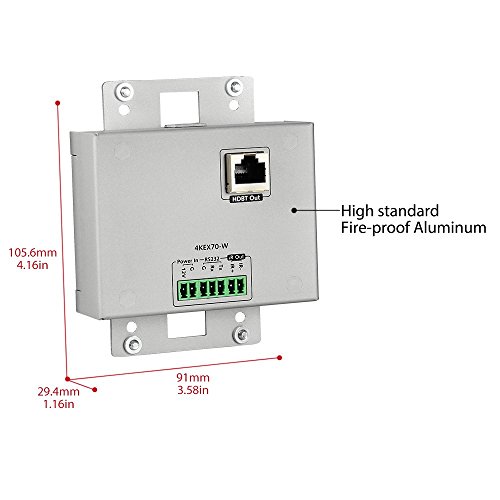
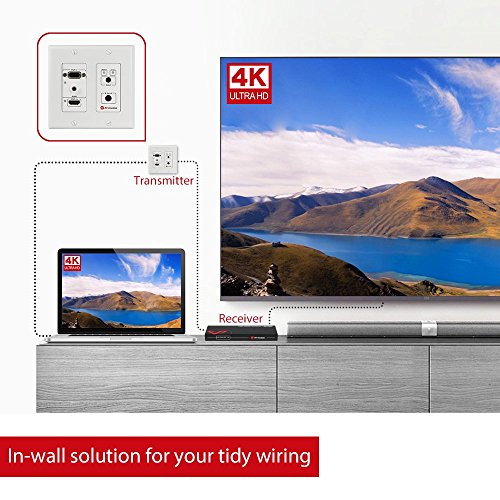
Key features
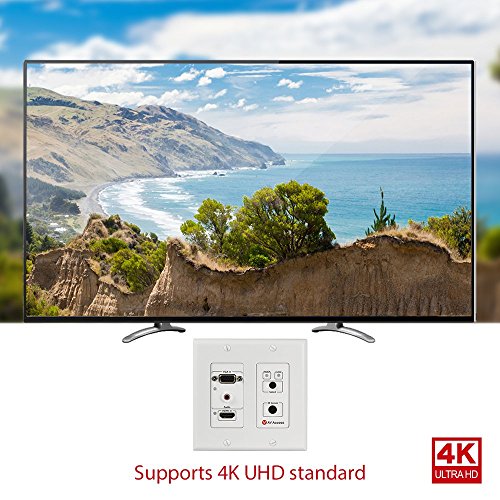
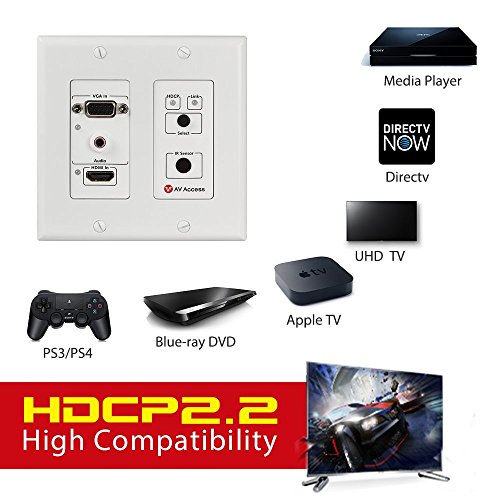
- •【HDMI & VGA Auto Switch】Switches HDMI&VGA inputs to a HDBT output(HDMI Input Priority).The HDMI input supports resolution up to 4K@60Hz(4:2:0 8bit),4K and 1080P Over single CAT5e/6/7 Cable.Cat6a/7:4K(131ft),1080P(230ft);Cat5e/6:4K(115ft),1080P(197ft).
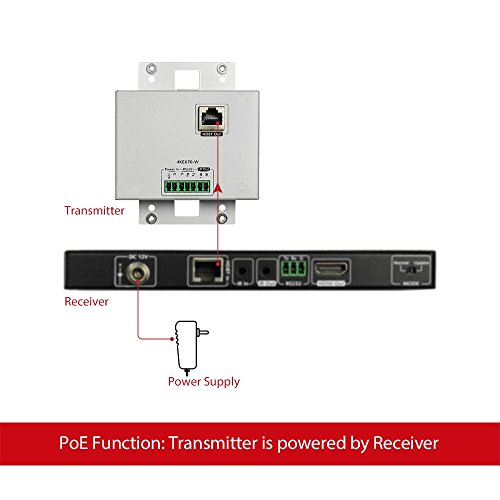
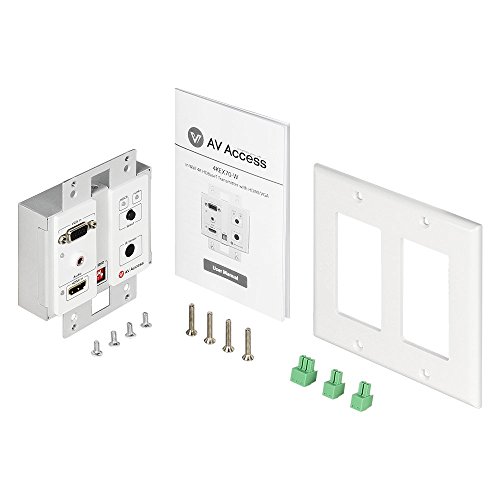
- •【 PoE&Bi-directional IR】Widebrand IR control(30-55kHz). Enable to get power from the POE receiver side. Provides extra Phoenix Male interface for power supply when your current receiver is not POE supported.Aluminum case guarantees a better cooling.2-Gang US Decora Wall Plate Cover is served.
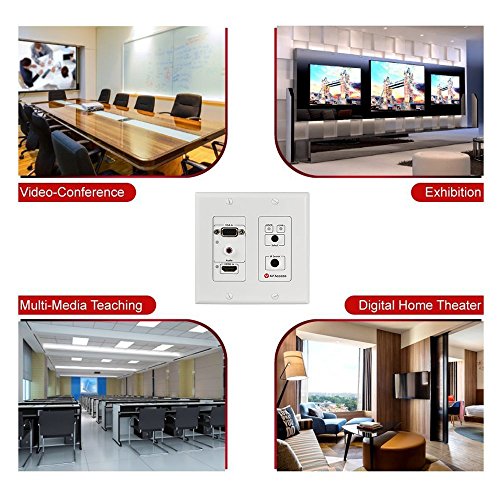
- •【High Compatibility】Work properly with your PC,PS3/PS4,DVD Player,Satellite Box,Cable Box,Android Box,Projector etc;Ideal for Digital Signage,home theater,Boardrooms,workshop,seminar,classrooms,conference,Gaming,Video Production etc.
- •【Note】This is only a Wall Plate(transmitter),we recommend it works with AV Access hdmi extender receiver[ASIN:B073QLKSSG].If you work with other HDBaseT Receivers,both Wall plate tansmitter and the receiver must be powered by power adapter.
- •【High Reliability】Built-in Surge/Lightning Protection;Superior ESD(Electro-Static Discharge) Protection: +/- 8KV(Air-gap discharge ) +/- 4KV(contact discharge ),Which Makes the Extender Durable.1-year Warranty.
HDMI/VGA Wall Plate Extender Transmitter,4K x 2K UHD,Bi-Directional IR + RS232+HDCP2.2+EDID Management,Over Single Cat5e/6/7,131ft 4K60Hz,230ft 1080P,Aluminum case,Built-in IR Receiver
List Price: $203.69$183.32DEALYou Save: $20.37 (10%)
Free shippingFree Returns – 30 daysFree Order CancellationSecure Payment2–3 Days DeliveryGet It October 26, 2026In Stock (1)No marketing spamNo account requiredFulfilment by FedEx / Amazon / UPS / ShipwirePayPal / Card Buyer Protection
Customer Reviews
Reviews sourced from verified Amazon purchasers4.2
out of 5
Based on 10 reviews
5★
50%
4★
50%
3★
0%
2★
0%
1★
0%
First set failed....second set working great!
Warren✓ Verified Purchase•June 23, 2018
My first unit worked great for a couple months then failed. I had know idea why. The company stood by their product and sent me replacement units and zero cost.
My entire home theater set up is running though a Panamax power distribution center that serves as a surge suppressor and power conditioner. I had ALL but my first set of AV HDMI extenders running through the Panamax. The reason I didn't run the first units through the Panamax was because the AV HDMI extenders claimed to have built in surge suppression. My new set of AV HDMI extenders now run through my Panamax. Just extra insurance because I suspect the first units failed because of a power spike or dip. It's just a guess. The units get constant power through the P over EThernet so they run rather warm too so that could be a weak point also. Time will tell.
I'm running over a shielded CAT 7 with "premium" HDMI cables at each end. Picture over 65 feet is second to none!
My entire home theater set up is running though a Panamax power distribution center that serves as a surge suppressor and power conditioner. I had ALL but my first set of AV HDMI extenders running through the Panamax. The reason I didn't run the first units through the Panamax was because the AV HDMI extenders claimed to have built in surge suppression. My new set of AV HDMI extenders now run through my Panamax. Just extra insurance because I suspect the first units failed because of a power spike or dip. It's just a guess. The units get constant power through the P over EThernet so they run rather warm too so that could be a weak point also. Time will tell.
I'm running over a shielded CAT 7 with "premium" HDMI cables at each end. Picture over 65 feet is second to none!
Long distance 4K/60 Hz HDR signal is no problem with the 4KEX70-H2
David Kazebeer✓ Verified Purchase•February 15, 2018
This review is for the AV Access 4KEX70-H2, HDMI 2.0 Over HDBaseT Extender. The packaging was excellent, with everything packed well to protect against any kind of shipping damage. The H2 comes with a transmitter, a receiver, a single 18VDC power supply, an IR transmitter, and IR receiver, two Phoenix male connectors for RS232 passthrough, and a user manual.
Setup is very easy. Connect the transmitter and receiver with a suitable Ethernet cable, connect your HDMI source to the transmitter, connect your TV via HDMI to the receiver, connect the power supply to either the transmitter or receiver (Power over Ethernet is bi-directional so it doesn't matter which unit has it), and then plug in the power supply.
The units power up quickly, with both showing a steady power light almost immediately. There will be a slight delay as the transmitter and receiver negotiate the connection, but in all of my uses that is only a few seconds. Once the connection is stable the power and link LED lights will be on steady, the status LED will blink, and the HDCP LED will either be on or off depending on the signal having HDCP or not.
I have an Onkyo TX-NR676 4K/60 Hz HDR receiver that has HDCP 2.2, a Shield TV, a PS4, and a Vizio M55-E0 4K/60 Hz HDR TV, and everything works exactly as it should. I use a 26ft CAT-7 cable run in-wall, with CAT-6 keystone passthrough jacks on each end, and CAT-7 patch cables that connect to each of the H2 units. I went with CAT-7 just to allow for future expansion, but I tested the setup with a standard 20ft CAT-5e cable and I had no issues at all, which supports the manufacturer recommendations for cable type and length. I've had no connection issues, no intermittent signal issues, and no signal quality issues.
The receiver does get very warm to the touch, but since this is passively cooled and it uses the metal case to aid in cooling, I'm not concerned with it. As long as there is adequate ventilation I don't expect any problems at all. I've had these powered up for over 8 hours and haven't had a single issue due to the heat. I do have a UPS configured with my receiver as a master, so the H2 units are powered off when the receiver is turned off/goes into standby, so I don't have any experience with heat when the devices aren't being used "“ although I did read other reviews that stated the receiver is still warm even if there is no input signal being transmitted.
Overall, I'm very happy with the 4KEX70-H2 in my home theater setup and I recommend using them if you have a long (25ft+) distance between your TV and your input devices.
Setup is very easy. Connect the transmitter and receiver with a suitable Ethernet cable, connect your HDMI source to the transmitter, connect your TV via HDMI to the receiver, connect the power supply to either the transmitter or receiver (Power over Ethernet is bi-directional so it doesn't matter which unit has it), and then plug in the power supply.
The units power up quickly, with both showing a steady power light almost immediately. There will be a slight delay as the transmitter and receiver negotiate the connection, but in all of my uses that is only a few seconds. Once the connection is stable the power and link LED lights will be on steady, the status LED will blink, and the HDCP LED will either be on or off depending on the signal having HDCP or not.
I have an Onkyo TX-NR676 4K/60 Hz HDR receiver that has HDCP 2.2, a Shield TV, a PS4, and a Vizio M55-E0 4K/60 Hz HDR TV, and everything works exactly as it should. I use a 26ft CAT-7 cable run in-wall, with CAT-6 keystone passthrough jacks on each end, and CAT-7 patch cables that connect to each of the H2 units. I went with CAT-7 just to allow for future expansion, but I tested the setup with a standard 20ft CAT-5e cable and I had no issues at all, which supports the manufacturer recommendations for cable type and length. I've had no connection issues, no intermittent signal issues, and no signal quality issues.
The receiver does get very warm to the touch, but since this is passively cooled and it uses the metal case to aid in cooling, I'm not concerned with it. As long as there is adequate ventilation I don't expect any problems at all. I've had these powered up for over 8 hours and haven't had a single issue due to the heat. I do have a UPS configured with my receiver as a master, so the H2 units are powered off when the receiver is turned off/goes into standby, so I don't have any experience with heat when the devices aren't being used "“ although I did read other reviews that stated the receiver is still warm even if there is no input signal being transmitted.
Overall, I'm very happy with the 4KEX70-H2 in my home theater setup and I recommend using them if you have a long (25ft+) distance between your TV and your input devices.
Works really nicely but the receiving unit runs outrageously hot
Greg Pappas✓ Verified Purchase•January 14, 2018
Works really nicely but the receiving unit runs outrageously hot! I've used it with a GTX 1080 and now a GTX 1080 Ti to play video games from my PC to my 4K Samsung KS8500 series TV. I strongly recommend keeping it isolated from any other equipment, and place it in an area where it is very well ventilated. I keep it on top of my AV stand with no other components within 12 inches of it. I've still had it overheat on numerous occasions. I place it upside down so that the vented bottom of the case is facing upward. This helps, but when the room temperature gets to 75F or slightly above, I need to place a small fan next to the HDMI receiver to keep it from overheating. I also suggest that you unplug at least the receiving unit from the POE Ethernet cable in order to keep it from being powered unnecessarily, and thus avoiding it from heating up when not in use. When the unit overheats you will see artifacts (random colored pixels) on your TV and ultimately it will just stop outputting signal altogether.
Aside from the issue of heat, I was pleasantly surprised to find that the HDBaseT technology is actually capable of displaying 4K video over an Ethernet cable. I've only played racing games, but I have not had any concerns with lag. Altogether still happy with the fact that this allows me to keep my gaming PC in the basement and play on my TV upstairs.
Aside from the issue of heat, I was pleasantly surprised to find that the HDBaseT technology is actually capable of displaying 4K video over an Ethernet cable. I've only played racing games, but I have not had any concerns with lag. Altogether still happy with the fact that this allows me to keep my gaming PC in the basement and play on my TV upstairs.
AV Access is amazing, unit is good, I'm waiting for the next version for the 4:4:4 4K 60 which is what I need
A. Friedrich✓ Verified Purchase•December 9, 2017
A good product. Customer service is incredibly good and I will be doing business with AV Access in the future.
Why 4 stars and not 5?
Well, some of that comes down to my particular use case. Rating AV Access as a company I give them 5/5, but this unit doesn't do exactly what I want it to do.
AV Access helped me setup as I was having screen flickering and some major issues.
1060GTX on a 1800x Ryzen Build. Going into the NVIDIA Control Panel, click on display, change resolution, click on the monitor in question (for me it is a Denon receiver / LG OLED B7 TV), then select 1080p, 1920x1080 and change the output color depth to 8bit. Viola the problem goes away. Moving up to 4K, the best I could get was 30Hz refresh rate. It does what it advertises to do, but for playing games it's an issue for me.
There is a newer version coming out that I'll be planning on getting that supports the 4:4:4 based on my conversation with the AV Access staff that will solve my problems.
It's REALLY important to go in and change the Output color depth to 8 bit when you are running at 4K - otherwise you will not get any screen (black)- but you will find everything works like magic at 1080p.
If you have an AMD card, steps should be similar- manually configure to 8bit color and if you run 4K, run it at 30Hz. I want to say that I was able to get 1080p to work with 12 bpc color depth, but when I disconnected one of my other monitors it required me to go to 8 bpc to get the screen flickering to stop.
I hope this helps someone.
Why 4 stars and not 5?
Well, some of that comes down to my particular use case. Rating AV Access as a company I give them 5/5, but this unit doesn't do exactly what I want it to do.
AV Access helped me setup as I was having screen flickering and some major issues.
1060GTX on a 1800x Ryzen Build. Going into the NVIDIA Control Panel, click on display, change resolution, click on the monitor in question (for me it is a Denon receiver / LG OLED B7 TV), then select 1080p, 1920x1080 and change the output color depth to 8bit. Viola the problem goes away. Moving up to 4K, the best I could get was 30Hz refresh rate. It does what it advertises to do, but for playing games it's an issue for me.
There is a newer version coming out that I'll be planning on getting that supports the 4:4:4 based on my conversation with the AV Access staff that will solve my problems.
It's REALLY important to go in and change the Output color depth to 8 bit when you are running at 4K - otherwise you will not get any screen (black)- but you will find everything works like magic at 1080p.
If you have an AMD card, steps should be similar- manually configure to 8bit color and if you run 4K, run it at 30Hz. I want to say that I was able to get 1080p to work with 12 bpc color depth, but when I disconnected one of my other monitors it required me to go to 8 bpc to get the screen flickering to stop.
I hope this helps someone.
Excellent product, price, design, and service.
Matthew✓ Verified Purchase•August 2, 2017
I run this unit at 1080 with a TiVO, PS4, and a computer over a 50ft Cat5e cable, and everything runs flawless, but I cannot feedback on 4K ability. I originally bought a different brand (Blackbird Pro) and returned it for this one, I made the right choice doing so, and I'll tell you why:
1) Heat. Both brand receivers generated heat, however this one is cooler while Blackbird got so hot I had concerns, as nothing I owned that didn't have active cooling ever got that hot. I believe the issue was with them using a 12V 1A adapter, as supplying additional power at the receiver side cooled it down. I can see the Blackbird burning out in less than 2 years, and no burn out on AV Access anytime soon.
2) IR: AV Access's 4KEX70-L came with a receiver and an emitter. Blackbird did not. I could not get any of my spares to work with Blackbird, nor did they sell a compatible set as a spare (AV Access does). I was told to shop for a pair on Amazon (two purchases & returns).
3) Cost. So far, the price of the Blackbird, plus a spare power adapter, plus 2 different sets of IR, and time waiting and experimenting trying to get IR to work on the Blackbird, I spent more than the AKEX70-L. I gave up, and sent it all back, and got the AKEX70-L. I have had no IR troubles save for the one I created for myself trying to chain it into an IR repeater kit.
4) Support: The manual is better, and (a shock to me) had IR Pinout drawings. With these I was able to make sure I could do more advanced IR tricks. I also emailed AV Access support regarding trying to link my AKEX70-L to an 3rd party IR Repeater kit. In the end nothing could be done as they used a proprietary receiver, but they were willing to help, and that means something. They didn't have to take time for connecting to a product that wasn't theirs, but they did. Not to many customer supports do that.
The only thing I'm not fond of, and it is not enough to make me knock down a star, is having all the ports on one side. I prefer a sort of linear box design (power/cat5e IN on back/bottom, HDMI/IR/RS232 on front/top).
1) Heat. Both brand receivers generated heat, however this one is cooler while Blackbird got so hot I had concerns, as nothing I owned that didn't have active cooling ever got that hot. I believe the issue was with them using a 12V 1A adapter, as supplying additional power at the receiver side cooled it down. I can see the Blackbird burning out in less than 2 years, and no burn out on AV Access anytime soon.
2) IR: AV Access's 4KEX70-L came with a receiver and an emitter. Blackbird did not. I could not get any of my spares to work with Blackbird, nor did they sell a compatible set as a spare (AV Access does). I was told to shop for a pair on Amazon (two purchases & returns).
3) Cost. So far, the price of the Blackbird, plus a spare power adapter, plus 2 different sets of IR, and time waiting and experimenting trying to get IR to work on the Blackbird, I spent more than the AKEX70-L. I gave up, and sent it all back, and got the AKEX70-L. I have had no IR troubles save for the one I created for myself trying to chain it into an IR repeater kit.
4) Support: The manual is better, and (a shock to me) had IR Pinout drawings. With these I was able to make sure I could do more advanced IR tricks. I also emailed AV Access support regarding trying to link my AKEX70-L to an 3rd party IR Repeater kit. In the end nothing could be done as they used a proprietary receiver, but they were willing to help, and that means something. They didn't have to take time for connecting to a product that wasn't theirs, but they did. Not to many customer supports do that.
The only thing I'm not fond of, and it is not enough to make me knock down a star, is having all the ports on one side. I prefer a sort of linear box design (power/cat5e IN on back/bottom, HDMI/IR/RS232 on front/top).
Page 1 of 2


