Brother Wireless High-Speed Desktop Document Scanner, ADS-2700W, Touchscreen LCD, Duplex Scanning


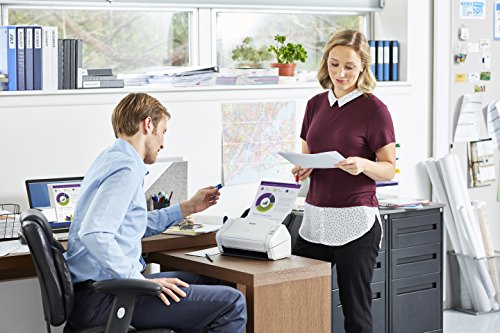


Key features
- •Fast scan speeds in a smaller footprint. Single-pass duplex scanning of color and Black & White documents at speeds up to 35 ppm (1) in a space saving, lightweight design ideal for most home office and business environments
- •Connect your way. Versatile connection options with built-in wireless, Fast Ethernet or connect locally to a single computer via high-speed USB 2.0
- •Support for your most secure information. Secure scanner access by individual and specific scanning functions; Settings Lock; secure network protocols including SSL, TLS, SFTP
- •Easy-to-use and saves time. A 2.8" color touchscreen display offers one-touch scanning to preset destinations and device settings management and Auto Start Scan allows you to simply drop paper into the feeder to automatically initiate scanning to a predefined profile
- •Compatible with the way you do business. Supports multiple "Scan-to" destinations: File (3), Image (3), OCR (3), Email, Network, FTP, Mobile Devices (4), USB flash memory drive (5) so you can optimize for your business process
BrandBrother
CategoryDocument Scanners
Size5.6" x 11.8" x 5.7"
ColorBlack
Warranty1 year limited with free phone support for life of your scanner
Brother Wireless High-Speed Desktop Document Scanner, ADS-2700W, Touchscreen LCD, Duplex Scanning
List Price: $686.76$618.08DEALYou Save: $68.68 (10%)
Free shippingFree Returns – 30 daysFree Order CancellationSecure Payment2–3 Days DeliveryGet It October 24, 2026In Stock (9)No marketing spamNo account requiredFulfilment by FedEx / Amazon / UPS / ShipwirePayPal / Card Buyer Protection
Customer Reviews
Reviews sourced from verified Amazon purchasers4.5
out of 5
Based on 10 reviews
5★
60%
4★
40%
3★
0%
2★
0%
1★
0%
This scanner is a dream come true!
Jodi Pelini✓ Verified Purchase•July 31, 2023
After years of using a free app to scan each and every picture, this scanner was a dream come true, from the moment I pulled it out of the box. It is lightweight and small so it doesn't take up much space and is easy to move from my home office to my work. After a few buttons on the touchscreen, the scanner was quickly and efficiently scanning the photos of my wedding from 20 years ago. The continuous load feature is a godsend when you have hundreds of photos to scan. Plus I love the scanner's ability to save directly to a flash drive, which meant no need to download software or connect to the internet. What would have taken me days to scan manually, instead this scanner had 300+ done and saved within 8 minutes flat. This scanner is highly versatile. You can scan letter-sized documents as PDFs or photos as high-resolution JPGS. Whether you're a professional photographer or just looking to save your precious pre-digital memories, you won't be disappointed with this scanner.
Fast document scanner - caution with MacOS 11
Kevin✓ Verified Purchase•July 3, 2023
The scan function on my Canon MX922 MFP has been flaky for months, either from age or a deficient Canon driver for OS 11. I wanted a dedicated, network-ready document scanner and the pickings were slim under $1000. Epson requires an extra cost $350 control module for their cheaper scanners, Fujitsu got so/so reviews so I fell back on Brother.
Compact (fit easily on a 12" bookshelf near ethernet and power), easy setup (10 minutes from box to function) and no trouble adding itself to my home network (ethernet now, haven't bothered with WiFi yet).
Pro:
1. fast - it really zips out the product
2. duplex scanning with option to ignore blank sides (software selectable)
3. Brother software worked well on the Mac. The basic functions were easy to set and adjust, plus there is a web-based management option.
4. Able to create multiple, basic workflows (scan to e-mail, scan to PC, etc.) with Brother software
5. Maintenance alerts and time-stamping options (these may be network-version only?)
Con:
No ICA driver for Mac Big Sur (!!!????), so no Image Capture (many graphics and PDF creation software use the ICA function for direct import of scans. If this is an issue, look elsewhere. Fortunately, the product works perfectly with Vuescan (Hamrick Software), my scanner app of choice. This is a major deficiency by Brother and should have been fixed months ago.
Summary: Excellent product so far and would be 5 stars if there was a working Mac ICA driver for Image Capture.
Compact (fit easily on a 12" bookshelf near ethernet and power), easy setup (10 minutes from box to function) and no trouble adding itself to my home network (ethernet now, haven't bothered with WiFi yet).
Pro:
1. fast - it really zips out the product
2. duplex scanning with option to ignore blank sides (software selectable)
3. Brother software worked well on the Mac. The basic functions were easy to set and adjust, plus there is a web-based management option.
4. Able to create multiple, basic workflows (scan to e-mail, scan to PC, etc.) with Brother software
5. Maintenance alerts and time-stamping options (these may be network-version only?)
Con:
No ICA driver for Mac Big Sur (!!!????), so no Image Capture (many graphics and PDF creation software use the ICA function for direct import of scans. If this is an issue, look elsewhere. Fortunately, the product works perfectly with Vuescan (Hamrick Software), my scanner app of choice. This is a major deficiency by Brother and should have been fixed months ago.
Summary: Excellent product so far and would be 5 stars if there was a working Mac ICA driver for Image Capture.
Outstanding product, quality, and value
William L. Lyman✓ Verified Purchase•June 23, 2023
This is an amazing product, and what I've become accustomed to from Brother. The machine is a workhorse - I bought this product 3+ years ago, as part of digitizing my world. I had boxes and boxes of documents, receipts, and photos to scan. The scan time is fast, scans both sides, great resolution, directly into PDF format or JPG for photos, as one continuous file or a separate file for each page being scanned, into your chosen folder location on your PC or on to a thumbdrive. Save profiles for diff doc settings (output format, resolution, Substantial duty cycle - I was scanning 2-3,000+ pages per day consistently without issue or jamming. Connects to wireless network easily. Machine is small and compact, which makes it convenient to access on the corner of my desk. My only issue is the LCD display options - could be better designed to make setting up and accessing profiles easier - but even on just this feature, I rate it 4 out of 5 stars. Finally, the price makes it an incredible value. Given the volume of scanning that I was doing, I fully anticipated that I would need to replace this in the first year... but it is still going strong. While my volume of scanning today is down to modest level of activity, the fact that it is so convenient means I scan everything the moment I touch it - no more paper stacks.
A very well designed device
Kyle L.✓ Verified Purchase•June 19, 2023
Use case:
Scanning handwritten letters (~1 page at a time), handwritten homework assignments (up to 40+ pages at a time), and old documents (~5 pages at a time).
Features I use:
WiFi, Scanning from the computer, OCR, PDF High Compression
Features I do not use:
TWAIN, mobile scanning, wired ethernet connection
Setup:
Setup is easy and painless. Unit has few buttons, which I love. Menu navigation is intuitive and uncluttered. WiFi connection worked on the first try. Two thumbs up!
Scanning on the computer:
Usually with my printers and scanners I go to the manufacturer's site and only download the drivers. I do not download utilities or software packages because they tend to be bloat (Ahem, Canon and HP). But after installing Brother's drivers and initiating scan-to-computer via the scanner touchscreen, I realized that options like pdf file size/compression, OCR, and TWAIN were missing. Files sizes also came out quite large - too large.
I was thinking of returning the unit, but decided to give Brother support a chance because the unit was just so well made and so nice to use. In less than 2 business days, Brother sent me a response explaining that the features I couldn't find (pdf file size/compression, OCR, and TWAIN) were actually in the Brother iPrint&Scan software utility. I downloaded the utility from the Mac App Store, connected my scanner, and still didn't find any of the features in scan options! So I ran a scan anyway and found out that the options are all available AFTER you scan. PDF file output size/compression, OCR, and TWAIN were all there! I tried OCR and the various file size outputs at 300 DPI and they worked as expected. Well, that is aside from the High Compression option, which sometimes caused parts of the image to be in focus and others to be blurry. I'll be contacting Brother about that for a future software fix.
About 2 weeks after initial setup the scanner would take an additional 10-15 seconds or so after cold boot up to be detected by my computer, but it never failed to connect. It's usually about 10 seconds, but sometimes it's a little faster and other times it's a little slower.
The software saves the files a bit slow. It can take up to a minute to save files. That may be because I am running a dual-core processor Mac, which takes longer to process the file compression and OCR in the background. Your mileage my vary. Again, I'm not a business user, so I can wait.
Conclusion:
If you are a casual user who has outgrown your existing flatbed printer scanner or is looking to upgrade from an old one, the 2700W is an excellent choice. In the month that I've had it I've already scanned more than 200 pages and it's never let me down, lost connection, or failed to scan properly. Brother customer support is also excellent and timely. The unit is also well-built and the plastic and finish on the plastic is of a very nice quality. I highly recommend it.
Scanning handwritten letters (~1 page at a time), handwritten homework assignments (up to 40+ pages at a time), and old documents (~5 pages at a time).
Features I use:
WiFi, Scanning from the computer, OCR, PDF High Compression
Features I do not use:
TWAIN, mobile scanning, wired ethernet connection
Setup:
Setup is easy and painless. Unit has few buttons, which I love. Menu navigation is intuitive and uncluttered. WiFi connection worked on the first try. Two thumbs up!
Scanning on the computer:
Usually with my printers and scanners I go to the manufacturer's site and only download the drivers. I do not download utilities or software packages because they tend to be bloat (Ahem, Canon and HP). But after installing Brother's drivers and initiating scan-to-computer via the scanner touchscreen, I realized that options like pdf file size/compression, OCR, and TWAIN were missing. Files sizes also came out quite large - too large.
I was thinking of returning the unit, but decided to give Brother support a chance because the unit was just so well made and so nice to use. In less than 2 business days, Brother sent me a response explaining that the features I couldn't find (pdf file size/compression, OCR, and TWAIN) were actually in the Brother iPrint&Scan software utility. I downloaded the utility from the Mac App Store, connected my scanner, and still didn't find any of the features in scan options! So I ran a scan anyway and found out that the options are all available AFTER you scan. PDF file output size/compression, OCR, and TWAIN were all there! I tried OCR and the various file size outputs at 300 DPI and they worked as expected. Well, that is aside from the High Compression option, which sometimes caused parts of the image to be in focus and others to be blurry. I'll be contacting Brother about that for a future software fix.
About 2 weeks after initial setup the scanner would take an additional 10-15 seconds or so after cold boot up to be detected by my computer, but it never failed to connect. It's usually about 10 seconds, but sometimes it's a little faster and other times it's a little slower.
The software saves the files a bit slow. It can take up to a minute to save files. That may be because I am running a dual-core processor Mac, which takes longer to process the file compression and OCR in the background. Your mileage my vary. Again, I'm not a business user, so I can wait.
Conclusion:
If you are a casual user who has outgrown your existing flatbed printer scanner or is looking to upgrade from an old one, the 2700W is an excellent choice. In the month that I've had it I've already scanned more than 200 pages and it's never let me down, lost connection, or failed to scan properly. Brother customer support is also excellent and timely. The unit is also well-built and the plastic and finish on the plastic is of a very nice quality. I highly recommend it.
Fast. Great on low page counts. High page counts can be a little more work.
RayInSeattle✓ Verified Purchase•June 4, 2023
2021 Update:
I have been having trouble with the scanner not connecting to my PC, both wirelessly and with ethernet. I found a firmware update on the Brother support site. Works again, connecting again without issues. Came very close to buying a new scanner. If you hit snags connecting with this unit -- consider the firmware update utility that Brother offers.
Summary:
I have been using the Brother ADS2700W Wireless scanner for several days -- using it fairly heavily. Works great mostly. Needed a work around for high count pages. PC software name might be confusing for some folks.
How used:
I used the Ethernet connection to the device. I installed the brother PC software on my Windows 10 laptop that connects wirelessly to the network.
Experience:
You have to start the Brother PC software on your PC for it to write directly to the PC. It seems to always write to the documents folder and there does not seem to be a way to change the folder it writes to.
The Brother PC software is a little spartan and weirdly named. Within the Brother ADS-2700W folder on your PC is a program called "Remote Setup". Starting Remote Setup brings up a window named "Search Devices". If you have connected your PC and the scanner, it connects shows Online and Ready.
Then you initiate the scan from the scanner. Choose PC and a PDF is created in the PC Documents folder.
It scans fast and well. I have had a couple of times when I have had to re-scan, but mostly it just works.
The exception to this experience was in larger documents -- say 15+ pages double sided. These larger documents failed consistently to scan directly to my PC. When I attempted to scan the same document to a memory stick, it worked fine. That led me to conclude that larger page counts would have to be done using the USB drive (potentially other options would work too).
Scans render nicely. At 300 DPI the PDFs can get fairly big, but the detail is very good.
I would recommend this scanner especially for those people that tend to scan less than 10 pages at a time and that are also pretty good with technology generally.
I have been having trouble with the scanner not connecting to my PC, both wirelessly and with ethernet. I found a firmware update on the Brother support site. Works again, connecting again without issues. Came very close to buying a new scanner. If you hit snags connecting with this unit -- consider the firmware update utility that Brother offers.
Summary:
I have been using the Brother ADS2700W Wireless scanner for several days -- using it fairly heavily. Works great mostly. Needed a work around for high count pages. PC software name might be confusing for some folks.
How used:
I used the Ethernet connection to the device. I installed the brother PC software on my Windows 10 laptop that connects wirelessly to the network.
Experience:
You have to start the Brother PC software on your PC for it to write directly to the PC. It seems to always write to the documents folder and there does not seem to be a way to change the folder it writes to.
The Brother PC software is a little spartan and weirdly named. Within the Brother ADS-2700W folder on your PC is a program called "Remote Setup". Starting Remote Setup brings up a window named "Search Devices". If you have connected your PC and the scanner, it connects shows Online and Ready.
Then you initiate the scan from the scanner. Choose PC and a PDF is created in the PC Documents folder.
It scans fast and well. I have had a couple of times when I have had to re-scan, but mostly it just works.
The exception to this experience was in larger documents -- say 15+ pages double sided. These larger documents failed consistently to scan directly to my PC. When I attempted to scan the same document to a memory stick, it worked fine. That led me to conclude that larger page counts would have to be done using the USB drive (potentially other options would work too).
Scans render nicely. At 300 DPI the PDFs can get fairly big, but the detail is very good.
I would recommend this scanner especially for those people that tend to scan less than 10 pages at a time and that are also pretty good with technology generally.
Page 1 of 2